



In our previous articles we learnt the basics of RTL-SDR and Created our own airplane radar using RTL-SDR using our Kali Linux system. So in this article we are not going to cover the basics again. Please make sure to read our previous articles carefully. One more thing, buying RTL-SDR from our Amazon link will support us, we earn a little commission income.
In our this detailed article we are going to discuss about scanning and analyzing GSM traffic using our RTL-SDR on Kali Linux with the help of kalibrate-rtl tool. This tool can scan for GSM based stations in a frequency band.
Scanning for GSM Signals
As we told we are going to use kalibrate-rtl or kal tool to scan GSM traffic. So we need to install it on our system. We can easily install it on our Kali Linux by applying following command:
sudo apt install kalibrate-rtl -y
In the following screenshot we can see the output:
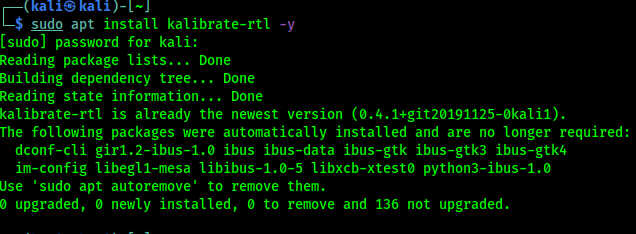 |
| kalibrate-rtl is already installed on our Kali Linux system |
Most of the countries use GSM900 band, but in USA it's GSM850. We are scanning for GSM900 band, our USA friends need to use GSM850 in the place of GSM900.
We need to plugin our RTL-SDR with antenna at first, Then to scan GSM900 traffic we run following command on our terminal:
kal -s GSM900 -g 40
The following screenshot shows the output of the above command:

In the above screenshot we can see that there are many channels, but we need to note the frequencies, in our case we are going to use 953.4MHz.
Now we open GQRX tool and enter the frequency in the Receiver Options window, shown in the following screenshot:

We can see the waterfall that the device is able to catch the signals perfectly.
Analyzing GSM Packets
Now we need to install gr-gsm tool by using following command:
sudo apt install gr-gsm -y
We can see the output in the following screenshot:
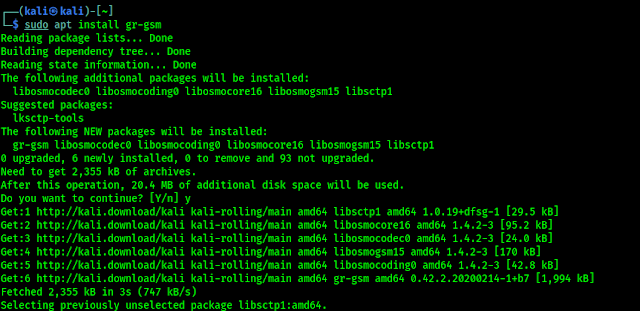
This gr-gsm tool will help us to look the data at the packet level. After the installation process is done, we need to run following command to start the monitoring packets:
grgsm_livemon
Here a new window will open, we will change the frequency we are working with (we had noted the 935.4MHz while using kalibrate). As we can see in the following screenshot:
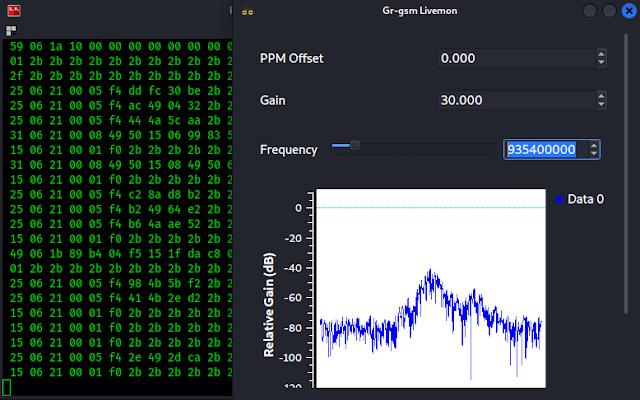
On the gr-gsm livemon window we can see the frequency and in the terminal window we can see the data traffic. Now we need to analyze the data packets using Wireshark. We leave this gr-gsm livemon terminal and window as it is capturing packets and open our Wireshark from application menu or from another terminal using wireshark command.

Here we need to select the interface. Our interface will be Loopback: lo by double clicking over it. Then we can see the packets on the Wireshark, as following screenshot:
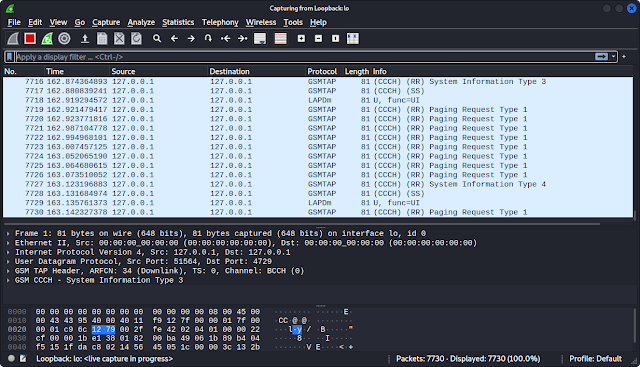
We need to apply the display filter now. We need to add the filter gsmtap. Then we need to look on the packet Info tab for System Information Type 3.

Now we need to check the GSM CCCH > Location Area Identification (LAI). There we will get the information about the data packets. Shown in the following screenshot:

In the highlighted line we can see that the mobile network provider is BSNL and this packets are transmitting from West Bengal. This is how we analyze GSM signal and how GSM packets travel on our Kali Linux.
This is how we can analyze GSM packets using RTL-SDR on our Kali Linux system. We can't say much for our ethical policy. Everything more than above can be misused. There are lots of good tutorials on GSM sniffing on the internet we just need to find out them, we just made an easy start. Our suggestion will be crazydanishhacker, he is far batter than us on this topic. He did well in his website and YouTube channel.
Love our articles? Make sure to follow us on Twitter and GitHub, we post article updates there. To join our KaliLinuxIn family, join our Telegram Group. We are trying to build a community for Linux and Cybersecurity. For anything we always happy to help everyone on the comment section. As we know our comment section is always open to everyone. We read each and every comment and we always reply.
SOCIAL SHARE CARD GENERATOR