
Zum Hauptinhalt springen
tsecurity.de LIVE
Echtzeit-Radar & Feeds
Alle RSS Feeds
👥 Community & Social
YouTube Security VideosŠkoda Peaq im Fahrest: DAS hätten wir nicht erwartet! | CHIP(21.09.2026 um 00:00 Uhr)
Sichere ProgrammierungBackups and other lies(20.09.2026 um 23:42 Uhr)
Sichere ProgrammierungOur linter's "safe" autofix would have silently disabled RBAC(20.09.2026 um 23:54 Uhr)
Sichere ProgrammierungTeaching our on-device assistant to say "I don't know"(20.09.2026 um 23:55 Uhr)
Sichere ProgrammierungThe Tracker Is the Spine(21.09.2026 um 00:02 Uhr)
YouTube Security VideosŠkoda Peaq im Fahrest: DAS hätten wir nicht erwartet! | CHIP(21.09.2026 um 00:00 Uhr)
Sichere ProgrammierungBackups and other lies(20.09.2026 um 23:42 Uhr)
Sichere ProgrammierungOur linter's "safe" autofix would have silently disabled RBAC(20.09.2026 um 23:54 Uhr)
Sichere ProgrammierungTeaching our on-device assistant to say "I don't know"(20.09.2026 um 23:55 Uhr)
Sichere ProgrammierungThe Tracker Is the Spine(21.09.2026 um 00:02 Uhr)
Intelligence View
⚡ tsecurity.de Intelligence

Install VirtualBox on Kali Linux

Reagiere als Erste:r — dein Feedback zählt!

Usually we use Virtual Machines on Windows and use Kali Linux there. But there are lots of Kali fans using Kali Linux directly (as a primary OS) on their PC. Here we sometime need to install virtual machine of other OS or vulnerable virtual machine.

Install VirtualBox in Kali Linux
We have already discussed a way where we had used KVM (Kernel Virtual Manager) in our Metasploitable2 and Windows installation in Linux. Al tough KVM has lots of functions but majority of people will chose VirtualBox because they are used to with VirtualBox.

Oracle VM VirtualBox is a free and open-source hosted hypervisor for x86 virtualization in this tutorial we describe how easily we can install VirtualBox in our Kali Linux system and use it.

First of all we need to go to the Linux download section of VirtualBox by clicking on this link. A new window will open like following screenshot:
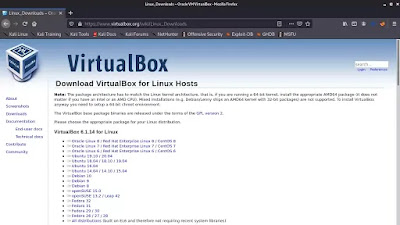
VirtualBox download
In the above screenshot we can see that VirtualBox is not directly available for Kali. But the Ubuntu's VirtualBox will work in Kali Linux and almost other Debian based distributions.

Now we download the VirtualBox for latest Ubuntu version. It is a .deb file with almost 85 MB of size.

After download the deb installer file on the Downloads folder we open the the terminal there and to install it we apply following command:

sudo dpkg -i virtualbox*.deb

Then it will start installing VirtualBox on our Kali Linux system.

VirtualBox started installing

After a little bit of time (depending on our computer's performance) it will complete.

Now we can search the VirtualBox on the Application menu.

Searching for VirtualBox in Application menu

Now we click on this to open it. It will open in the following screenshot:

VirtualBox Installed in Kali Linux

Now we can use it to configure any other OS under Kali Linux. This is how we can install VirtualBox in our Kali Linux machine and the installation process of other OS in it will be the same as we do it on Windows.

Using Kali Linux as primary OS ? Our daily life with Kali Linux might be interesting.

Liked our tutorial? Don't miss out! Connect with us on Twitter and GitHub for instant updates on our latest articles. Ready to dive into the world of Kali Linux and Cybersecurity? Become a part of our thriving community by joining our lively Telegram Group. We're on a mission to foster a strong community dedicated to Linux and Cybersecurity enthusiasts. Have questions or thoughts? Drop a comment - we're here to assist! Our comment section is your space to engage, and we make sure to read and respond to each one.

Ähnliche Beiträge
🔍 Verwandte News

Auch interessante Nachrichten Install VirtualBox on Kali Linux

Thematisch verwandte Begriffe: Install, VirtualBox, Kali, Linux · 6 Treffer

Laden...

Videos werden geladen ...

Laden...

Beiträge werden geladen ...

Laden...

Videos werden geladen ...

Laden...

Beiträge werden geladen ...

Laden...

Videos werden geladen ...

Laden...

Beiträge werden geladen ...

Laden...

Videos werden geladen ...

Laden...

Beiträge werden geladen ...

Laden...

Videos werden geladen ...

Zum Aktualisieren ziehen
ZERO-DAY CVE-2026-93957 | A vulnerability has been found in olivier-ls PHP-FTS up to 1.1.3. This a…
Advisory →
TTS Reader • tsecurity.de Voice
tsecurity.de Icon
tsecurity.de App
Offline-Lesen, Eilmeldungen & 0ms Ladezeit

Installiere tsecurity.de direkt auf deinen Home-Bildschirm für das ultimative Vollbild-Magazinerlebnis ohne Browser-Leisten.

Nächster Beitrag
Themen-Radar & Intelligence Matrix
Echtzeit-Taxonomie nach Angriffsvektoren & Plattformen

tsecurity.de Live Threat Radar

🔴 LIVE RADAR
MONITORING
AKTIV
CVE-DATENBANK
LIVE
🔍
Community Radar & Live Chat
Sentinel Bot online • Live-Stream
Dein Cluster: Security Explorer
Match:
lädt…
Verbindung zum Community-Stream wird aufgebaut...
Bearbeitungsmodus — Senden überschreibt deine Nachricht
Community-Puls — was gerade passiert
lädt…
Aktivitäten deiner Analysten
lädt…
Neues Thema oder Eilmeldung einreichen

Reiche interessante Links, Zero-Days oder Debatten ein. Die Community entscheidet per Upvote über die Veröffentlichung.

Heiß diskutierte Einreichungen
🔖 Gespeicherte Artikel
📂 Keine gespeicherten Artikel vorhanden.
Zurück Ziehen Vor
Links: vorheriger Artikel Rechts: nächster Artikel unten: schließen
News NIS-2 Frühwarnung Tier-1 Intel ⏱️ 3 Min vor 10 Min
Artikeldaten werden geladen...

Zurück: vorheriger Vor: nächster
↗ Original-Quelle
Social Reaktionen Deine Reaktion zählt
Einstufung & Relevanz-Poll 0 Stimmen
In sozialen Netzwerken teilen 1-Klick