
Terminaux is a C# library that allows you to give your terminal applications a great makeover using its powerful features. It allows you to color your console text, easily create pane-based interactive applications, make your interactive applications resizable, perform basic console graphics, and more.
You can install Terminaux to your project by following the instructions on this NuGet page.
This article talks about how to colorfully print your text to the console in an easy way. This article assumes that you have installed .NET 8.0 SDK to your machine.
Making a console project
To make a console project, make a directory that will hold your project files. For example, we're going to name our project Colorful. Make a directory called Colorful and run the following command:
$ dotnet new console --use-program-main
Then, open the Colorful.csproj file using your favorite text editor and add the following lines to install Terminaux to the project:
<ItemGroup>
  <PackageReference Include="Terminaux" Version="2.0.1" />
</ItemGroup>
Save the text file and run the following command to install Terminaux to the project:
$ dotnet restore
Once this is done, open your Program.cs file and remove the line that says Console.WriteLine("Hello, World!"); so that your program code becomes:
namespace Colorful;

class Program
{
    static void Main(string[] args)
    {

    }
}
Coloring text
This section assumes that your console supports the VT sequences needed to print colors higher than 16 colors. If your console doesn't support that, you'll not get colored text.
Make sure that you manually reset the colors using ConsoleExtensions.ResetColor() from Terminaux.Base, or the color will leak after exiting the app, just like shown in the screenshots.
Now, suppose that you want to use the green color from the pre-defined ConsoleColors enumeration to print Hello World! to the console. You'll have to use the WriteColor() function from the TextWriterColor class to be able to write text with color. You can use one of the following function overloads sorted from simplest to most complex:
WriteColor(string Text, ConsoleColors color, params object[] vars)WriteColor(string Text, bool Line, ConsoleColors color, params object[] vars)WriteColor(string Text, bool Line, bool Highlight, ConsoleColors color, params object[] vars)
Writing with green color
To write the above text with the green color, you'll need to use the first function variant, which works for most situations. Place the following usings at the top of the source code file:
using Terminaux.Writer.ConsoleWriters;
using Terminaux.Colors;
Then, place the following statement inside the Main() function body to do the action by calling the WriteColor() function like this:
using Terminaux.Writer.ConsoleWriters;
using Terminaux.Colors;

namespace Colorful;

class Program
{
    static void Main(string[] args)
    {
        TextWriterColor.WriteColor("Hello World!", ConsoleColors.Green);
    }
}
Once you're done, save the source file and run dotnet build. Upon finishing the build, run the application using either dotnet run Colorful.csproj or dotnet path/to/Colorful.dll, and you should see the Hello World text in green as shown in the screenshot:

The next section talks about how to write two parts of a text in a single line using different colors.
Writing two parts of text
Let's assume that you want "Hello" in green and "World" in light blue. To do this, change the first call to the WriteColor() function so that it prints just "Hello" instead in one line without advancing to the new line.
TextWriterColor.WriteColor("Hello", false, ConsoleColors.Green);
Afterwards, add the second call to the same function, but, this time, make it print "World" in light blue and make it advance to the new line.
TextWriterColor.WriteColor(" World!", ConsoleColors.SkyBlue1);
Once you're done, save the changes and run dotnet build and dotnet run again. Afterwards, you should see "Hello" in green and "World" in light blue.

Writing text in true color
This is when the power of Terminaux's console writer lies in! You can also write text easily in true color! Terminaux provides you several ways to write text in true color, but let's focus on the simplest way to do this.
WriteColor(string Text, Color color, params object[] vars)WriteColor(string Text, bool Line, Color color, params object[] vars)WriteColor(string Text, bool Line, bool Highlight, Color color, params object[] vars)
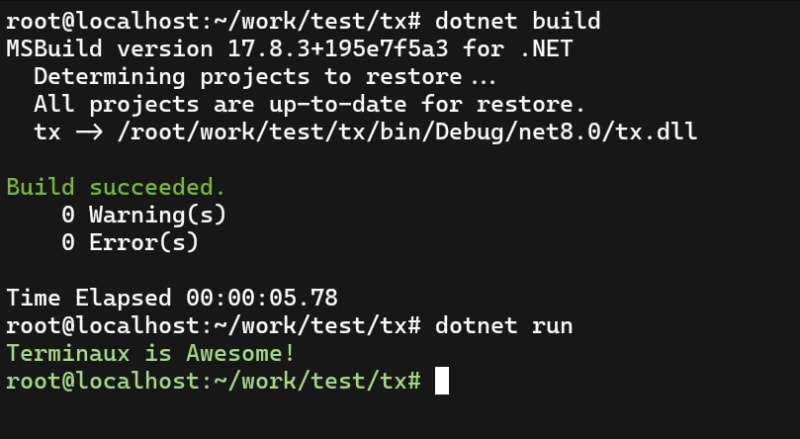
Assuming that your Program.cs file is empty, let's assume that you want to print "Terminaux is Awesome" in pastel green (#A5D687). You can use the hex representation of a color, the color name, the RGB specifier in the format of RRR;GGG;BBB, and more.
TextWriterColor.WriteColor("Terminaux is Awesome!", "#A5D687");
From Terminaux's documentation, you can use the following modes:
-
<num>-
<num>should be of the range between 0 and 255
-
-
<rrr>;<ggg>;<bbb>-
<rrr>,<ggg>, and<bbb>should be of the range between 0 and 255
-
-
cmyk:<ccc>;<mmm>;<yyy>;<kkk>-
<ccc>,<mmm>,<yyy>, and<kkk>should be of the range between 0 and 100
-
-
cmy:<ccc>;<mmm>;<yyy>-
<ccc>,<mmm>, and<yyy>should be of the range between 0 and 100
-
-
hsl:<hhh>;<sss>;<lll>-
<hhh>should be of the range between 0 and 360 in degrees and not radians -
<sss>and<lll>should be of the range between 0 and 100
-
-
hsv:<hhh>;<sss>;<vvv>-
<hhh>should be of the range between 0 and 360 in degrees and not radians -
<sss>and<vvv>should be of the range between 0 and 100
-
-
ryb:<rrr>;<yyy>;<bbb>-
<rrr>,<yyy>, and<bbb>should be of the range between 0 and 255, just like RGB.
-
-
#000000- Hexadecimal representation of the color for HTML fans. You can also use the
#RGBformat, implying that the three digits represent: - R: Red color level converted to RR (F becomes FF)
- G: Green color level converted to GG (F becomes FF)
- B: Blue color level converted to BB (F becomes FF)
- Hexadecimal representation of the color for HTML fans. You can also use the
-
<ColorName>- Color name from
ConsoleColorsenumeration
- Color name from
Once you're done, save the changes and run dotnet build and dotnet run again. Afterwards, you should see "Terminaux is Awesome" in pastel green.
Your experiments
We'll come back with more Terminaux tips and tricks. Stay tuned!
Now, it's your turn to show us your awesome text made with Terminaux. Show your results in the comments section of this article!
Enjoy hacking!
SOCIAL SHARE CARD GENERATOR