
Welcome to our TypeScript tutorial series! TypeScript, a superset of JavaScript developed by Microsoft, enables you to build robust and scalable applications. This series will guide you from the basics to advanced concepts, making TypeScript approachable and easy to understand. Let's unlock the full potential of TypeScript together!

Meet the Creator of TypeScript
Anders Hejlsberg, the luminary behind TypeScript, is no stranger to the world of programming languages. He is also the architect of popular languages like Turbo Pascal and C#. His vast experience and innovative vision have been instrumental in steering the ship for the creation of TypeScript.
Hejlsberg's mission with TypeScript was to support the development of large-scale applications, a challenge that JavaScript, the language TypeScript is based on, struggles with. By introducing features commonly found in languages such as C# and Java, like static typing and class-based object-oriented programming, TypeScript helps catch errors early in the development process and enhances code quality and maintainability. This makes TypeScript a key player in the dynamic landscape of modern programming.
How the Tech Industry Embraced TypeScript
As the chronicles of TypeScript unfold, its narrative intertwines with some of the tech industry's giants. Microsoft uses TypeScript extensively in its applications, including in the development of Visual Studio Code. Google has adopted TypeScript as the primary language for Angular , one of its most popular frameworks. Companies like Asana and Lyft have transitioned large codebases to TypeScript to take advantage of its robustness and scalability. Even Slack has welcomed TypeScript into their tech stack to improve their desktop client.
The language's versatility is further showcased as it seamlessly integrates with popular frameworks like Angular, React, and Vue. Developers worldwide laud TypeScript not only for its robust capabilities but also for its gentle learning curve and its kinship with JavaScript.
The Key Advantages of Using TypeScript
Let's illuminate the advantages that beckon developers to embrace TypeScript:
- Superset Synergy: TypeScript, being a superset of JavaScript, inherits all the features of its predecessor, offering a smooth transition for developers familiar with JavaScript.
- Cross-Platform Prowess: TypeScript's portability spans browsers, devices, and operating systems, ensuring a consistent and seamless development experience.
- Open-Source Overture: An open-source gem, TypeScript invites collaboration, innovation, and community-driven evolution.
- Type Safety Sentinel: Armed with static typing, TypeScript fortifies your codebase, catching potential bugs early in the development process.
Object-Oriented Odyssey: TypeScript's support for object-oriented programming enriches the development experience, fostering code organization and reusability.
Compiled Confidence: Being a compiled language, TypeScript facilitates streamlined debugging and testing processes, assuring developers of code integrity.
Static Typing Sanctuary: In the vast landscape of software development, TypeScript stands out as a statically typed language, a boon for the maintenance of expansive applications.
As we navigate the rich tapestry of TypeScript, our journey is just beginning. In the upcoming sections, we'll guide you through the practical steps of installing and configuring TypeScript, setting the stage for your hands-on exploration of its features. Get ready to unlock the full potential of TypeScript—where code becomes not just functional but a work of art.
Getting Started: How to Install TypeScript
Embarking on our TypeScript journey requires a sturdy foundation, and that begins with the installation process. Fear not, as we guide you through the steps to set up TypeScript on your system seamlessly.
Prerequisites: Node.js
Before we dive into TypeScript, ensure that Node.js is part of your developer toolkit. If you haven't installed it yet, navigate to the official Node.js website and follow the straightforward installation instructions.
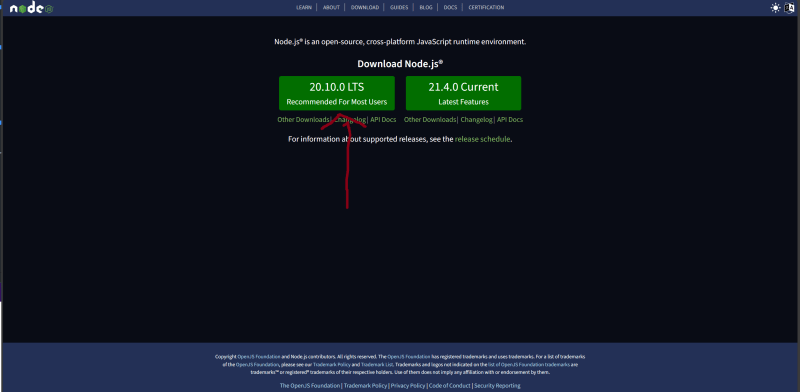
Installing TypeScript with npm
Once Node.js has found a home on your system, the next step is to introduce TypeScript to the mix. Fire up your terminal and let npm work its magic with the following command:
npm install -g typescript
The -g flag grants TypeScript a global passport, allowing you to harness its power from any corner of your development ecosystem.
Verification Voyage
Ensure TypeScript has securely anchored itself on your system by executing the following command:
tsc --version

A victorious response should unveil the version of TypeScript proudly residing in your development environment.
Understanding TypeScript Compilation
With TypeScript at your disposal, it's essential to understand that it's a language that speaks in compiled tones. Meet the maestro, the TypeScript compiler, affectionately known as tsc.
A compiler is a special program that processes statements written in a particular programming language and turns them into machine language or "code" that a computer's processor uses. In the case of TypeScript, the tsc compiler transforms your TypeScript code, which is not natively understood by browsers, into JavaScript, a language that browsers can interpret.
This compilation step is crucial because it allows us to write code in TypeScript, taking advantage of its features like static typing and classes, and then compile that code into JavaScript so it can run in any environment where JavaScript runs.
To compile a TypeScript file, use the following command in your terminal:
tsc <file-name>.ts
This command orchestrates the compilation ballet, transforming your TypeScript script, stored in .ts, into the enchanting language of JavaScript. The resulting opus will bear the name .js.
Building Your First TypeScript Project
Now that TypeScript has found its home on your system, let's delve into the art of creating a TypeScript project. This section will guide you through the initiation process, ensuring your voyage into the world of TypeScript is anchored with a solid project structure.
Setting Sail: Creating a TypeScript Project
To inaugurate a TypeScript project, chart a new course by creating a dedicated directory for your venture. Navigate to this newfound haven in your terminal and invoke the following command:
tsc --init

Behold, the birth of a tsconfig.json file within your project directory. This file, adorned with TypeScript compiler options, dictates the rules by which your TypeScript code transforms into its JavaScript counterpart. For an in-depth exploration of the tsconfig.json file and its compiler options, consult the official TypeScript documentation.
Before we embark on the coding odyssey, let's grasp a fundamental distinction. Unlike its JavaScript sibling, TypeScript files bear the .ts extension, signaling the type-centric nature of your coding endeavors, while JavaScript files don the familiar .js attire.
Your First TypeScript Code
Let's create a simple TypeScript file named greet.ts in your project directory:
// greet.ts
function greet(name: string): void {
  console.log(`Hello, ${name}!`);
}

greet("TypeScript"); // Hello, TypeScript!
To compile and run this file, use the following commands:
tsc greet.ts
node greet.js
You should see the output Hello, TypeScript! in your terminal. Congratulations, you've just created and run your first TypeScript project!
Understanding Basic TypeScript Syntax
In TypeScript, we can declare variables, functions, and classes. Here's an example:
// Declaring a class
class Person {
  constructor(public name: string) {}

// Declaring a function
  greet() {
    console.log(`Hello, ${this.name}`);
  }
}

// Using the class
let person1 = new Person("TypeScript");
person1.greet(); // Hello, TypeScript!

let person2 = new Person("John Doe");
person2.greet(); // Hello, John Doe
You can compile and run this code using the following commands:
tsc basicSyntax.ts
node basicSyntax.js
Exploring TypeScript Features
let age: number = 25;
age = "25"; // This will cause a compile-time error

// so that we can use it later

age = 20 + 5; // This is fine
console.log(age); // 25
One of the key features of TypeScript is static typing. This means that we declare the type of a variable when we declare the variable. If we try to assign a value of a different type to the variable, TypeScript will give us a compile-time error. Here's an example:
In the upcoming sections, we'll delve deeper into TypeScript's features and see more examples of how to use them in practice.
Conclusion: The Impact and Potential of TypeScript
We've embarked on an exciting journey into the world of TypeScript, a powerful language that enhances JavaScript with static types, classes, and interfaces. We've seen how TypeScript can help us build robust and scalable applications, and we've explored its rich feature set, from basic syntax to advanced features.
We've also seen how TypeScript is being adopted by tech giants like Microsoft, Google, Asana, Lyft, and Slack, and how it integrates seamlessly with popular frameworks like Angular, React, and Vue. We've learned about the advantages of TypeScript, such as its superset synergy with JavaScript, cross-platform prowess, open-source nature, type safety, support for object-oriented programming, and compiled confidence.
As we continue our journey with TypeScript, remember that the power of this language lies not just in its features, but also in how we use them to write better, more reliable code. So keep exploring, keep learning, and keep unlocking the full potential of TypeScript!
You find all the code been used in the blog here
You can also
connect with me on LinkedIn
SOCIAL SHARE CARD GENERATOR