



This post is kind of a follow on from my previous article Usermode Sandboxing, so if you've not yet read that you should do so first.
AppContainer was a fairly quietly introduced feature in Windows 8, which is a shame as it provides some great features which can be used for desktop application security too (Few people are aware that it's not just used for Apps as the name might suggest). I'll go over some of the features which stood out to me.
Network Restrictions
A feature previously lacking in the Windows integrity mechanism was proper network restrictions. Low integrity processes could still freely create sockets, which would allow malicious code to escape a sandbox by exploiting a vulnerable higher integrity process listening on the host.
AppContainer introduces some new network restrictions such as:
AppContainer was a fairly quietly introduced feature in Windows 8, which is a shame as it provides some great features which can be used for desktop application security too (Few people are aware that it's not just used for Apps as the name might suggest). I'll go over some of the features which stood out to me.
Network Restrictions
A feature previously lacking in the Windows integrity mechanism was proper network restrictions. Low integrity processes could still freely create sockets, which would allow malicious code to escape a sandbox by exploiting a vulnerable higher integrity process listening on the host.
AppContainer introduces some new network restrictions such as:
- WinCapabilityInternetClientSid - Application can make outbound connections but not listen on sockets.
- WinCapabilityInternetClientServerSid - Application can create listening sockets but not make outbound connections.
- WinCapabilityPrivateNetworkClientServerSid - Application can listen or make outbound connections to IPs within the host's local network (not to external networks i.e the internet), but only if the network is set to Work or Private.
An additional restriction I've noticed is that by default the application can connect to localhost, but cannot interact with listening sockets created by applications outside of its container (Services, other Apps, etc), which would prevent the application from exploiting anything listening on localhost.
Filesystem & Registry Restrictions
Inside the AppContainer variable such as %temp% and %localappdata% are reassigned to directories within that container (%localappdata%\Packages\<Container Name>\), which is the only writable path by default. For registry the default accessible path is: HKEY_CURRENT_USER\Software\Classes\Local Settings\Software\Microsoft\Windows\ CurrentVersion\AppContainer\Storage.
Although Apps can be assigned privileges such as WinCapabilityDocumentsLibrarySid (access to My Documents), this is implemented by the App broker process and will not work for desktop applications, instead one must explicitly add the AppContainer's SID to the file/folder's ACL's from the process creating the container (Same goes for other objects such as sections and registry keys).
Process Isolation
Previously low integrity processes could interfere with other low integrity processes, but with AppContainer this is no longer the case. Listing processes will only show the system pseudo-process and any processes running inside that specific container (no desktop processes, services, or other applications), and it's the same story for any other objects created outside of the container. This is pretty handy as browser worker processes usually run as low integrity, which meant that any malware run inside a sandbox would still be able to inject the browser and exfil data.
Kernel Mode Checks
All the actual access checks are part of the Windows kernel, so it's not a case of just removing a few user mode hooks or performing direct system calls, access is restricted at kernel level making AppContainer a great improvement over old sandboxing methods.
Example Code
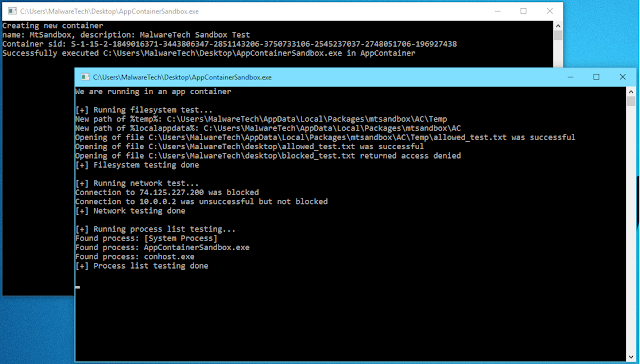
I've created a little example and test of the AppContainer capabilities in C, it creates a container and executes itself inside the container in order to test the restrictions (Obviously this will only work on Windows 8+ where AppContainer is available).
The test container is given permission to connect to network IPs (but not the internet), the broker also create a text file (%userprofile%\Desktop\allowed_test.txt) and grants the AppContainer access. Other than connecting to network IPs and accessing the App's install directory or the explicitly allowed file, everything else is restricted.
Github Link: https://github.com/MalwareTech/AppContainerSandbox
SOCIAL SHARE CARD GENERATOR