
Note: This article is an English translation of my original article, which you can find here. The translation was done using ChatGPT.
Introduction
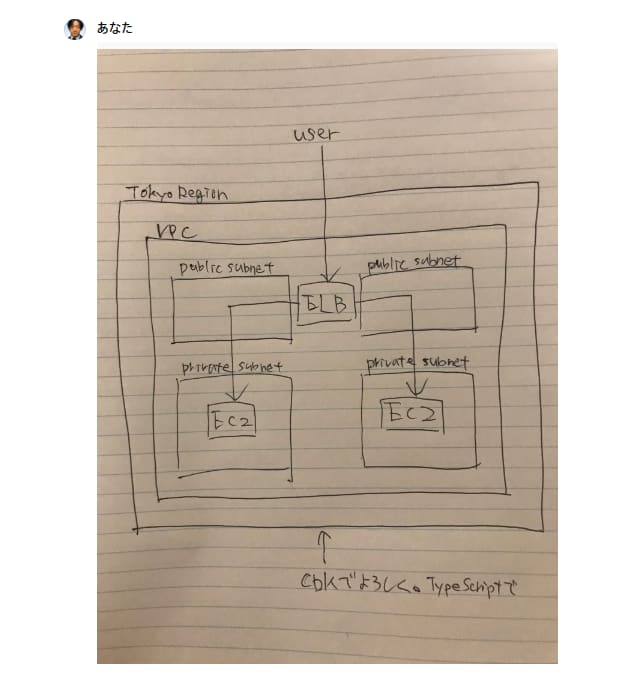
If you can generate HTML from a sketch, why not try generating CDK code? I decided to give it a shot.
// Detect dark theme var iframe = document.getElementById('tweet-1790227959724618123-634'); if (document.body.className.includes('dark-theme')) { iframe.src = "https://platform.twitter.com/embed/Tweet.html?id=1790227959724618123&theme=dark" }
Experiment
To test its image analysis capabilities, I deliberately didn't input any prompts.
Here are the results. It responded in English, possibly due to the lack of a prompt, but it generated the CDK code as expected. It's quite handy that it can even read the instructions written in the image.
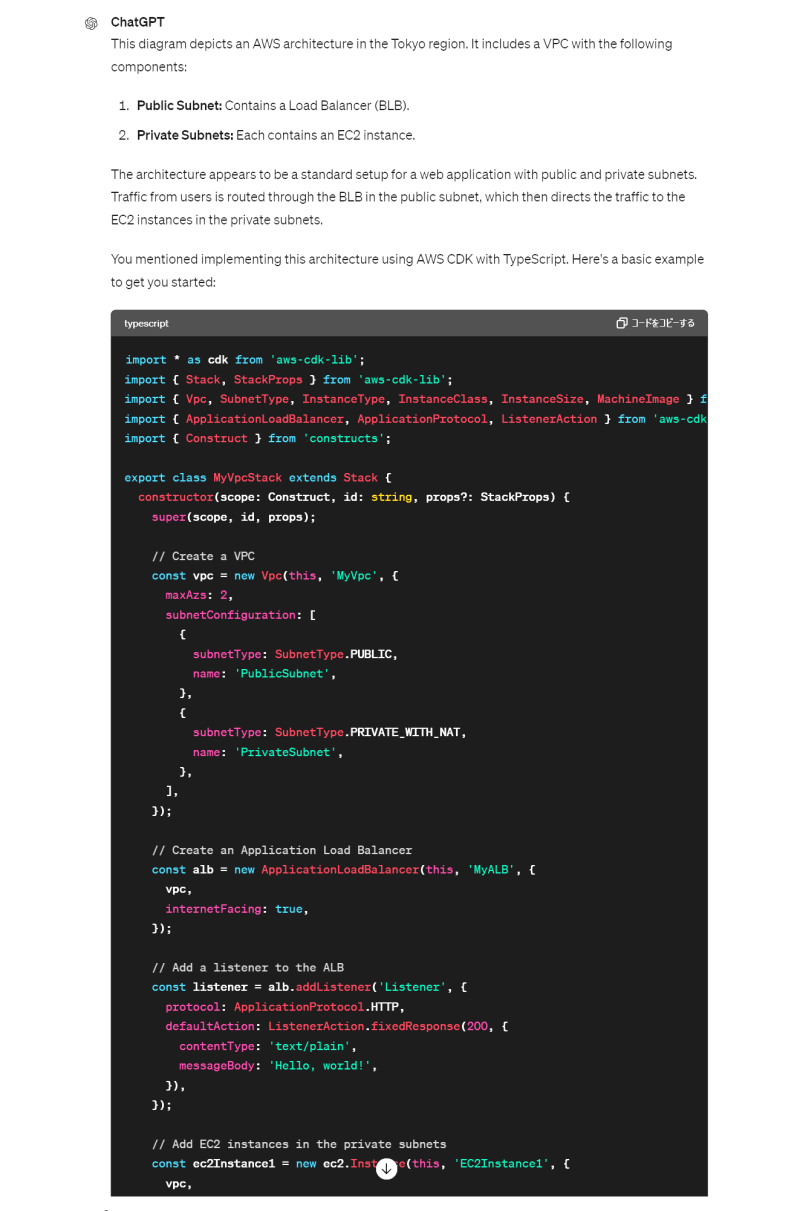
To add, the initial instruction in the sketch was simply "Use CDK". Since it unexpectedly generated Python code, I added "in TypeScript".
Here is the generated code.
import * as cdk from 'aws-cdk-lib';
import { Stack, StackProps } from 'aws-cdk-lib';
import { Vpc, SubnetType, InstanceType, InstanceClass, InstanceSize, MachineImage } from 'aws-cdk-lib/aws-ec2';
import { ApplicationLoadBalancer, ApplicationProtocol, ListenerAction } from 'aws-cdk-lib/aws-elasticloadbalancingv2';
import { Construct } from 'constructs';

export class MyVpcStack extends Stack {
  constructor(scope: Construct, id: string, props?: StackProps) {
    super(scope, id, props);

    // Create a VPC
    const vpc = new Vpc(this, 'MyVpc', {
      maxAzs: 2,
      subnetConfiguration: [
        {
          subnetType: SubnetType.PUBLIC,
          name: 'PublicSubnet',
        },
        {
          subnetType: SubnetType.PRIVATE_WITH_NAT,
          name: 'PrivateSubnet',
        },
      ],
    });

    // Create an Application Load Balancer
    const alb = new ApplicationLoadBalancer(this, 'MyALB', {
      vpc,
      internetFacing: true,
    });

    // Add a listener to the ALB
    const listener = alb.addListener('Listener', {
      protocol: ApplicationProtocol.HTTP,
      defaultAction: ListenerAction.fixedResponse(200, {
        contentType: 'text/plain',
        messageBody: 'Hello, world!',
      }),
    });

    // Add EC2 instances in the private subnets
    const ec2Instance1 = new ec2.Instance(this, 'EC2Instance1', {
      vpc,
      instanceType: InstanceType.of(InstanceClass.T2, InstanceSize.MICRO),
      machineImage: MachineImage.latestAmazonLinux(),
      vpcSubnets: {
        subnetType: SubnetType.PRIVATE_WITH_NAT,
      },
    });

    const ec2Instance2 = new ec2.Instance(this, 'EC2Instance2', {
      vpc,
      instanceType: InstanceType.of(InstanceClass.T2, InstanceSize.MICRO),
      machineImage: MachineImage.latestAmazonLinux(),
      vpcSubnets: {
        subnetType: SubnetType.PRIVATE_WITH_NAT,
      },
    });

    // Add the instances to the ALB target group
    listener.addTargets('EC2Targets', {
      port: 80,
      targets: [ec2Instance1, ec2Instance2],
    });
  }
}
Fixing CDK Code Errors
Create a CDK project and replace it with the code above.
mkdir my-vpc
cd my-vpc/
npx cdk init -l typescript
Open it in an editor and fix the errors displayed.
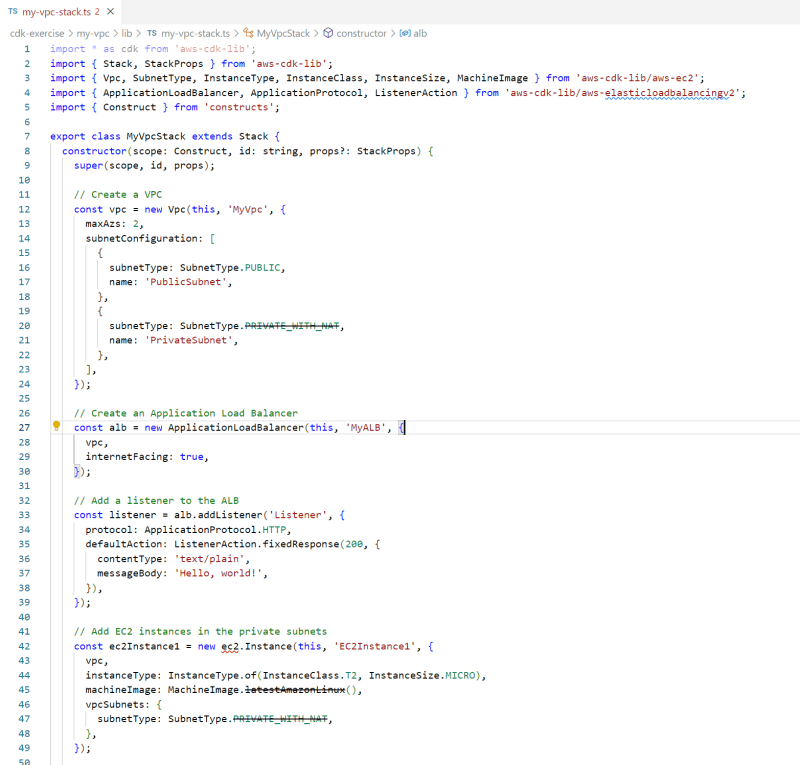
Here is the corrected code.
Fixed errors, deprecated parts, and added permission for ALB to EC2 traffic.
- import * as cdk from 'aws-cdk-lib';
import { Stack, StackProps } from 'aws-cdk-lib';
- import { Vpc, SubnetType, InstanceType, InstanceClass, InstanceSize, MachineImage } from 'aws-cdk-lib/aws-ec2';
+ import { Vpc, SubnetType, InstanceType, InstanceClass, InstanceSize, MachineImage, Instance, Port } from 'aws-cdk-lib/aws-ec2';
import { ApplicationLoadBalancer, ApplicationProtocol, ListenerAction } from 'aws-cdk-lib/aws-elasticloadbalancingv2';
+ import * as elbv2_tg from 'aws-cdk-lib/aws-elasticloadbalancingv2-targets'
import { Construct } from 'constructs';

export class MyVpcStack extends Stack {
  constructor(scope: Construct, id: string, props?: StackProps) {
    super(scope, id, props);

    // Create a VPC
    const vpc = new Vpc(this, 'MyVpc', {
      maxAzs: 2,
      subnetConfiguration: [
        {
          subnetType: SubnetType.PUBLIC,
          name: 'PublicSubnet',
        },
        {
-         subnetType: SubnetType.PRIVATE_WITH_NAT,
+         subnetType: SubnetType.PRIVATE_WITH_EGRESS,
          name: 'PrivateSubnet',
        },
      ],
    });

    // Create an Application Load Balancer
    const alb = new ApplicationLoadBalancer(this, 'MyALB', {
      vpc,
      internetFacing: true,
    });

    // Add a listener to the ALB
    const listener = alb.addListener('Listener', {
      protocol: ApplicationProtocol.HTTP,
      defaultAction: ListenerAction.fixedResponse(200, {
        contentType: 'text/plain',
        messageBody: 'Hello, world!',
      }),
    });

    // Add EC2 instances in the private subnets
-   const ec2Instance1 = new ec2.Instance(this, 'EC2Instance1', {
+   const ec2Instance1 = new Instance(this, 'EC2Instance1', {
      vpc,
      instanceType: InstanceType.of(InstanceClass.T2, InstanceSize.MICRO),
-     machineImage: MachineImage.latestAmazonLinux(),
+     machineImage: MachineImage.latestAmazonLinux2023(),
      vpcSubnets: {
-       subnetType: SubnetType.PRIVATE_WITH_NAT,
+       subnetType: SubnetType.PRIVATE_WITH_EGRESS,
      },
    });
+   ec2Instance1.connections.allowFrom(alb, Port.tcp(80), 'Allow inbound traffic on port 80 from the ALB only');

-   const ec2Instance1 = new ec2.Instance(this, 'EC2Instance2', {
+   const ec2Instance2 = new Instance(this, 'EC2Instance2', {
      vpc,
      instanceType: InstanceType.of(InstanceClass.T2, InstanceSize.MICRO),
-     machineImage: MachineImage.latestAmazonLinux(),
+     machineImage: MachineImage.latestAmazonLinux2023(),
      vpcSubnets: {
-       subnetType: SubnetType.PRIVATE_WITH_NAT,
+       subnetType: SubnetType.PRIVATE_WITH_EGRESS,
      },
    });
+   ec2Instance2.connections.allowFrom(alb, Port.tcp(80), 'Allow inbound traffic on port 80 from the ALB only');

    // Add the instances to the ALB target group
    listener.addTargets('EC2Targets', {
      port: 80,
-     targets: [ec2Instance1, ec2Instance2],
+     targets: [new elbv2_tg.InstanceTarget(ec2Instance1), new elbv2_tg.InstanceTarget(ec2Instance2)],
    });
  }
}
Verify the Operation
Deploy it.
$ npx cdk deploy
# Do you wish to deploy these changes (y/n)? y
# MyVpcStack: deploying... [1/1]
# MyVpcStack: creating CloudFormation changeset...

#  ✅  MyVpcStack

# ✨  Deployment time: 222.7s

# Stack ARN:
# arn:aws:cloudformation:ap-northeast-1:xxxxxxxxxxxx:stack/MyVpcStack/9cebe450-1230-11ef-bf56-0a943cda165d

# ✨  Total time: 226.68s
Access the DNS name of the ALB.
curl http://MyVpcS-MyALB-UrksBygjrlzv-1011360440.ap-northeast-1.elb.amazonaws.com
# <html>
# <head><title>502 Bad Gateway</title></head>
# <body>
# <center><h1>502 Bad Gateway</h1></center>
# </body>
# </html>
Since no web server is configured, a 502 Bad Gateway is returned, but if you configure an EC2 instance, it should work properly.
Conclusion
I was able to generate CDK code from a sketch using GPT-4o. I was surprised that it could even read the instructions written in the image. Although there were errors in the generated code, I fixed them and confirmed it worked correctly.
For production environments or other uses that require high quality, careful review is necessary, but it should be more than sufficient for prototyping and demonstrations.
SOCIAL SHARE CARD GENERATOR