



Posted by Laurence Moroney, Developer Advocate
This is part 4 of a series on Google Sign-In that began with a blog post on the user experience improvements that launched with Google Play services 8.3. We then discussed the API updates that make the programming model much easier. Most recently, we went into how you can use Google Sign-In to authenticate a user with your backend server.
In this post, we’ll discuss how you can have your users sign in via your app to authorize your service for access to Google APIs, such as Google Drive, on their behalf.
When using Google Sign-In, it is easy to extend your integration with Google by requesting additional scopes for API access after sign-in, like storing the user’s pictures of food in Google Drive. Typically, you should request this access incrementally (not at initial sign-in) -- i.e. in the context of a user’s actions (for example, after an app user’s order has been delivered and they’d like to save a copy of their food photos), following best practices in user experience to make it most likely that the user will grant access, and aligning with the runtime permissions model in Android Marshmallow 6.0.
When you do this kind of integration, you probably want to access data from your server, so that you can continue to have access when the user is offline, or to store user-generated data in your own database. This flow would look like Figure 1. This also has the advantage of working across all platforms.
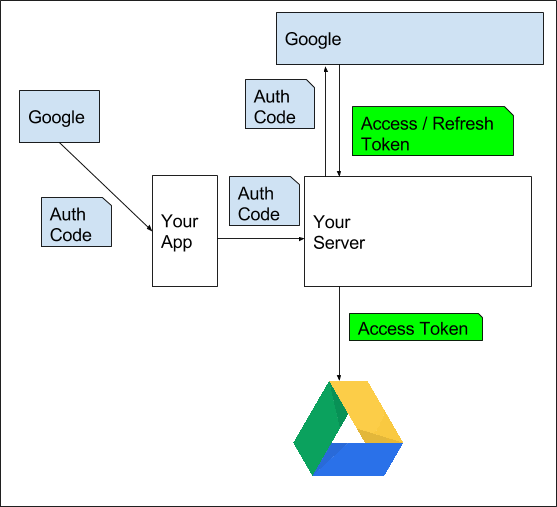
Figure 1. Accessing Google Services with Credentials.
To do this, follow these steps:
Step 1: As with the scenario in server authentication covered in the previous post, this sample provides canonical code for your Android app. In particular see the ServerAuthCodeActivity.
 GoogleSignInOptions gso = new GoogleSignInOptions.Builder(GoogleSignInOptions.DEFAULT_SIGN_IN)
      .requestScopes(new Scope(Scopes.DRIVE_APPFOLDER))
      // The serverClientId is an OAuth 2.0 web client ID
     // Details at: https://developers.google.com/identity/sign-in/android/?utm_campaign=android_discussion_server_021116&utm_source=anddev&utm_medium=blogstart step 4
     .requestServerAuthCode(serverClientId)
     .requestEmail()
     .build();
This requires you to get a web client ID for your server. Details on how to obtain this are available here (see Step 4).
In this case, the scope DRIVE_APPFOLDER is requested, meaning that the user will be asked to give the app permission to access their Google Drive. In addition to this, a server auth code will be requested.
If the sign-in is successful, the auth code can be extracted from the account object like this:
 if (result.isSuccess()) {
     GoogleSignInAccount acct = result.getSignInAccount();
     String authCode = acct.getServerAuthCode();
 }
(Taken from onActivityResult in the sample here)
This auth code should then be sent to your server using HTTPS POST, and, after it is exchanged, will give your server access to the user’s Google Drive. [Important: you should send the code in an authenticated call to your backend to ensure that it is a legitimate request from the active user].
Step 2: On your server, you will then exchange the auth code for tokens using the GoogleAuthorizationCodeTokenRequest class:
 // Set path to the Web application client_secret_*.json file you downloaded from the
 // Google Developers Console: https://console.developers.google.com/project/_/apiui/credential
 // You can also find your Web application client ID and client secret from the
 // console and specify them directly when you create the GoogleAuthorizationCodeTokenRequest
 // object.
 String CLIENT_SECRET_FILE = "/path/to/client_secret.json"; // Be careful not to share this!
 String REDIRECT_URI = "/path/to/web_app_redirect" // Can be empty if you don’t use web redirects
 // Exchange auth code for access token
 GoogleClientSecrets clientSecrets =
     GoogleClientSecrets.load(
         JacksonFactory.getDefaultInstance(), new FileReader(CLIENT_SECRET_FILE));
 GoogleTokenResponse tokenResponse =
            new GoogleAuthorizationCodeTokenRequest(
                new NetHttpTransport(),
                JacksonFactory.getDefaultInstance(),
               "https://www.googleapis.com/oauth2/v4/token",
                clientSecrets.getDetails().getClientId(),
                clientSecrets.getDetails().getClientSecret(),
                authCode,
                REDIRECT_URI)
               .execute();
 String accessToken = tokenResponse.getAccessToken();
 String refreshToken = tokenResponse.getRefreshToken();
 Long expiresInSeconds = tokenResponse.getExpiresInSeconds();
 // You can also get an ID token from the exchange result if basic profile scopes are requested
 // e.g. starting GoogleSignInOptions.Builder from GoogleSignInOptions.DEFAULT_SIGN_IN like the
 // sample code as used here: http://goo.gl/0Unpq8
 //
 // GoogleIdToken googleIdToken = tokenResponse.parseIdToken();
Then, create a GoogleCredential object using the tokens from GoogleTokenResponse:
 GoogleCredential credential = new GoogleCredential.Builder()
          .setTransport(new NetHttpTransport())
          .setJsonFactory(JacksonFactory.getDefaultInstance())
          .setClientSecrets(clientSecrets)
          .build();
 credential.setAccessToken(accessToken);
 credential.setExpiresInSeconds(expiresInSeconds);
 credential.setRefreshToken(refreshToken);
If a refresh token is available, you can persist the credentials using StoredCredential for later use if you need ongoing access to the API on behalf of the user.
Step 3: The credential can then be used to access Google services. Now, in our food delivery scenario, you might want to store or retrieve photos or receipts of finished deliveries in Google Drive. For example, it would look something like this:
 Drive drive = new Drive.Builder(new NetHttpTransport(),
                                 JacksonFactory.getDefaultInstance(),
                                 credential)
       .setApplicationName("Auth Code Exchange Demo")
       .build();
 File file = drive.files().get("appfolder").execute();
This demonstrates the use of Google Sign-In credentials where your server can make Google API calls on behalf of your users. To learn more about this, and all Google Sign In technologies, visit the Google Identity Platform website.


SOCIAL SHARE CARD GENERATOR