Zum Hauptinhalt springen
tsecurity.de LIVE
Echtzeit-Radar & Feeds
Alle RSS Feeds
👥 Community & Social
Sichere ProgrammierungFirst-touch attribution on a cookieless static Nuxt site(21.09.2026 um 02:51 Uhr)
Sichere ProgrammierungWho Is the Customer? It Might Not Be Who Uses the Product(21.09.2026 um 02:57 Uhr)
Sichere ProgrammierungOn My Japanese Team, We Greet Each Other by Saying "You Must Be Tired"(21.09.2026 um 03:06 Uhr)
Sichere ProgrammierungRedis vs Memcached: Complete Comparison(21.09.2026 um 03:16 Uhr)
Sichere ProgrammierungHow Databricks Serverless Compute Cost My Team $14k in One Weekend(21.09.2026 um 03:20 Uhr)
Sichere ProgrammierungStop trying to make Airflow work for Medallion pipelines(21.09.2026 um 03:21 Uhr)
Sichere ProgrammierungI built an app that turns workout videos into actual workouts(21.09.2026 um 03:39 Uhr)
Sichere ProgrammierungFirst-touch attribution on a cookieless static Nuxt site(21.09.2026 um 02:51 Uhr)
Sichere ProgrammierungWho Is the Customer? It Might Not Be Who Uses the Product(21.09.2026 um 02:57 Uhr)
Sichere ProgrammierungOn My Japanese Team, We Greet Each Other by Saying "You Must Be Tired"(21.09.2026 um 03:06 Uhr)
Sichere ProgrammierungRedis vs Memcached: Complete Comparison(21.09.2026 um 03:16 Uhr)
Sichere ProgrammierungHow Databricks Serverless Compute Cost My Team $14k in One Weekend(21.09.2026 um 03:20 Uhr)
Sichere ProgrammierungStop trying to make Airflow work for Medallion pipelines(21.09.2026 um 03:21 Uhr)
Sichere ProgrammierungI built an app that turns workout videos into actual workouts(21.09.2026 um 03:39 Uhr)
Intelligence View
⚡ tsecurity.de Intelligence

Azure Applied Skills: Create and configure virtual networks

Reagiere als Erste:r — dein Feedback zählt!

In this article series, I will be walking though the process of configuring secure access to workloads using Azure virtual networking. In this exercise, we will put in place the virtual networks and subnets
We will be walking through this exercise

Requirements:

To do this exercise you will need:

  • An Azure subscription with Contributor RBAC role assigned. In this lab, when you are asked to create a resource, for any properties that are not specified, use the default value.

Exercise 01 - Create and configure virtual networks

In this section, we will be walking through the steps detailed here

This exercise will emulate the steps to migrate a web-based application to Azure. The first task is to put in place the virtual networks and subnets. Then we need to securely peer the virtual networks.

  • Tasks:
    • Create a virtual network.
    • Create a subnet.
    • Configure vnet peering.

Steps:

  • Sign into the Azure portal
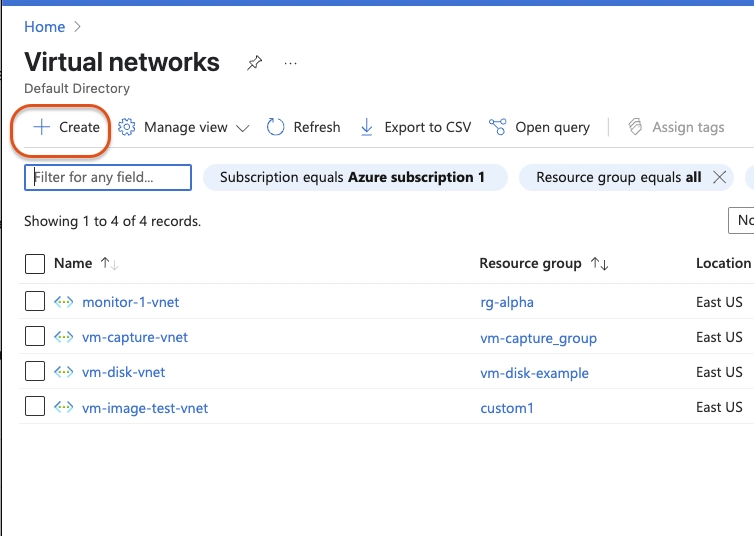
  • Search for and select Virtual Networks. Search for and select Virtual Networks
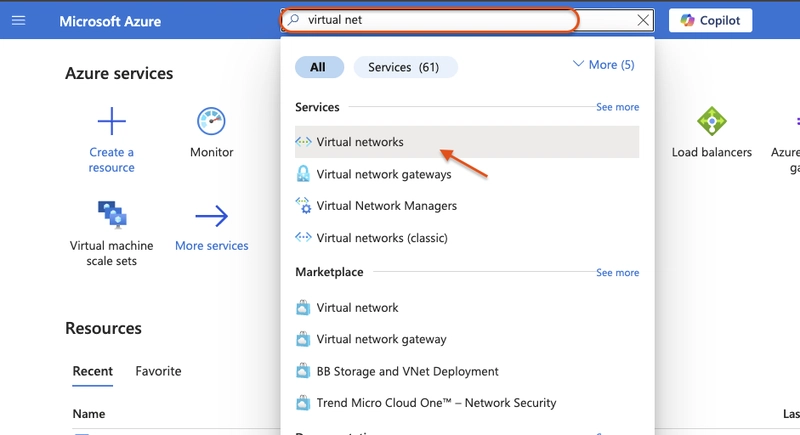
  • Click + Create
    Click + Create

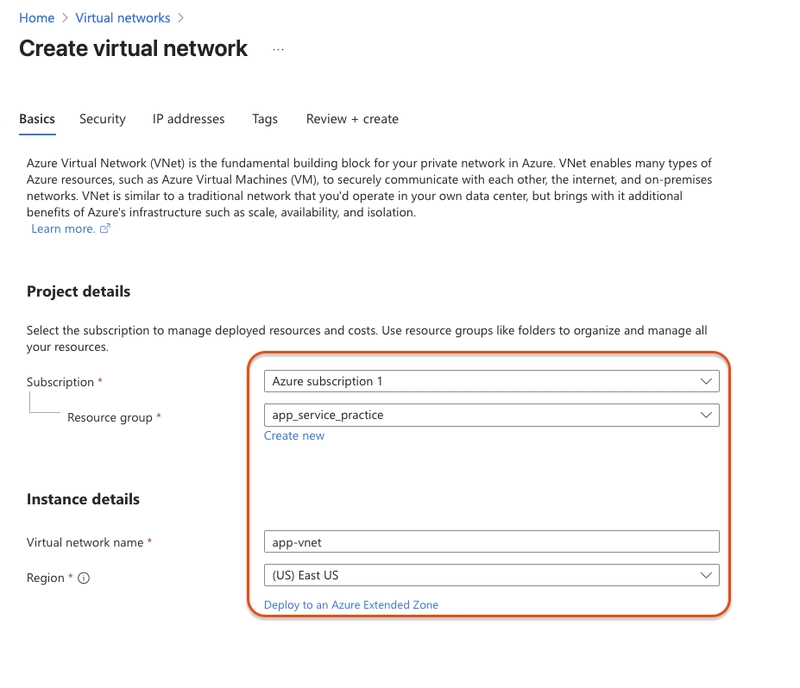
  • Enter these values:

    • Subscription and Resource group: Your valid subscription and chosen resource group
    • Virtual network name: app-vnet
    • Region: (US) East US configuration
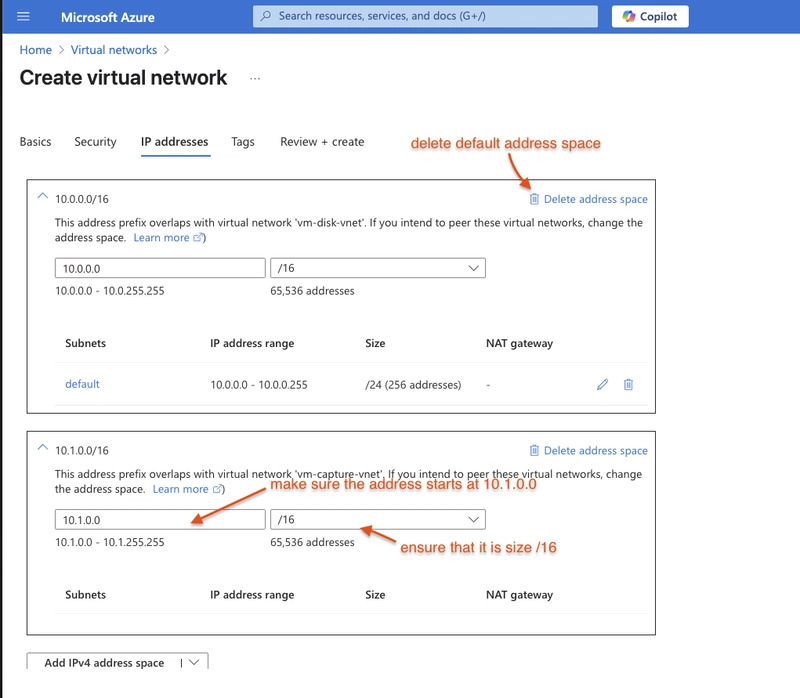
  • Click IP addresses, then add IPV4 address space
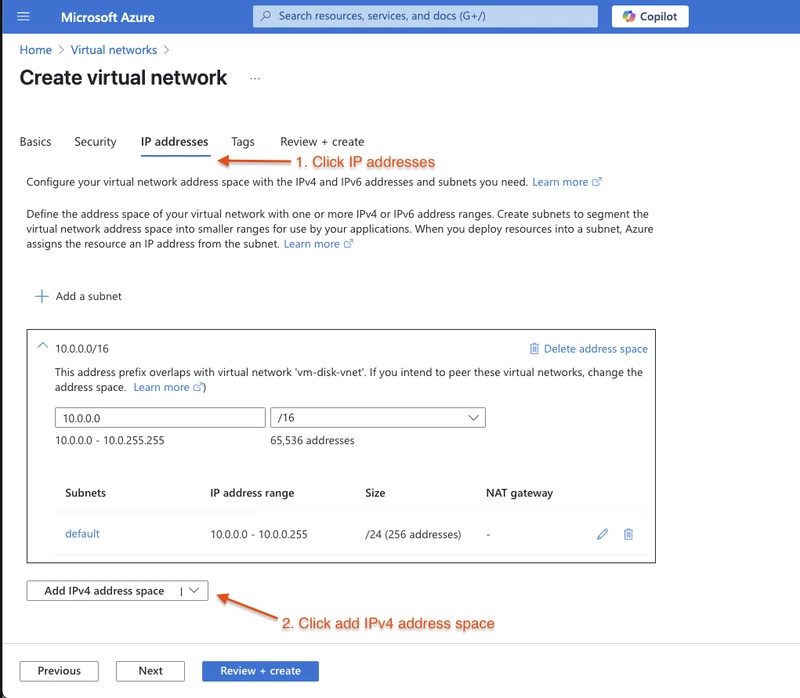
    add IPV4 address space

  • Ensure that the new space starts at 10.1.0.0 and the size is /16

  • Delete the default address space

    new space

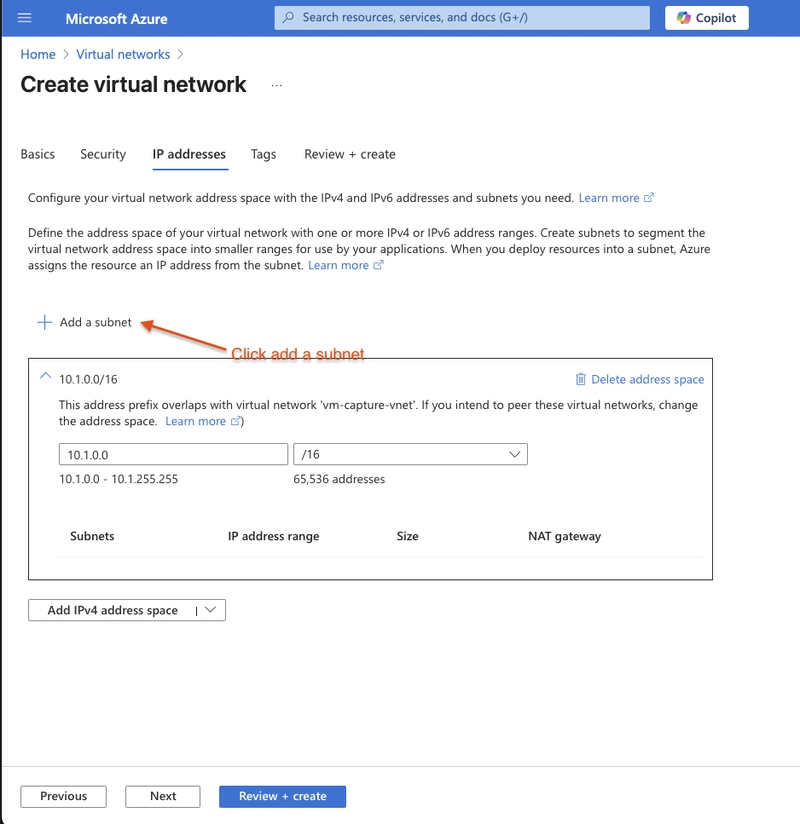
  • Click add a subnet

    Click add a subnet

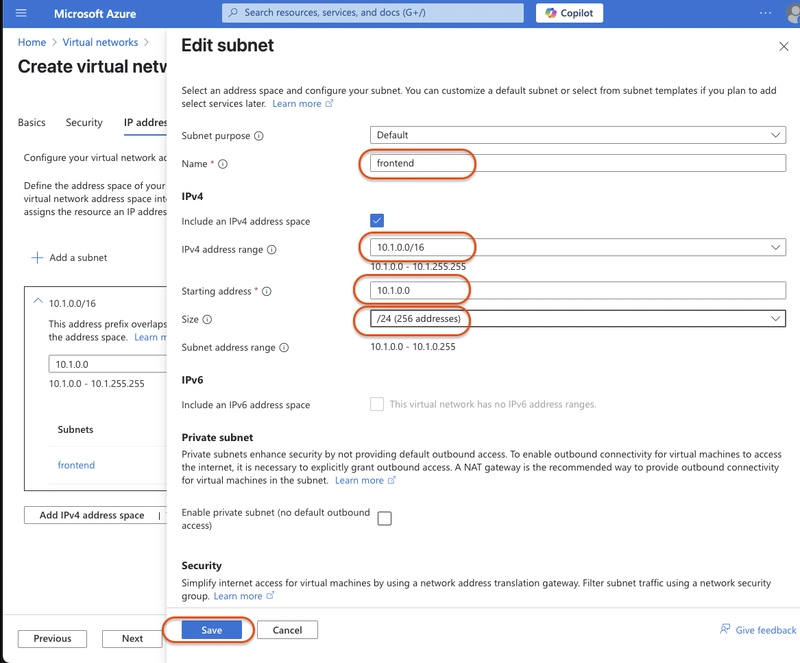
  • Call it frontend, make sure the starting address is 10.1.0.0 and the size is 24

  • Click add when settings are configured

    add when settings are configured

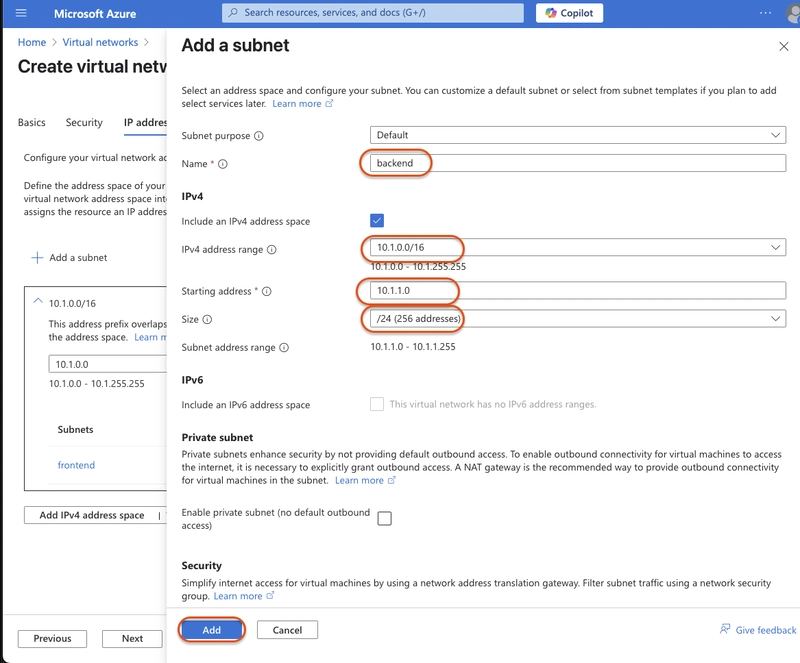
  • Click Add subnet again in the same address space. Name it backend also a size of 24. Make sure that the starting address is 10.1.1.0. Click add

    Click add

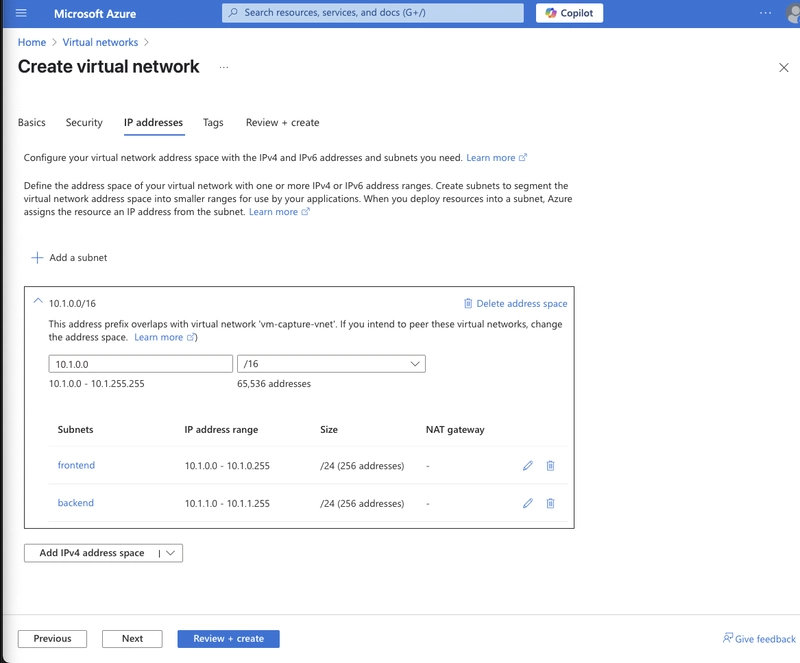
  • Final setup

    Final setup

  • Click review + create. Then create again and wait for deployment

  • Search for and select virtual networks again. Click + create, like in the other steps.

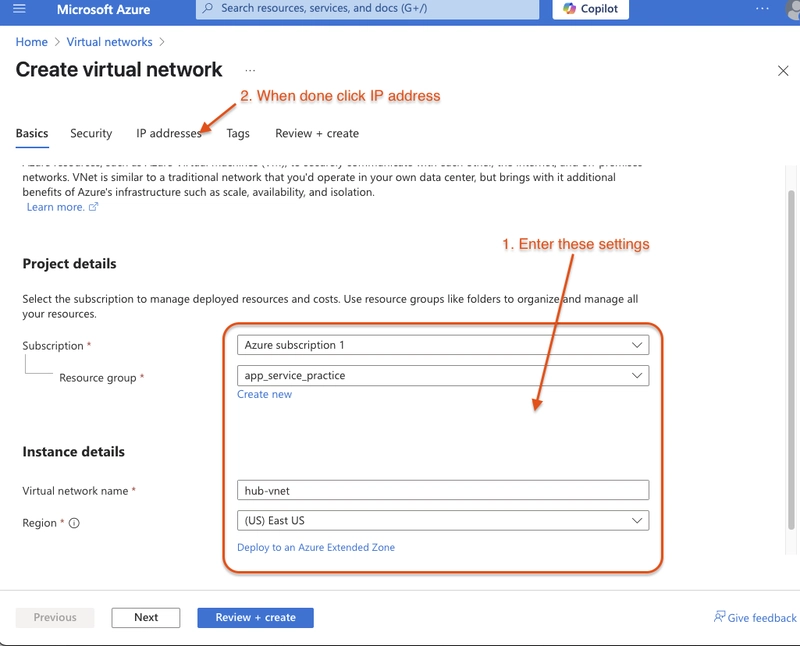
  • Use these settings for the configuration:

    • Subscription and Resource Group: Same as previous virtual network
    • Name: Virtual Network Name: hub-vnet
  • Click IP addresses

    Click IP addresses

  • Click add subnet

    Click add subnet

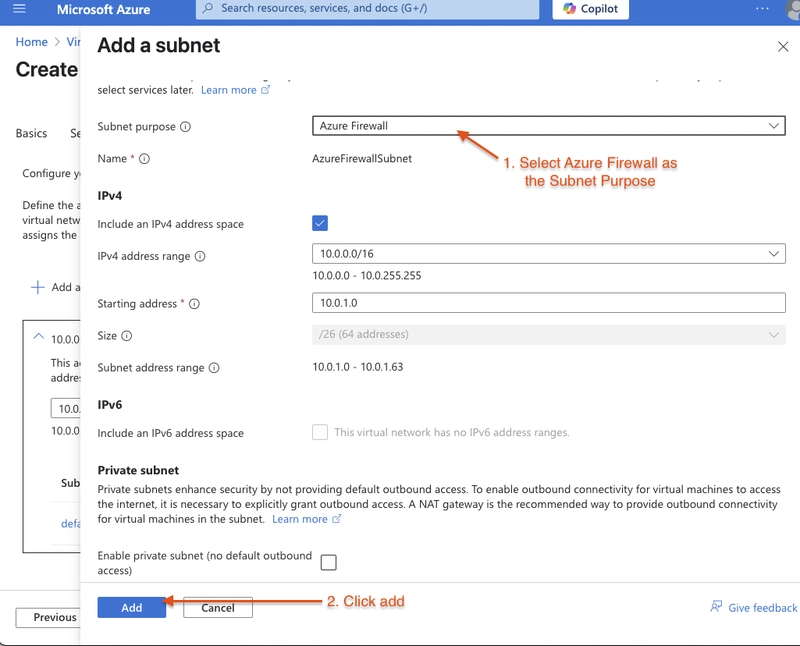
  • Click add subnet. Choose Azure Firewall as the subnet purpose, leave the default settings, and click Add.
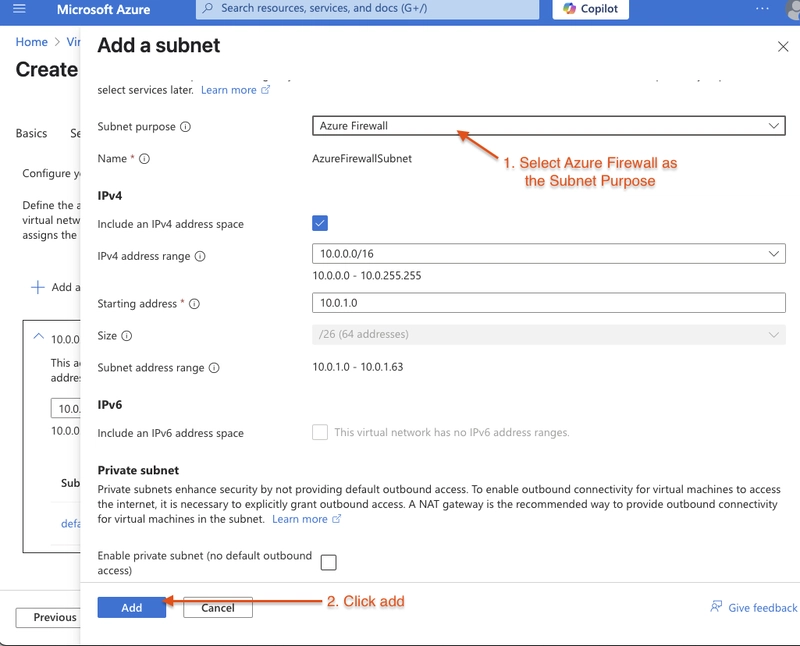
    Click add

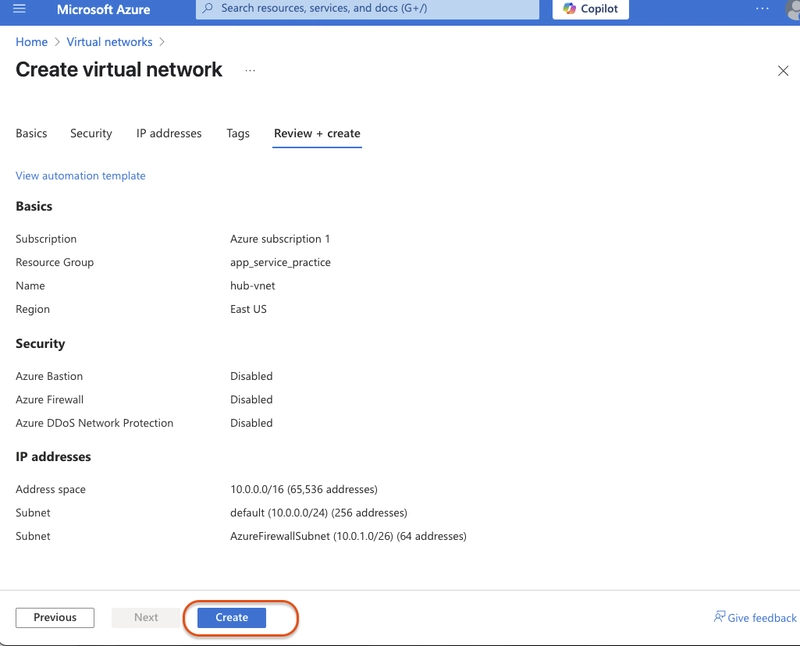
  • Remove the default space, click review + create
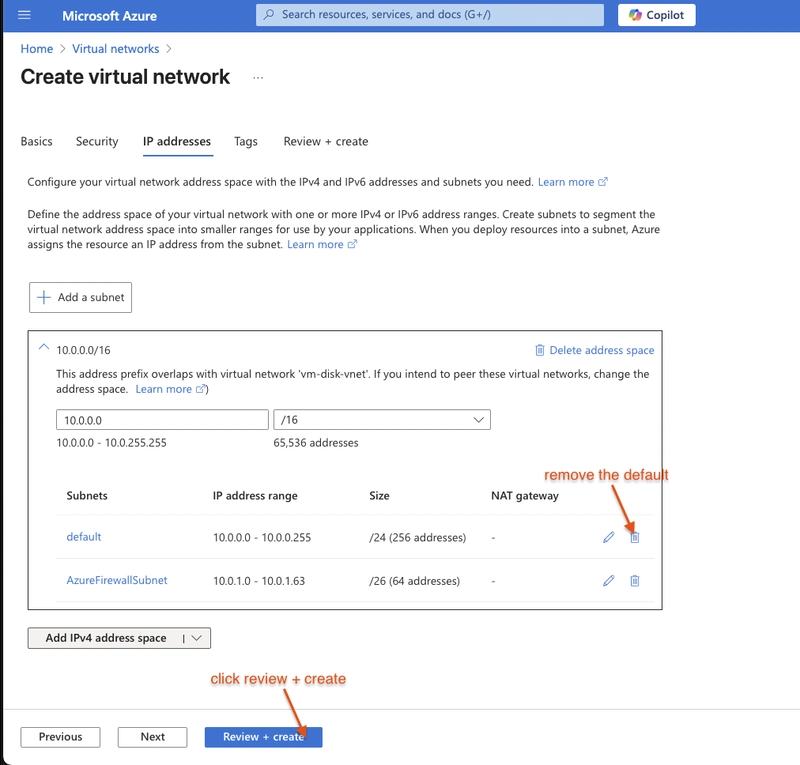
    click review + create

Click Review + create

  • In the virtual networks portal, click app-vnet
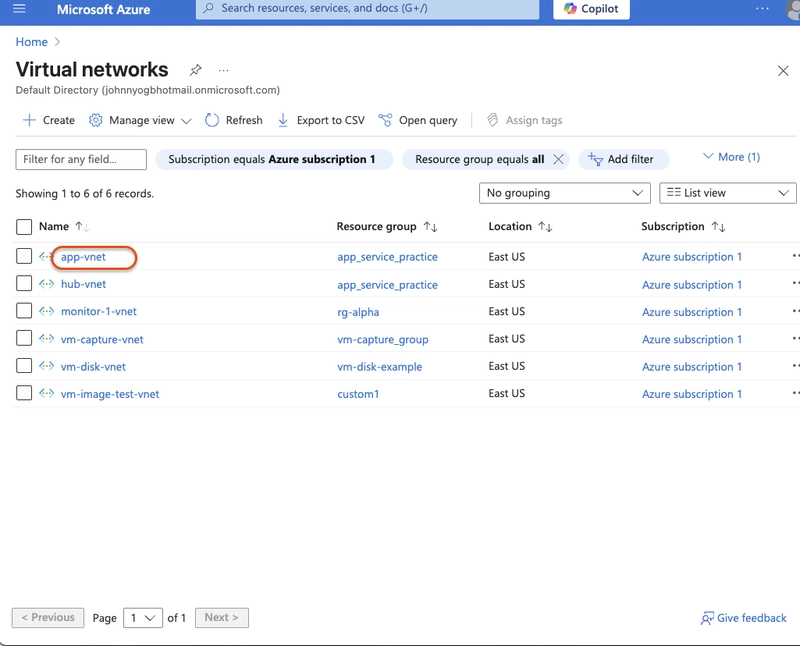
    virtual networks

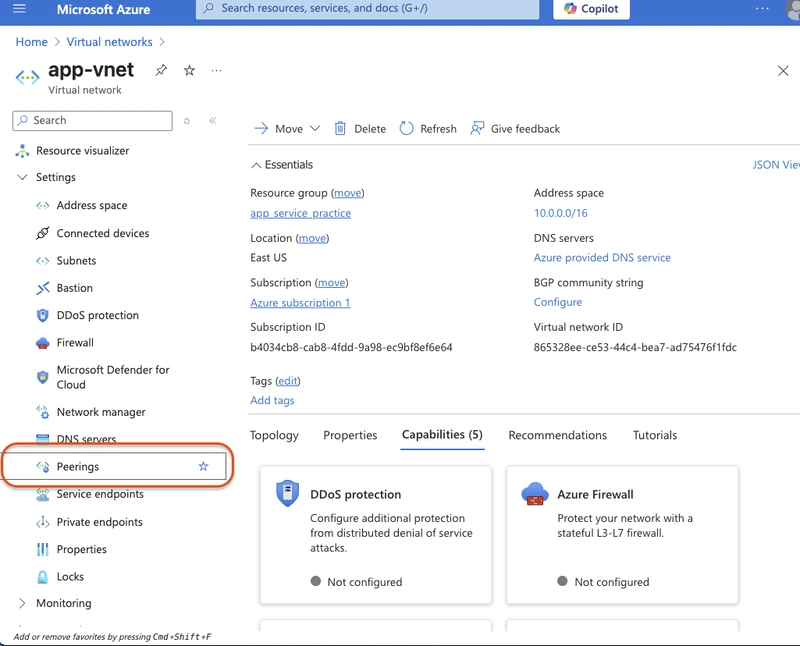
  • Under peerings, select settings
    Under peerings, select settings

  • Click add

  • Use these settings:

    • Peering link name: app-vnet-to-hub
    • Subscription: same subscription used earlier
    • Virtual network: hub-vnet
    • Local virtual network peering link name: hub-to-app-vnet
    • Leave the rest on defaults and click "Add" settings
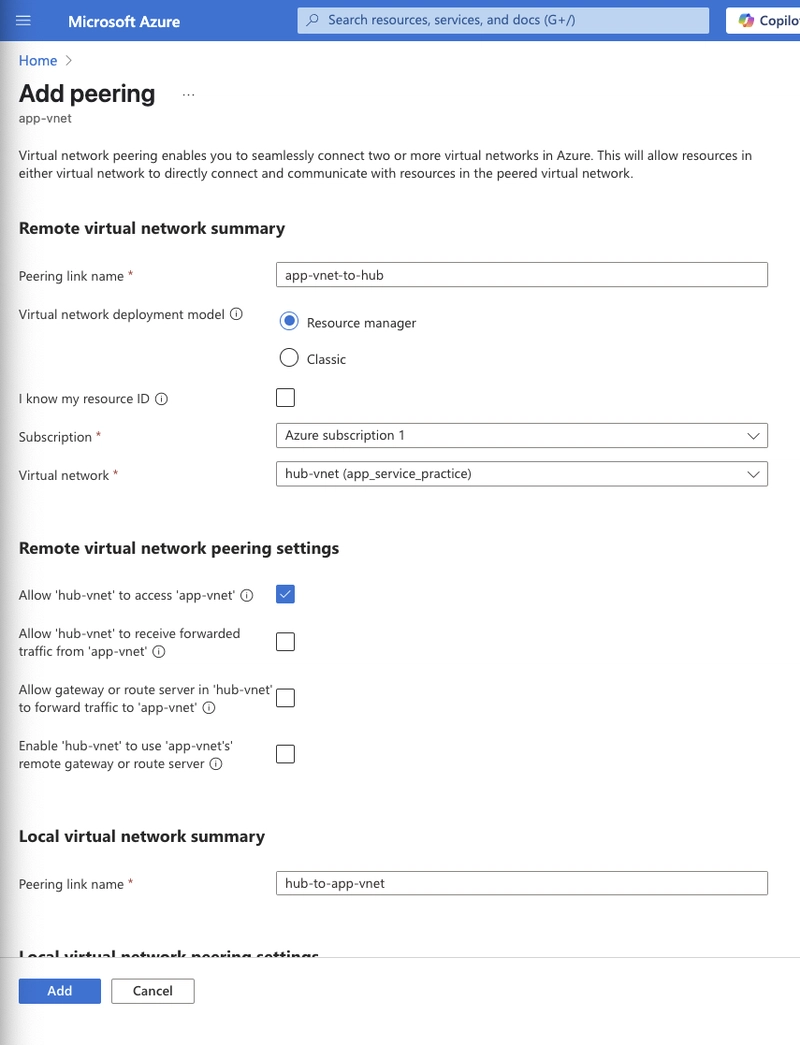
  • Once the deployment completes, verify the Peering status is Connected (in the peering menu of app-vnet)
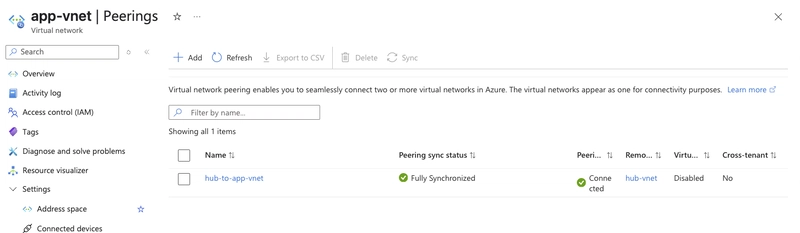
    connected

At this point, you’ve successfully created and peered two virtual networks: app-vnet and hub-vnet. In the next exercise, we’ll start configuring security rules and deploying workloads within these networks.

Ähnliche Beiträge
🔍 Verwandte News

Auch interessante Nachrichten Azure Applied Skills: Create and configure virtual networks

Thematisch verwandte Begriffe: Azure, Applied, Skills, Create · 6 Treffer

Laden...

Videos werden geladen ...

Laden...

Beiträge werden geladen ...

Laden...

Videos werden geladen ...

Laden...

Beiträge werden geladen ...

Laden...

Videos werden geladen ...

Laden...

Beiträge werden geladen ...

Laden...

Videos werden geladen ...

Laden...

Beiträge werden geladen ...

Laden...

Videos werden geladen ...

Zum Aktualisieren ziehen
ZERO-DAY CVE-2026-93974 | A flaw has been found in SourceCodester Online Reviewer Management Syste…
Advisory →
TTS Reader • tsecurity.de Voice
tsecurity.de Icon
tsecurity.de App
Offline-Lesen, Eilmeldungen & 0ms Ladezeit

Installiere tsecurity.de direkt auf deinen Home-Bildschirm für das ultimative Vollbild-Magazinerlebnis ohne Browser-Leisten.

Nächster Beitrag
Themen-Radar & Intelligence Matrix
Echtzeit-Taxonomie nach Angriffsvektoren & Plattformen

tsecurity.de Live Threat Radar

🔴 LIVE RADAR
MONITORING
AKTIV
CVE-DATENBANK
LIVE
🔍
Community Radar & Live Chat
Sentinel Bot online • Live-Stream
Dein Cluster: Security Explorer
Match:
lädt…
Verbindung zum Community-Stream wird aufgebaut...
Bearbeitungsmodus — Senden überschreibt deine Nachricht
Community-Puls — was gerade passiert
lädt…
Aktivitäten deiner Analysten
lädt…
Neues Thema oder Eilmeldung einreichen

Reiche interessante Links, Zero-Days oder Debatten ein. Die Community entscheidet per Upvote über die Veröffentlichung.

Heiß diskutierte Einreichungen
🔖 Gespeicherte Artikel
📂 Keine gespeicherten Artikel vorhanden.
Zurück Ziehen Vor
Links: vorheriger Artikel Rechts: nächster Artikel unten: schließen
News NIS-2 Frühwarnung Tier-1 Intel ⏱️ 3 Min vor 10 Min
Artikeldaten werden geladen...

Zurück: vorheriger Vor: nächster
↗ Original-Quelle
Social Reaktionen Deine Reaktion zählt
Einstufung & Relevanz-Poll 0 Stimmen
In sozialen Netzwerken teilen 1-Klick