
Posted by Fergus Hurley, Product Manager, Google Play
Millions of users rate and review your apps every day on Google Play. From feature requests to technical issues, ratings and reviews offer a wealth of information about what people like and dislike. Since 2013, you’ve been able to reply to reviews on Google Play, giving you a direct communication channel with your most engaged users. You've told us you value having this channel because it helps you iterate on user feedback faster on Android than other platforms. In the last few months, we’ve made a number of improvements in the Google Play Developer Console to help you better analyze and manage ratings and reviews so that you can improve your app experience and boost its rating.
Improvements to ratings and reviews
We recently revamped ratings and reviews with features you can now find on dedicated pages in the Developer Console:
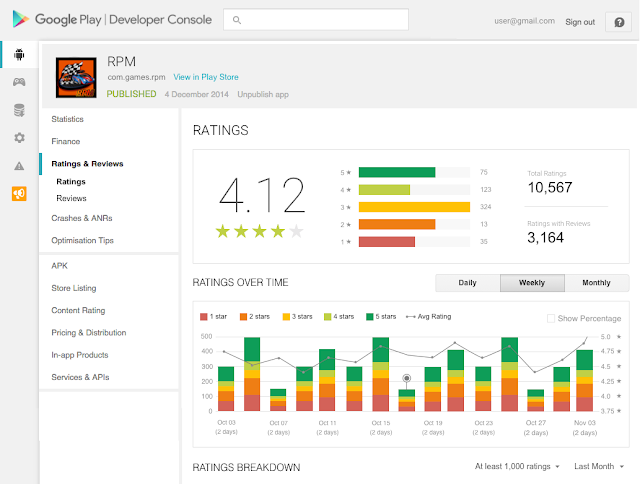
- See ratings over time: See how your rating changes daily, weekly, and monthly and easily spot any changes when you release a new version of your app.
- Ratings breakdown: Break down your rating by country, language, device, app version, or Android version.
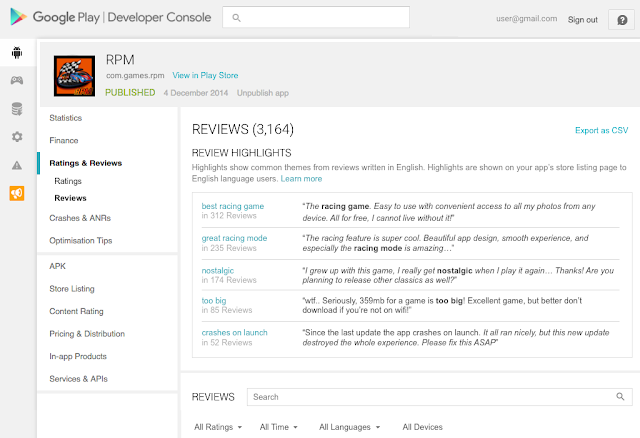
- Review highlights: See common themes from what users say in reviews of your app – these are the same highlights that users see on the Play Store. Review highlights are shown when you have a high enough volume of reviews and are updated regularly to reflect the latest user experiences with your app.
- Device metadata: See certain device data such as RAM, CPU, and screen size so you can more easily identify problems users are mentioning in user reviews and debug such issues.
- Search review text: Search inside reviews to see what people are saying about a particular topic or keyword.
- Replies & updates to reviews: When you reply to reviews, the user receives an email. Now, you can also opt-in to be emailed if the user updates their review or rating.
Learn from other developers on how to make the most of ratings and reviews
Photo Editor by Aviary is a photo editing app with a strong focus on simplicity and intuitive use. Ratings and reviews and other Android features allow Aviary to iterate on builds two to three times faster compared to other platforms while being in a regular dialogue with their users.
Glu Mobile is a mobile gaming company known for Racing Rivals, Cooking Dash 2016 and its upcoming Taylor Swift game. Ratings and reviews features help Glu engage their audience, gather feedback, and manage user satisfaction. “Google’s review highlights allow us to see a snapshot of game features users like or dislike at a glance. We monitor review trends, watch out for notifications, and respond to reviews for our games,” says Niccolo de Masi, Glu Mobile CEO. Here are some tips Glu is using to master ratings and reviews in the Developer Console:
- Reply to reviews: Reply to user reviews of your game in the Google Play Developer Console. Help them with their issues or let them know that you're considering their feature suggestions. A positive experience could result in the user increasing their rating.
- Use search: You can now search within all reviews and apply search filters for rating, language, app version, device and more. Use this feature to find specific user feedback, for example, on new content you’ve added.
- Take action: Now, you can be notified when a user answers you or updates their review. You can immediately start working on improvements if you learned about an issue. If the feedback is positive, engage with your community and turn satisfied users into fans.
- Analyze over time: Analyze ratings over time to learn more about how user satisfaction improves as you update your game. This allows you to understand if your latest feature update or bug fix results in higher user satisfaction.
- Identify key themes: Google Play automatically surfaces review highlights that users are mentioning about your game. This makes it quick for you to analyze reviews and understand user feedback.
We hope these tools help you better engage with your audience and improve your app. Visit the Developer Console Help Center to find out more about seeing and managing ratings and reviews. For more tools and best practices to help you grow a successful business, download The Secrets to App Success on Google Play.



SOCIAL SHARE CARD GENERATOR