
Want to Create Google Drive Direct Download Link?
If yes then you are in the right place.
Google Drive is one of the best Cloud Storage service providers in the market.
According to theverge, Google Drive is about to hit 1 billion users & has more than 800 million daily users.
But why Google Drive is so much popular? As it provides 15 GB of free storage space.
No. I think it’s because of its feature & functionality. One feature which I really like is File Sharing.
Using this feature you can easily share your files or folders stored on your drive via shareable links.
But one thing is really bad about this is that whenever these links are shared on the web. And accessed by other people, these links are opened in a new preview window instead of downloading the files directly.
So in this post, I will show you how to convert google drive link to direct download links easily.
Let’s see How it works…
Also Read: How to Create Dropbox Direct Download Link 2026
How to Create Google Drive Direct Download Link
In this tutorial, I will be using an online tool called WonderPlugin-Google Drive Direct Link Generator for Image, MP3 and Video Files.
But before that, we need a google drive shared URL.
Let’s see how to get it.
Create or Get Google Drive File Shared URL
1. Open Google Drive & Upload the desired file for which you want to create a direct downloadable link.
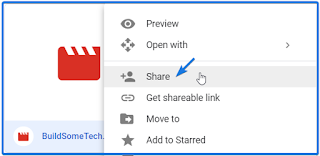
And When the file is Uploaded, Right Click on it and then select Share.
Tip:- You can also use the Backup and Sync app to upload files and folders.
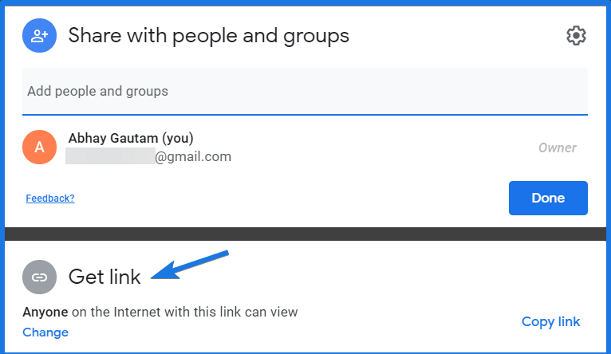
2. Now here you will see two options Share with people and groups and Get link. So click on the Get link.
3. Now Click on the Copy link and your google drive file shareable link is ready. And you can further configure it also & can change its permissions.
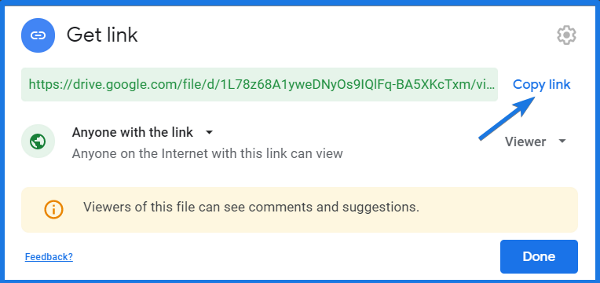
And you can further configure it also & can change its permissions.
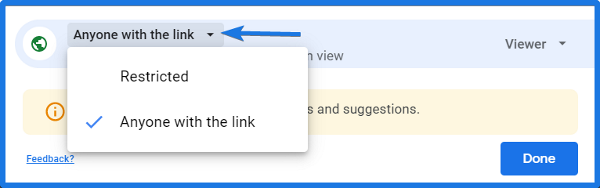
Like Anyone with the link means this file is public on the web and can access or viewed by anyone. Also, you can change its editing permission by clicking on Viewer and changing to the Commenter or Editor.
4. And Now Click on Done.
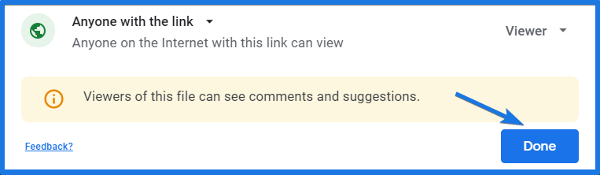
Note:- It works with the files of any type like Google Docs, Spreadsheets, Video & Audio files and not with the Folders but for that you can convert a folder into a .Zip file.
Now the next part of converting it to direct link.
Convert Google Drive Link to Direct Download Link
Now Open the WonderPlugin Link Generator tool and Paste the copied google drive file link & then Click on Generate Google Drive Direct Link.
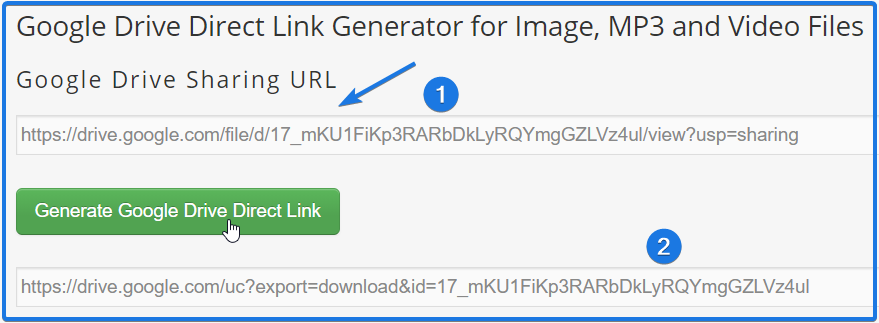
And Done! You have successfully converted a normal google drive shareable link into a direct download link.
Now the bonus part…
Google drive URL Format for Direct Links
So basically when you create a shared URL for Google drive file. Its default format looks like this:
https://drive.google.com/open?id=FILE_IDAnd FILE_ID is unique for every file present in Google drive. And if you Copy the FILE_ID and the use this in the below code, then you will get a direct download link of a google drive file.
https://drive.google.com/uc?export=download&id=FILE_IDAnd if you only want to view the file viewer mode, then paste the FILE_ID in the below code.
https://drive.google.com/file/d/FILE_ID/viewThat’s it for now…
Conclusion
This is how by using these two simple steps you can easily generate a Google drive sharing Url and can convert it into a direct download link using a link generator.
So what are you waiting for? Go ahead and use this awesome tool to generate direct download links for free and share them on the internet.
Stay tuned for the next posts on Onedrive direct download link.
Feel free to share your thoughts and also tell us if you know any better way to create or make google drive direct download link in 2026.
If you liked this post, Don’t forget to share this with your friends.
SOCIAL SHARE CARD GENERATOR