



@philm wrote:
Hello community,
here is another Stable Update.
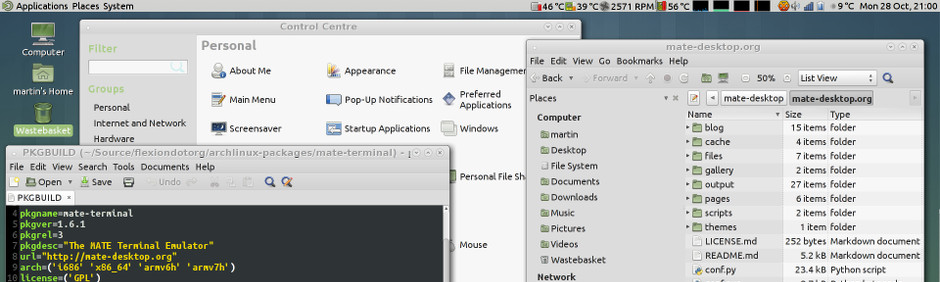
After about a year of development, the MATE Desktop team have finally released MATE 1.24. A big thank you to all contributors who helped to make this happen.
This release contains plenty of new features, bug-fixes, and general improvements. Some of the most important highlights include:
- We did it again, the MATE desktop environment is easier to use than before, once the user starts the session. Do you want to hide applications startup? Now you can set which applications to show on startup.
- Engrampa now has support for a handful of extra formats, as well as fixed support for passwords and unicode characters in some of them.
- Eye of MATE now has support for Wayland and we’ve added support for embedded color profiles.
- The thumbnail generation has been reworked and fixed in several places.
- Added support for webp files.
- Our window manager, marco, has gotten quite a few changes:
- We’ve brought a bunch of window decorations from the past to feed your nostalgia.
- Finally added invisible resize borders. No more struggling to find a border to grab with your mouse!
- All window controls (you know, the min, max, close buttons) are now rendered in HiDPI.
- The Alt+Tab and Workspace Switcher popups have been entirely reworked. Now they render in beautiful OSD style, are more configurable, and can respond to keyboard arrows.
- Tiling windows with the keyboard now allows you to cycle through different window sizes. You no longer need to feel constrained by only half of your screen.
- The System Monitor panel applet now has support for NVMe drives.
- Calculator now supports using either “pi” or “π”.
- Scientific notation has been improved.
- Some fixes for supporting pre-defined physical constants.
- The Control Center now displays its icons correctly on HiDPI displays.
- A brand new Time And Date Manager app has been added.
- The Mouse app now supports acceleration profiles.
- The Preferred Applications app has been improved for accessibility, as well as better support for integration with IM clients.
- The Indicator Applet has slightly better interaction with oddly-sized icons.
- Speaking of icons, the network manager applet icons in our own themes have been entirely redesigned and can now be enjoyed on HiDPI displays.
- If you’re the type of person that does not like to be disturbed when busy, or giving a presentation, or watching a movie, you’ll be happy to know that the notification daemon now supports a Do-Not-Disturb mode.
- The MATE Panel had several bugs that caused crashes in the past when changing layouts. Those are now fixed!
- Support for Wayland compatibility has improved considerably.
- Status icons (a.k.a. notification area, or system tray) have support for HiDPI displays.
- Wanda the Fish got a make-over and now you can enjoy her in full HiDPI glory.
- The window list applet now supports window thumbnails on hover.
- Various accessibility improvements throughout the panel and its core applets.
- If your system doesn’t, uh, support systemd you might be interested in knowing that we’ve added support for elogind to both the MATE Screensaver and the MATE Session.
- We’ve also added a brand new MATE Disk Image Mounter utility.
- Mozo, the menu editor, now supports Undo and Redo actions.
- Pluma plugins have now fully switched to Python 3.
- Pluma no longer has to envy anything from other complex editors, since it can now show the formatting marks.
- i18n: All applications have been migrated from intltools to gettext.
If you like following latest Plasma development you may also like to check out our current version of manjaro-kde-dev, which we build on a regular basis against kde-git master packages. Also check out our current 19.0-rc2 ISOs and give us the needed feedback. You might also want to give our latest spin with NX-Desktop a try ...
As always we appreciate your input and feedback for the updates.
Upstream notice
Arch updated their default compression to zstd. We adopted to the same standard. More and more packages will have the
zstextension from now on. If you get for what ever reason an error with ZSTD not supported as archive format you can do this:
wget https://pkgbuild.com/~eschwartz/repo/x86_64-extracted/pacman-static

chmod +x pacman-static

sudo ./pacman-static -Syyu
Our current supported kernels
- linux316 3.16.81
- linux44 4.4.213
- linux49 4.9.213
- linux414 4.14.170
- linux419 4.19.102
- linux53 5.3.18 [EOL]
- linux54 5.4.18
- linux55 5.5.2
- linux419-rt 4.19.94_rt39
- linux54-rt 5.4.10_rt5
Package Changes (Sat Feb 15 20:19:45 CET 2020)
- stable community x86_64: 39 new and 0 removed package(s)
A detailed list of all packages changes can be found here
- No issue, everything went smoothly
- Yes there was an issue. I was able to resolve it myself.(Please post your solution)
- Yes i am currently experiencing an issue due to the update. (Please post about it)
0
voters
Check if your mirror has already synced:
Posts: 2
Participants: 1
SOCIAL SHARE CARD GENERATOR