



 Buckle up kids, as this is a tale. As you may know, I have a lovely podcast at https://hanselminutes.com. You should listen.
Recently through an number of super cool random events I got the opportunity to interview actor Chris Conner who plays Poe on Altered Carbon. I'm a big fan of the show but especially Chris. You should watch the show because Poe is a joy and Chris owns every scene, and that's with a VERY strong cast.
I usually do my interviews remotely for the podcast but I wanted to meet Chris and hang out in person so I used my local podcasting rig which consists of a Zoom H6 recorder.
I have two Shure XLR mics, a Mic stand, and the Zoom. The Zoom H6 is a very well though of workhorse and I've used it many times before when recording shows. It's not rocket surgery but one should always test their things.
I didn't want to take any chances to I picked up a 5 pack of 32GIG high quality SD Cards. I put a new one in the Zoom, the Zoom immediately recognized the SD Card so I did a local recording right there and played it back. Sounds good. I played it back locally on the Zoom and I could hear the recording from the Zoom's local speaker. It's recording the file in stereo, one side for each mic. Remember this for later.
I went early to the meet and set up the whole recording setup. I hooked up a local monitor and tested again. Records and plays back locally. Cool. Chris shows up, we recorded a fantastic show, he's engaged and we're now besties and we go to Chipotle, talk shop, Sci-fi, acting, AIs, etc. Just a killer afternoon all around.
I head home and pull out the SD Card and put it into the PC and I see this. I almost vomit. I get lightheaded.
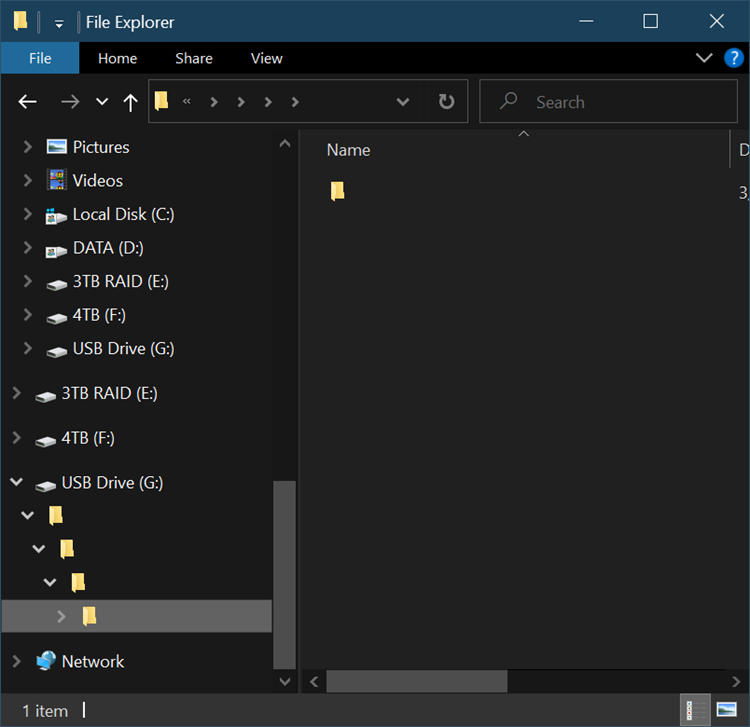
I've been recording the show for over 730 episodes over 14 years and I've never lost a show. I do my homework - as should you. I'm reeling. Ok, breathe. Let's work the problem.
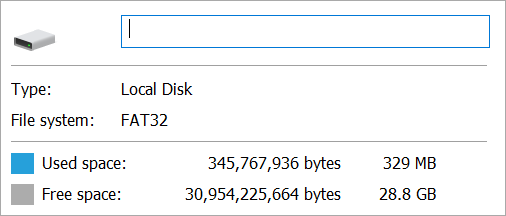
Right click the drive, check properties. Breathe. This is a 32 gig drive, but Windows sees that it's got 329 MB used. 300ish megs is the size of a 30 minute long two channel WAV file. I know this because I've looked at 300 meg files for the last several hundred shows. Just like you might know roughly the size of a JPEG your camera makes. It's a thing you know.
Command line time. List the root directory. Empty. Check it again but "show all files," weird, there's a Mac folder there but maybe the SD Card was preformatted on a Mac.
Interesting Plot Point - I didn't format the SD card. I use it as it came out of the packaging from Amazon. It came preformatted and I accepted it. I tested it and it worked but I didn't "install my own carpet." I moved in to the house as-is.
What about a little "show me all folders from here down" action? Same as I saw in Windows Explorer. The root folder has another subfolder which is itself. It's folder "Inception" with no Kick!
G:>dir /a


Volume in drive G has no label.


Volume Serial Number is 0403-0201


Directory of G:


03/12/2020 12:29 PM <DIR>


03/13/2020 12:44 PM <DIR> System Volume Information


0 File(s) 0 bytes


2 Dir(s) 30,954,225,664 bytes free


G:>dir /s


Volume in drive G has no label.


Volume Serial Number is 0403-0201


Directory of G:


03/12/2020 12:29 PM <DIR>


0 File(s) 0 bytes


Directory of G:


03/12/2020 12:29 PM <DIR>


0 File(s) 0 bytes


IT GOES FOREVER
Ok, the drive thinks there's data but I can't see it. I put the SD card back in the Zoom and try to play it back.
The Zoom can see folders and files AND the interview itself. And the Zoom can play it back. The Zoom is an embedded device with an implementation of the FAT32 file system and it can read it, but Windows can't. Can Linux? Can a Mac?
Short answer. No.
Hacky Note: Since the Zoom can see and play the file and it has a headphone/monitor jack, I could always plug in an analog 1/8" headphone cable to a 1/4" input on my Peavy PV6 Mixer and rescue the audio with some analog quality loss. Why don't I use the USB Audio out feature of the Zoom H6 and play the file back over a digital cable, you ask? Because the Zoom audio player doesn't support that. It supports three modes - SD Card Reader (which is a pass through to Windows and shows me the recursive directories and no files), an Audio pass-through which lets the Zoom look like an audio device to Windows but doesn't show the SD card as a drive or allow the SD Card to be played back over the digital interface, or its main mode where it's recording locally.
It's Forensics Time, Kids.
We have an 32 SD Card - a disk drive as it were - that is standard FAT32 formatted, that has 300-400 megs of a two-channel (Chris and I had two mics) WAV file that was recorded locally by the Zoom H6 audio reorder and I don't want too lose it or mess it up.
I need to take a byte for byte image of what's on the SD Card so I can poke and it and "virtually" mess with with it, change it, fix it, try again, without changing the physical.
"dd" is a command-line utility with a rich and storied history going back 45 years. Even though it means "Data Definition" it'll always be "disk drive" I my head.
How to clone a USB Drive or SD Card to an IMG file on Windows
I have a copy of dd for Windows which lets me get a byte for byte stream/file that represents this SD Card. For example I could get an entire USD device:
dd if=\?DeviceHarddisk1Partition0 of=c:tempusb2.img bs=1M --size --progress
I need to know the Harddisk number and Partition number as you can see above. I usually use diskpart for this.
>diskpart


Microsoft DiskPart version 10.0.19041.1


Copyright (C) Microsoft Corporation.


On computer: IRONHEART


DISKPART> list disk


  Disk ###  Status         Size     Free     Dyn  Gpt


  --------  -------------  -------  -------  ---  ---


  Disk 0    Online          476 GB      0 B        *


  Disk 1    Online         1863 GB      0 B        *


  Disk 2    Online         3725 GB      0 B


  Disk 3    Online         2794 GB      0 B        *


  Disk 8    Online           29 GB  3072 KB


DISKPART> select disk 8


Disk 8 is now the selected disk.


DISKPART> list part


  Partition ###  Type              Size     Offset


  -------------  ----------------  -------  -------


  Partition 1    Primary             29 GB  4096 KB
Looks like it's Disk 8 Partition 1 on my system. Let's get it all before I panic.
dd if=\?DeviceHarddisk8Partition1 of=c:tempZOMG.img bs=1M --size --progress
IF and OF are input file and output file, and I will do it for the whole size of the SD Card. It's likely overkill though as we'll see in a second.
This file ended up being totally massive and hard to work with. Remember I needed just the first 400ish megs? I'll chop of just that part.
dd if=ZOMG.img of=SmallerZOMG.img bs=1M count=400
What is this though? Remember it's an image of a File System. It just bytes in a file. It's not a WAV file or a THIS file or a THAT file. I mean, it is if we decide it is, but in fact, a way to think about it is that it's a mangled envelope that is dark when I peer inside it. We're gonna have to feel around and see if we can rebuild a sense of what the contents really are.
Importing Raw Bytes from an IMG into Audition or Audacity
Both Adobe Audition and Audacity are audio apps that have an "Import RAW Data" feature. However, I DO need to tell Audition how to interpret it. There's lots of WAV files out there. How many simples were there? 1 channel? 2 channel? 16 bit or 32 bit? Lots of questions.
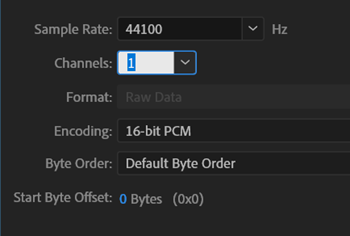
Can I just import this 4 gig byte array of a file system and get something?
Looks like something. You can see that the first part there is likely the start of the partition table, file system headers, etc. before audio data shows up. Here's importing as 2 channel.
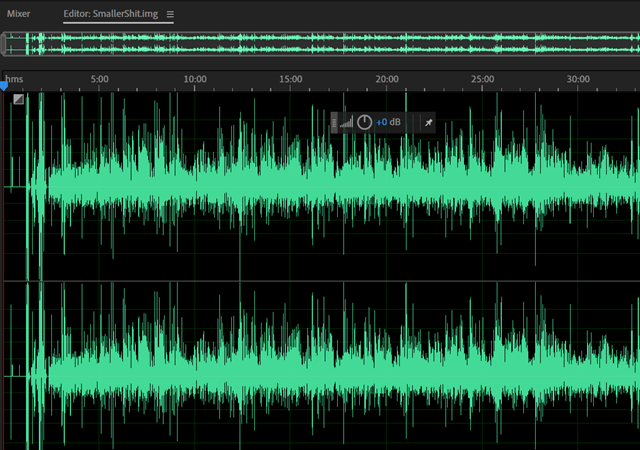
I can hear voices but they sound like chipmunks and aren't understandable. Something is "doubled." Sample rate? No, I double checked it.
Here's 1 channel raw data import even though I think it's two.
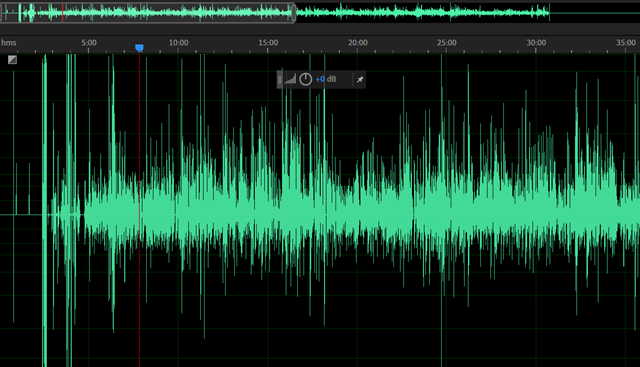
Now THIS is interesting. I can hear audio at normal speed of us talking (after the preamble) BUT it's only a syllable at a time, and then a quieter version of the same syllable repeats. I don't want to (read: can't really) reassemble a 30 min interview from syllables, right?
Remember when I said that the Zoom H6 records a two channel file with one channel per mic? Not really. It records ONE FILE PER CHANNEL. A whateverL.wav and a whateverR.wav. I totally forgot!
This "one channel" file above is actually the bytes as they were laid down on disk, right? It's actually two files written simultaneously, a few kilobytes at a time, L,R,L,R,L,R. And here I am telling my sound software to treat this "byte for byte file system dump" as one file. It's two that were made at the same time.
It's like the Brundlefly. How do I tease it apart? Well I can't treat the array as a raw file anymore, it's not. And I want (really don't have the energy yet) to write my own little app to effectively de-interlace this image. I also don't know if the segment size is perfectly reliable or if it varies as the Zoom recorded.
NOTE: Pete Brown has written about RIFF/WAV files from Sound Devices records having an incorrect FAT32 bit set. This isn't that, but it's in the same family and is worth noting if you ever have an issue with a Broadcast Wave File getting corrupted or looking encrypted.
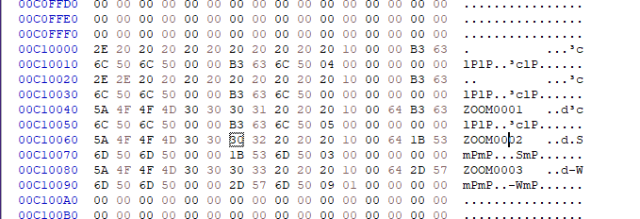
Whole helping me work this issue, Pete Brown tweeted a hexdump of the Directory Table so you can see the Zoom0001, Zoom0002, etc directories there in the image.
Let me move into Ubuntu on my Windows machine running WSL. Here I can run fdisk and get some sense of what this Image of the bad SD Card is. Remember also that I hacked off the first 0-400 Megs but this IMG file thinks it's a 32gig drive, because it is. It's just that's been aggressively truncated.
$ fdisk -u -l SmallerZOMG.img


Disk SmallerZOMG.img: 400 MiB, 419430400 bytes, 819200 sectors


Units: sectors of 1 * 512 = 512 bytes


Sector size (logical/physical): 512 bytes / 512 bytes


I/O size (minimum/optimal): 512 bytes / 512 bytes


Disklabel type: dos


Disk identifier: 0x00000000


Device           Boot Start      End  Sectors  Size Id Type


SmallerZOMG.img1       8192 61157375 61149184 29.2G  c W95 FAT32 (LBA)
Maybe I can "mount" this IMG? I make a folder on Ubuntu/WSL2 called ~/recovery. Yikes, ok there's nothing there. I can take the sector size 512 times the Start block of 8192 and use that as the offset.
sudo mount -o loop,offset=4194304 SmallerShit.img recover/


$ cd recover/


$ ll


total 68


drwxr-xr-x  4 root  root  32768 Dec 31  1969  ./
Ali Mosajjal thinks perhaps "they re-wrote the FAT32 structure definition and didn't use a standard library and made a mistake," and Leandro Pereria postulates "what could happen is that the LFN (long file name) checksum is invalid and they didn't bother filling in the 8.3 filename... so that complying implementations of VFAT tries to look at the fallback 8.3 name, it's all spaces and figures out "it's all padding, move along."
Ali suggested running dosfsck on the mounted image and you can see again that the files are there, but there's like 3 root entries? Note I've done a cat of /proc/mounts to see the loop that my img is mounted on so I can refer to it in the dosfsck command.
$ sudo dosfsck -w -r -l -a -v -t /dev/loop3


fsck.fat 4.1 (2017-01-24)


Checking we can access the last sector of the filesystem


Boot sector contents:


System ID "        "


Media byte 0xf8 (hard disk)


       512 bytes per logical sector


     32768 bytes per cluster


      1458 reserved sectors


First FAT starts at byte 746496 (sector 1458)


         2 FATs, 32 bit entries


   3821056 bytes per FAT (= 7463 sectors)


Root directory start at cluster 2 (arbitrary size)


Data area starts at byte 8388608 (sector 16384)


    955200 data clusters (31299993600 bytes)


63 sectors/track, 255 heads


      8192 hidden sectors


  61149184 sectors total


Checking file /


Checking file /


Checking file /


Checking file /System Volume Information (SYSTEM~1)


Checking file /.


Checking file /..


Checking file /ZOOM0001


Checking file /ZOOM0002


Checking file /ZOOM0003


Checking file /ZOOM0001/.


Checking file /ZOOM0001/..


Checking file /ZOOM0001/ZOOM0001.hprj (ZOOM00~1.HPR)


Checking file /ZOOM0001/ZOOM0001_LR.WAV (ZOOM00~1.WAV)


Checking file /ZOOM0002/.


Checking file /ZOOM0002/..


Checking file /ZOOM0002/ZOOM0002.hprj (ZOOM00~1.HPR)


Checking file /ZOOM0002/ZOOM0002_Tr1.WAV (ZOOM00~1.WAV)


Checking file /ZOOM0002/ZOOM0002_Tr2.WAV (ZOOM00~2.WAV)


Checking file /ZOOM0003/.


Checking file /ZOOM0003/..


Checking file /ZOOM0003/ZOOM0003.hprj (ZOOM00~1.HPR)


Checking file /ZOOM0003/ZOOM0003_Tr1.WAV (ZOOM00~1.WAV)


Checking file /ZOOM0003/ZOOM0003_Tr2.WAV (ZOOM00~2.WAV)


Checking file /System Volume Information/.


Checking file /System Volume Information/..


Checking file /System Volume Information/WPSettings.dat (WPSETT~1.DAT)


Checking file /System Volume Information/ClientRecoveryPasswordRotation (CLIENT~1)


Checking file /System Volume Information/IndexerVolumeGuid (INDEXE~1)


Checking file /System Volume Information/AadRecoveryPasswordDelete (AADREC~1)


Checking file /System Volume Information/ClientRecoveryPasswordRotation/.


Checking file /System Volume Information/ClientRecoveryPasswordRotation/..


Checking file /System Volume Information/AadRecoveryPasswordDelete/.


Checking file /System Volume Information/AadRecoveryPasswordDelete/..


Checking for bad clusters.
We can see them, but can't get at them with the vfat file system driver on Linux or with Windows.
The DUMP.exe util as part of mtools for Windows is amazing but I'm unable to figure out what is wrong in the FAT32 file table. I can run minfo on the Linux command land telling it to skip 8192 sectors in with the @@offset modifier:
$ minfo -i ZOMG.img@@8192S


device information:


===================


filename="ZOMG.img"


sectors per track: 63


heads: 255


cylinders: 3807


mformat command line: mformat -T 61149184 -i ZOMG.img@@8192S  -h 255 -s 63 -H 8192 ::


bootsector information


======================


banner:"        "


sector size: 512 bytes


cluster size: 64 sectors


reserved (boot) sectors: 1458


fats: 2


max available root directory slots: 0


small size: 0 sectors


media descriptor byte: 0xf8


sectors per fat: 0


sectors per track: 63


heads: 255


hidden sectors: 8192


big size: 61149184 sectors


physical drive id: 0x80


reserved=0x0


dos4=0x29


serial number: 04030201


disk label="           "


disk type="FAT32   "


Big fatlen=7463


Extended flags=0x0000


FS version=0x0000


rootCluster=2


infoSector location=1


backup boot sector=6


Infosector:


signature=0x41615252


free clusters=944648


last allocated cluster=10551
Ok, now we've found yet ANOTHER way to mount this corrupted file system. With mtools we'll use mdir to list the root directory. Note there is something wrong enough that I have to set mtools_skip_check=1 to ~/.mtoolsrc and continue.
$ mdir -i ZOMG.img@@8192S ::


Total number of sectors (61149184) not a multiple of sectors per track (63)!


Add mtools_skip_check=1 to your .mtoolsrc file to skip this test


$ pico ~/.mtoolsrc


$ mdir -i ZOMG.img@@8192S ::


 Volume in drive : is


 Volume Serial Number is 0403-0201


Directory for ::/


             <DIR>     2020-03-12  12:29


        1 file                    0 bytes


                     30 954 225 664 bytes free
Same result. I can run mdu and see just a few folders. Note the ZOOMxxxx ones are missing here
$ mdu -i ZOMG.img@@8192S ::


::/System Volume Information/ClientRecoveryPasswordRotation 1


::/System Volume Information/AadRecoveryPasswordDelete 1


::/System Volume Information 5


::/ 6
Now, ideally I want to achieve two things here.
- Know WHY it's broken and exactly WHAT is wrong.
- There's a nameless root directory here and I lack the patience and skill to manually hexdump and patch it.
- Be able to copy the files out "normally" by mounting the IMG and, well, copying them out.
UPDATE #1 - I'm back after a few minutes of thinking again. If I do the 512*8192 offset again and visualize the FAT32 table in Hexdump/xxd like this:
xxd -seek 4194304 ZOMG.img  | more


00400000: eb00 9020 2020 2020 2020 2000 0240 b205  ...        ..@..


00400010: 0200 0000 00f8 0000 3f00 ff00 0020 0000  ........?.... ..


00400020: 0010 a503 271d 0000 0000 0000 0200 0000  ....'...........


00400030: 0100 0600 0000 0000 0000 0000 0000 0000  ................


00400040: 8000 2901 0203 0420 2020 2020 2020 2020  ..)....


00400050: 2020 4641 5433 3220 2020 0000 0000 0000    FAT32   ......


00400060: 0000 0000 0000 0000 0000 0000 0000 0000  ................


00400070: 0000 0000 0000 0000 0000 0000 0000 0000  ................


00400080: 0000 0000 0000 0000 0000 0000 0000 0000  ................


00400090: 0000 0000 0000 0000 0000 0000 0000 0000  ................


004000a0: 0000 0000 0000 0000 0000 0000 0000 0000  ................


004000b0: 0000 0000 0000 0000 0000 0000 0000 0000  ................


004000c0: 0000 0000 0000 0000 0000 0000 0000 0000  ................
I can see I seek'ed to the right spot, as the string FAT32 is just hanging out. Maybe I can clip out this table and visualize it in a better graphical tool.
I could grab a reasonable (read: arbitrary) chunk from this offset and put it in a very small manageable file:
dd if=ZOMG.img ibs=1 skip=4194304 count=64000 > another.img
And then load it in dump.exe on Windows which is really a heck of a tool. It seems to be thinking thinking there's multiple FAT Root Entries (which might be why I'm seeing this weird ghost root). Note the "should be" parts as well.
FAT Root Entry (non LFN) (0x00000000)


                  Name: ···


             Extension:


             Attribute: 0x00


        FAT12:reserved: 02 40 B2 05 02 00 00 00 00 F8


        FAT32:reserved: 02


   FAT32:creation 10th: 0x40


   FAT32:creation time: 0x05B2


   FAT32:creation date: 0x0002


   FAT32:last accessed: 0x0000


FAT32:hi word start cluster: 0xF800


                  Time: 0x0000  (00:00:00) (hms)


                  Date: 0x003F  (1980/01/31) (ymd)


      Starting Cluster: 0x00FF (0xF80000FF)


             File Size: 8192


FAT Root Entry (non LFN) (0x00000020)


                  Name: ····'···


             Extension: ···


             Attribute: 0x00


        FAT12:reserved: 02 00 00 00 01 00 06 00 00 00


        FAT32:reserved: 02


   FAT32:creation 10th: 0x00


   FAT32:creation time: 0x0000


   FAT32:creation date: 0x0001


   FAT32:last accessed: 0x0006


FAT32:hi word start cluster: 0x0000


                  Time: 0x0000  (00:00:00) (hms)


                  Date: 0x0000  (1980/00/00) (ymd)


      Starting Cluster: 0x0000 (0x00000000) <--- should be 0x0002 or higher.


             File Size: 0


FAT Root Entry (non LFN) (0x00000040)


                  Name: ··)····


             Extension:


             Attribute: 0x20  Archive


        FAT12:reserved: 20 20 20 20 20 20 46 41 54 33


        FAT32:reserved: 20


   FAT32:creation 10th: 0x20


   FAT32:creation time: 0x2020


   FAT32:creation date: 0x2020


   FAT32:last accessed: 0x4146


FAT32:hi word start cluster: 0x3354


                  Time: 0x2032  (04:01:18) (hms)


                  Date: 0x2020  (1996/01/00) (ymd)


      Starting Cluster: 0x0000 (0x33540000)


             File Size: 0


FAT Root Entry (non LFN) (0x00000060)


                  Name: ········


             Extension: ···


             Attribute: 0x00


        FAT12:reserved: 00 00 00 00 00 00 00 00 00 00


        FAT32:reserved: 00


   FAT32:creation 10th: 0x00


   FAT32:creation time: 0x0000


   FAT32:creation date: 0x0000


   FAT32:last accessed: 0x0000


FAT32:hi word start cluster: 0x0000


                  Time: 0x0000  (00:00:00) (hms)


                  Date: 0x0000  (1980/00/00) (ymd)


      Starting Cluster: 0x0000 (0x00000000) <--- should be 0x0002 or higher.


             File Size: 0


FAT Root Entry (non LFN) (0x00000080)


                  Name: ········


             Extension: ···


             Attribute: 0x00


        FAT12:reserved: 00 00 00 00 00 00 00 00 00 00


        FAT32:reserved: 00


   FAT32:creation 10th: 0x00


   FAT32:creation time: 0x0000


   FAT32:creation date: 0x0000


   FAT32:last accessed: 0x0000


FAT32:hi word start cluster: 0x0000


                  Time: 0x0000  (00:00:00) (hms)


                  Date: 0x0000  (1980/00/00) (ymd)


      Starting Cluster: 0x0000 (0x00000000) <--- should be 0x0002 or higher.


             File Size: 0


FAT32 Info Block (0x00000000)


                   sig: 0x209000EB  (' ···') [1] <--- should be 0x41615252.


              reserved:


00000004  20 20 20 20 20 20 20 00-02 40 B2 05 02 00 00 00     .........@......


00000014  00 F8 00 00 3F 00 FF 00-00 20 00 00 00 10 A5 03     ....?...........


00000024  27 1D 00 00 00 00 00 00-02 00 00 00 01 00 06 00     '...............


00000034  00 00 00 00 00 00 00 00-00 00 00 00 80 00 29 01     ..............).


00000044  02 03 04 20 20 20 20 20-20 20 20 20 20 20 46 41     ..............FA


00000054  54 33 32 20 20 20 00 00-00 00 00 00 00 00 00 00     T32.............
The most confusing part is that the FAT32 signature - the magic number is always supposed to be 0x41615252. Google that. You'll see. It's a hardcoded signature but maybe I've got the wrong offset and at that point all bets are off.
So do I have that? I can search a binary file for Hex values with a combo of xxd and grep. Note the byte swap:
xxd another.img  | grep "6141"


00000200: 5252 6141 0000 0000 0000 0000 0000 0000  RRaA............


00000e00: 5252 6141 0000 0000 0000 0000 0000 0000  RRaA............
Just before this is 55 AA which is the last two bytes of the 64 byte partition table.
Now do I have two FAT32 info blocks and three Root Entries? I'm lost. I'll update this part as I learn more.
7zip all the things
Here's where it gets weird and it got so weird that both Pete Brown and I were like, WELL. THAT'S AMAZING.
On a whim I right-clicked the IMG file and opened it in 7zip and saw this.
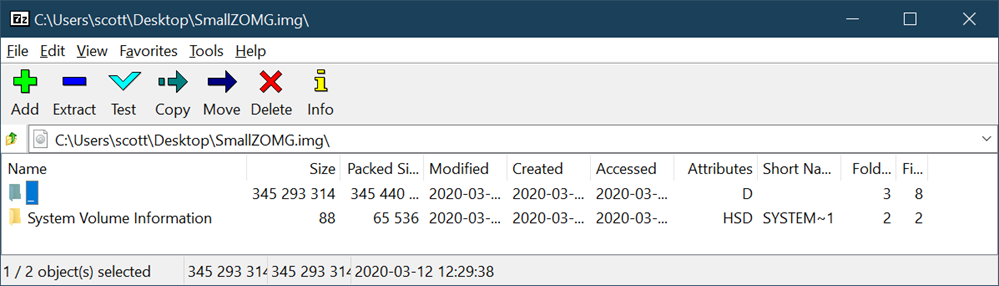
See that directory there that's a nothing? A space? A something. It has no Short Name. It's an invalid entry but 7zip is cool with it. Let's go in. Watch the path and the \. That's a path separator, nothing, and another path separator. That's not allowed or OK but again, 7zip is chill.
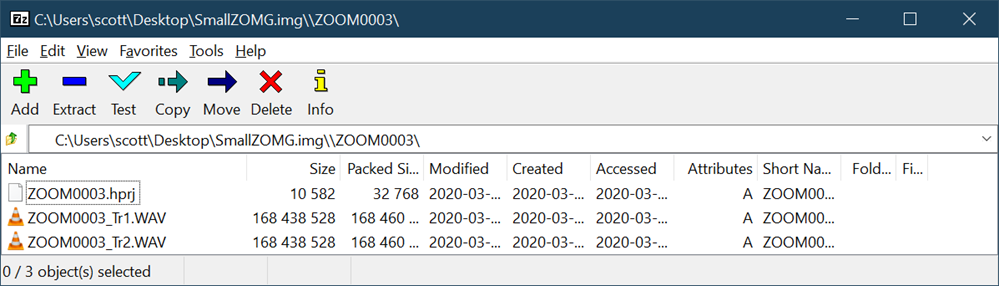
I dragged the files out and they're fine! The day is saved.
The moral? There are a few I can see.
- Re-format the random SD cards you get from Amazon specifically on the device you're gonna use them.
- FAT as a spec has a bunch of stuff that different "drivers" (Windows, VFAT, etc) may ignore or elide over or just not implement.
- I've got 85% of the knowledge I need to spelunk something like this but that last 15% is a brick wall. I would need more patience and to read more about this.
- Knowing how to do this is useful for any engineer. It's the equivalent of knowing how to drive a stick shift in an emergency even if you usually use Lyft.
- I'm clearly not an expert but I do have a mental model that includes (but not limited to) bytes on the physical media, the file system itself, file tables, directory tables, partition tables, how they kinda work on Linux and Windows.
- I clearly hit a wall as I know what I want to do but I'm not sure the next step.
- There's a bad Directory Table Entry. I want to rename it and make sure it's complete and to spec.
- I'm clearly not an expert but I do have a mental model that includes (but not limited to) bytes on the physical media, the file system itself, file tables, directory tables, partition tables, how they kinda work on Linux and Windows.
- 7zip is amazing. Try it first for basically everything.
Ideally I'd be able to update this post with exactly what byte is wrong and how to fix it. Thanks to Ali, Pete, and Leandro for playing with me!
Your thoughts? (If you made it this far the truncated IMG of the 32 gig SD is here (500 megs) but you might have to pad it out with zeros to make some tools like it.
Oh, and listen to https://hanselminutes.com/ as the interview was great and it's coming soon!
Sponsor: Have you tried developing in Rider yet? This fast and feature-rich cross-platform IDE improves your code for .NET, ASP.NET, .NET Core, Xamarin, and Unity applications on Windows, Mac, and Linux.
© 2019 Scott Hanselman. All rights reserved.


SOCIAL SHARE CARD GENERATOR