
Zum Hauptinhalt springen
Echtzeit-Radar & Feeds
Alle RSS Feeds ➔
👥 Community & Social
Windows Tipps & SecurityGrafikkarte vor Überhitzung schützen: So geht’s(25.09.2026 um 08:00 Uhr)
••••••••••
Windows Tipps & SecurityGrafikkarte vor Überhitzung schützen: So geht’s(25.09.2026 um 08:00 Uhr)
••••••••••
Intelligence View
⚡ tsecurity.de Intelligence

Python in Visual Studio Code – March 2020 Release

We are pleased to announce that the March 2020 release of the Python Extension for Visual Studio Code is now available. You can download the Python extension from the Marketplace, or install it directly from the extension gallery in Visual …

0
↗ Quelle (devblogs.microsoft.com)
Reagiere als Erste:r — dein Feedback zählt!


We are pleased to announce that the
March 2020 release of the Python Extension for Visual Studio Code is now available. You can download the Python extension from the Marketplace, or install it directly from the extension gallery in Visual Studio Code. If you already have the Python extension installed, you can also get the latest update by restarting Visual Studio Code. You can learn more about  Python support in Visual Studio Code in the documentation.  


This release is focused mostly on product quality. We closed a total of 66 issues, 43 of them being bug fixes.  But we’re also pleased to include a brand-new Python debugger: debugpy!  


If you’re interested, you can check the full list of improvements in our changelog. 


New Debugger 


We’re excited to announce that in this release we’re including a new debugger, debugpy. The debugger team has put a lot of effort into making it a faster and even more reliable Python debugger. Along with the debugger, a new feature also comes: an easier configuration experience to attach the debugger to local processes. 


Attaching to local processes 


Sometimes you may want to attach the debugger to a Python process that is running on your machine, but that can be tricky if, for example, you don’t have control over the application that launched that process.  


We made it easy to be done with our new configuration experience for attaching the debugger to local processes.  


If you don’t have a launch.json file on your workspace folder, you can simply start a debug session (by pressing F5 or through Run > Start Debugging) and you’ll be presented with a list of debug configuration options. When you select “Attach using Process ID”, it will display a list of processes running locally on your machine: 
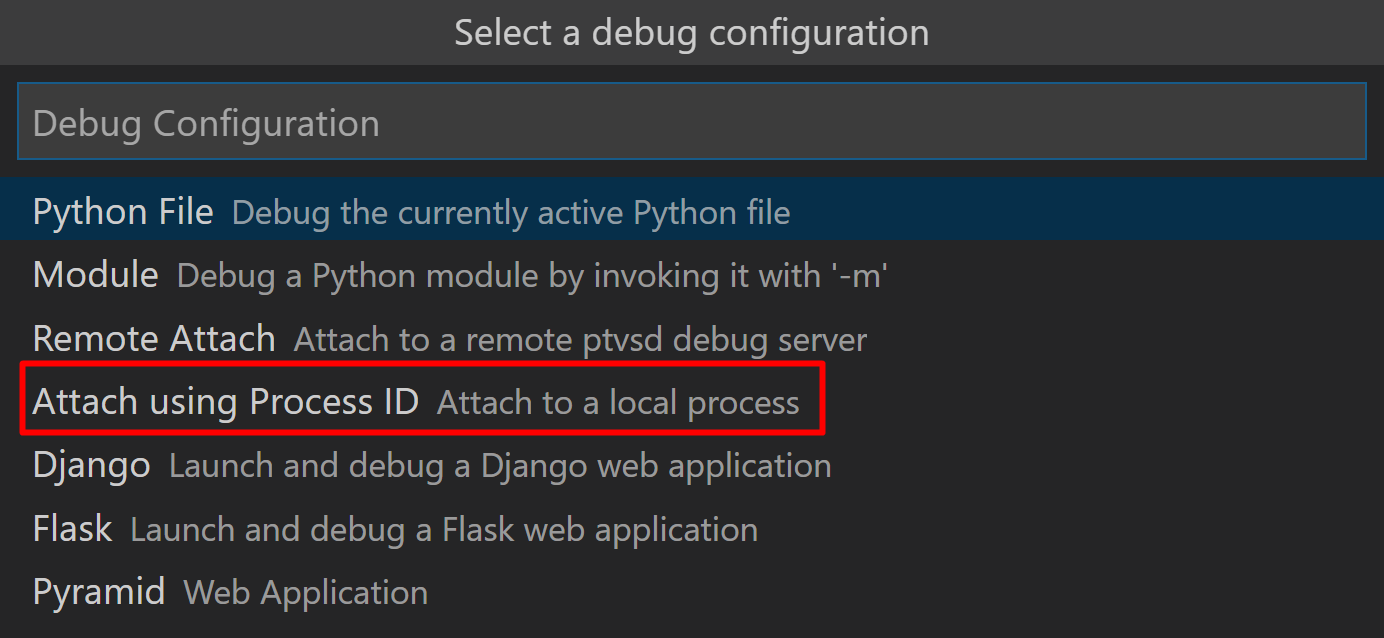

Configuration options for debugger.


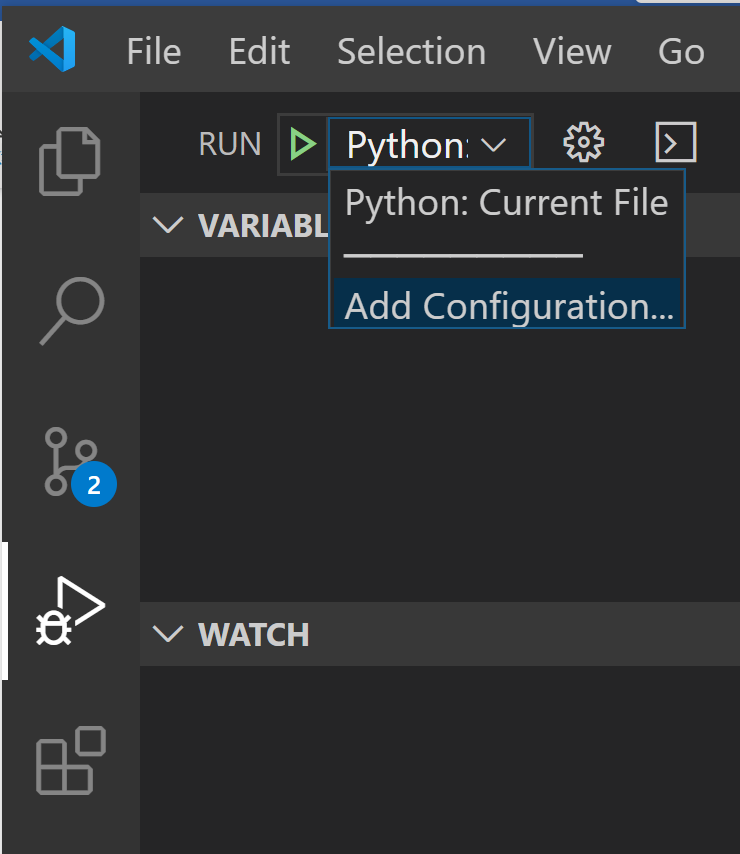
Alternatively, if you already have a launch.json file on your workspace folder, you can add a configuration to it by clicking on the “Add configuration…” option under the drop-down menu in the Run viewlet: Adding a configuration from the debug viewlet

Then when you select “Python”, you’ll be presented with the same configuration options as above: 
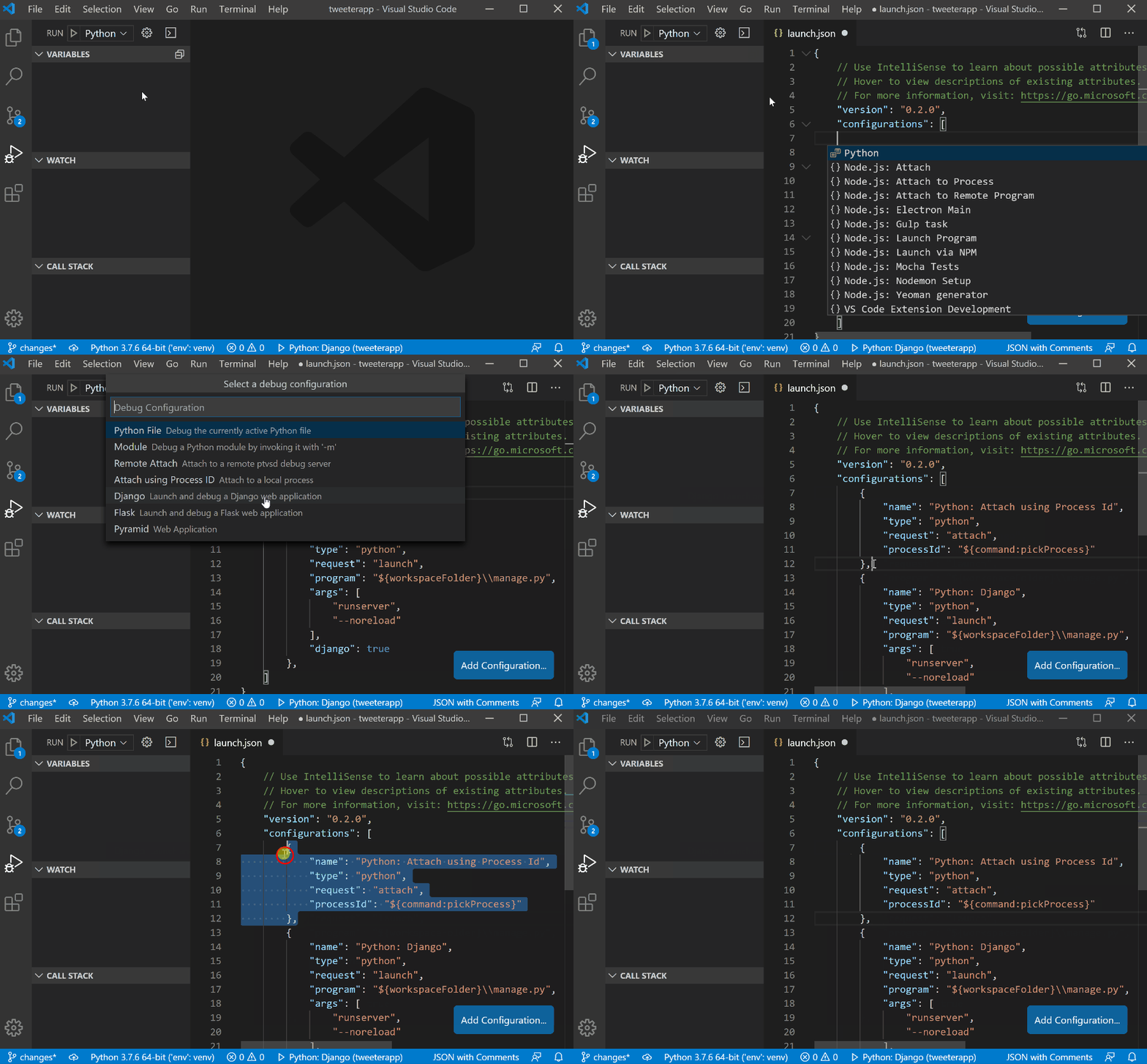

Adding a configuration for attaching to a local process


Selecting the “Attach using Process ID” option from the debug configuration menu adds the below configuration to the existing launch.json file: 

{ 

            "name": "Python: Attach using Process Id", 

            "type": "python", 

            "request": "attach", 

            "processId": "${command:pickProcess}" 

}

When you start a debug session with this configuration selected, a list of processes to which you can attach the debugger will be displayed, and once you pick one, the debugger will attempt to attach to it: 
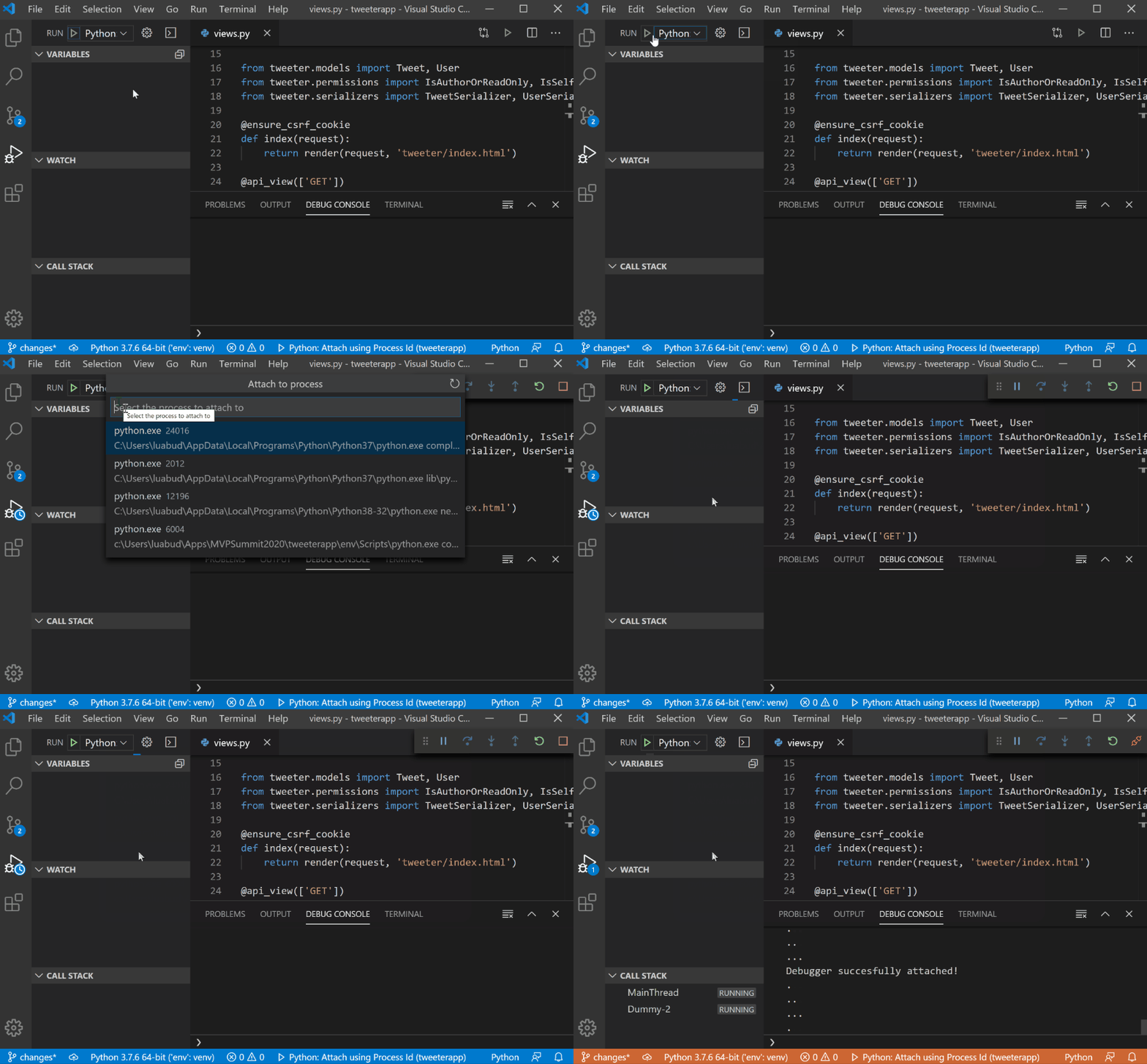

Selecting a process to attach the debugger


You can also filter the processes by ID, file name or interpreter name: 
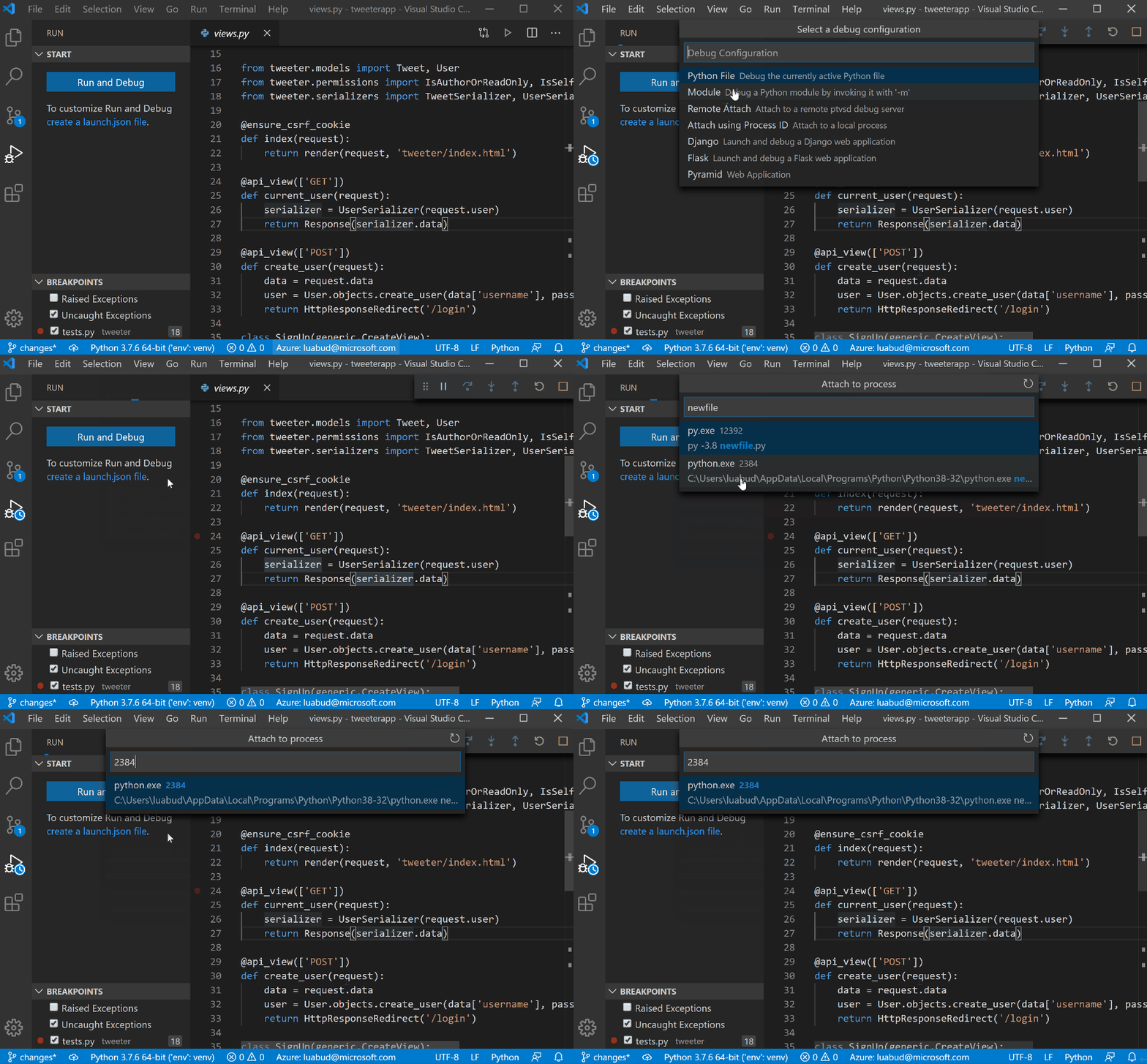

Filtering the processes view by file name and process ID


Alternatively, if you already know the ID of the process to which you wish to attach the debugger, you can simply add the value directly on the configuration. For example, to attach to a process of ID 1796, you can simply use the below configuration: 

{ 

            "name": "Python: Attach using Process Id", 

            "type": "python", 

            "request": "attach", 

            "processId": 1796 

}

For more information about debugpy such as how to transition from ptvsd, API changes, CLI references, allowed debug configurations and more, you can check debugpy’s wiki page.   


Other Changes and Enhancements 


We have also added small enhancements and fixed issues requested by users that should improve your experience working with Python in Visual Studio Code. Some notable changes include: 


  • Remove extra lines at the end of the file when formatting with Black. (#1877) 

  • Support scrolling beyond the last line in the notebook editor and the interactive window. (#7892) 

  • Added a command to allow users to select a kernel for a Notebook. (#9228) 

  • Show quickfixes for launch.json. (#10245) 

  • Update Jedi to 0.16.0. (#9765) 

We’re constantly A/B testing new features. If you see something different that was not announced by the team, you may be part of the experiment! To see if you are part of an experiment, you can check the first lines in the Python extension output channel. If you wish to opt-out of A/B testing, you can open the user settings.json file (View > Command Palette… and run Preferences: Open Settings (JSON)) and set the “python.experiments.enabled” setting to false.  


Be sure to download the Python extension for Visual Studio Code now to try out the above improvements. If you run into any problems, please file an issue on the Python VS Code GitHub page. 


The post Python in Visual Studio Code – March 2020 Release appeared first on Python.

1. Sofort-Triage & Abwehrmaßnahmen

SOC Incident Playbook: Vulnerability Remediation & Verification
Syntax validiert (0 Fehler)
title: Detect Exploitation - Python in Visual Studio Code – March 2020 Release
id: 59824eed-2ed7-4934-8c5f-dc2144998835
status: experimental
description: Automatisch generierte SIEM-Erkennungsregel basierend auf CTI Intelligence
references:
  - https://tsecurity.de/
author: iShareStuff CTI Automated Detection Engine
date: 2026-09-26
logsource:
  category: network_connection
  product: any
detection:
  selection:
      CommandLine|contains:
        - 'exploit'
  condition: selection
falsepositives:
  - Legitime administrative Zugriffe oder Penetrationstests
level: high
tags:
  - attack.initial_access
Syntax validiert (0 Fehler)
rule CTI_Threat_Indicator {
    meta:
        author = "iShareStuff CTI Automated Detection Engine"
        date = "2026-09-26"
        description = "YARA Signature for "
    strings:
        $str = "Python in Visual Studio Code –" ascii wide
    condition:
        any of them
}
Syntax validiert (0 Fehler)
index=security sourcetype IN ("cisco:asa", "pan:traffic", "zeek_conn", "suricata", "WinEventLog:Security")
("Python in Visual Studio Code  March 2020")
| stats count earliest(_time) as first_seen latest(_time) as last_seen by src_ip, dest_ip, dest_host, signature
| eval first_seen=strftime(first_seen, "%Y-%m-%d %H:%M:%S"), last_seen=strftime(last_seen, "%Y-%m-%d %H:%M:%S")
| sort - count
Syntax validiert (0 Fehler)
message: "*Python in Visual Studio Code  March 2020*"
Syntax validiert (0 Fehler)
CommonSecurityLog
| where Message has "Python in Visual Studio Code  March 2020"
| summarize EventCount = count(), FirstSeen = min(TimeGenerated), LastSeen = max(TimeGenerated) by SourceIP, DestinationIP, DestinationPort, Activity
| extend DetectionRule = "iShareStuff-CTI-Compiled"
| sort by EventCount desc

2. Cyber Threat Intelligence & Forensik

CTI Threat Relationship Graph2 Knoten / 1 Relationen
CVE / Incident Software MITRE ATT&CK CWE Weakness IoC
🎯
MITRE ATT&CK Matrix Navigator 14 Taktiken
Reconnaissance
-
Resource Development
-
Initial Access
Execution
Persistence
-
Privilege Escalation
Defense Evasion
Credential Access
-
Discovery
-
Lateral Movement
-
Collection
-
Command and Control
Exfiltration
-
Impact
tsecurity.de Cognitive Threat RAG
Fokus-Vektor:

Kognitive Analyse für identifizierte Bedrohung: Erhöhte Bedrohungslage im Bereich Python in Visual Studio Code – March 202.... Basierend auf 368k Vektor-Korrelationen werden sofortige Isolationsmaßnahmen für betroffene Endpunkte empfohlen.

🛡️ Angriffsfläche & Exposure

Netzwerk/Remote-Zugriff ohne Vorauthentifizierung möglich.

⚡ Empfohlene Sofortmaßnahmen
  • 1. Perimeter-Inspektion: Relevante Portfreigaben und exponierte Endpunkte unverzüglich scannen.
  • 2. Patch-Applikation: Hersteller-Hotfix einspielen oder betroffene Daemons in isolierte DMZ-Segmente überführen.
  • 3. Telemetrie & EDR-Alerts: Prozessaufrufe und Child-Processes auf anomale Shell-Spawns überwachen.
🔗 Semantisch verwandte Zero-Days MariaDB 11.7 VEC
Ähnliche Beiträge
🔍 Verwandte News

Auch interessante Nachrichten Python in Visual Studio Code – March 2020 Release

Thematisch verwandte Begriffe: Python, Visual, Studio, Code · 6 Treffer

Laden...

Videos werden geladen ...

Laden...

Beiträge werden geladen ...

Laden...

Videos werden geladen ...

Laden...

Beiträge werden geladen ...

Laden...

Videos werden geladen ...

Laden...

Beiträge werden geladen ...

Laden...

Videos werden geladen ...

Laden...

Beiträge werden geladen ...

Laden...

Videos werden geladen ...

Zum Aktualisieren ziehen
ZERO-DAY CVE-2026-86066 | Horilla is an HR and CRM software. Prior to 2.0.0, approve_validate_atte…
Advisory →
tsecurity.de Icon
Offline-Lesen, Eilmeldungen & 0ms Ladezeit

Installiere tsecurity.de direkt auf deinen Home-Bildschirm für das ultimative Vollbild-Magazinerlebnis ohne Browser-Leisten.

Nächster Beitrag