



Well that sucks.
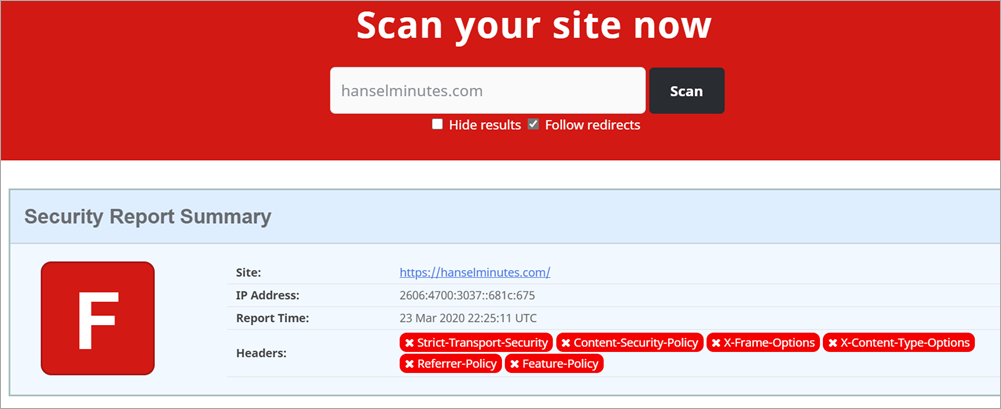
That's my podcast website with an F rating from SecurityHeaders.com. What's the deal? I took care of this months ago!
Turns out, recently I moved from Windows to Linux on Azure.
If I am using IIS on Windows, I can (and did) make a section in my web.config that looks something like this.
Do note that I've added a few custom things and you'll want to make sure you DON'T just copy paste this. Make yours, yours.
Note that I've whitelisted a bunch of domains to make sure my site works. Also note that I have a number of "unsafe-inlines" that are not idea.
<configuration>


  <system.webServer>


    <httpProtocol>


      <customHeaders>


        <add name="Strict-Transport-Security" value="max-age=31536000"/>


        <add name="X-Content-Type-Options" value="nosniff"/>


        <add name="X-Xss-Protection" value="1; mode=block"/>


        <add name="X-Frame-Options" value="SAMEORIGIN"/>


        <add name="Content-Security-Policy" value="default-src https:; img-src * 'self' data: https:; style-src 'self' 'unsafe-inline' www.google.com platform.twitter.com cdn.syndication.twimg.com fonts.googleapis.com; script-src 'self' 'unsafe-inline' 'unsafe-eval' www.google.com cse.google.com cdn.syndication.twimg.com platform.twitter.com platform.instagram.com www.instagram.com cdn1.developermedia.com cdn2.developermedia.com apis.google.com www.googletagservices.com adservice.google.com securepubads.g.doubleclick.net ajax.aspnetcdn.com ssl.google-analytics.com az416426.vo.msecnd.net/;"/>


        <add name="Referrer-Policy" value="no-referrer-when-downgrade"/>


        <add name="Feature-Policy" value="geolocation 'none';midi 'none';notifications 'none';push 'none';sync-xhr 'none';microphone 'none';camera 'none';magnetometer 'none';gyroscope 'none';speaker 'self';vibrate 'none';fullscreen 'self';payment 'none';"/>


        <remove name="X-Powered-By" />


        <remove name="X-AspNet-Version" />


        <remove name="Server" />


      </customHeaders>


    </httpProtocol>


...
But, if I'm NOT using IIS - meaning I'm running my ASP.NET app in a container or on Linux - this will be ignored. Since I recently moved to Linux, I assumed (my bad for no tests here) that it would just work.
My site is hosted on Azure App Service for Linux, so I want these headers to be output the same way. There are several great choices in the form of Open Source NuGet libraries to help. If I use the ASP.NET Core middleware pipeline then these headers will be output and work the SAME on both Windows AND Linux.
I'll be using the NWebsec Security Libraries for ASP.NET Core. They offer a simple fluent way to add the headers I want.
TO BE CLEAR: Yes I, or you, can add these headers manually with AddHeader but these simple libraries ensure that our commas and semicolons are correct. They also offer a strongly typed middleware that is fast and easy to use.
Taking the same web.config above and translating it to Startup.cs's Configure Pipeline with NWebSec looks like this:
app.UseHsts(options => options.MaxAge(days: 30));


app.UseXContentTypeOptions();


app.UseXXssProtection(options => options.EnabledWithBlockMode());


app.UseXfo(options => options.SameOrigin());


app.UseReferrerPolicy(opts => opts.NoReferrerWhenDowngrade());


app.UseCsp(options => options


    .DefaultSources(s => s.Self()


        .CustomSources("data:")


        .CustomSources("https:"))


    .StyleSources(s => s.Self()


        .CustomSources("www.google.com","platform.twitter.com","cdn.syndication.twimg.com","fonts.googleapis.com")


        .UnsafeInline()


    )


    .ScriptSources(s => s.Self()


           .CustomSources("www.google.com","cse.google.com","cdn.syndication.twimg.com","platform.twitter.com" ... )


        .UnsafeInline()


        .UnsafeEval()


    )


);
There is one experimental HTTP header that NWebSec doesn't support (yet) called Feature-Policy. It's a way that your website can declare at the server-side "my site doesn't allow use of the webcam." That would prevent a bad guy from injecting local script that uses the webcam, or some other client-side feature.
I'll do it manually both to make the point that I can, but also that you aren't limited by your security library of choice.
NOTE: Another great security library is Andrew Lock's NetEscapades that includes Feature-Policy as well as some other great features.
Here's my single Middleware that just adds the Feature-Policy header to all responses.
//Feature-Policy


app.Use(async (context, next) =>


{


    context.Response.Headers.Add("Feature-Policy", "geolocation 'none';midi 'none';notifications 'none';push 'none';sync-xhr 'none';microphone 'none';camera 'none';magnetometer 'none';gyroscope 'none';speaker 'self';vibrate 'none';fullscreen 'self';payment 'none';");


    await next.Invoke();


});
Now I'll commit, build, and deploy (all automatic for me using Azure DevOps) and scan the site again:
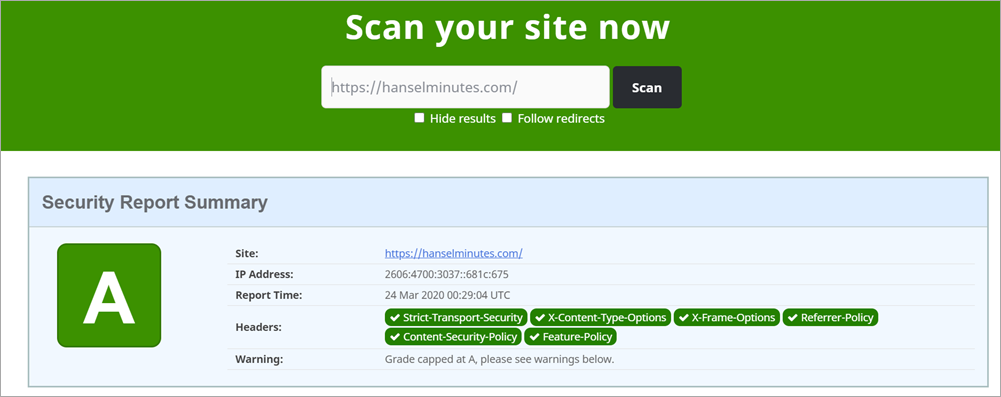
That was pretty straightforward and took less than an hour. Your mileage may vary but that's the general idea!
Sponsor: Protect your apps from reverse engineering and tampering with PreEmptive, makers of Dotfuscator. Dotfuscator has been in-the-box with Microsoft Visual Studio since 2003. Mention HANSELMAN for savings on a professional license!
© 2020 Scott Hanselman. All rights reserved.


