Posted by is a popular machine learning technique, in which you train a new model by reusing information learned by a previous model. Most common applications of transfer learning are for the vision domain, to train accurate image classifiers, or object detectors, using a small amount of data -- or for text, where pre-trained text embeddings or language models like BERT are used to improve on natural language understanding tasks like sentiment analysis or question answering. In this article, you'll learn how to use transfer learning for a new and important type of data: audio, to build a sound classifier.
There are many important use cases of audio classification, including and even , you can create a customized audio classifier in a few easy steps:
- Prepare and use a public audio dataset
- Extract the embeddings from the audio files using YAMNet
- Create a simple two layer classifier and train it.
- Save and test the final model
You can follow the code ("Yet another Audio Mobilenet Network") is a pretrained model that predicts 521 audio events based on the including the TFLite and TF.js versions, for running the model on mobile and the web. The code can be found on their
As an example, trying the model with this audio file [
The ESC-50 dataset
To do transfer learning with the model, you'll use the .
The ESC-50 has the classes Dog and Cat that you'll need.
The dataset has two important components: the audio files and a metadata csv file with the metadata about every audio file.
The columns in the metadata csv file contains information that will be used to train the model:
- Filename gives the name of the .wav audio file
- Category is the human-readable class name for the numeric target id
- Target is the unique numeric id of the category
- Fold ensures that clips originating from the same initial source are always contained in the same group. This is important to avoid cross-contamination when splitting the data into train, validation and test sets and for cross-validation.
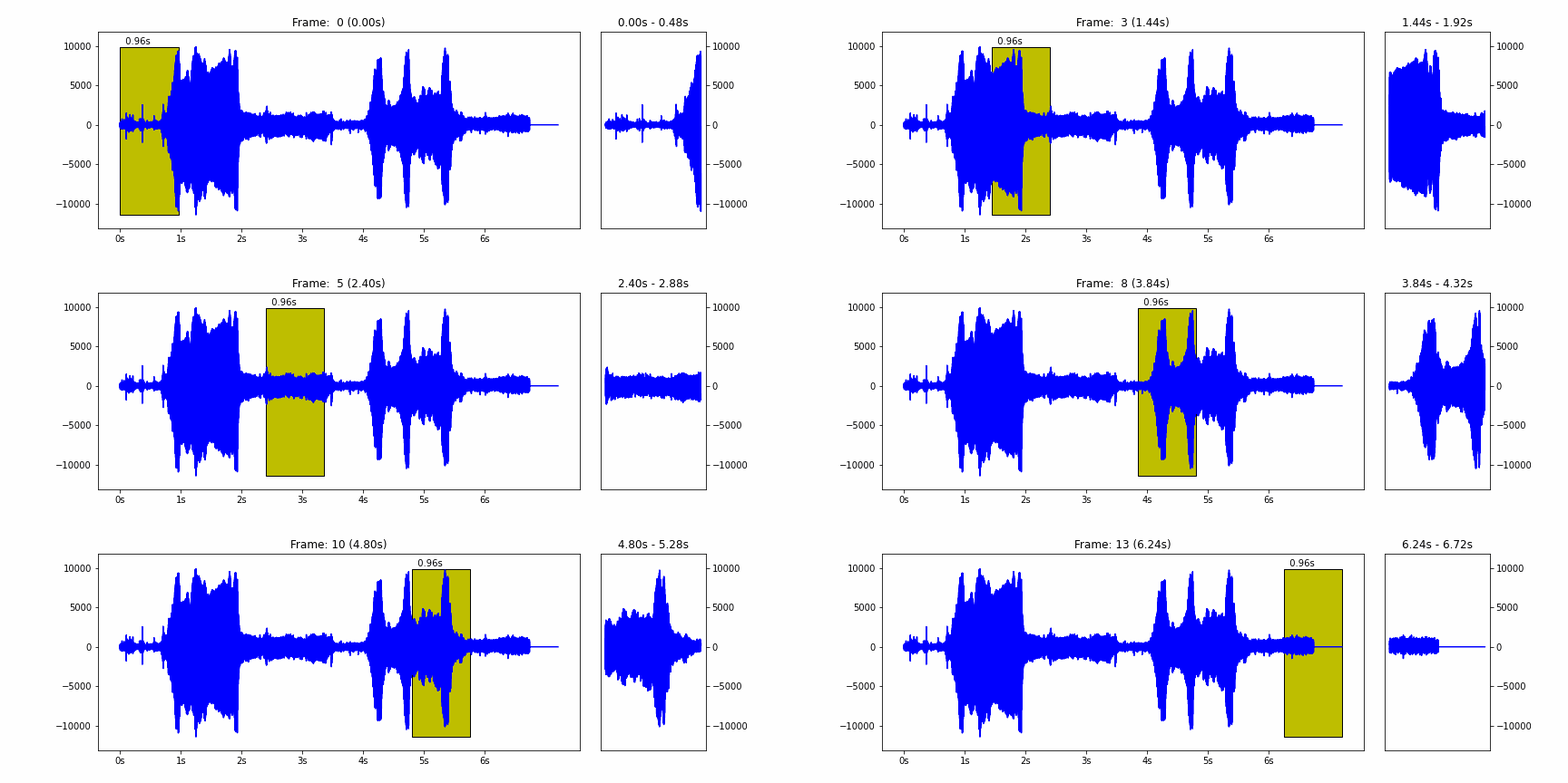
For more detailed information you can read the , you can read that for a given audio file, it will frame the waveform into sliding windows of length 0.96 seconds and hop 0.48 seconds, and then run the core of the model. So, in summary, for each 0.48 seconds, the model will output one embedding array with 1024 float values. This part is also done using map(), so again, lazy evaluation and that's why it executes so fast.
The final dataset contains the three used columns: embedding, label and fold.
The last dataset operation is to split into train, validation and test datasets. To do so the filter() method and use the fold field (an integer between 1 and 5) as criteria.
cached_ds = main_ds.cache()
train_ds = cached_ds.filter(lambda embedding, label, fold: fold < 4)
val_ds = cached_ds.filter(lambda embedding, label, fold: fold == 4)
test_ds = cached_ds.filter(lambda embedding, label, fold: fold == 5)
Training the Classifier
With the YAMNet embedding vectors and the label, the next step is to train a classifier that learns what's a dog's sound and what is a cat's sound.
The classifier model is very simple with just two dense layers, but as you'll see this is enough for the amount of data used.
my_model = tf.keras.Sequential([
    tf.keras.layers.Input(shape=(1024), dtype=tf.float32, name='input_embedding'),
    tf.keras.layers.Dense(512, activation='relu'),
    tf.keras.layers.Dense(len(my_classes))
])
Saving the final model
The model that was trained works and has good accuracy but the input it expects is not an audio waveform but an embedding array. To address this problem, the final model will combine YAMNet as the input layer and the model just trained. This way, the final model will accept a waveform and output the class:
input_segment = tf.keras.layers.Input(shape=(), dtype=tf.float32,
                                       name='audio')
embedding_extraction_layer = hub.KerasLayer('https://tfhub.dev/google/yamnet/1', trainable=False)
scores, embeddings, spectrogram = embedding_extraction_layer(input_segment)
serving_outputs = my_model(embeddings_output)
serving_outputs = ReduceMeanLayer(axis=0, name='classifier')(serving_outputs)
serving_model = tf.keras.Model(input_segment, serving_outputs)
serving_model.save(saved_model_path, include_optimizer=False)
To try the reloaded model, you can use the same way it was used earlier in the colab:
reloaded_model = tf.saved_model.load(saved_model_path)
reloaded_results = reloaded_model(testing_wav_data)
cat_or_dog = my_classes[tf.argmax(reloaded_results)]
This model can also be used with and the tutorial on and Elizabeth Kemp have greatly improved the presentation of the material in this post and the associated tutorial.

SOCIAL SHARE CARD GENERATOR