



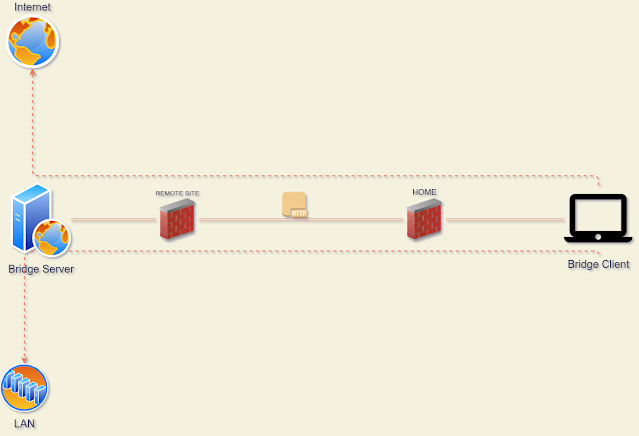
I've wrote this program as a proof of concept to test the idea of be able to send tcp stream packets over simple http request like PUT, PATCH, POST, GET, without use a proxy way like CONNECT method. Also as a practice exercise to train my novice skill on rust language.
These tool is compouned of two parts, the server and a client.
Server
The server is just a php file with some logic to keep a stateful connections using tcp sockets, and handle the incomming http requests; by now this logic only works over linux servers.
I've test it with apache+mod_php, nginx+php-fpm and the built-in php server (php -S)
Client
The client is a Socks5 server that listen for incomming client connections and packets the bytestrings and sent the http request to the server, once it get the response write back to the client.
This client is written in rust, I've borrowed the Socks5 implementation from this project v2socks so thanks to ylxdzsw
Examples
Proxychains is required to run this example.
Upload the server file hbserver/hbserver.php to a running web server with php support, or run a local one as follow, this will spawn a docker container listening in the 8080 port.
docker run --rm -it --net host --name apache-webserver -v "$PWD/hbserver:/app -v "$PWD/tools/ports.conf:/etc/apache2/ports.conf" webdevops/php-apache:7.3
To client need to be compiled, so you need to have a rust compiler installed or get one from here rustup
cd client &&\
cargo build &&\
./target/debug/hbsc
configure proxychains to point to local socks5 port:
echo "socks5 127.0.0.1 1986" >> $HOME/.proxychains/proxychains.conf
With all in place some tests:
Plain http
icanhazip.com
alejandro@0x2e ~ $ proxychains curl -v icanhazip.com
[proxychains] config file found: /home/alejandro/.proxychains/proxychains.conf
[proxychains] preloading /usr/lib64/libproxychains.so.4.14
*   Trying 224.0.0.1:80...
* Connected to icanhazip.com (127.0.0.1) port 80 (#0)
> GET / HTTP/1.1
> Host: icanhazip.com
> User-Agent: curl/7.72.0
> Accept: */*
>
* Mark bundle as not supporting multiuse
< HTTP/1.1 200 OK
< Date: Thu, 25 Feb 2021 18:08:04 GMT
< Content-Type: text/plain
< Content-Length: 15
< Connection: close
< Set-Cookie: __cfduid=dd994605ef1b77d0aa6dc46b6fdbb4c8d1614276484; expires=Sat, 27-Mar-21 18:08:04 GMT; path=/; domain=.icanhazip.com; HttpOnly; SameSite=Lax
< Access-Control-Allow-Origin: *
< Access-Control-Allow-Methods: GET
< X-RTFM: Learn about this site at http://bit.ly/icanhazip-faq
< X-THANK-YOU: Many thanks to the fine people at Clo   udflare for keeping this site afloat!
< cf-request-id: 087bf977730000e790d13c4000000001
< Server: cloudflare
< CF-RAY: 62735e9f1ec9e790-MDE
< alt-svc: h3-27=":443"; ma=86400, h3-28=":443"; ma=86400, h3-29=":443"; ma=86400
<
XXX.33.235.XXX
* Closing connection 0
TLSV3
http://httpbin.org/headers
alejandro@0x2e ~ $ proxychains curl -v http://httpbin.org/headers
[proxychains] config file found: /home/alejandro/.proxychains/proxychains.conf
[proxychains] preloading /usr/lib64/libproxychains.so.4.14
*   Trying 224.0.0.1:80...
* Connected to httpbin.org (127.0.0.1) port 80 (#0)
> GET /headers HTTP/1.1
> Host: httpbin.org
> User-Agent: curl/7.72.0
> Accept: */*
>
* Mark bundle as not supporting multiuse
< HTTP/1.1 200 OK
< Date: Thu, 25 Feb 2021 18:05:51 GMT
< Content-Type: application/json
< Content-Length: 173
< Connection: keep-alive
< Server: gunicorn/19.9.0
< Access-Control-Allow-Origin: *
< Access-Control-Allow-Credentials: true
<
{
  "headers": {
    "Accept": "*/*",
    "Host": "httpbin.org",
    "User-Agent": "curl/7.72.0",
    "X-Amzn-Trace-Id": "Root=1-6037e6ff-06059b933c2d8c495ecee43a"
  }
}
* Connecti   on #0 to host httpbin.org left intact
HTTP2
https://mozilla.org
alejandro@0x2e ~ $ proxychains curl -v https://mozilla.org
[proxychains] config file found: /home/alejandro/.proxychains/proxychains.conf
[proxychains] preloading /usr/lib64/libproxychains.so.4.14
*   Trying 224.0.0.1:443...
* Connected to mozilla.org (127.0.0.1) port 443 (#0)
* ALPN, offering h2
* ALPN, offering http/1.1
* successfully set certificate verify locations:
*   CAfile: /etc/ssl/certs/ca-certificates.crt
  CApath: /etc/ssl/certs
* TLSv1.3 (OUT), TLS handshake, Client hello (1):
* TLSv1.3 (IN), TLS handshake, Server hello (2):
* TLSv1.3 (IN), TLS handshake, Encrypted Extensions (8):
* TLSv1.3 (IN), TLS handshake, Certificate (11):
* TLSv1.3 (IN), TLS handshake, CERT verify (15):
* TLSv1.3 (IN), TLS handshake, Finished (20):
* TLSv1.3 (OUT), TLS change cipher, Change cipher spec (1):
* TLSv1.3 (OUT), TLS handshake, Finished (20):
* SSL connection using TLSv1.3 / TLS_AES_256_GCM_SHA384
* A   LPN, server accepted to use h2
* Server certificate:
*  subject: CN=mozilla.org
*  start date: Jan  1 19:11:54 2021 GMT
*  expire date: Apr  1 19:11:54 2021 GMT
*  subjectAltName: host "mozilla.org" matched cert's "mozilla.org"
*  issuer: C=US; O=Let's Encrypt; CN=R3
*  SSL certificate verify ok.
* Using HTTP2, server supports multi-use
* Connection state changed (HTTP/2 confirmed)
* Copying HTTP/2 data in stream buffer to connection buffer after upgrade: len=0
* Using Stream ID: 1 (easy handle 0x562758dbab60)
> GET / HTTP/2
> Host: mozilla.org
> user-agent: curl/7.72.0
> accept: */*
>
* TLSv1.3 (IN), TLS handshake, Newsession Ticket (4):
* TLSv1.3 (IN), TLS handshake, Newsession Ticket (4):
* old SSL session ID is stale, removing
* Connection state changed (MAX_CONCURRENT_STREAMS == 128)!
< HTTP/2 301
< date: Thu, 25 Feb 2021 18:03:56 GMT
< content-type: text/html< content-length: 162
< location: https://www.mozilla.org/
< strict-transport-security: max-age=60; includeSubDomains
< x-backend-server: TS
< cache-control: max-age=3600
< x-frame-options: SAMEORIGIN
< content-security-policy: frame-ancestors 'none'
<
<html>
<head><title>301 Moved Permanently</title></head>
<body>
<center><h1>301 Moved Permanently</h1></center>
<hr><center>nginx</center>
</body>
</html>
* Connection #0 to host mozilla.org left intact
SMTP
smtp.gmail.com
alejandro@0x2e ~ $ proxychains nc -v smtp.gmail.com 25
[proxychains] config file found: /home/alejandro/.proxychains/proxychains.conf
[proxychains] preloading /usr/lib64/libproxychains.so.4.14
Connection to smtp.gmail.com 25 port [tcp/smtp] succeeded!
220 smtp.gmail.com ESMTP z1sm4022921qtu.83 - gsmtp
EHLO smtp.gmail.com
250-smtp.gmail.com at your service, [XXX.33.235.XXX]
250-SIZE 35882577
250-8BITMIME
250-STARTTLS
250-ENHANCEDSTATUSCODES
250-PIPELINING
250-CHUNKING
250 SMTPUTF8
^C
SSH
alejandro@0x2e ~ $ proxychains ssh  localhost 'ps axl --sort=-pcpu|tail -n 5'
[proxychains] config file found: /home/alejandro/.proxychains/proxychains.conf
[proxychains] preloading /usr/lib64/libproxychains.so.4.14
Password:
4     0  65375   1242  20   0   9516  6988 -      Ss   ?          0:00 sshd: alejandro [priv]
5  1000  65420  65375  20   0   9516  4320 -      S    ?          0:00 sshd: alejandro@notty
0  1000  65421  65420  20   0 218168  3260 -      Ss   ?          0:00 bash -c ps axl --sort=-pcpu|tail -n 5
4  1000  65422  65421  20   0 220568  3484 -      R    ?          0:00 ps axl --sort=-pcpu
0  1000  65423  65421  20   0 216756   748 -      S    ?          0:00 tail -n 5
alejandro@0x2e ~ $
SOCIAL SHARE CARD GENERATOR