



Parallels Desktop implements a hypercall interface using an RDPMC instruction (“Read Performance-Monitoring Counter”) for communication between guest and host. More interestingly, this interface is accessible even to an unprivileged guest user. Though the HYPER-CUBE: High-Dimensional Hypervisor Fuzzing [PDF] paper by Ruhr-University Bochum has a brief mention of this interface, we have not seen many details made public. This blog post gives a brief description of the interface and discusses a couple of vulnerabilities (CVE-2021-31424/ZDI-21-434 and CVE-2021-31427/ZDI-21-435) I found in UEFI variable services.
Parallels Desktop has support for two Virtual Machine Monitors (VMM): Apple’s built-in hypervisor and the Parallels proprietary hypervisor. Prior to macOS Big Sur, the Parallels proprietary hypervisor is used by default. With this hypervisor there is a considerable amount of guest-to-host kernel attack surface, making it an interesting target. The details in this blog correspond to Parallels Desktop 15.1.5 running on a macOS Catalina 10.15.7 host.
Dumping the VMM
The proprietary VMM is a Mach-O executable that is compressed and embedded within the user space worker process prl_vm_app. The worker process injects the VMM blob into the kernel using an IOCTL_LOAD_MONITOR request to the prl_hypervisor kernel extension. The address of the zlib-compressed VMM and its sizes are maintained in a global structure, which can be used to dump the blobs for analysis. The VMM Mach-O binary has function names, making it easier to locate the hypercall handler for RDPMC.
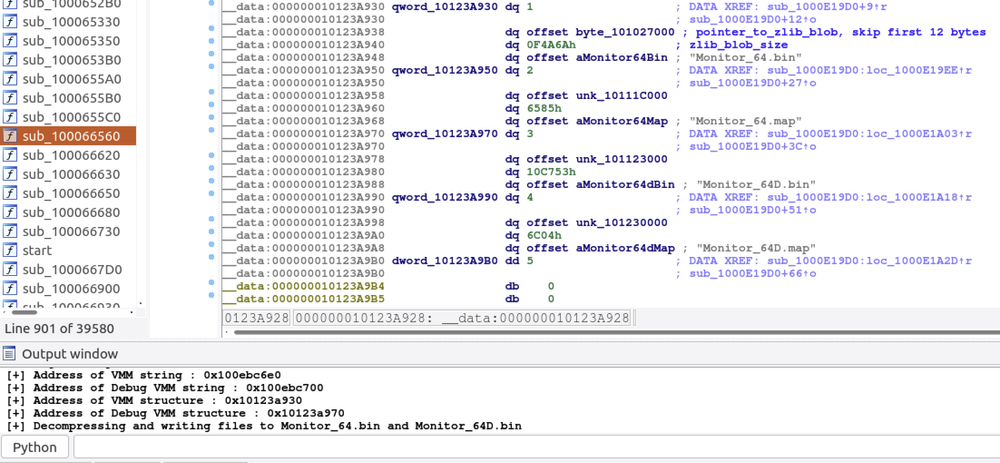
Figure 1 - Compressed VMM Mach-O executable
When the guest executes an RDPMC instruction, the VMM calls Em_RDPMC_func()->HandleOpenToolsGateRequest() to process the request. The arguments to the hypercall are expected through the general-purpose registers RAX, RBX, RCX, RDX, RDI and RSI. The status of the request is returned through register RAX. The VMM also has an alternate code path PortToolsGateOutPortFunc()->HandleOpenToolsGateRequest(), reachable by writing to I/O port 0xE4.
HandleOpenToolsGateRequest() dispatches the request based on the value of register RAX and sub-commands in other registers. The code path of interest for this writeup is Em_RDPMC_func()->HandleOpenToolsGateRequest()->OTGHandleGenericCommand(), which can be reached by setting RAX = 0x7B6AF8E and RBX = 7. OTGHandleGenericCommand() further supports multiple guest operations based on the value set in register RDX. The debug messages quickly reveal that RDX = 9 handles UEFI service requests for reading and writing UEFI variables.
The UEFI runtime variable services in Parallels Desktop include three components: UEFI firmware, a hypercall interface in the VMM, and an API through which the VMM makes requests to the host user space prl_vm_app worker process. The VMM and the worker process communicate using shared memory.
Analyzing the Firmware
The UEFI firmware that ships with Parallels Desktop (efi64d.bin and efi64.bin) is based on EDK2. Just like the VMM Mach-O binary, it is a zlib-compressed binary starting with 12 bytes of magic header. To analyze the firmware, decompress the file skipping the first 12 bytes and load it using the efiXplorer IDA Pro plugin. This may take a while, but it does work well. Once the analysis is over, search the firmware for the hypercall number for invoking OTGHandleGenericCommand (0x7B6AF8E).
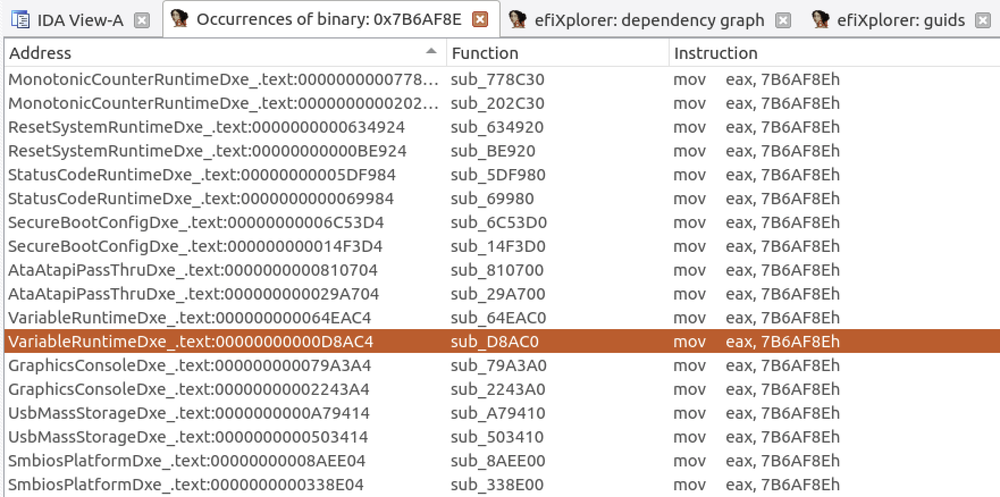
Figure 2 - Search for OTGHandleGenericCommand
The search returned multiple results, but the most interesting ones for the UEFI runtime variable services hypercall are part of VariableRuntime.Dxe. Note that the firmware relies on I/O port 0xE4 for the hypercall instead of RDPMC, as illustrated below.
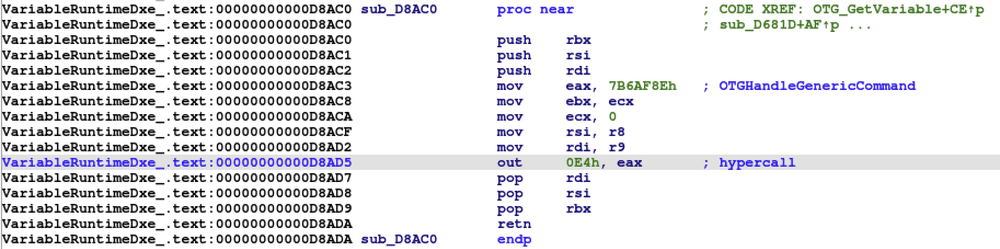
Figure 3 - UEFI firmware invoking hypercall
By cross-referencing the hypercall, the UEFI variable driver entry points can be located in the firmware. Then, by comparing the decompiled code with VariableServiceInitialize() in EDK2, the handlers for UEFI runtime variable services can be easily identified. This can be done using the efiXplorer IDA plugin, which imports all the type information.
Consider the callback for GetVariable(). The firmware sets up a 48 byte request structure with an operation type (0x10) and other required fields. OTG_Hypercall() loads the address of the request structure in register RSI and triggers the hypercall as seen in Figure 3. Similarly, each variable service has an operation type associated with it. By analyzing the callbacks for SetVariable(), GetNextVariableName(), and QueryVariableInfo(), the operation type to service mapping as well as the structure of the VMM service request can be recovered.
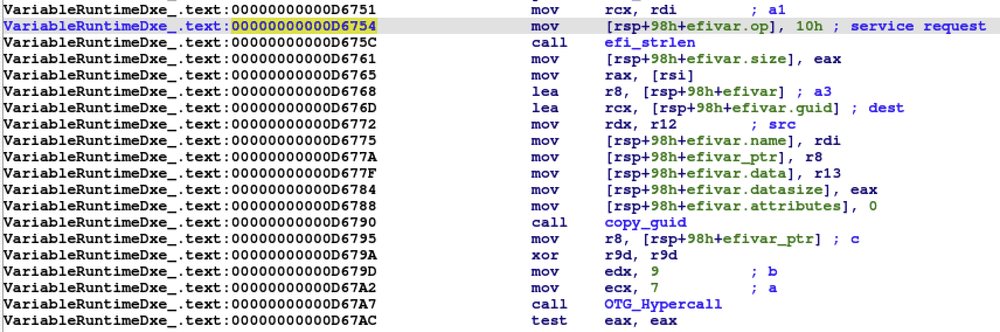
Figure 4 - UEFI GetVariable() service
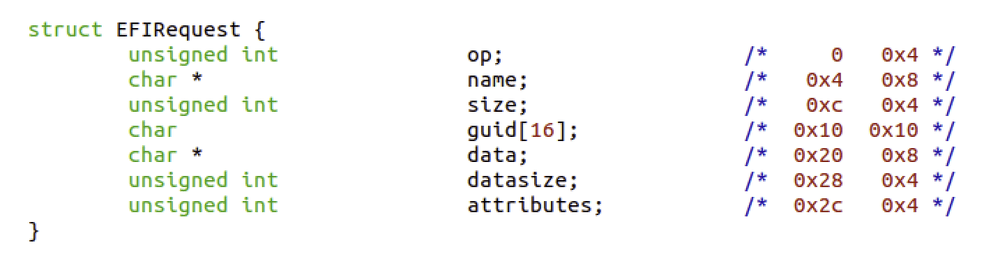
Figure 5 - VMM request structure
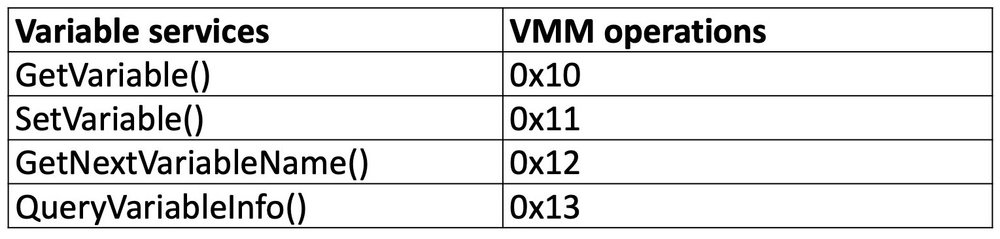
Table 1 - Mapping Variable services to VMM operations
Hypercall Vulnerabilities
We will be examining some vulnerabilities in OTGHandleGenericCommand. A simplified view of the decompiled code is shown below. Note that the Parallels VMM uses functions ReadLinear() and WriteLinear() for reading from and writing to guest memory respectively. MonRetToHostSwitch() transfers control from the VMM to the user space worker process (still on the host) to handle a specific API request, and the parameter value of 0xD7 corresponds to API_EFI_VAR_REQUEST.
CVE-2021-31424/ZDI-CAN-12848 – Heap Overflow
The first bug is a heap overflow. The size of the UEFI variable name provided by the guest is not validated. Therefore, the copy operation using ReadLinear() overflows the host kernel heap by a guest provided value * 2 (UTF-16).
CVE-2021-31427/ZDI-CAN-13082 - Time-Of-Check Time-Of-Use Information Disclosure
The second interesting observation I made during my analysis was that the data size in the UEFI service request is written to shared memory before validation. After writing, the VMM validates the data size, but only when handling SetVariable(). For read requests, such as GetVariable(), GetNextVariableName(), or QueryVariableInfo(), the validation is delegated to user mode process using the MonRetToHostSwitch(API_EFI_VAR_REQUEST) call.
After MonRetToHostSwitch(API_EFI_VAR_REQUEST) returns, the VMM checks the status set by the user space. If the status is 0, WriteLinear() fetches data size from the shared memory again for writing back to the guest. This is where things get interesting. There is a race window between the call to user space MonRetToHostSwitch() and WriteLinear() in the VMM. If the data size can be updated to some untrusted value, with status set to 0, it is possible to trigger an out-of-bounds read during WriteLinear(). To trigger the race, it is necessary to understand how the status is updated in the shared memory by the worker process. In prl_vm_app, the handler for API_EFI_VAR_REQUEST is at the address 0x1000DEDF0:
EFIVar.datasize is updated or validated in the user space and status is set to 0 only when a request is successful. Otherwise EFIVar.datasize is set to 0 and status is set to a non-zero error code. The simplest request type turned out to be QueryVariableInfo(), which returns the maximum storage size, remaining storage size, and maximum size of a single UEFI variable. It also sets the status to 0 when the expected data size equals 24. As there are no state changing operations, QueryVariableInfo() is ideal for triggering the bug. Consider the following scenario:
Thread A – Keep sending SetVariable() request with arbitrary data size value > 0x1000 bytes that updates SharedMem->EFIVar.datasize but always returns without entering the worker process due to the validation request.datasize > 0x1000.
Thread B – Keep sending QueryVariableInfo() requests, which sets status to 0. If thread A updates the SharedMem->EFIVar.datasize after the status is set by QueryVariableInfo() in the user space but before the VMM copies data using WriteLinear(), an out-of-bounds read can be triggered. Below is a debug log of the VMM page fault when the OOB read hits an unmapped kernel address.
Conclusion
What made these bugs particularly interesting is that they are reachable through a lesser-known interface. Also, they can be triggered by an unprivileged guest user to execute code in the host kernel. That said, since the introduction of macOS Big Sur, the Parallels proprietary hypervisor is not used by default. Parallels patched both these RDPMC hypercall bugs in the recently released 16.5.0 along with many other issues reported through the ZDI program.
You can find me on Twitter @RenoRobertr, and follow the team for the latest in exploit techniques and security patches.
SOCIAL SHARE CARD GENERATOR