



Posted by Dave Burke, VP of Engineering

Last month, we released the first developer preview of Android 13, built around our core themes of privacy and security, developer productivity, as well as tablets and large screen support. Today we’re sharing Android 13 Developer Preview 2 with more new features and changes for you to try in your apps. Your input helps us make Android a better platform for developers and users, so let us know what you think!
Today’s release also comes on the heels of the 12L feature drop moving to the Android Open Source Project (AOSP) last week, helping you better take advantage of the over 250+ million large screen Android devices. And to dive into Android 13, tablets, as well as our developer productivity investments in Jetpack Compose, check out the latest episode of #TheAndroidShow.
12L feature drop, now in AOSP
Before jumping into Developer Preview 2, let’s take a look at the other news from last week: we’ve officially released the 12L feature drop to AOSP and it’s rolling out to all supported Pixel devices over the next few weeks. 12L makes Android 12 even better on tablets, and includes updates like a new taskbar that lets users instantly drag and drop apps into split-screen mode, new large-screen layouts in the notification shade and lockscreen, and improved compatibility modes for apps. You can read more here.
Starting later this year, 12L will be available in planned updates on tablets and foldables from Samsung, Lenovo, and Microsoft, so now is the time to make sure your apps are ready. We highly recommend testing your apps in split-screen mode with windows of various sizes, trying it in different orientations, and checking the new compatibility mode changes if they apply. You can read more about 12L for developers here.
And the best part: the large screen features in 12L are foundational in Android 13, so you can develop and test on Android 13 knowing that you’re also covering your bases for tablets running Android 12L. We see large screens as a key surface for the future of Android, and we’re continuing to invest to give you the tools you need to build great experiences for tablets, Chromebooks, and foldables. You can learn more about how to get started optimizing for large screens, and make sure to check out our large screens developer resources.
Let’s dive into what’s new in today’s Developer Preview 2 of Android 13.
Privacy and user trust
People want an OS and apps that they can trust with their most personal and sensitive information and the resources on their devices. Privacy and user trust are core to Android’s product principles, and in Android 13 we’re continuing to focus on building a responsible and high quality platform for all by providing a safer environment on the device and more controls to the user. Here’s what’s new in Developer Preview 2.
Notification permission - To help users focus on the notifications that are most important to them, Android 13 introduces a new runtime permission for sending notifications from an app: POST_NOTIFICATIONS. Apps targeting Android 13 will now need to request the notification permission from the user before posting notifications. For apps targeting Android 12 or lower, the system will handle the upgrade flow on your behalf. The flow will continue to be fine tuned. To provide more context and control for your users, we encourage you to target Android 13 as early as possible and request the notification permission in your app. More here.
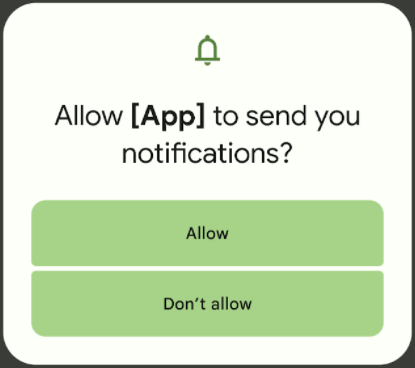
Notification permission dialog in Android 13.
Developer downgradable permissions - Some apps may no longer require certain permissions which were previously granted by the user to enable a specific feature, or retain a sensitive permission from an older Android version. In Android 13, we’re providing a new API to let your app protect user privacy by downgrading previously granted runtime permissions.
Safer exporting of context-registered receivers - In Android 12 we required developers to declare the exportability of manifest-declared Intent receivers. In Android 13 we’re asking you to do the same for context-registered receivers as well, by adding either the RECEIVER_EXPORTED or RECEIVER_NOT_EXPORTED flag when registering receivers for non-system sources. This will help ensure that receivers aren’t available for other applications to send broadcasts to unless desired. While not required in Android 13, we recommend declaring exportability as a step toward securing your app.
Developer productivity
In Android 13 we’re working to give you more tools to help you deliver a polished experience and better performance for users. Here are some of the updates in today’s release.
Improved Japanese text wrapping - TextViews can now wrap text by Bunsetsu (the smallest unit of words that sounds natural) or phrases -- instead of by character -- for more polished and readable Japanese applications. You can take advantage of this wrapping by using android:lineBreakWordStyle="phrase" with TextViews.
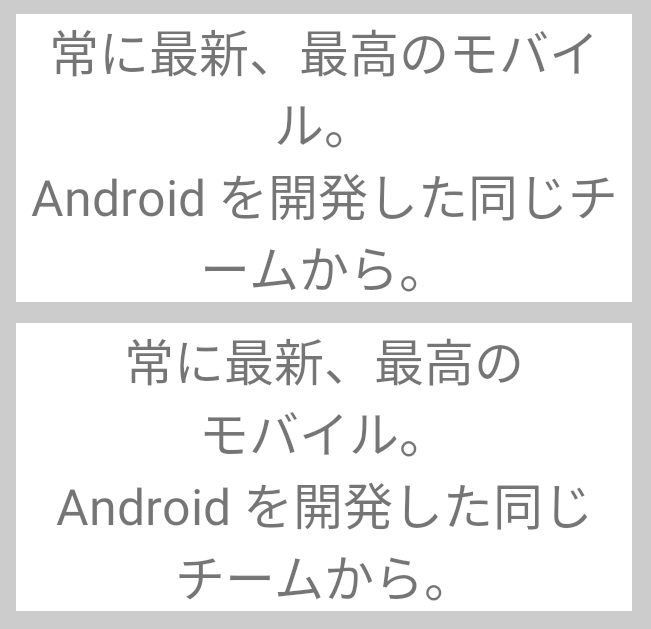
Japanese text wrapping with phrase style
enabled (bottom) and without (top).
Improved line heights for non-latin scripts - Android 13 improves the display of non-Latin scripts (such as Tamil, Burmese, Telugu, and Tibetan) by using a line height that’s adapted for each language. The new line heights prevent clipping and improve the positioning of characters. Your app can take advantage of these improvements just by targeting Android 13. Make sure to test your apps when using the new line spacing, since changes may affect your UI in non-Latin languages.
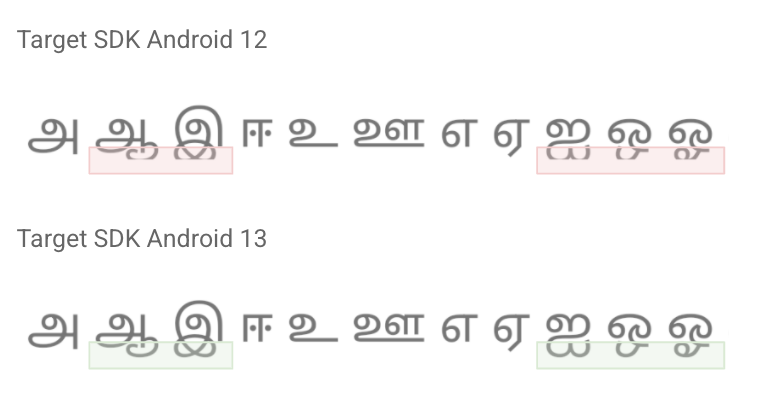
Improved line height for non-Latin scripts in apps targeting Android 13 (bottom).
Text Conversion APIs - People who speak languages like Japanese and Chinese use phonetic lettering input methods, which often slow down searching and features like auto-completion. In Android 13, apps can call the new text conversion API so users can find what they're looking for faster and easier. Previously, for example, searching required a Japanese user to (1) input Hiragana as the phonetic pronunciation of their search term (i.e. a place or an app name), (2) use the keyboard to convert the Hiragana characters to Kanji, (3) re-search using the Kanji characters to (4) get their search results. With the new text conversion API, Japanese users can type in Hiragana and immediately see Kanji search results live, skipping steps 2 and 3.
Color vector fonts - Android 13 adds rendering support for COLR version 1 (spec, intro video) fonts and updates the system emoji to the COLRv1 format. COLRv1 is a new, highly compact, font format that renders quickly and crisply at any size. For most apps this will just work, the system handles everything. You can opt in to COLRv1 for your app starting in Developer Preview 2. If your app implements its own text rendering and uses the system's fonts, we recommend opting in and testing emoji rendering. Learn more about COLRv1 in the Chrome announcement.
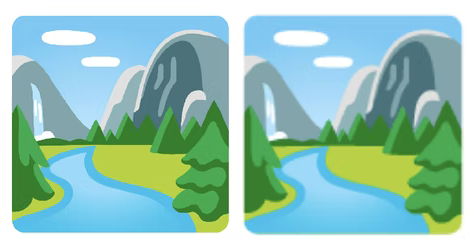
COLRv1 vector emoji (left) and bitmap emoji.
Bluetooth LE Audio - Low Energy (LE) Audio is the next-generation wireless audio built to replace Bluetooth classic and enable new use cases and connection topologies. It will allow users to share and broadcast their audio to friends and family, or subscribe to public broadcasts for information, entertainment, or accessibility. It’s designed to ensure that users can receive high fidelity audio without sacrificing battery life and be able to seamlessly switch between different use cases that were not possible with Bluetooth Classic. Android 13 adds built-in support for LE Audio, so developers should get the new capabilities for free on compatible devices.
MIDI 2.0 - Android 13 adds support for the new MIDI 2.0 standard, including the ability to connect MIDI 2.0 hardware through USB. This updated standard offers features such as increased resolution for controllers, better support for non-Western intonation, and more expressive performance using per-note controllers.
App compatibility
With each platform release, we’re working to make updates faster and smoother by prioritizing app compatibility as we roll out new platform versions. In Android 13 we’ve made app-facing changes opt-in to give you more time, and we’ve updated our tools and processes to help you get ready sooner.
With Developer Preview 2, we’re well into the release and continuing to improve overall stability, so now is the time to try the new features and changes and give us your feedback. We’re especially looking for input on our APIs, as well as details on how the platform changes affect your apps. Please visit the feedback page to share your thoughts with us or report issues.
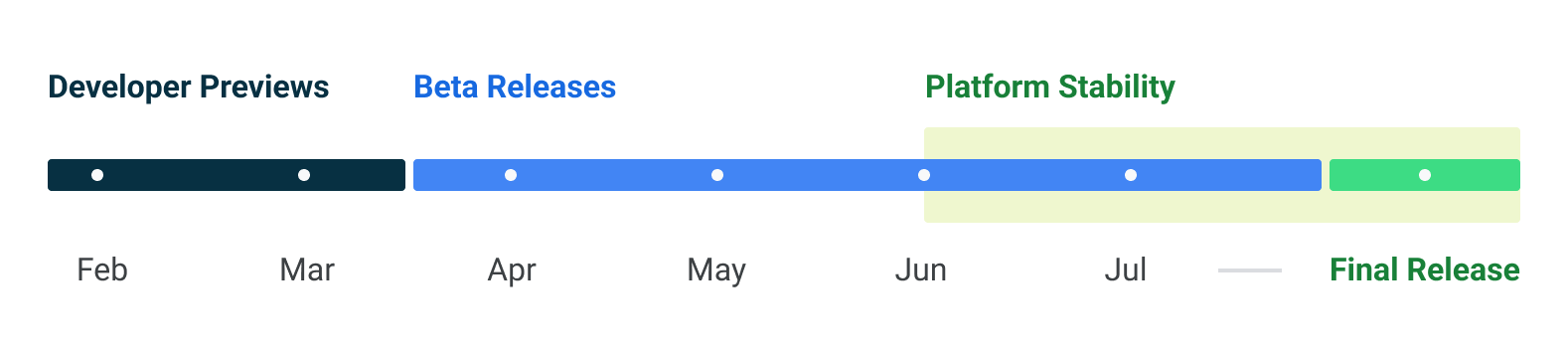
It’s also a good time to start your compatibility testing and identify any work you’ll need to do. We recommend doing the work early, so you can release a compatible update by Android 13 Beta 1. There’s no need to change your app’s targetSdkVersion at this time, but we do recommend using the behavior change toggles in Developer Options to get a preliminary idea of how your app might be affected by opt-in changes in Android 13.
As we reach Platform Stability in June 2022, all of the app-facing system behaviors, SDK/NDK APIs, and non-SDK lists will be finalized. At that point, you can wind up your final compatibility testing and release a fully compatible version of your app, SDK, or library. More on the timeline for developers is here.
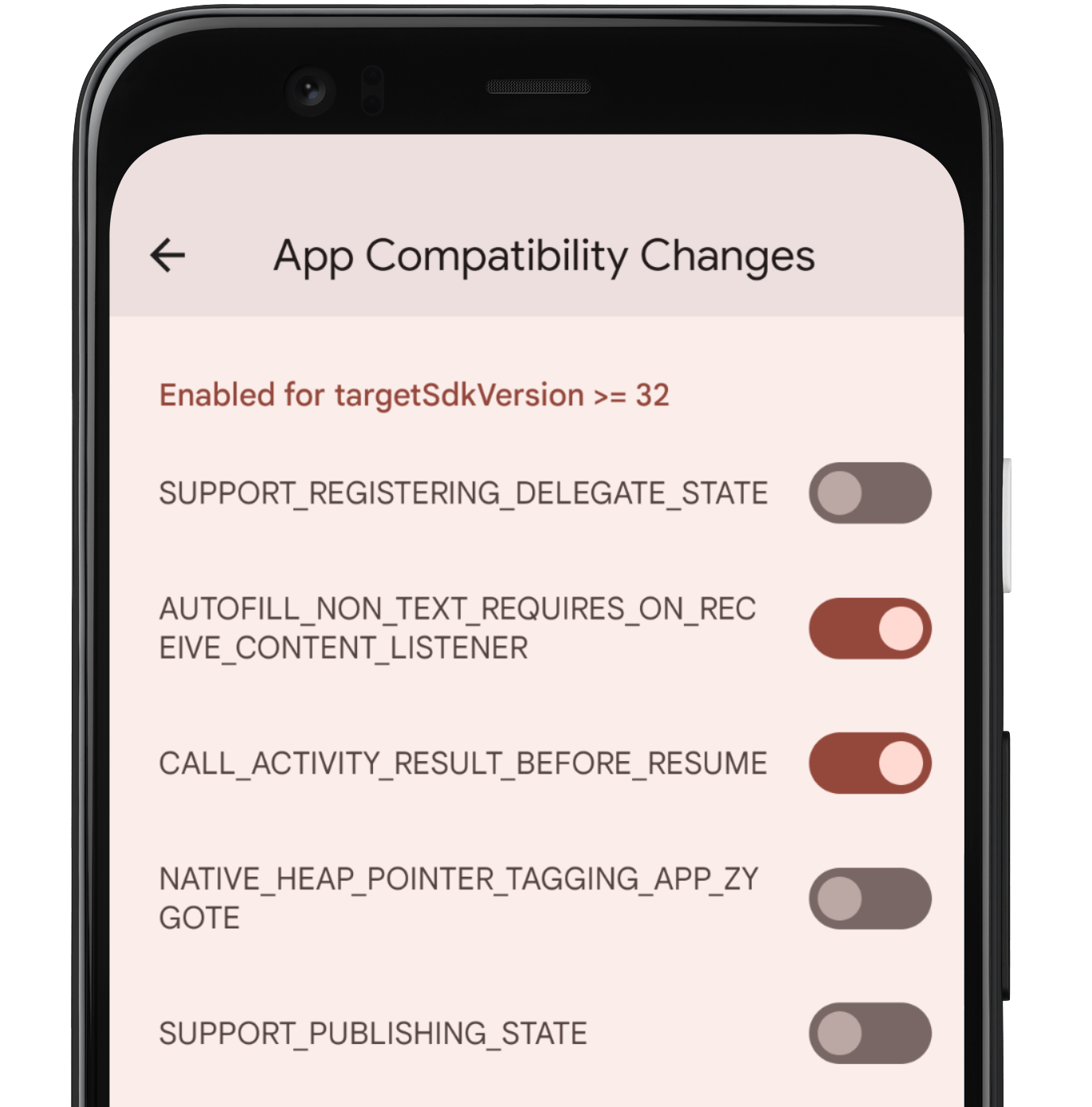
App compatibility toggles in Developer Options.
Get started with Android 13
The Developer Preview has everything you need to try the Android 13 features, test your apps, and give us feedback. You can get started today by flashing a device system image to a Pixel 6 Pro, Pixel 6, Pixel 5a 5G, Pixel 5, Pixel 4a (5G), Pixel 4a, Pixel 4 XL, or Pixel 4 device. If you don’t have a Pixel device, you can use the 64-bit system images with the Android Emulator in Android Studio Dolphin. For even broader testing, GSI images are available. If you’ve already installed a preview build to your Pixel device, you’ll automatically get this update and all later previews and Betas over the air. More details on how to get Android 13 are here.
For complete information, visit the Android 13 developer site.

