
Zum Hauptinhalt springen
tsecurity.de LIVE
Echtzeit-Radar & Feeds
Alle RSS Feeds
👥 Community & Social
Windows Tipps & SecurityNighthawk M7 Pro im Test: Flexibler, aber teurer 5G-Router(21.09.2026 um 10:30 Uhr)
Sichere ProgrammierungNeue Gmail-Funktion: So sparst du jetzt Zeit bei Einmalcodes(21.09.2026 um 10:00 Uhr)
Sichere ProgrammierungYour GIF exporter is fine — the container is the problem(21.09.2026 um 10:01 Uhr)
Sichere ProgrammierungCSS, Motion, or GSAP? I Choose by Who Owns the Animation(21.09.2026 um 10:12 Uhr)
Windows Tipps & SecurityNighthawk M7 Pro im Test: Flexibler, aber teurer 5G-Router(21.09.2026 um 10:30 Uhr)
Sichere ProgrammierungNeue Gmail-Funktion: So sparst du jetzt Zeit bei Einmalcodes(21.09.2026 um 10:00 Uhr)
Sichere ProgrammierungYour GIF exporter is fine — the container is the problem(21.09.2026 um 10:01 Uhr)
Sichere ProgrammierungCSS, Motion, or GSAP? I Choose by Who Owns the Animation(21.09.2026 um 10:12 Uhr)
Intelligence View
⚡ tsecurity.de Intelligence

Mitmproxy2Swagger - Automagically Reverse-Engineer REST APIs Via Capturing Traffic

A tool for automatically converting mitmproxy captures to OpenAPI 3.0 specifications. This means that you can automatically reverse-engineer REST APIs by just running the apps and capturing the traffic. Installation First you will need…

0
↗ Quelle (kitploit.com)
Reagiere als Erste:r — dein Feedback zählt!


A tool for automatically converting mitmproxy captures to OpenAPI 3.0 specifications. This means that you can automatically reverse-engineer REST APIs by just running the apps and capturing the traffic.


Installation

First you will need python3 and pip3.

$ pip install mitmproxy2swagger 
# ... or ...
$ pip3 install mitmproxy2swagger

Then clone the repo and run mitmproxy2swagger as per examples below.

Usage

Mitmproxy

To create a specification by inspecting HTTP traffic you will need to:

  1. Capture the traffic by using the mitmproxy tool. I personally recommend using mitmweb, which is a web interface built-in to mitmproxy.

    $ mitmweb
    Web server listening at http://127.0.0.1:8081/
    Proxy server listening at http://*:9999
    ...

    IMPORTANT

    To configure your client to use the proxy exposed by mitm proxy, please consult the mitmproxy documentation for more information.

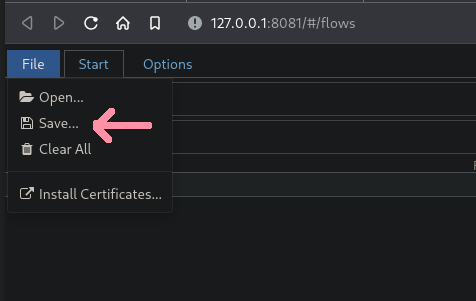
  2. Save the traffic to a flow file.

    In mitmweb you can do this by using the "File" menu and selecting "Save":

  3. Run the first pass of mitmproxy2swagger:

    $ mitmproxy2swagger -i <path_to_mitmptoxy_flow> -o <path_to_output_schema> -p <api_prefix>

    Please note that you can use an existing schema, in which case the existing schema will be extended with the new data. You can also run it a few times with different flow captures, the captured data will be safely merged.

    <api_prefix> is the base url of the API you wish to reverse-engineer. You will need to obtain it by observing the requests being made in mitmproxy.

    For example if an app has made requests like these:

    https://api.example.com/v1/login
    https://api.example.com/v1/users/2
    https://api.example.com/v1/users/2/profile

    The likely prefix is https://api.example.com/v1.

  4. Running the first pass should have created a section in the schema file like this:

    x-path-templates:
    # Remove the ignore: prefix to generate an endpoint with its URL
    # Lines that are closer to the top take precedence, the matching is greedy
    - ignore:/addresses
    - ignore:/basket
    - ignore:/basket/add
    - ignore:/basket/checkouts
    - ignore:/basket/coupons/attach/{id}
    - ignore:/basket/coupons/attach/104754

    You should edit the schema file with a text editor and remove the ignore: prefix from the paths you wish to be generated. You can also adjust the parameters appearing in the paths.

  5. Run the second pass of mitmproxy2swagger:

    $ mitmproxy2swagger -i <path_to_mitmptoxy_flow> -o <path_to_output_schema> -p <api_prefix> [--examples]

    Run the command a second time (with the same schema file). It will pick up the edited lines and generate endpoint descriptions.

    Please note that mitmproxy2swagger will not overwrite existing endpoint descriptions, if you want to overwrite them, you can delete them before running the second pass.

    Passing --examples will add example data to requests and responses. Take caution when using this option, as it may add sensitive data (tokens, passwords, personal information etc.) to the schema.

HAR

  1. Capture and export the traffic from the browser DevTools.

    In the browser DevTools, go to the Network tab and click the "Export HAR" button.

  2. Continue the same way you would do with the mitmproxy dump. mitmproxy2swagger will automatically detect the HAR file and process it.

Example output

See the examples. You will find a generated schema there and an html file with the generated documentation (via redoc-cli).

See the generated html file here.


Ähnliche Beiträge
🔍 Verwandte News

Auch interessante Nachrichten Mitmproxy2Swagger - Automagically Reverse-Engineer REST APIs Via Capturing Traffic

Thematisch verwandte Begriffe: Mitmproxy2Swagger, Automagically, ReverseEngineer, REST · 6 Treffer

Laden...

Videos werden geladen ...

Laden...

Beiträge werden geladen ...

Laden...

Videos werden geladen ...

Laden...

Beiträge werden geladen ...

Laden...

Videos werden geladen ...

Laden...

Beiträge werden geladen ...

Laden...

Videos werden geladen ...

Laden...

Beiträge werden geladen ...

Laden...

Videos werden geladen ...

Zum Aktualisieren ziehen
ZERO-DAY CVE-2026-94030 | A security vulnerability has been detected in SerenityOS up to 3d83e4509…
Advisory →
TTS Reader • tsecurity.de Voice
tsecurity.de Icon
tsecurity.de App
Offline-Lesen, Eilmeldungen & 0ms Ladezeit

Installiere tsecurity.de direkt auf deinen Home-Bildschirm für das ultimative Vollbild-Magazinerlebnis ohne Browser-Leisten.

Nächster Beitrag
Themen-Radar & Intelligence Matrix
Echtzeit-Taxonomie nach Angriffsvektoren & Plattformen

tsecurity.de Live Threat Radar

🔴 LIVE RADAR
MONITORING
AKTIV
CVE-DATENBANK
LIVE
🔍
Community Radar & Live Chat
Sentinel Bot online • Live-Stream
Dein Cluster: Security Explorer
Match:
lädt…
Verbindung zum Community-Stream wird aufgebaut...
Bearbeitungsmodus — Senden überschreibt deine Nachricht
Community-Puls — was gerade passiert
lädt…
Aktivitäten deiner Analysten
lädt…
Neues Thema oder Eilmeldung einreichen

Reiche interessante Links, Zero-Days oder Debatten ein. Die Community entscheidet per Upvote über die Veröffentlichung.

Heiß diskutierte Einreichungen
🔖 Gespeicherte Artikel
📂 Keine gespeicherten Artikel vorhanden.
Zurück Ziehen Vor
Links: vorheriger Artikel Rechts: nächster Artikel unten: schließen
News NIS-2 Frühwarnung Tier-1 Intel ⏱️ 3 Min vor 10 Min
Artikeldaten werden geladen...

Zurück: vorheriger Vor: nächster
↗ Original-Quelle
Social Reaktionen Deine Reaktion zählt
Einstufung & Relevanz-Poll 0 Stimmen
In sozialen Netzwerken teilen 1-Klick