A guest post by Chansung Park, Sayak Paul (ML-GDEs)
. So, to cater to the data changes we need to continuously evaluate our deployed ML models and retrain and re-deploy them as necessary.
In this blog post, we present a project that implements a workflow combining batch prediction and model evaluation for continuous evaluation retraining In order to capture changes in the data. We will first discuss the general setup of the project. Then we will move on to key components (batch prediction, new data spans, retraining, etc.) that are important for continuously evaluating an ML model and then re-training it if needed. Rather than discussing the technical implementation details of the project, we will keep it high-level so that we will focus on understanding the underlying concepts.
The project is implemented with TensorFlow Extended (TFX), Keras, and various services offered from Google Cloud Platform. You can find the )
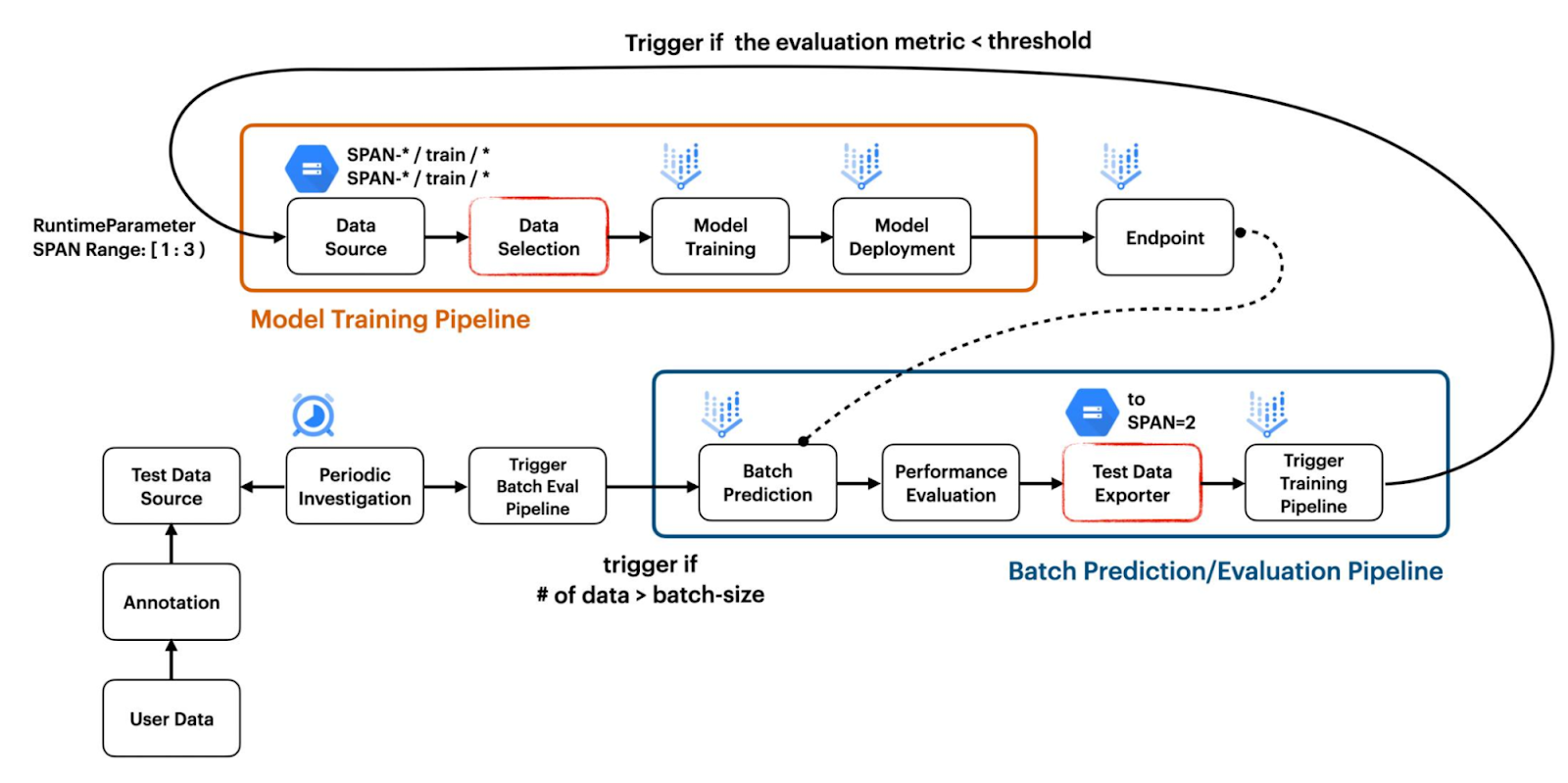
The model training pipeline is built by combining standard TFX components such as ImportExampleGen and Trainer with custom TFX components such as VertexUploader and VertexDeployer. .
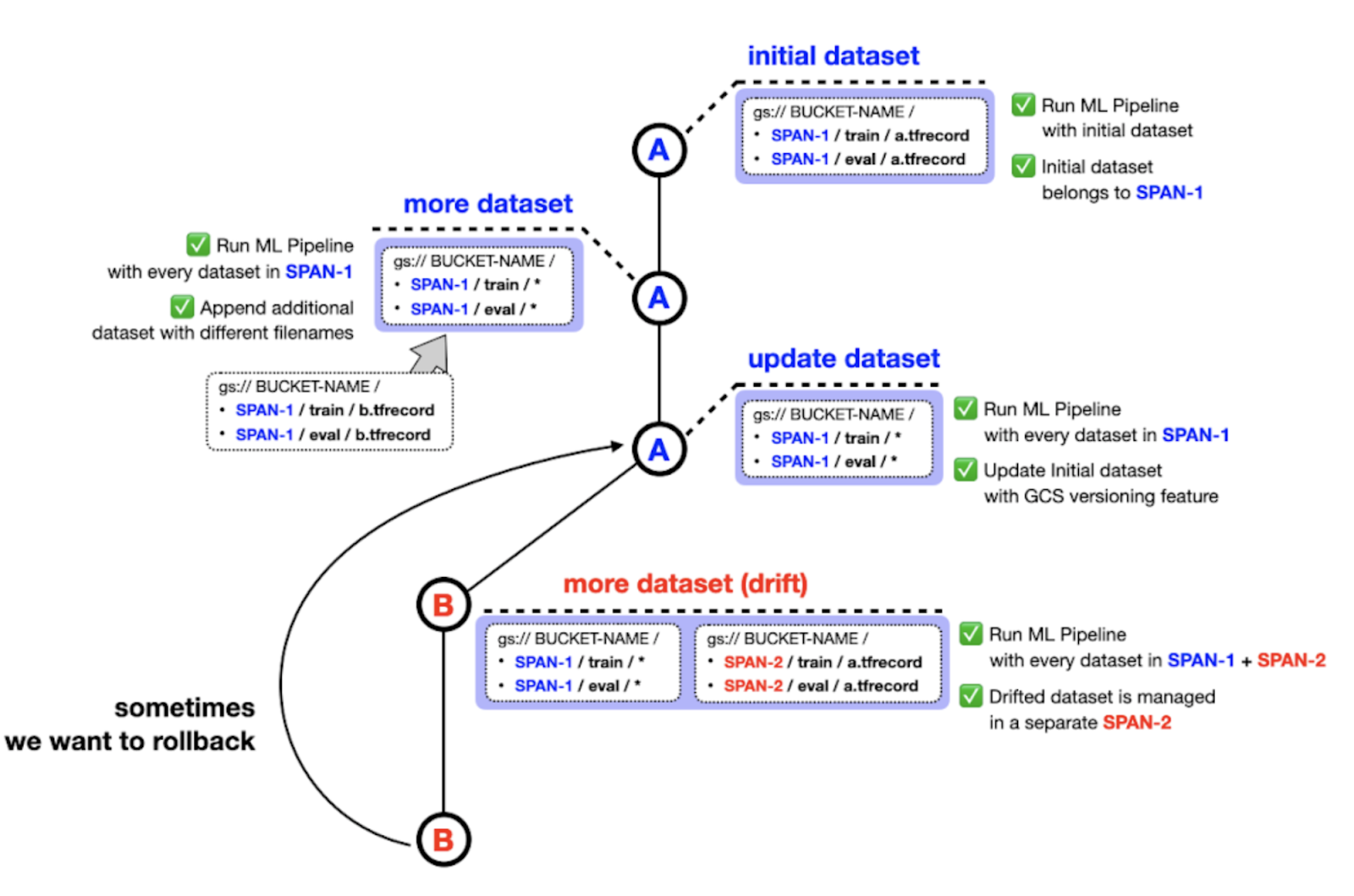
There is one significant implementation detail on how ImportExampleGen handles the dataset to be fed into the model. We have designed our project to hold datasets from different distributions in separate folders with filesystem paths which indicate the span number. For instance, the initial training and test dataset can be stored in SPAN-1/train and SPAN-2/test while the drifted dataset can be stored in SPAN-2/train and SPAN-2/test respectively as shown in Figure 2.
For the sake of the versioning feature in Google Cloud Storage (GCS), you might think we don’t need to manage datasets in this manner. However, we thought our way makes datasets much more manageable. For example, you might want to pick data from SPAN-1 and SPAN-2 or SPAN-1 and SPAN-3 to train the model depending on situations. Also, datasets belonging to the same distribution can still benefit from the versioning feature in GCS.
Figure 2. How datasets are managed (.
Figure 3. Custom TFX components in batch evaluation pipeline (. Then BatchPredictionGen will simply perform Vertex Prediction based on the prepared text file from the FileListGen and output a set of files containing the batch prediction results. PerformanceEvaluator calculates the average accuracy based on the batch prediction results and outputs False if it is less than the threshold. If the output is True, the pipeline will be terminated. Or if the output is False, SpanPreparator prepares TFRecord files by compressing the list of raw data, and then puts those TFRecords into a new folder whose name contains the successive span number such as span-2. Finally, PipelineTrigger triggers the model training pipeline by passing the span numbers for the data which should be included for training the model through RuntimeParameter.
General setup
In this section, we walk through the key components of the project and also leave some notes on the tools we used to implement them.
Getting the initial model ready
We focus on the concepts and consider implementing them in a minimal manner so that our implementations are as reproducible and as accessible as possible. Keeping that in mind, we use the model to fit the data. Our training pipeline is demonstrated in . This workflow also includes uploading and deploying the trained model as a service on the to realize this. In practice, usually after this step, the model test images and model predictions are sent to domain experts for audit purposes. They also provide the expected ground-truth labels on the test images. Only after that, we can validate the prediction results. But for the purpose of this project, we eliminate this step and pretend that the ground-truth labels are already available. So, as soon as the batch prediction results are available we evaluate them. This entire workflow is covered to monitor a specific location inside a . This is how we achieve the “continuous evaluation” aspect of our project.
There are other ways to capture drift in data, though. For example, using from Robert Crowe which dives deep into these techniques.
Model retraining
After the batch predictions are evaluated, the next step is to determine if we need to re-train the model based on a predefined performance threshold that generally depends on the business context and a lot of other factors. We set this threshold to 0.9 in the project. If we need to re-train then we trigger the same model training pipeline (as shown in .
Implementation details on managing datasets with span numbers
In this section, we walk through the implementation details on some key aspects of the project. Please go through the . Then, we download more images of the same categories as in CIFAR-10 by using component which prepares a text file in the required format to perform Vertex AI Batch Prediction.
Let’s skip the batch prediction performed by the component determines that retraining should be performed based on the result from the prepares a TFRecord file with the newly collected images, moves it to {bucket-name}/span-1/train and {bucket-name}/span-2/test where the training pipeline is ingesting data for model training, and renames the GCS location where the newly collected images are to {bucket-batch-prediction}/YYYY-MM_old/.
We add the _old suffix so that Cloud Function will ignore the renamed GCS location. If the retrained model doesn’t show a good enough performance metric, then you can have a chance to collect more data and merge them with the images in the _old GCS location.
The in the parameter_values in this way is that the pattern matching feature of the ImportExampleGen component should be specified in the input-config and output-config parameters. We do not need the output-config parameter for our purpose, but it is required when passing the input-config parameter as a RuntimeParameter. That’s why the output-config parameter is left empty. Note that you have to form the parameter in protocol buffer format when using RuntimeParameter for standard TFX components. The code below shows how the passed input-config and output-config can be consumed by the component and a with the TFX team about this, which is why we came up with a different approach from the standard way.
Cost
Vertex AI Training is a separate service from Pipeline. We need to pay for the Vertex AI Pipeline individually, and at the time of writing this article, it costs about $0.03 USD per pipeline run. The type of compute instance for each TFX component was , to get a better understanding of how your cost for the GCP services might differ.
Summary
In this blog post, we touched upon the idea of continuous evaluation and re-training for machine learning systems as well as the tooling needed to implement them. There is also a more traditional form of CI/CD for ML systems in response to code changes including changes in hyperparameters, model architecture, etc. We have a separate project demonstrating that use case. You are encouraged to check them here: .
Acknowledgements
We are grateful to the ML-GDE program that provided GCP credits for supporting our experiments. We sincerely thank Robert Crowe and Jiayi Zhao of Google for their help with the review.
Vollständiger Original-Bericht
Ausführliche Details, Code-Beispiele & Hersteller-Stellungnahme auf blog.tensorflow.org.


SOCIAL SHARE CARD GENERATOR