Posted by
Posted by
On the Keras team, we recently released aimed at making preprocessing data fit more naturally into model development workflows. In this post we are going to use the layers to build a simple sentiment classification model with the layer.
By default, the TextVectorization layer will process text in three phases:
A simple approach we can try here is a multi-hot encoding, where we only consider the presence or absence of terms in the review. For example, say a layer vocabulary is ['movie', 'good', 'bad'], and a review read 'This movie was bad.'. We would encode this as [1, 0, 1], where movie (the first vocab term) and bad (the last vocab term) are present.
text_vectorizer = tf.keras.layers.TextVectorization(
     output_mode='multi_hot', max_tokens=2500)
features = train_ds.map(lambda x, y: x)
text_vectorizer.adapt(features)
Above, we create a TextVectorization layer with multi-hot output, and do two things to set the layer’s state. First, we map over our training dataset and discard the integer label indicating a positive or negative review. This gives us a dataset containing only the review text. Next, we layer, which will scale the input to have 0 mean and 1 variance. We have only updated code up to the preprocess function below, but we will show the rest of training for clarity.
# This layer will scale our review length feature to mean 0 variance 1.
normalizer = tf.keras.layers.Normalization(axis=None)
normalizer.adapt(features.map(lambda x: tf.strings.length(x)))

def preprocess(x):
  multi_hot_terms = text_vectorizer(x)
  normalized_length = normalizer(tf.strings.length(x))
  # Combine the multi-hot encoding with review length.
  return tf.keras.layers.concatenate((multi_hot_terms, normalized_length))

def forward_pass(x):
  return tf.keras.layers.Dense(1)(x)  # Linear model.

inputs = tf.keras.Input(shape=(1,), dtype='string')
outputs = forward_pass(preprocess(inputs))
model = tf.keras.Model(inputs, outputs)
model.compile(loss=tf.keras.losses.BinaryCrossentropy(from_logits=True))
model.fit(train_ds, epochs=5)
Above, we create the normalization layer and adapt it to our input. Within the preprocess function, we simply concatenate our multi-hot encoding and length features together. We learn a linear model over the union of the two feature representations.
The last change we can make is to speed up training. We have one major opportunity to improve our training throughput. Right now, every training step, we spend some time on the CPU performing string operations (which cannot run on an accelerator), followed by calculating a loss function and gradients on a GPU.
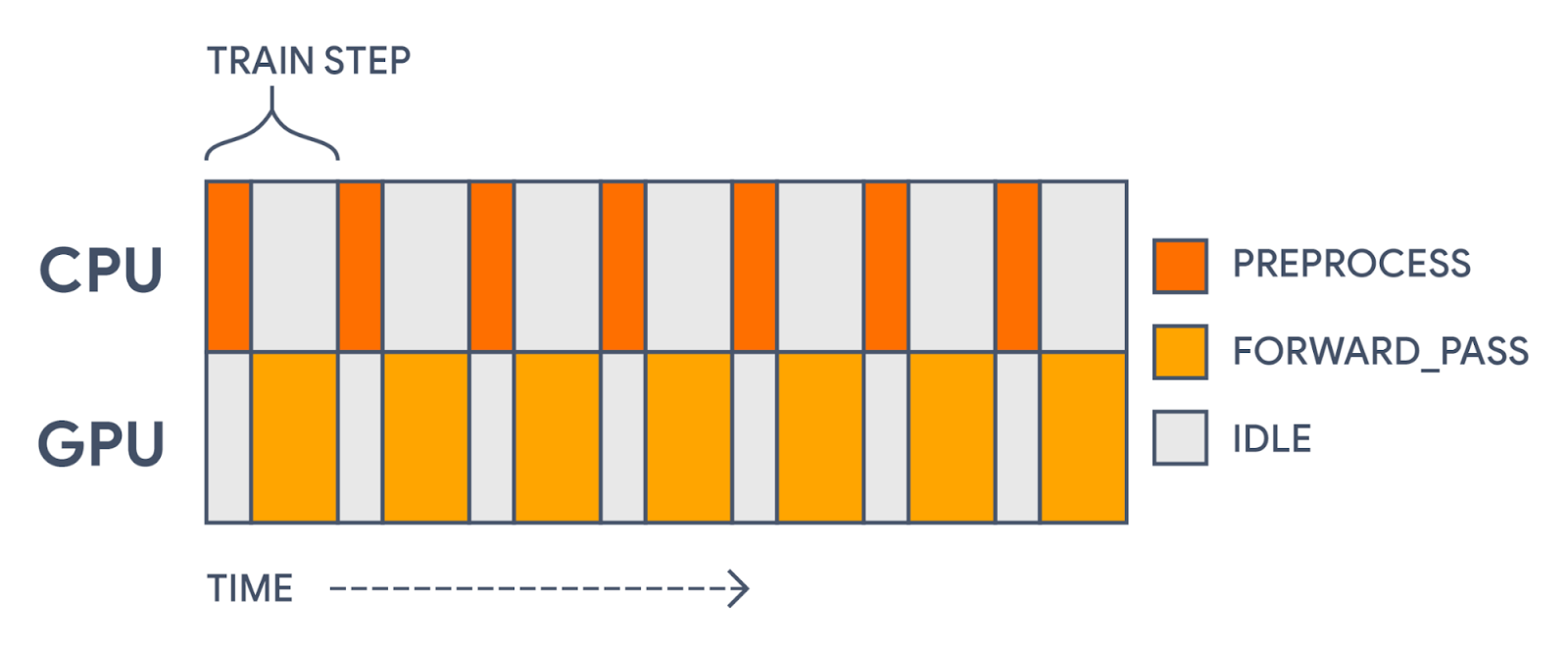 |
| With all computation in a single model, we will first preprocess each batch on the CPU and then update parameter weights on the GPU. This leaves gaps in our GPU usage. |
This gap in accelerator usage is totally unnecessary! Preprocessing is distinct from the actual forward pass of our model. The preprocessing doesn't use any of the parameters being trained. It’s a static transformation that we could precompute.
To speed things up, we would like to prefetch our preprocessed batches, so that each time we are training on one batch we are preprocessing the next. This is easy to do with the .
inputs = tf.keras.Input(shape=(1,), dtype="string")
preprocessed_inputs = preprocess(inputs)
outputs = forward_pass(preprocessed_inputs)

# The first model will only apply preprocessing.
preprocessing_model = tf.keras.Model(inputs, preprocessed_inputs)
# The second model will only apply the forward pass.
training_model = tf.keras.Model(preprocessed_inputs, outputs)
training_model.compile(
    loss=tf.keras.losses.BinaryCrossentropy(from_logits=True))

# Apply preprocessing asynchronously with tf.data.
# It is important to call prefetch and remember the AUTOTUNE options.
preprocessed_ds = train_ds.map(
    lambda x, y: (preprocessing_model(x), y),
    num_parallel_calls=tf.data.AUTOTUNE).prefetch(tf.data.AUTOTUNE)

# Now the GPU can focus on the training part of the model.
training_model.fit(preprocessed_ds, epochs=5)
In the above example, we pass a single keras.Input through our preprocess and forward_pass functions, but define two separate models over the transformed inputs. This slices our single graph of operations into two. Another valid option would be to only make a training model, and call the preprocess function directly when we map over our dataset. In this case, the keras.Input would need to reflect the type and shape of the preprocessed features rather than the raw strings.
Using tf.data to prefetch batches cuts our train step time by over 30%! Our compute time now looks more like the following:
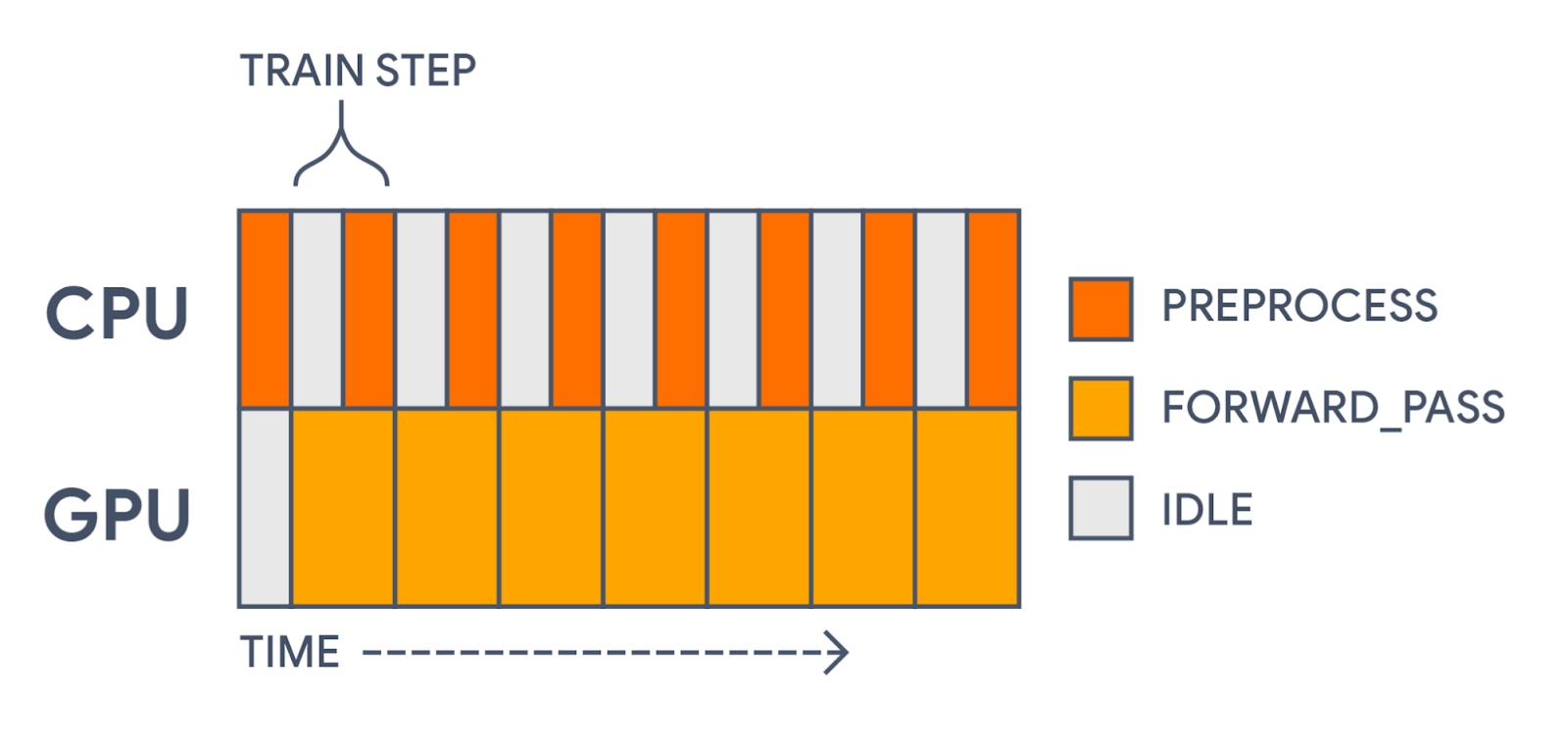 |
| With tf.data, we are now precomputing each preprocessed batch before the GPU needs it. This significantly speeds up training. |
We could even go a step further than this, and use tf.data to . To see a wide range of tasks you can do with preprocessing layers, see the , .
 Ähnliche Beiträge
Thematisch verwandte Begriffe: Introduction, Keras, Preprocessing, Layers · 6 Treffer
Videos werden geladen ...
Beiträge werden geladen ...
Videos werden geladen ...
Beiträge werden geladen ...
Videos werden geladen ...
Beiträge werden geladen ...
Videos werden geladen ...
Beiträge werden geladen ...
Videos werden geladen ...
Installiere tsecurity.de direkt auf deinen Home-Bildschirm für das ultimative Vollbild-Magazinerlebnis ohne Browser-Leisten.
Reiche interessante Links, Zero-Days oder Debatten ein. Die Community entscheidet per Upvote über die Veröffentlichung.
SOCIAL SHARE CARD GENERATOR