Zum Hauptinhalt springen
tsecurity.de LIVE
Echtzeit-Radar & Feeds
Alle RSS Feeds
👥 Community & Social
Sichere ProgrammierungLandlock LSM: Sandbox-Linux ohne Root-Rechte sichern(22.09.2026 um 02:00 Uhr)
Sichere ProgrammierungQuarkus + GraalVM Advanced Obfuscation(22.09.2026 um 02:00 Uhr)
Sichere Programmierung06 — Chat Works. Does the Agent Actually Retrieve Memory?(22.09.2026 um 02:03 Uhr)
Sichere ProgrammierungMCP Debate: Token Tax, Context Bloat, and What Devs Can Do(22.09.2026 um 02:03 Uhr)
Sichere ProgrammierungI gave my AI agent a kill switch tied to its own bank balance(22.09.2026 um 02:08 Uhr)
Sichere ProgrammierungLandlock LSM: Sandbox-Linux ohne Root-Rechte sichern(22.09.2026 um 02:00 Uhr)
Sichere ProgrammierungQuarkus + GraalVM Advanced Obfuscation(22.09.2026 um 02:00 Uhr)
Sichere Programmierung06 — Chat Works. Does the Agent Actually Retrieve Memory?(22.09.2026 um 02:03 Uhr)
Sichere ProgrammierungMCP Debate: Token Tax, Context Bloat, and What Devs Can Do(22.09.2026 um 02:03 Uhr)
Sichere ProgrammierungI gave my AI agent a kill switch tied to its own bank balance(22.09.2026 um 02:08 Uhr)
Intelligence View
⚡ tsecurity.de Intelligence

Android Studio Dolphin Canary 6 now available

Android Studio - Dolphin | 2021.3.1 Canary 6 is now available in the Canary and Dev channels.If you already have an Android Studio build on the Canary or Dev channel, you can get the update by clicking Help > Check for Upd…

0
↗ Quelle (androidstudio.googleblog.com)
Reagiere als Erste:r — dein Feedback zählt!

Android Studio - Dolphin | 2021.3.1 Canary 6 is now available in the Canary and Dev channels.

If you already have an Android Studio build on the Canary or Dev channel, you can get the update by clicking Help > Check for Update (or Android Studio > Check for Updates on macOS). Otherwise, you can download it here.

For information on new features and changes in all preview builds of Android Studio Dolphin, see the Android Studio Preview release notes. For details of bugs fixed in each preview release, see previous entries on this blog.

We greatly appreciate your bug reports, which help us to make Android Studio better. If you encounter a problem, let us know by reporting a bug. Note that you can also vote for an existing issue to indicate that it also affects you. 

General fixes

The bug fixes included in this update can be found here. For details of bugs fixed in each preview release, see previous entries on this blog.

New features

New Logcat

Logcat has been updated to make it easier to parse, query, and track logs. This represents the most significant update to the tool since its introduction, and we would appreciate early feedback to make sure we create the best experience for you.

New formatter

Logcat now formats logs to make it easier to scan useful information, such as tags and messages, and identify different types of logs, such as warnings and errors.


Create multiple Logcat windows


You can now create multiple tabs within Logcat, so that you can easily switch between different devices or queries. Right-clicking a tab allows you to rename it, and you can click and drag to rearrange the tabs.

Additionally, to help you more easily compare between two sets of logs, you can now split the view within a tab by right-clicking in the log view and selecting either Split Right or Split Down. To close a split, right-click and select Close. Each split allows you to set its own device connection, view options, and query.


Switch between view presets

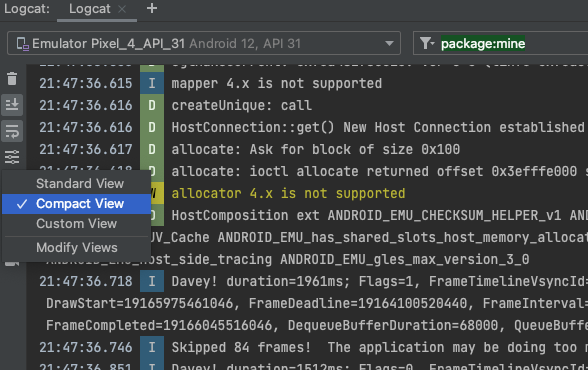
Logcat now allows you to quickly switch between different view modes—Standard, Compact, and Custom—by clicking . Each view mode provides a different default setting for showing you more or less information, such as timestamps, tags, and process IDs (PIDs). You can also customize each of these default view modes, as well as a custom view mode, by selecting Modify View.


New key-value search

In the previous version of Logcat, you had the option to either use string search (with support for regular expressions) or create a new filter by populating various fields using the Logcat UI. The first option made search more complex and the second option made sharing and setting up queries more difficult. We’ve now simplified the experience by introducing key-value searches right from the main query field.


This new query system provides accurate query results, without relying on regular expressions, as well as the ability to recall past queries from history, and share those queries with others. Additionally, you still have the option to use regular expressions and exclude logs based on key-values. Here are some examples of how to use the new query system, but you can also simply start typing in the query field to see suggestions:

  • PIDs for the local app project: package-mine
  • Specific values:
    • package:<my-package-ID>
    • tag:<my-tag>
    • level:[VERBOSE | INFO | ASSERT | DEBUG | WARN | ERROR]
  • Exclude a specific value by preceding the key with -:
    • -tag:<exclude-this-tag>
  • Use the regular expressions with a given key by placing a ~ after the key:
    • tag~:<regular-expression-tag>
    • Combine with the exclude tag: -tag~:<exclude-this-regex-tag>

You can also see a history of queries by clicking in the query field and selecting them from the drop down. To favorite a query so that it stays at the top of the list across all your studio projects, click the at the end of the query field.


Track logs across app crashes/restarts

The new Logcat now makes it easier to track logs from your app across app crashes and restarts, so that you don’t miss important logs across these events. When a Logcat notices that your app process has stopped and restarted you’ll see a message in the output—such as PROCESS ENDED and PROCESS STARTED—as shown below:


And, restarting Logcat preserves your session configuration, such as tab splits, filters, and view options, so that you can continue your session easily. We appreciate any feedback you might have with the new Logcat, which you can report here.

Ähnliche Beiträge
🔍 Verwandte News

Auch interessante Nachrichten Android Studio Dolphin Canary 6 now available

Thematisch verwandte Begriffe: Android, Studio, Dolphin, Canary · 6 Treffer

Laden...

Videos werden geladen ...

Laden...

Beiträge werden geladen ...

Laden...

Videos werden geladen ...

Laden...

Beiträge werden geladen ...

Laden...

Videos werden geladen ...

Laden...

Beiträge werden geladen ...

Laden...

Videos werden geladen ...

Laden...

Beiträge werden geladen ...

Laden...

Videos werden geladen ...

Zum Aktualisieren ziehen
ZERO-DAY CVE-2026-49449 | Joplin is an open source note-taking and to-do application that organise…
Advisory →
TTS Reader • tsecurity.de Voice
tsecurity.de Icon
tsecurity.de App
Offline-Lesen, Eilmeldungen & 0ms Ladezeit

Installiere tsecurity.de direkt auf deinen Home-Bildschirm für das ultimative Vollbild-Magazinerlebnis ohne Browser-Leisten.

Nächster Beitrag
Themen-Radar & Intelligence Matrix
Echtzeit-Taxonomie nach Angriffsvektoren & Plattformen

tsecurity.de Live Threat Radar

🔴 LIVE RADAR
MONITORING
AKTIV
CVE-DATENBANK
LIVE
🔍
Community Radar & Live Chat
Sentinel Bot online • Live-Stream
Dein Cluster: Security Explorer
Match:
lädt…
Verbindung zum Community-Stream wird aufgebaut...
Bearbeitungsmodus — Senden überschreibt deine Nachricht
Community-Puls — was gerade passiert
lädt…
Aktivitäten deiner Analysten
lädt…
Neues Thema oder Eilmeldung einreichen

Reiche interessante Links, Zero-Days oder Debatten ein. Die Community entscheidet per Upvote über die Veröffentlichung.

Heiß diskutierte Einreichungen
🔖 Gespeicherte Artikel
📂 Keine gespeicherten Artikel vorhanden.
Zurück Ziehen Vor
Links: vorheriger Artikel Rechts: nächster Artikel unten: schließen
News NIS-2 Frühwarnung Tier-1 Intel ⏱️ 3 Min vor 10 Min
Artikeldaten werden geladen...

Zurück: vorheriger Vor: nächster
↗ Original-Quelle
Social Reaktionen Deine Reaktion zählt
Einstufung & Relevanz-Poll 0 Stimmen
In sozialen Netzwerken teilen 1-Klick