In my – Insecure deserialization.
· – Path traversal, delivered with a fun authentication bypass.
Each of these three vulnerabilities leads to remote code execution as SYSTEM.
CVE-2022-36971: A Tricky Insecure Deserialization
I discovered the first vulnerability when I came across an interesting class named JwtTokenUtility, which defines a non-default constructor that could be a potential target:
At [1], the function base64-decodes one of the arguments.
At [2], it checks if the publicOnly argument is true.
If not, it deserializes the base64 decoded argument at [3].
This looks like a possible insecure deserialization sink. In addition, it is invoked from many locations within the codebase. The following screenshot illustrates several instances where it is invoked with the first argument set to false:
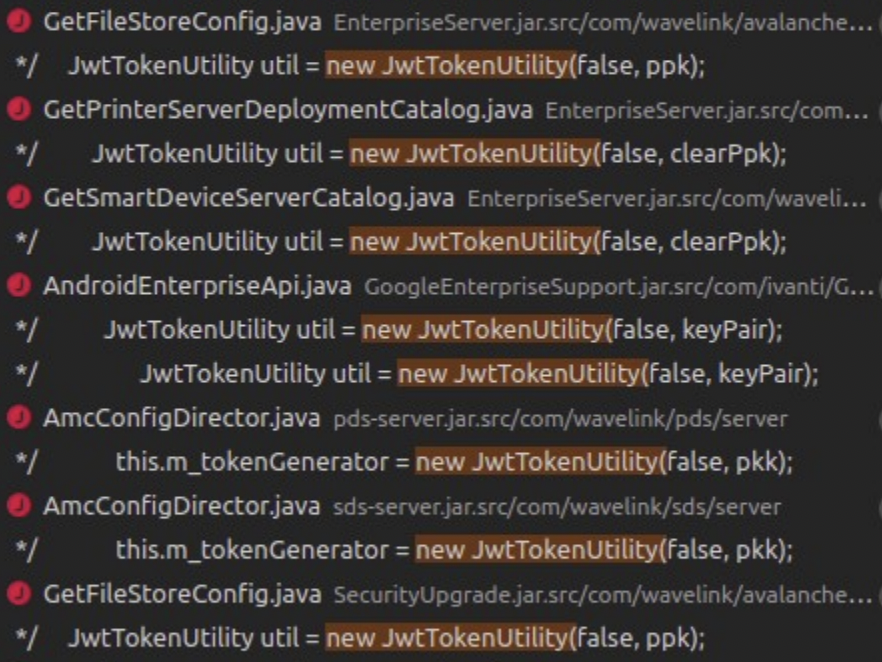
Figure 1 - Example invocations of JwtTokenUtility non-default constructor
It turned out that most of these potential vectors require control over the SQL database. The serialized object is retrieved from the database, and I found no direct way to modify this value. Luckily, there are two services with a more direct attack vector: the Printer Device Server and the Smart Device Server. The exploitation of both services is almost identical. We will focus on the Printer Device Server (PDS).
Let’s have a look at the PDS AmcConfigDirector.createAccessTokenGenerator method:
At [1], it uses acctApi.getGlobal to retrieve an object that implements IGlobal.
At [2], it retrieves the pkk string by calling global.getAccessKeyPair.
At [3], it decrypts the pkk string by calling PasswordUtils.decryptPassword. We are not going to analyze this decryption routine. This decryption function implements a fixed algorithm with a hardcoded key, thus the attacker can easily perform the encryption or decryption on their own.
At [4], it invokes the vulnerable JwtTokenUtility constructor, passing the pkk string as an argument.
At this point, we are aware that there is potential for abusing the non-default JwtTokenUtility constructor. However, we are missing two things:
-- How can we control the pkk string?
-- How can we reach createAccessTokenGenerator?
Let’s start with the control of the pkk string.
Controlling the value of pkk
To begin, we know that:
-- The code retrieves an object to assign to the global variable. This object implements IGlobal.
-- It calls the global.getAccessKeyPair getter to retrieve pkk.
There is a Global class that appears to control the PDS service global settings. It implements the IGlobal interface and both the getter and the setter for the accessKeyPair member, so this is probably the class we’re looking for.
Next, we must look for corresponding setAccessKeyPair setter calls. Such a call can be found in the AmcConfigDirector.processServerProfile method.
At [1], processServerProfile accepts the config argument, which is of type PrinterAgentConfig.
At [2], it retrieves a list of PropertyPayload objects by calling config.getPayload.
At [3], the code iterates over the list of PropertyPayload objects.
At [4], there is a switch statement based on the property.name field.
At [5], the code checks to see if property.name is equal to the string "webfs.ac.ppk".
If so, it calls setAccessKeyPair at [6].
So, the AmcConfigDirector.processServerProfile method can be used to control the pkk value. Finally, we note that this method can be invoked remotely through a ServerConfigHandler InfoRail message:
At [1], we see that this message type can be accessed through the subcategory 1000000 (see first blog post - Message Processing and Subcategories section).
At [2], the main processMessage method is defined. It will be called during message handling.
At [3], the code retrieves the message payload.
At [4], it calls the second processMessage method.
At [5], it deserializes the payload and casts it to the PrinterAgentConfig type.
At [6], it calls processServerProfile and provides the deserialized config object as an argument.
Success! We can now deliver our own configuration through the ServerConfigHandler method of the PDS server. This method can be invoked through the InfoRail protocol. Next, we need to get familiar with the PrinterAgentConfig class to prepare the appropriate serialized object.
It has a member called payload, which is of type List<PropertyPayload>.
PropertyPayload has two members that are interesting for us: name and value. Recall that the processServerProfile method does the following:
-- Iterates through the list of PropertyPayload objects with a for loop.
-- Executes switch statement based on PropertyPayload.name.
-- Sets values based on PropertyPayload.value.
With this in mind, we can understand how to deliver a serialized object and control the pkk variable. We have to prepare an appropriate gadget (we can use the Ysoserial C3P0 or CommonsBeanutils1 gadgets), encrypt it (decryption will be handled by the PasswordUtils.decryptPassword method) and deliver through the InfoRail protocol.
The properties of the InfoRail message should be as follows:
-- Message subcategory: 1000000.
-- InfoRail distribution list address: 255.3.5.15 (PDS server).
Here is an example payload:
The first step of the exploitation is completed. Next, we must find a way to call the createAccessTokenGenerator function.
Triggering the Deserialization
Because the full flow that leads to the invocation of createAccessTokenGenerator is extensive, I will omit some of the more tedious details. We will instead focus on the InfoRail message that allows us to trigger the deserialization via the needFullConfigSync function. Be aware that the PDS server frequently performs synchronization operations, but typically does not perform a synchronization of the full configuration. By calling needFullConfigSync, a full synchronization will be performed, leading to execution of doPostDeploymentCleanup:
At [1], the code invokes our target method, createAccessTokenGenerator.
The following snippet presents the NotificationHandler message, which calls the needFullConfigSync method:
At [1], the message subcategory is defined as 2200.
At [2], the main processMessage method is defined.
At [3], the payload is deserialized and casted to the NotifyUpdate type (variable nu).
At [4], the code iterates through the entries of the NotifyUpdateEntry object that was obtained from nu.getEntries.
At [5], [6], and [7], the code checks to see if entry.ObjectType is equal to 61, 64, or 59.
If one of the conditions is true, the code sets the universalDeployment variable to true value at [8], [9], or [10], so that needFullConfigSync will be called at [11].
The last step is to create an appropriate serialized message object. An example payload is presented below. Here, the objectType field is equal to 61.
The attacker must send this payload through a message with the following properties:
-- Message subcategory: 2200.
-- InfoRail distribution list address: 255.3.5.15 (PDS server).
To summarize, we must send two different InfoRail messages to exploit this deserialization issue. The first message is to invoke ServerConfigHandler, which delivers a serialized pkk string. The second message is to invoke NotificationHandler, to trigger the insecure deserialization of the pkk value. The final result is a nice pre-auth remote code execution as SYSTEM.
CVE-2021-42133: One Vuln to Rule Them All - Arbitrary File Read and Write
Ivanti Avalanche has a File Store functionality, which can be used to upload files of various types. This functionality has been already abused in the past, in and follow the team on for the latest in exploit techniques and security patches.

SOCIAL SHARE CARD GENERATOR