A guest post by Sandeep Mistry,
based device to create a dedicated input device. This device will take real-time input from a camera and applies a machine learning (ML) image classification model to detect if the image from the camera contains a set of known hand gestures (✋, 👎, 👍, 👊). When the hand gesture is detected with high certainty, the device will then use the run-time with Arm and all technical assets for the guide can be found on message to send to the PC using the USB standard. 🎥 Künstliche Intelligenz Videos 🕛 kürzlich 8 Min Lesezeit
Building a TensorFlow Lite based computer vision emoji input device with OpenMV
📑 Inhaltsübersicht
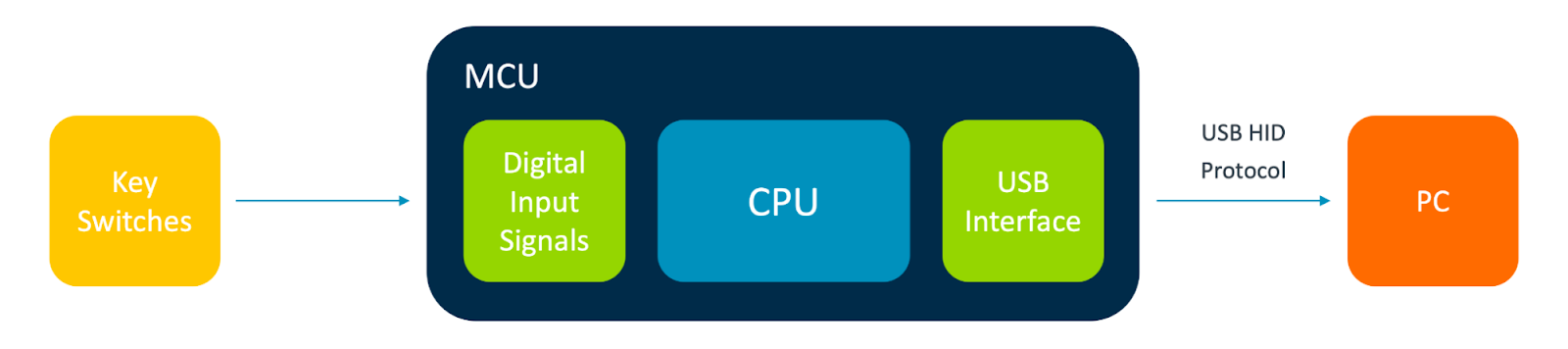 |
| Block diagram of USB keyboard |
The emoji ‘keyboard’ will use an image sensor for input (instead of key switches) and then process the image data locally on a more powerful , which contains an Arm Cortex-M7 CPU along with a digital interface for the image sensor and USB communications.
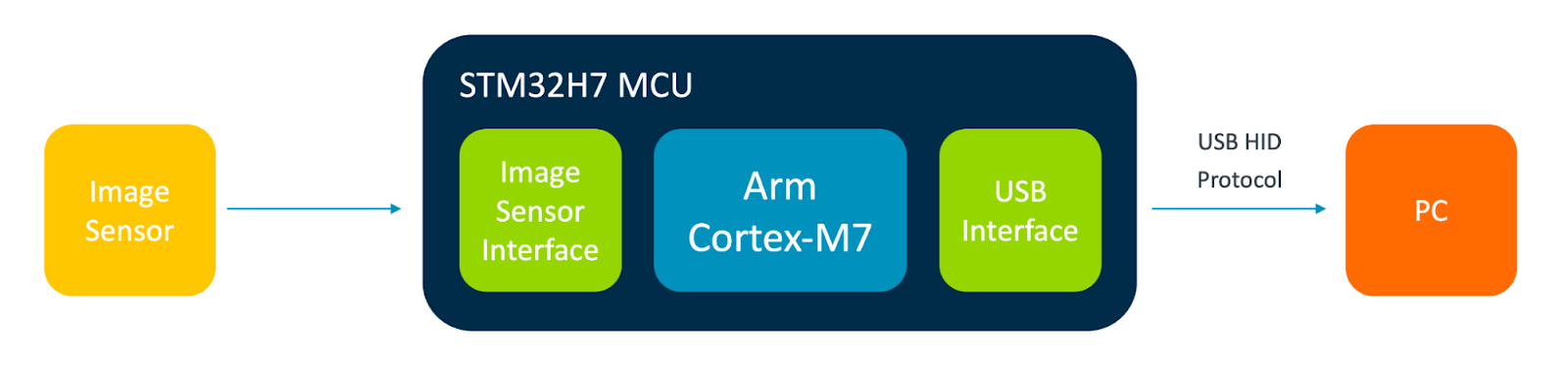 |
| Block diagram of computer vision based emoji “keyboard” |
Even though the STM32 H7 is a constrained computing platform that runs at 480 MHz with 1 MB of on-board RAM - we can still process a grayscale 96x96 pixel image input from the camera at just under 20 frames per second (fps)!
The OpenMV development platform
consists of several Arm Cortex-M based development boards. Each board is equipped with an on-board camera and MCU. For this project, the board will suit our needs.
What we will need
or Dataset has previously curated and shared an excellent . The dataset contains ~23k image files of people performing various hand gestures over a 30 second period. Images from the dataset will need to be relabeled as follows:
Since the swipe right and swipe left gestures in the Kaggle dataset do not correspond to any of these classes, any images in these classes will need to be discarded for our model. Images in the Kaggle dataset are taken over a 30 second period, they might contain other gestures at the start or end of the series. For example, some of the people in the dataset started with their hands in a fist position before eventually going to the labeled gesture hand up, thumbs up and thumbs down. Other times the person in the dataset starts off with no hand gesture in frame. We have gone ahead and manually re-labeled the images into the classes, it can be found in CSV format in the . Loading and Augmenting ImagesImages from the dataset can be loaded as a This API supports adjusting the image’s color mode (to grayscale) and size (96x96 pixels) to meet the model’s desired input format. Built-in Keras layers for data augmentation (random: , ) will also be used during training. Model Architecture. This model architecture is trained on our dataset, with the same alpha (0.25) and image sizes (96x96x1) used in the API can be used to easily create a MobileNetV1 model for 5 output classes and the desired alpha and input shape values: python
ConclusionThroughout this project we’ve covered an end-to-end flow of training a custom image classification model and how to deploy it locally to a Arm Cortex-M7 based OpenMV development board using TensorFlow Lite! TensorFlow was used in a Google Colab notebook to train the model on a re-labeled public dataset from Kaggle. After training, the model was converted into TensorFlow Lite format to run on the OpenMV board using the TensorFlow Lite for Microcontrollers run-time along with accelerated Arm CMSIS-NN kernels. At inference time the model’s outputs were processed using model certainty techniques, and then fed output from the (Softmax) activation output into an exponential smoothing function to determine when to send keystrokes over USB HID to type emojis on a PC. The dedicated input device we created was able to capture and process grayscale 96x96 image data at just under 20 fps on an Arm Cortex-M7 processor running at 480 MHz. On-device inferencing provided a low latency response and preserved the privacy of the user by keeping all image data at the source and processing it locally. Build one yourself by purchasing an OpenMV Cam H7 R2 board on . The project can be extended by fine tuning the model on your own data or applying transfer learning techniques and using the model we developed as base to train other hand gestures. Maybe you can find another public dataset for facial gestures and use it to type 😀 emojis when you smile! A big thanks to Sparsh Gupta for sharing the Gesture Recognition dataset on Kaggle under a public domain license and my Arm colleagues Rod Crawford, Prathyusha Venkata, Elham Harirpoush, and Liliya Wu for their help in reviewing the material for this blog post and associated tutorial! Vollständiger Original-Bericht Ausführliche Details, Code-Beispiele & Hersteller-Stellungnahme auf blog.tensorflow.org. Wie bewertest du diesen Beitrag? 1 Klick Feedback Teilen mit Netzwerk & Team: Hat Ihnen dieser Tipp / Anleitung geholfen? Community-Analysen & Experten-Meinungen 0Verfasse deine eigene Analyse, teile Workarounds oder diskutiere diesen Vorfall im Blog. Noch keine Community-Analyse verfasst. Markiere einen Textabschnitt oder klicke oben auf „ Eigene Analyse verfassen“! Community Pulse: Relevanz-Einschätzung 1 Klick Experten-Votum 🔴 Akute Relevanz 0% 🟡 In Evaluierung 0% 🟢 Keine Auswirkung 0% Spannende Innovation 0% Verwandte Story-Cluster & Quellen (Vektor-KI) Tipp: Mit Pfeiltasten [ ← ] und [ → ] blättern  Ähnliche Beiträge
🔍 Verwandte News
Auch interessante Nachrichten Building a TensorFlow Lite based computer vision emoji input device with OpenMVThematisch verwandte Begriffe: Building, TensorFlow, Lite, based · 6 Treffer 🪟 Windows Tipps Elastic Security Labs WinVisor – A hypervisor-based emulator for Windows x64 user-mode executables ⚠️ Malware / Trojaner / Viren Elastic Security Labs EMOTET Dynamic Configuration Extraction 🔧 AI Nachrichten Elastic Security Labs Exploring the Future of Security with ChatGPT
Laden...
Videos werden geladen ...
Laden...
Beiträge werden geladen ...
Laden...
Videos werden geladen ...
Laden...
Beiträge werden geladen ...
Laden...
Videos werden geladen ...
Laden...
Beiträge werden geladen ...
Laden...
Videos werden geladen ...
Laden...
Beiträge werden geladen ...
Laden...
Videos werden geladen ...
🔖 Gespeicherte Artikel
📂
Keine gespeicherten Artikel vorhanden.
📂 News
⏱️ 3 Min
vor 10 Min
Artikeldaten werden geladen...
tsecurity.de AppOffline-Lesen, Eilmeldungen & 0ms Ladezeit
Installiere tsecurity.de direkt auf deinen Home-Bildschirm für das ultimative Vollbild-Magazinerlebnis ohne Browser-Leisten.
Nächster Beitrag
🤖
Community Radar & Live Chat
Sentinel Bot online • Live-Stream
Dein Cluster:
Security Explorer
👥 Match:
lädt…
📡 Aktivitäten deiner Analystenlädt…
💡 Neues Thema oder Eilmeldung einreichenReiche interessante Links, Zero-Days oder Debatten ein. Die Community entscheidet per Upvote über die Veröffentlichung. 🔥 Heiß diskutierte Einreichungen |
SOCIAL SHARE CARD GENERATOR