



Introduction
Being a JavaScript developer today comes with more flex. It has been one language I enjoy using most. In my 3+ years as a MERN STACK developer, I have gained much experience in using JavaScript. Earlier this year, I start using TypeScript in Place of JavaScript for my Projects. This has really been an eye opener for me. In this article, I will be discussing with you the Difference between TypeScript and JavaScript, how to get started using TypeScript, and the benefits of using TypeScript for your next project.
Difference between TypeScript and JavaScript
JavaScript is a scripting language that enables you to create dynamically updating content, control multimedia, animate images, and pretty much more. TypeScript on the other hand is a strongly typed, object oriented, compiled language. It was designed by Anders Hejlsberg (designer of C#) at Microsoft. TypeScript is both a language and a set of tools. TypeScript is a typed superset of JavaScript compiled to JavaScript. In other words, TypeScript is JavaScript plus some additional features.
Do I need to learn JavaScript before typescript? This is one popular question I come across anytime I talk to beginners to TS?
To answer, You should have a fundamental grasp and knowledge of JavaScript in order to write TypeScript code. Additionally, you need to understand the OOPS concept. Contrarily, JavaScript is a well-liked and simple to learn scripting language.

| JavaScript |
|---|
function verify(result) {

  if (result === "pass") {

    console.log("Passed")

  } else {

    console.log("Failed")

  }

}
| TypeScript |
|---|
type Result = "pass" | "fail"


function verify(result: Result) {

  if (result === "pass") {

    console.log("Passed")

  } else {

    console.log("Failed")

  }

}
With a few extra capabilities, TypeScript offers all of JavaScript's features and functionalities. The browsers cannot interpret or execute Typescript, the only language browsers can execute is Javascript, therefore if you write your project with TS you need a transpilation step to - at least - strip out the type annotations outputing simple JS. JavaScript benefits from TypeScript's "type safety" (thus the name!). It is an open source project that Microsoft developed.
You can peruse the repository on GitHub
Introduction to TypeScript
Having basic understanding of TypeScript, Let's go ahead and create your first TypeScript project.
By default, browsers do not understand TypeScript as they do with JavaScript. You need to compile your TypeScript code to JavaScript to be understood by the browser. Hence, a TypeScript compiler is required.
There are two approaches to install the TS Compiler. The global scope and the local scope. The recommended approach is to install the compiler locally per project.
To begin with:
- go ahead and create a directory for your project.
- run the npm command
npm install typescriptin the directory to install the TSC in your project.
mkdir my_project


cd my_project


npm install typescript
With the compiler installed, you can you can make use of the tsc command in your project directory.
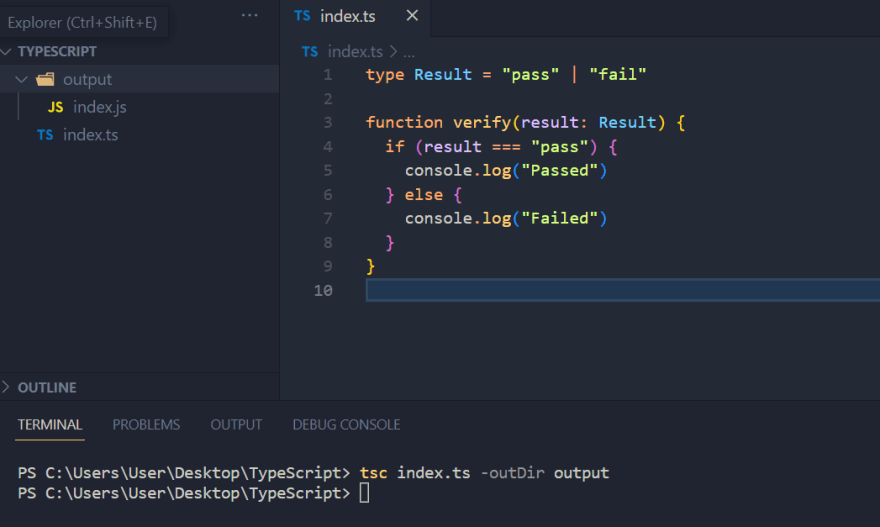
Now you can create a file, [name].ts In the directory. Check the project structure below👇

To run the code, run the command tsc [name].ts in the project directory. This will compile the TS code into TS with the name [name].js.
You can compile the code into a different directory using the -outDir flag.
example: tsc index.ts -outDir output.
This will compile the ts code into a directory called output.
Check the demo below:
Explore TypeScript
TypeScript extends JavaScript to enhance the developer environment and experience. It helps developers to include type safety in their projects. In addition, TypeScript offers a number of additional capabilities, including generics, tuples, interfaces, type aliases, abstract classes, and function overloading.
You can explore these features using Documatic VScode Extension
This extension brings Documatic to VSCode: quickly search your large codebases using simple queries - what does it do? what dependencies does it have? And more.
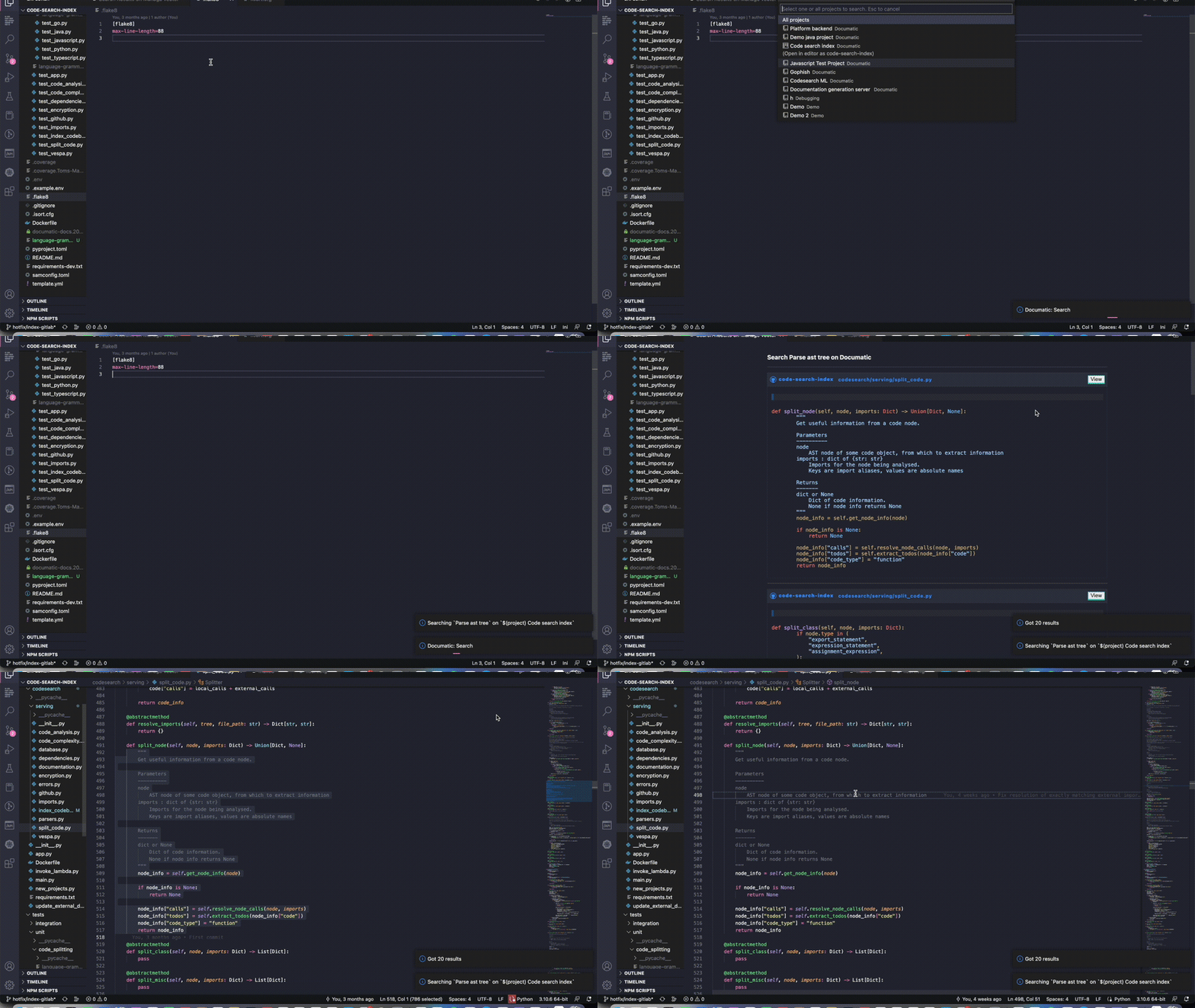
Documatic search uses AI to link relations between your query and snippets of code, so you don't have to know the exact keywords you're looking for!
Benefits of using TypeScript
Among the top 10 programming languages in the PYPL Popularity of Programming Language Index, TypeScript comes with a lot of benefits in software development.
Optional static typing: Strong static typing is a feature introduced by TypeScript; once declared, a variable cannot change its type and can only accept certain values. This takes away the extreme risk of production bugs in JavaScript since it only detects data type errors during runtime.
Object oriented programming: TypeScript supports object-oriented programming concepts like classes, inheritance, etc. As your project increases in size and complexity, the OOP paradigm becomes more advantageous since it makes it simpler to write well-organized, scalable code.
Code editor support: Autocomplete for a TypeScript codebase is supported by IDEs and code editors like VS Code. They also point out the issues and provide inline documentation.
Use of Existing packages: You might want to use a JavaScript-written npm package. Since TypeScript is a superset of JavaScript, It allows you to import and use JavaScript packages. Additionally, you can use type definitions for well-known packages that are created and maintained by the TypeScript community in your project.
This is to mention a few benefits of using TypeScript
Conclusion
Becoming a web developer can be stressful at some point without a good guidance and tips like this. I found it challenging while learning but you don't have to. TypeScript will same you a lot of debugging time.
Happy Hacking!
Bentil here🚀
Are you a JavaScript developer? Have you used TypeScript before?
Share your experience in using TypeScript in the comment section or the challenges you face in writing TypeScript. I will be glad to answer your questions as well.
If you find this content helpful, Please Like, comment and share
Follow me on Twitter for more.
SOCIAL SHARE CARD GENERATOR