Posted by Chansung Park, Sayak Paul (ML and Cloud GDEs)
) is a flexible framework allowing Machine Learning (ML) practitioners to iterate on production-grade ML workflows faster with reliability and resiliency. TFX’s power lies in its flexibility to run ML pipelines across different compatible orchestrators such as Kubeflow, Apache Airflow, Vertex AI Pipelines, etc., both locally and on the cloud.In this blog post, we discuss the crucial details of building an end-to-end ML pipeline for - HFPusher. Finally, you will see how we implemented CI/CD into the mix by leveraging GitHub Actions.
Although we won’t go over all the bits of the pipeline, you can still find the code of the underlying project in .
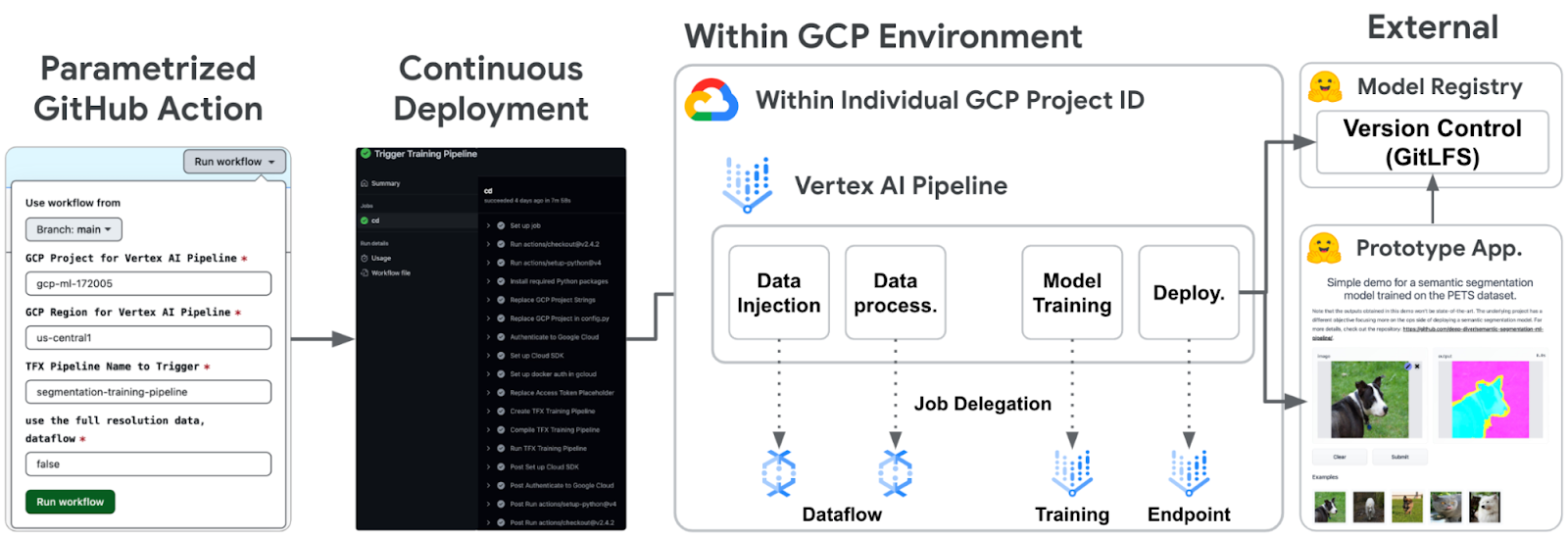 |
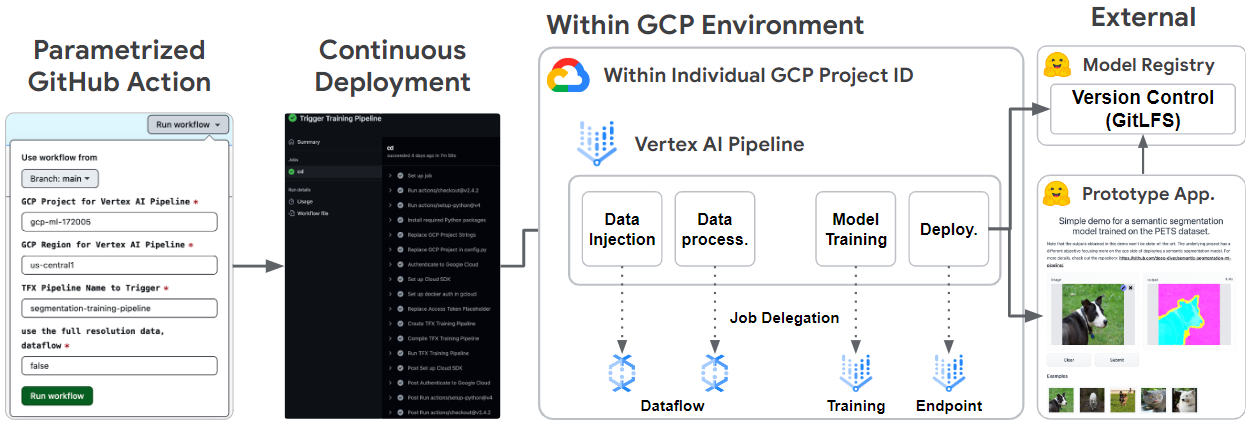
Figure 1. Overall system architecture () |
ExampleGen
In this project, we have prepared and stored them in Google Cloud Storage(GCS). patterns, and stores them as TFRecords in GCS. Note that ExampleGen could take different data types such as CSV, TFRecord, or Parquet, then it generates datasets in a uniform format in TFRecord. It lets us handle the data uniformly inside the entire TFX pipeline. Note that since the for this task.
ExampleGen can be integrated with Dataflow out of the box. All you need to do to benefit from Dataflow is to call such as machine type, disk size, the number of workers, and so on. For context, Dataflow is a managed service provided by Google Cloud that allows us to run Apache Beam pipelines efficiently in a fully distributed manner.
ImportSchemaGen
. It can also be hand-tuned to define the structure of the output data from ExampleGen.
In our case, the prepared Pets dataset has two features - image and segmentation map (label), and the size of each feature is 128x128. Therefore, we could define a schema like the one below.
feature { |
Also note that in the float_domain section, we can set the value restrictions. In this project, the input data is standard RGB images, so each pixel value should be between 0 and 255. On the other hand, the pixel value of the label should be 0, 1, or 2, meaning outer, inner, and border of an object in an image, respectively.
Transform
With the help of ImportSchemaGen, the data is already shaped correctly in .
# IMAGE_KEY is "image" which matches the name of feature in the ImportSchemaGen |
Since data preprocessing is a CPU and memory-intensive job, Transform also can be integrated with Dataflow. Just like in ExampleGen, the job could be seamlessly delegated to Dataflow by calling the with_beam_pipeline_args method.
Trainer
(Vertex) . Since the model architecture is nothing new, let’s take a look at how it is modularized and some of the key pieces of code.
pipeline/ ├─ ... |
You place your modeling code in a separate file, which is supplied as a parameter to the Trainer. In this case, that file is named train.py. When the Trainer component is run, it looks for a starting point function with the name . The run_fn() function basically pulls in the training and evaluation datasets from the output of Transform, trains the UNet model ( defined in out of the box, which is a managed service to train models in a distributed system. By specifying how you would want to parameter of the Trainer, the training job is handled by Vertex AI Training automatically.
It is also important to notice which signatures the model exports in TensorFlow. Consider the following code snippet that saves a trained model (of the tf.keras.Model instance) into a SavedModel resource.
model.save( model, tf_transform_output ), |
The signatures are functions that define how to handle given input data. For example, we have defined three different signatures. While serving_default is used during serving time, the other two are used during the model evaluation time.
- applies a transformation graph obtained from the Transform component to the data produced by ExampleGen. This function will be used in the Evaluator component, so the raw evaluation inputs from ExampleGen can be appropriately transformed that the model could understand.
- lets us define such metrics that not only evaluates the trained model itself but also compares the trained model to the last best model retrieved by .
EVAL_CONFIGS = tfma.EvalConfig(
model_specs=[
tfma.ModelSpec(
signature_name="from_examples",
preprocessing_function_names=["transform_features"],
)
],
...
)The reason that we had transform_features and from_examples signatures that are doing the same data preprocessing is that they are used in different situations. Evaluator runs the method at the same time.
Pusher
When the trained model is evaluated to be deployed, (Vertex) in Vertex AI. It also optionally creates an to Pusher: machine type, GPU type, the number of GPUs, traffic splits etc.
Integration with Hugging Face 🤗 Hub
, . Since it supports seamless support for storing model artifacts with automatic version control, we developed a custom TFX component named given an API toolkit to interact with it. That is how it provides seamless support for version control, large file storage, and interaction.
In Figures 3 and 4, we show how the model repository and the application repository (which were automatically created from a TFX pipeline) look like on the Hugging Face Hub.
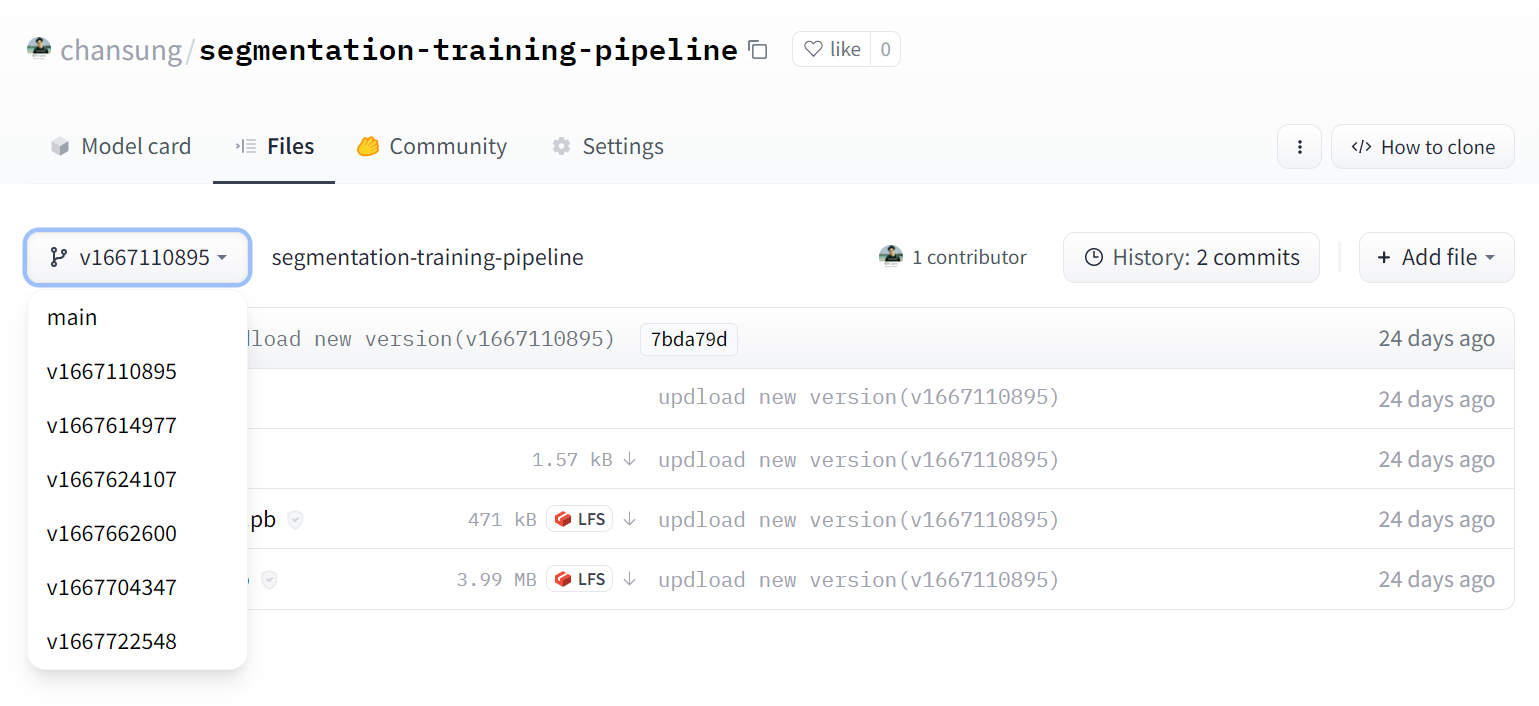
Figure 3. Model versioning in Hugging Face Model Hub () HFPusher has been contributed to the official package. HFPusher will be available in version 0.4.0 and later in the and . Each credential is mapped to the name which is identical to the Google Cloud project ID.
2. Some of the sensitive information is replaced with envsubst command. In this project, it is required to provide a Hugging Face 🤗access token to the HFPusher component to create and update any repositories in Hugging Face 🤗 Hub. The access token is stored in GitHub Action Secret.
3. An environment variable enable_dataflow is set to "true" or "false" based on the specified parameter. By looking up the environment variable, the TFX pipeline conditionally defines dedicated parameters for Dataflow and passes them to ExampleGen and Transform components via with_beam_pipeline_args method.
4. The last part of the workflow compiles and runs the TFX pipeline on Vertex AI with the TFX CLIs as below. The (GCR) based on a custom CLI runs the pipeline on Vertex AI with the specified Google Cloud Project ID and region.
tfx pipeline create \
--pipeline-path kubeflow_runner.py \
--engine vertex --build-image
tfx run create \
--engine vertex \
--pipeline-name PIPELINE_NAME \
--project GCP_PROJECT_ID --region GCP_REGIONIn this case, we need to verify each PR if the suggested modification works well at the build and run times. Also, sometimes each collaborator wants to run the ML pipeline with their own Google Cloud account. Furthermore, it is better if we could conditionally delegate some heavy jobs in the ML pipeline to more dedicated Google Cloud services.
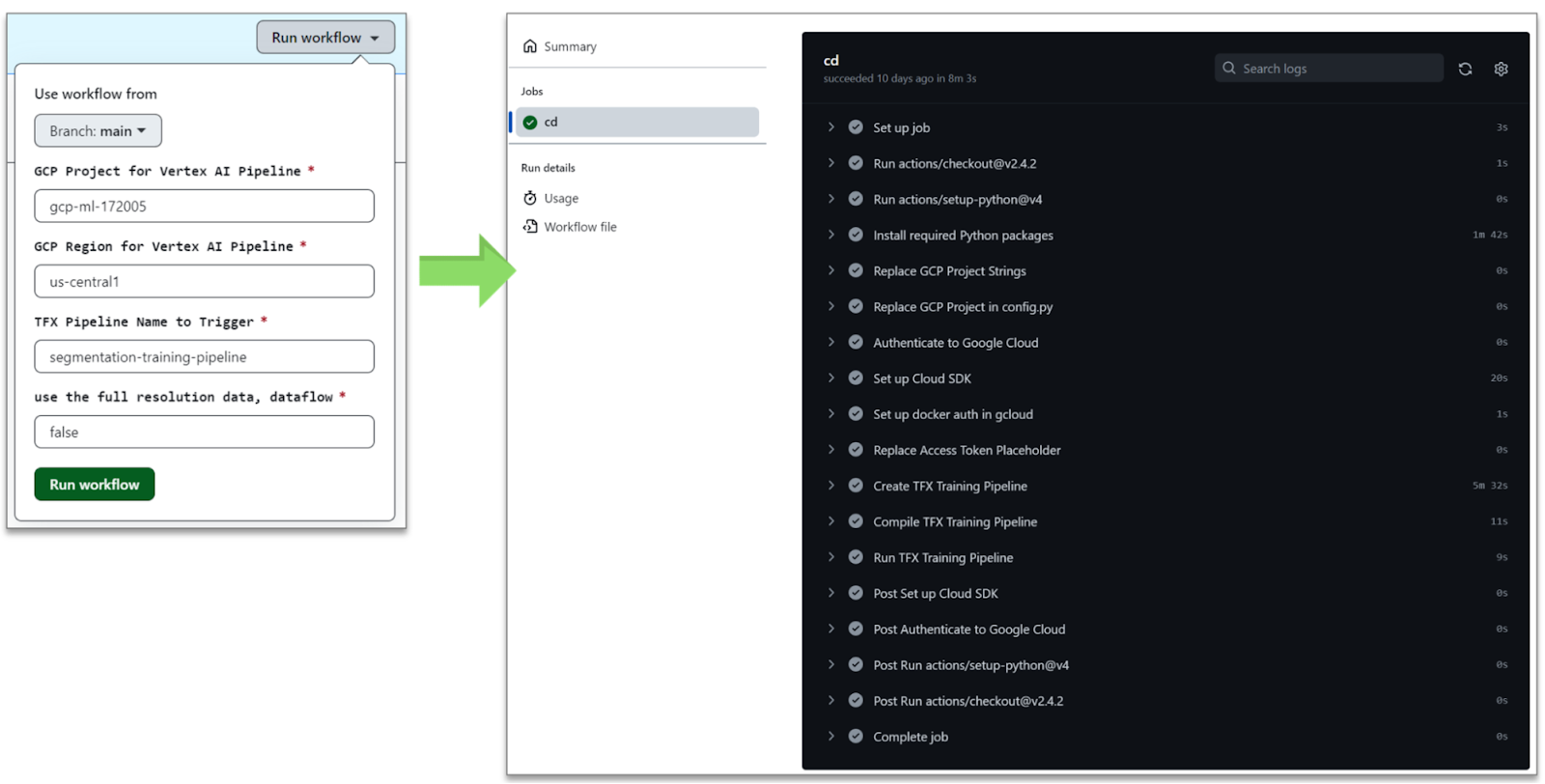
Figure 5. GitHub Action for CI/CD of ML pipeline ( that provided Google Cloud credits to support our experiments. We thank who worked on integrating the model card utilities into the HFPusher component. ↗ Original-Artikel auf blog.tensorflow.org lesenVollständiger Original-BerichtAusführliche Details, Code-Beispiele & Hersteller-Stellungnahme auf blog.tensorflow.org.Wie bewertest du diesen Beitrag?1 Klick FeedbackTeilen mit Netzwerk & Team:Hat Ihnen dieser Tipp / Anleitung geholfen?Community-Analysen & Experten-Meinungen 0
Verfasse deine eigene Analyse, teile Workarounds oder diskutiere diesen Vorfall im Blog.Noch keine Community-Analyse verfasst. Markiere einen Textabschnitt oder klicke oben auf „ Eigene Analyse verfassen“!Community Pulse: Relevanz-Einschätzung1 Klick Experten-Votum🔴 Akute Relevanz 0%🟡 In Evaluierung 0%🟢 Keine Auswirkung 0%Spannende Innovation 0%Port 8095 EngineVerwandte Story-Cluster & Quellen (Vektor-KI)
Tipp: Mit Pfeiltasten [ ← ] und [ → ] blättern Ähnliche Beiträge
🔍 Verwandte News
Ähnliche Beiträge
🔍 Verwandte NewsAuch interessante Nachrichten End-to-End Pipeline for Segmentation with TFX, Google Cloud, and Hugging Face
Thematisch verwandte Begriffe: EndtoEnd, Pipeline, Segmentation, with · 6 Treffer
🕵️ Sicherheitslücken Exploit-DB.com RSS Feed[webapps] Langflow 1.8.4 - Path Traversal to Remote Code Execution
🔧 AI Nachrichten Elastic Security LabsGetting the Most Out of Transformers in Elastic
🕵️ Sicherheitslücken InfoSec Write-ups - MediumHow I Turned Self-XSS into Reflected XSS (and Bypassed the WAF)
🕵️ Sicherheitslücken Elastic Security LabsDetecting and responding to Dirty Pipe with Elastic
Laden...Videos werden geladen ...
Laden...Beiträge werden geladen ...
Laden...Videos werden geladen ...
Laden...Beiträge werden geladen ...
Laden...Videos werden geladen ...
Laden...Beiträge werden geladen ...
Laden...Videos werden geladen ...
Laden...Beiträge werden geladen ...
Laden...Videos werden geladen ...
🔖 Gespeicherte Artikel
📂 Keine gespeicherten Artikel vorhanden.📂 News ⏱️ 3 Min vor 10 MinArtikeldaten werden geladen...Zum Aktualisieren ziehen
tsecurity.de App
Offline-Lesen, Eilmeldungen & 0ms LadezeitInstalliere tsecurity.de direkt auf deinen Home-Bildschirm für das ultimative Vollbild-Magazinerlebnis ohne Browser-Leisten.
Nächster Beitrag🤖Community Radar & Live Chat
Sentinel Bot online • Live-StreamDein Cluster: Security Explorer👥 Match:lädt…📡 Aktivitäten deiner Analysten
lädt…💡 Neues Thema oder Eilmeldung einreichen
Reiche interessante Links, Zero-Days oder Debatten ein. Die Community entscheidet per Upvote über die Veröffentlichung.
🔥 Heiß diskutierte Einreichungen
SOCIAL SHARE CARD GENERATOR