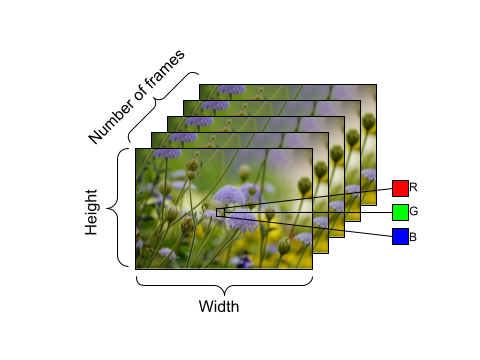
tutorial, let’s take the opportunity to talk about the main workhorse of the majority of these tutorials: the FrameGenerator class. Through this class, we are able to yield the tensor representation of the video and the label, or class, of the video.
classFrameGenerator: def__init__(self, path, n_frames, training = False): """ Returns a set of frames with their associated label. Args: path: Video file paths. n_frames: Number of frames. training: Boolean to determine if training dataset is being created. """ self.path = path self.n_frames = n_frames self.training = training self.class_names = sorted(set(p.name for p in self.path.iterdir() if p.is_dir())) self.class_ids_for_name = dict((name, idx) for idx, name in enumerate(self.class_names)) defget_files_and_class_names(self): video_paths = list(self.path.glob('*/*.avi')) classes = [p.parent.name for p in video_paths] return video_paths, classes def__call__(self): video_paths, classes = self.get_files_and_class_names() pairs = list(zip(video_paths, classes)) if self.training: random.shuffle(pairs) for path, name in pairs: video_frames = frames_from_video_file(path, self.n_frames) label = self.class_ids_for_name[name] # Encode labels yield video_frames, label
Upon creating the generator class, we use the function , let’s discuss the use of the einops library and how it can be incorporated into a Keras model backed by TensorFlow. This library is useful to perform flexible tensor operations and can be used with not only TensorFlow, but also JAX. Specifically in this tutorial, we use it to help with resizing the size of the data as it goes through the (2+1)D convolutional neural network we create. In the context of this second tutorial, we wanted to downsample the video data. Downsampling is particularly useful because it allows our model to examine specific parts of frames to detect patterns that may be specific to a certain feature in that video. Through downsampling, non-essential information can be discarded. It will allow for dimensionality reduction and therefore faster processing.
We use the functions parse_shape() and rearrange() from the einops library. The parse_shape() function used here maps the names of the axes to their corresponding lengths. It will return a dictionary containing this information, called old_shape. Next, we use the rearrange() function that allows you to reorder the axes for multidimensional tensors. Pass in the tensor, alongside the names of the axes you are trying to rearrange.
The notation b t h w c -> (b t) h w c here means we want to squeeze together the batch size (denoted by b) and time (denoted by t) dimensions to pass this data into the Keras Resizing layer object. When we instantiate the ResizeVideo class, we pass in the height and width values that we want to resize the frame to. Once this resizing is complete, we use the rearrange() function again to unsqueeze (using the notation (b t) h w c -> b t h w c) the batch size and time dimensions.
classResizeVideo(keras.layers.Layer): def__init__(self, height, width): super().__init__() self.height = height self.width = width self.resizing_layer = layers.Resizing(self.height, self.width) defcall(self, video): """ Use the einops library to resize the tensor. Args: video: Tensor representation of the video, in the form of a set of frames. Return: A downsampled size of the video according to the new height and width it should be resized to. """ # b stands for batch size, t stands for time, h stands for height, # w stands for width, and c stands for the number of channels. old_shape = einops.parse_shape(video, 'b t h w c') images = einops.rearrange(video, 'b t h w c -> (b t) h w c') images = self.resizing_layer(images) videos = einops.rearrange( images, '(b t) h w c -> b t h w c', t = old_shape['t']) return videos
What’s next?
These are just a few ways you can leverage TensorFlow to work with video data in a memory-efficient manner, but such techniques aren’t just limited to video data. Medical data such as MRI scans or 3D image data also require efficient data loading and potential resizing of the shape of data. These techniques could prove useful when you are working with limited computational resources. We hope you find these tutorials helpful, and thank you for reading!
Vollständiger Original-Bericht
Ausführliche Details, Code-Beispiele & Hersteller-Stellungnahme auf blog.tensorflow.org.

SOCIAL SHARE CARD GENERATOR