



Although not a function from the outset (And I think it should have been) ALM has been a definite focus for Microsoft, first with Dev Ops pipelines and now the new Power Platform pipelines.
But neither are quite perfect, Dev Ops is anything but 'LowCode' and requires support from your IT dept. The new pipelines look promising, though they are still very much in preview (missing features) and they require managed environments. Managed environments are great with lots of features, but they require all makers AND users to have premium licenses. So that bog standard SharePoint Power App would require all its uses to have premium license even though there are now premium capabilities.
The great thing about the Power Platform is it's built in Dataverse (the same place where we can store our data) and it has a great API. Even better there are Admin/Dataverse connectors also built on the API, so that means with the right know how we can pretty much build our own pipeline.
There are a couple of caveats
- The pipeline solution would have to be installed in every environment
- The maker/owner of the solution would have to have System Admin/Customizer security role
- There is no way to sign in for any maker/owner, so when a solution is imported for the first time a human in the loop step is required to sign in the connection references.
So for my pipeline there are a couple of components
- SharePoint List as trigger and tracker
- SharePoint List for human in the loop actions
- Export Flow
- Import Flow
- Change Owner Flow
- An Environment Variable
The solution looks like this:

The overarching design plan is below, which each environment passing the solution along.

For protection I set the list to edit only records, that way others cant trigger peoples pipelines.
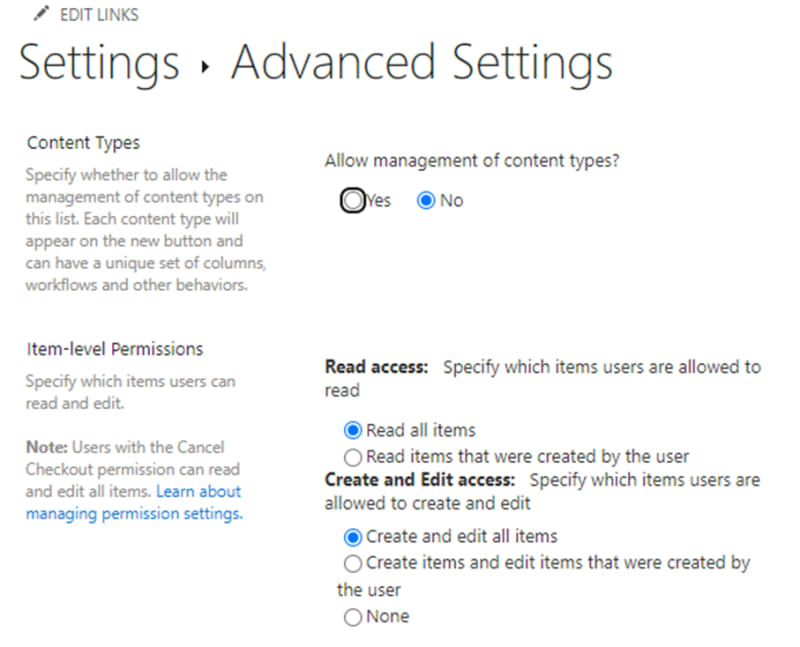
SharePoint list should have following fields
- Solution Name
- Version Number
- From Environment
- To Environment
- Deployment (Dev-Test, Test-Prod, Dev-Dev)
- Change Number (for Test to Prod to show compliance)
- Service Account (owner of solution in Test / Prod)
- Account Sign in (used to request manual sign in to connectors)
- Status (Queued, Exporting, Exported, Importing, Complete, Failed, Not Approved)
- Error Message (Fail messages or not approved details)
- Solution Data (where we store the solution)
The first 8 should be filled in by the requester, Status should default to Queued, Solution Data and Error Message left empty and filled in by the flows.
The Status is used by the flows as the key trigger condition:
- Queued - triggers export
- Exporting - while creating export
- Exported - when export complete and triggers import
- Importing - while importing (including waiting for approval)
- Complete - import complete
- Not Approved - if not approved
- Failed - any exception
Point of reference, my solutions follows my business processes, so yours might not be the same. For me Dev-Test does not require any approval. Nothing can go from Dev to Prod, it has to go Dev to Test to Prod. Test to Prod requires a pre-approved change request (with all test evidence and approvals). Someone has to then validate/approve the change request to ensure its valid before imports to Prod. To help control/identify this all our environments have either DEV, TEST or PROD in their name, this helps the flow know when to request change approval.
The Export Flow
The export flow is triggered when the from environment is its environment (this is stored in an environment variable) and status is Queued.
@equals(triggerOutputs()?['body/FromEnvirnoment'], parameters('Environment (ia_Environment)'))

@equals(triggerOutputs()?['body/Status/Value'], 'Queued')
First it updates the SharePoint item to Exporting, this is to make sure we don't have any accidental triggers and to let user know the flow has started.
It will then use the Unbound Dataverse action to create a solution export, selecting ExportSolution as the Action Name.
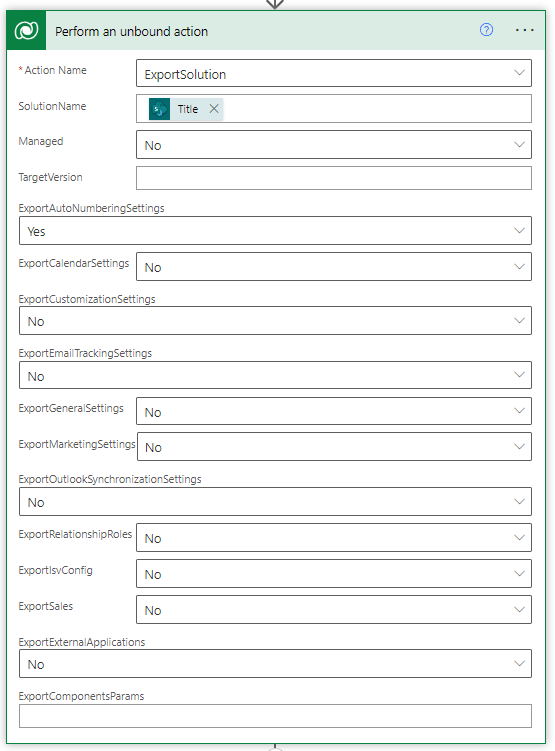
The outputs('Perform_an_unbound_action')?['body/ExportSolutionFile'] will be stored in the Solution Data field.
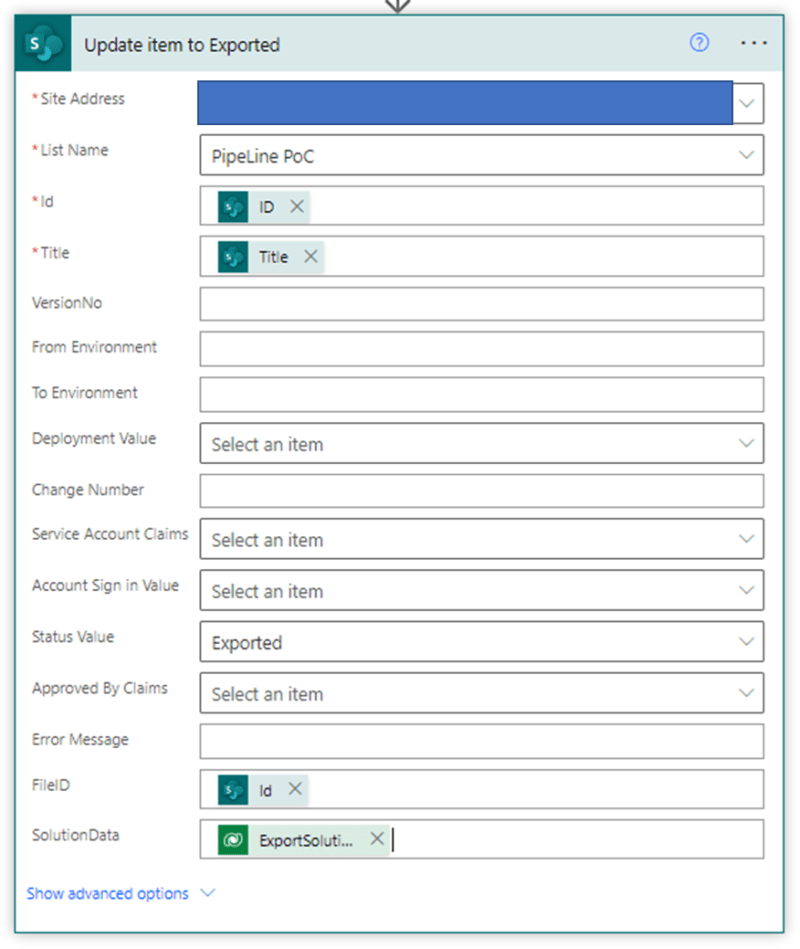
A backup of the export can be saved as an attachment but we need to convert the contents from base64 to binary, we can then attach it.

So the full flow should look something like this:

The Import Flow
The import flow is triggered when the To environment is its environment (this is stored in an environment variable) and status is Exported.
First it updates the SharePoint item to Importing, this is to make sure we don't have any accidental triggers and to let user know the flow has started.
As I mentioned I have additional steps for Test to Prod imports, so the flow will first do some checks
No Approval
Type = Dev to Test or Dev to Dev
From Environment includes DEV
To Environment does not include PROD
Approval
Type = Test-Prod
From Environment includes TEST
To Environment includes PROD
I use the SharePoint List with the Human in the Loop names to create the approvers for the approval flow. If it does not follow one of the two patterns an exception will be reported.

We use the unbound action again, but this time Action Name ImportSolution. The export contents was stored in the Solution Data field, and we need to create a unique import guid.

guid()
At this point we have successfully imported our solution, but there are a couple for things still to do.
First we need to check if the connections need updating. As I said we can't create those connections without signing in as that account. But once connected future imports will be ok and can use the signed in connection references.
This is just another simple logic that sends approval request, once they have completed the sign ins, they set to approved ie complete (Again the SharePoint List with Human in the Loop people is used for the approvers).
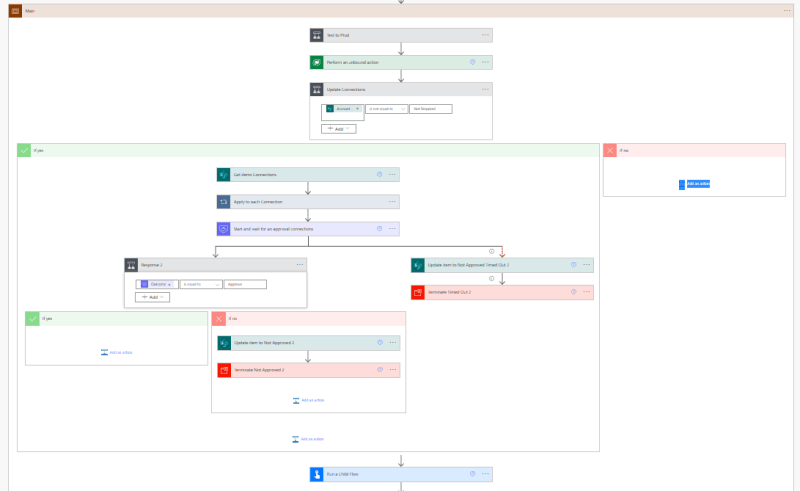
Next we need to change the owner of the Solution, as all of its contents (flows, apps, connection refs, environment vars, etc) are now owned the account that ran the import flow.
To keep things simple this is a separate child flow, and I will go over it in the next blog (it's useful to use outside of pipelines). Though if you plan to us same account then you can skip this stage.
Then as before final step is to update the SharePoint item but this time to Complete.

As you can see it's not exactly simple, but I wouldn't say difficult, and if you want to save money on premium licenses it could be the way to go.
Im hopeful in the furture I might be abale to automate the connections, as its in another dataverse table too.
SOCIAL SHARE CARD GENERATOR