



In this tutorial, we will guide you through the process of hosting a Next.js blog using AWS Amplify and automating deployments with GitHub. We will also provide information about the AWS resources created by Amplify and present some architecture images to help you understand the underlying infrastructure.
To host a site using AWS Amplify, we first need to have a website we can host. For this article, we will use a site that was created on our previous blog post.
Prerequisites
Before getting started with Amplify, make sure you have the following:
An AWS Account: If you don't have one, you can create it by following the instructions in the AWS Account Creation Guide.
Amplify CLI: Install the Amplify CLI by referring to the Amplify CLI Installation Guide.
GitHub Account: Create a GitHub account if you don't have one already at https://github.com/.
Setting Up the Project
To set up your Next.js blog with Amplify, follow these steps:
Initialize Amplify for SSR (Server-Side Rendering): In the root directory of your project, run the following command:
$ amplify init


? Enter a name for the project: albacdev

? Enter a name for the environment: dev

? Choose your default editor: vim

? Choose the type of app that you're building: javascript

? What javascript framework are you using: react

? Source Directory Path: src

? Distribution Directory Path: .next

? Build Command: npm run-script build

? Start Command: npm run-script start

? Do you want to use an AWS profile? Y

? Please choose the profile you want to use: <your profile>
Push Code to GitHub Repository:
If you don't have one already, create a public repository on Github:
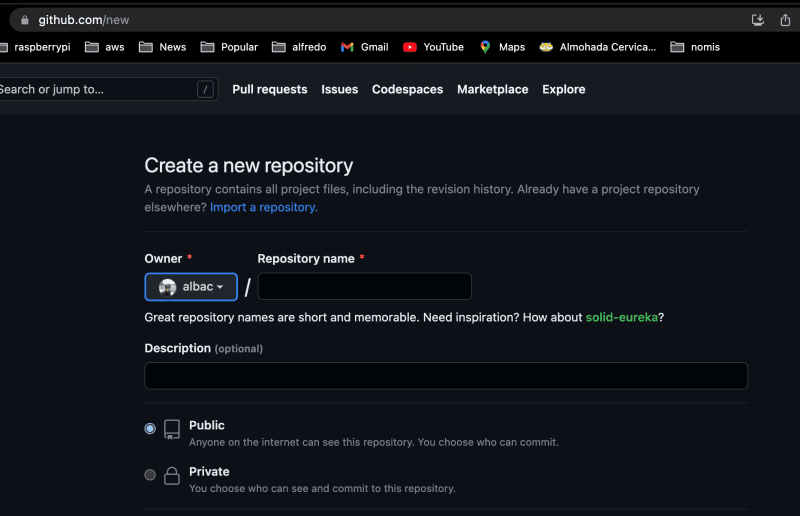
And push your project code to the main branch using the following commands:
$ git init

$ git remote add origin [email protected]:username/my-next-app.git

$ git add .

$ git commit -m "initial commit"

$ git push origin main
Adding Amplify Hosting
First, since we will need server-side rendering for NextJS in future blogs, we need to make sure we initialize Amplify for SSR. Make sure you enter .next as the Distribution Directory Path.
To add hosting to your project and enable continuous deployments from GitHub, follow these steps:
Add Hosting with Amplify CLI: Run the following command to add hosting to your project:
$ amplify add hosting


? Select the plugin module to execute: # Hosting with Amplify Console (Managed hosting with custom domains, Continuous deployment)

? Choose a type: # Continuous deployment (Git-based deployments)
Connect to GitHub: Amplify will open the Amplify AWS console in your browser. Follow the instructions to connect your project to the GitHub repository.


Configure Build Settings: In the Amplify console, set up or select the environment to use and the required AWS role for Amplify to access your resources.

Build and Deployment: Once the build settings are configured, Amplify will start the build process. You can monitor the build progress in the Amplify console. The build process will create all the necessary resources and deploy your application.
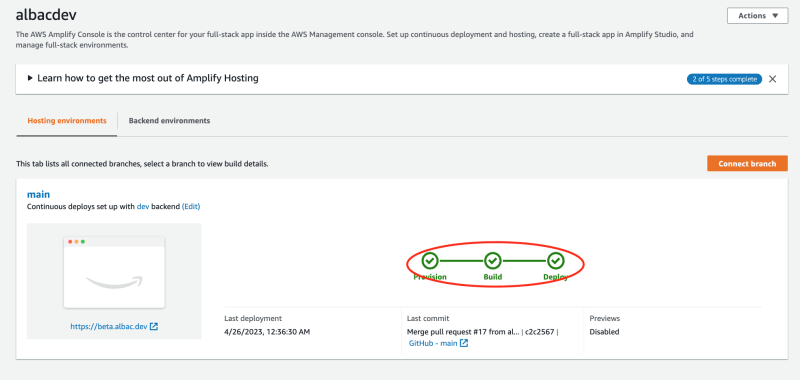

Custom Domain (Optional): You can set up a custom domain for your hosted website by accessing the Amplify console and selecting "Domain management" under "Amplify settings".
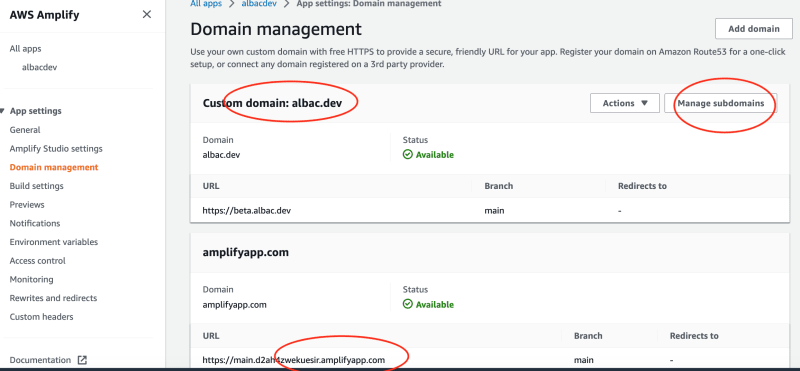
Architecture and AWS Resources
Amplify utilizes AWS resources behind the scenes to deploy and host your Next.js blog. Here are some of the AWS resources and configurations created by Amplify:
- Multiple AWS roles and policies: Amplify creates IAM roles and policies to manage access to AWS resources.
S3 bucket: Amplify uses an S3 bucket to store your application's static assets.
CloudFront setup configurations (CDN): Amplify configures CloudFront, a content delivery network, to cache and serve your application's content globally.
AppSync GraphQL setup: Amplify sets up an AppSync GraphQL API for data management and real-time updates.
AppSync API Key setup: Amplify generates an API key for accessing the AppSync API.
AppSync DataStore setup: Amplify enables the AppSync DataStore, which provides offline data synchronization and conflict resolution capabilities.
Multiple AppSync Resolvers: Amplify configures resolvers to handle data queries and mutations in the AppSync API.
Multiple AppSync Functions: Amplify creates AppSync functions to perform custom logic or integrations.
Build pipeline: Amplify sets up a build pipeline to automate the deployment process.
Domain Name management: Amplify offers domain management features, allowing you to configure custom domains for your website.
SSL/TLS certificates: Amplify automatically provisions and manages SSL/TLS certificates for secure communication with your website.
Conclusion
AWS Amplify simplifies the deployment workflow by seamlessly integrating with GitHub for continuous deployments. This means that every time you push changes to your GitHub repository, Amplify will automatically trigger a build process and deploy the updated version of your Next.js blog. This streamlined workflow saves time and effort, allowing you to focus on developing your application rather than dealing with manual deployment processes.
One of the key advantages of using AWS Amplify is its user-friendly interface. The Amplify console provides a centralized location where you can manage your Amplify projects, configure build settings, monitor deployment progress, and access various AWS resources. This intuitive interface makes it easy to navigate and understand the different components of your Next.js blog's infrastructure.
Amplify also offers support for custom domains, allowing you to associate a personalized domain name with your hosted website. This feature enables you to create a branded and professional online presence. With Amplify's domain management capabilities, you can easily configure and manage custom domains, making it simple to establish a unique identity for your Next.js blog.
Hosting a Next.js blog with AWS Amplify provides a comprehensive solution for deploying and managing your application. It streamlines the deployment process, offers a user-friendly interface, supports custom domains, and ensures secure communication. By utilizing Amplify's powerful features and its integration with Next.js, you can focus on delivering an exceptional user experience while leaving the infrastructure management to Amplify.
SOCIAL SHARE CARD GENERATOR