




Posted by Francesco Romano, Developer Relations Engineer on Android

It’s been more than a year since the release of the Jetpack WindowManager 1.0 stable version, and many things have happened in the foldables and large screen space. Many new devices have entered the market, and many new use cases have been unlocked!
Jetpack WindowManager is one of the most important libraries for optimizing your Android app for different form factors. And this release is a major milestone that includes a number of new features and improvements.
Let’s recap all the use cases covered by the Jetpack WindowManager library.
Get window metrics (and size classes!)
Historically, developers relied on the device display size to decide the layout of their apps, but with the availability of different form factors (such as foldables) and display modes (such as multi-window and multi-display) information about the size of the app window rather than the device display has become essential.
The Jetpack WindowManager WindowMetricsCalculator interface provides the source of truth to measure how much screen space is currently available for your app.
Built on top of that, the window size classes are a set of opinionated viewport breakpoints that help you design, develop, and test responsive and adaptive application layouts. The breakpoints have been chosen specifically to balance layout simplicity with the flexibility to optimize your app for unique cases.
You can use the following code snippet to compute the current WindowSize classes:
private fun computeWindowSizeClasses() { |
To learn more, see our Support different screen sizes developer guide.
Make your app fold aware
Jetpack WindowManager also provides all the APIs you need to optimize the layout for foldable devices.
In particular, use WindowInfoTracker to query FoldingFeature information, such as:
- state: The folded state of the device, FLAT or HALF_OPENED
- orientation: The orientation of the fold or device hinge, HORIZONTAL or VERTICAL
- occlusion type: Whether the fold or hinge conceals part of the display, NONE or FULL
- is separating: Whether the fold or hinge creates two logical display areas, true or false
- bounds: The bounding rectangle of the feature within the application window (inherited from DisplayFeature)
You can access this data through a Flow:
override fun onCreate(savedInstanceState: Bundle?) { |
Once you collect the FoldingFeature info, you can use the data to create an optimized layout for the current device state, for example, by implementing tabletop mode! You can see a tabletop mode example in MediaPlayerActivity.kt.
A great place to start learning about foldables is our codelab: Support foldable and dual-screen devices with Jetpack WindowManager.
Show two Activities side by side
Last, but not least, you can use the latest stable Jetpack WindowManager API: activity embedding.
Available since Android 12L, activity embedding enables developers with legacy multi-activiity architectures to display multiple activities from the same application—or even from multiple applications—side-by-side on large screens.
It’s a great way to implement list-detail layouts with minimal or no code changes.
Note: Modern Android Development (MAD) recommends using a single-activity architecture based on Jetpack APIs, including Jetpack Compose. If your app uses fragments, check out SlidingPaneLayout. Activity embedding is designed for multiple-activity, legacy apps that can't be easily updated to MAD. |
It is also the biggest change in the library, as the activity embedding APIs are now stable in 1.1!
Not only that, but the API is now richer in features, as it enables you to:
- Modify the behavior of the split screen (split ratio, rules, finishing behavior)
- Define placeholders
- Check (and change) the split state at runtime
- Implement horizontal splits
- Start a modal in full window
Interested in exploring activity embedding? We’ve got you covered with a dedicated codelab: Build a list-detail layout with activity embedding.
Many apps are already using activity embedding in production, for example, WhatsApp:

And ebay!
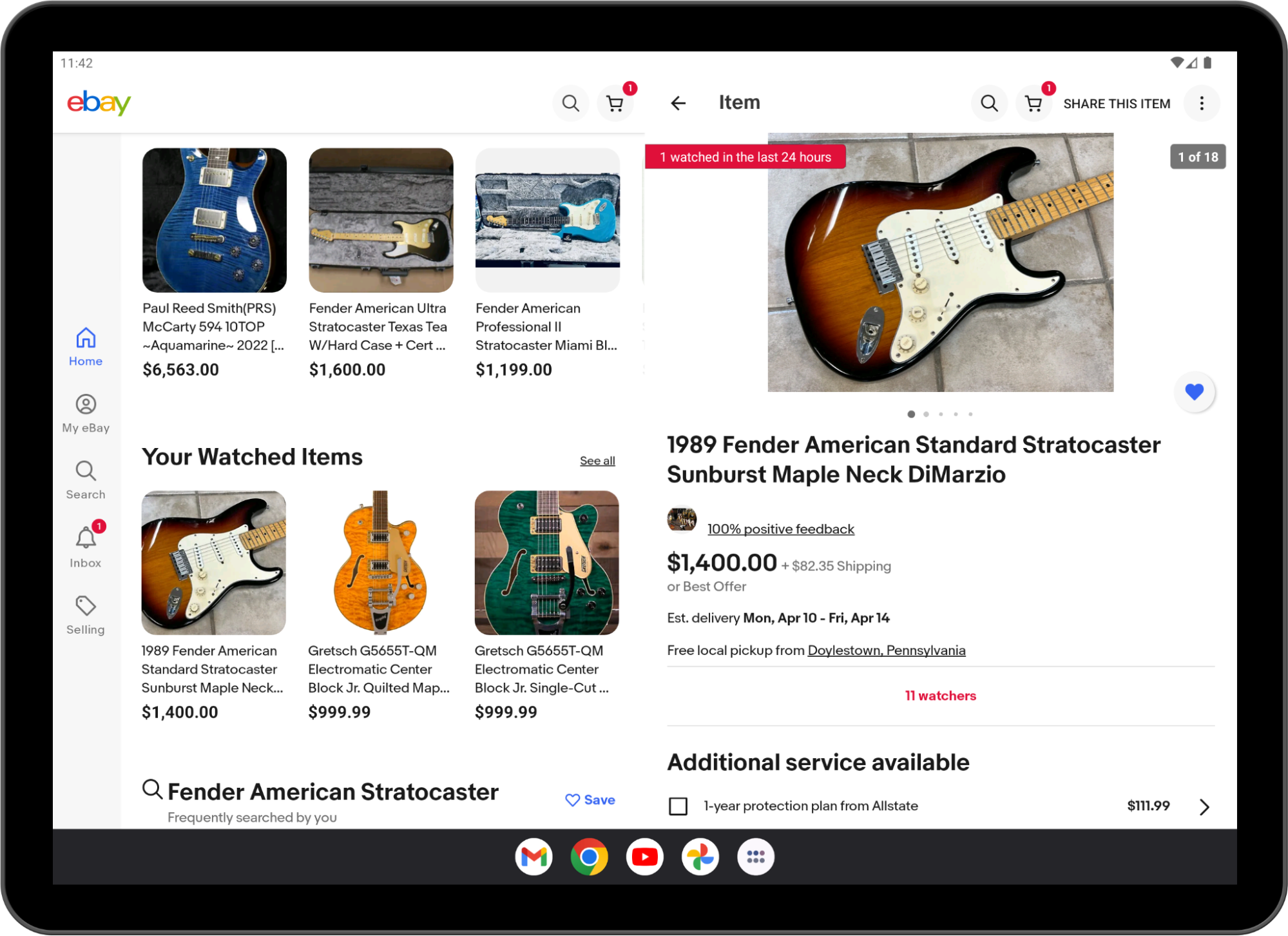
Implementing list-details layouts with multiple activities is not the only use case of activity embedding!
Starting from Android 13 (API level 33), apps can embed activities from other apps.
Cross‑application activity embedding enables visual integration of activities from multiple Android applications. The system displays an activity of the host app and an embedded activity from another app on screen side by side or top and bottom, just as in single-app activity embedding.
Host apps implement cross-app activity embedding the same way they implement single-app activity embedding, but the embedded app must opt-in for security reasons.
You can learn more about cross-application embedding in the Activity embedding developer guide.
Conclusion
Jetpack WindowManager is one of the most important libraries you should learn if you want to optimize your app’s user experience for different form factors.
WindowManager is also adding new, interesting features with every release, so keep an eye out for what’s coming in version 1.2.
See the Jetpack WindowManager documentation and sample app to get started with WindowManager today!
SOCIAL SHARE CARD GENERATOR