Posted by Allison Chang, Product Manager, Google Play
coming to the Play Store for large screen devices. Since then, we’ve seen even more people using large screens for work and play, across millions of active Android devices. Apps and games play a critical role in shaping the on-device experience, so we’ve redesigned the Play Store to help users get the most from their tablets, Chromebooks, and foldables.
Today, we’re introducing four major updates to help users find high-quality large screen apps on Play: refreshed app listing pages, ranking and quality improvements, streamlined store navigation, and a split-screen search experience.
1. Refreshed app listing pages for high-quality apps
Your store listing page is the best way to demonstrate the functionality and value of your app, so we’ve revamped the experience to put your content front and center. Games with
2. Ranking and quality improvements
To promote high-quality apps that shine on large screens, we’ve made several ranking changes to boost quality across Play. Apps and games that adhere to our for apps and games that do not meet Play’s per-device technical quality bar. This extends our phone technical quality requirements for phones to large screens, and affects apps and games with an 8% user-perceived crash rate or 8% user-perceived ANR rate on the user’s device.
in Play Console or the
New content forward formats will use form factor specific screenshots, videos, and descriptions to display a preview of the app experience and help users make install decisions. As part of this change, apps with large screen assets that follow our .
3. Streamlined store navigation
For more seamless browsing, we’ve simplified our store navigation and moved to a left-side navigation rail on larger screens. This puts menu items closer to users’ thumbs and makes them more accessible, especially when holding a device in landscape mode.
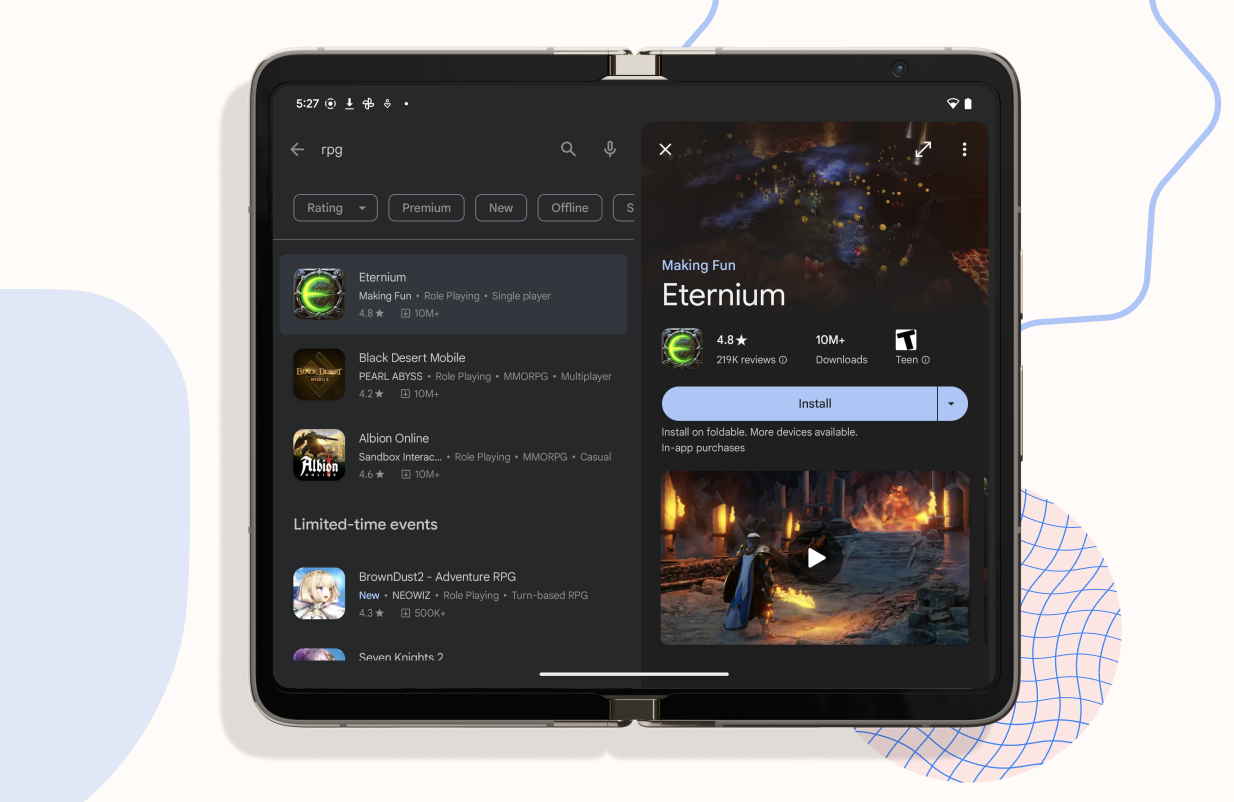
We’re launching a split-screen search experience on large screens, displaying search results and app details pages side by side. This prevents users from switching back and forth when exploring new apps and streamlines the discovery process.
These changes will begin rolling out over the coming weeks, and are just the beginning of our journey in creating a tailored Play Store experience for large screens. For more inspiration and examples of high-quality large screen apps, visit our .
Vollständiger Original-Bericht
Ausführliche Details, Code-Beispiele & Hersteller-Stellungnahme auf android-developers.googleblog.com.


SOCIAL SHARE CARD GENERATOR