Want to download Tiny11 Builder?
If yes, then this post is definitely for you.
One of the most common reasons why people still prefer Windows 10 over the latest version 11 is that, it is highly bloated.
While it is possible to debloat Windows 11 after the installation but this process can be very time-consuming.
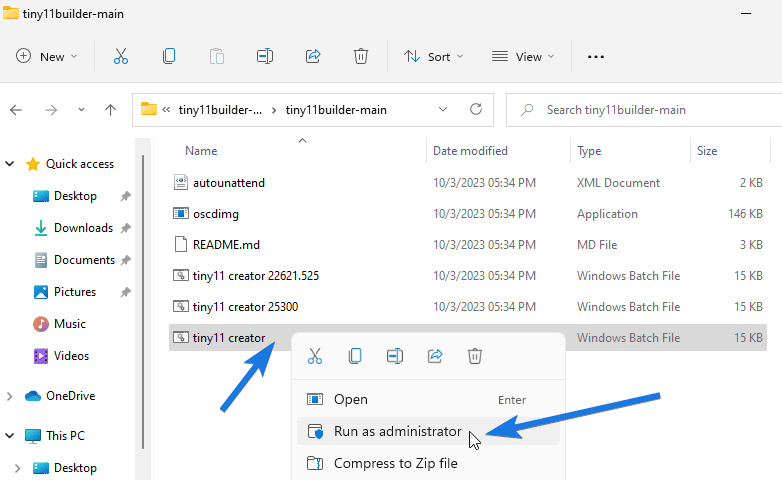
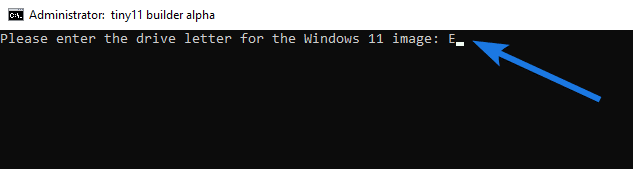
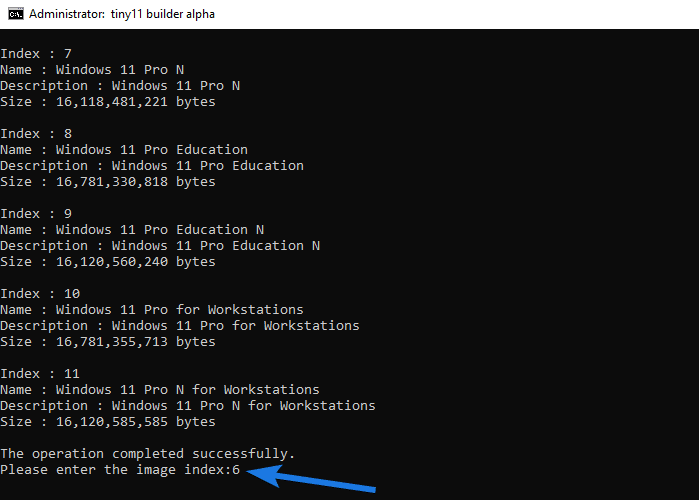
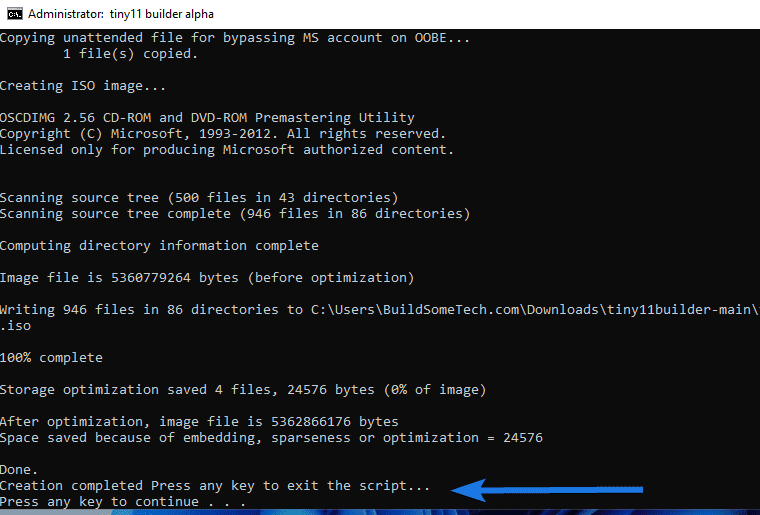
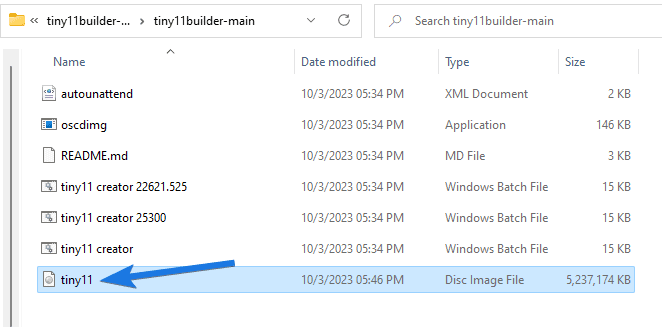
But what if there was a way to create your own Tiny11 Builder is a script that is commonly used to create a stripped-down version of Windows 11. It is developed by NTDEV and can be used as a tool to remove useless bloatware and junk files from the original ISO image file. Basically, this helps us to make our operating system light so that it can run on devices with lower specifications which are mostly unsupported by the latest operating system. Moreover, the debloated version created by this tool can also , Quick Assist, Office Hub, Your Phone, Media Players, etc.) to make your system lightweight, so that it can run smoothly. Before using this app, it’s better to know which version it supports like the latest one is 22621.2361 ( from here, which is officially provided by NTDEV. Or if you are interested in creating your own light version with your preferred apps like Microsoft Teams or more, then use the given steps. Note:- If you are still unsure of this third-party tool, you can install it on a virtual machine first then get your hands on it, and then install it on your main system. First, you need to get the . The file size of this script is around 100 KB and can easily run on a system having 4GB of RAM. The second step is mounting an ISO on your device. I know it is very easy to do but if you don’t know then follow the given steps. You can also use third-party apps to Mount but we prefer the default Microsoft tools for it. Note:- Please note down the “Virtual Drive Letter” where the ISO was mounted. However, there is nothing in this process that can go wrong but make sure to follow all the steps carefully as it involves some delicate commands. 1. First, locate the “Tiny11 Builder” zip file that was downloaded earlier and then extract it into a new folder. 2. Now open the folder, right-click on the “tiny11 creator.bat” file, and then select the “Run as administrator” option. Note:- If you want to use it for specific builds such as 22621.525 and 25300 then use the specific bat file from the folder. 3. After that, a command prompt dialog box will open up. Now type the “Drive Letter” that you noted above, where the ISO file was mounted, and then hit the Enter button. 4. Now it will start copying the files from the drive and once done, it will display all the different versions from it with the index numbers. After that, type the “Index Number” of the version that you want to debloat and then hit the Enter button. 5. After that, the script will start debloating the ISO Image files by removing all the unnecessary apps, bloatware, system requirements, and more. 6. Once the ISO creation is done, you can close the command prompt by pressing any key from your keyboard. Note:- You will find the newly created “tiny11.iso” in the same folder from where you launched the tiny11 builder .bat script file in starting. Although, the installation process of tiny ISO is almost similar to the normal Windows 11 but still here, I have given a brief overview here. Also, to
How to use Tiny 11 Builder?
1. Download Tiny11 Builder & ISO File
2. Mount ISO Image File
3. How to Make Windows 11 Lite using Tiny 11 Builder
A Brief Overview of Tiny11 Installation
That’s it for now…
Conclusion
So, that’s how you can easily create your own custom ISO image using the Tiny 11 Builder, which is slim in size, less cluttered, and free from unnecessary bloatware. Also, if you are looking for some of the other lightest versions of Windows 11 then you can try the Ghost Spectre edition.
Furthermore, this tool works with all the different versions such as Home, Basic, Pro, Education, Server, and Enterprise.
Stay tuned for the latest posts…
Feel free to share your thoughts via comments and also tell us about this post on Tiny11 Builder Download and How to Make Your Windows 11 Light.
If you liked this post, don’t forget to share it.

SOCIAL SHARE CARD GENERATOR