
Zum Hauptinhalt springen
tsecurity.de LIVE
Echtzeit-Radar & Feeds
Alle RSS Feeds
👥 Community & Social
YouTube Security VideosAndroid Police: Samsung is smashing records! #shorts #tech #phones(21.09.2026 um 13:55 Uhr)
YouTube Security Videosheise & c't: Bundesnetzagentur wollte diesen Futterautomaten verbieten(21.09.2026 um 13:53 Uhr)
YouTube Security VideosNeil Patel: Your Google Traffic Isn't An Asset It's A Loan #shorts(21.09.2026 um 14:05 Uhr)
Windows Tipps & SecurityF-14 A Tomcat Top Gun endlich als Revell Klemmbausteinmodell erhältlich(21.09.2026 um 14:27 Uhr)
Sichere ProgrammierungShow the Hand-Back Sample Before Approving an Agent Score(21.09.2026 um 14:15 Uhr)
Sichere ProgrammierungHybrid retrieval in one Postgres query: RRF over tsvector + pgvector(21.09.2026 um 14:15 Uhr)
YouTube Security VideosAndroid Police: Samsung is smashing records! #shorts #tech #phones(21.09.2026 um 13:55 Uhr)
YouTube Security Videosheise & c't: Bundesnetzagentur wollte diesen Futterautomaten verbieten(21.09.2026 um 13:53 Uhr)
YouTube Security VideosNeil Patel: Your Google Traffic Isn't An Asset It's A Loan #shorts(21.09.2026 um 14:05 Uhr)
Windows Tipps & SecurityF-14 A Tomcat Top Gun endlich als Revell Klemmbausteinmodell erhältlich(21.09.2026 um 14:27 Uhr)
Sichere ProgrammierungShow the Hand-Back Sample Before Approving an Agent Score(21.09.2026 um 14:15 Uhr)
Sichere ProgrammierungHybrid retrieval in one Postgres query: RRF over tsvector + pgvector(21.09.2026 um 14:15 Uhr)
Intelligence View
⚡ tsecurity.de Intelligence

Right way to record and share our Terminal sessions

The Terminal, also known as the command line or a Terminal emulator, is an crusial component of any useful operating system. It is by far one of the most important applications on MacOS and Linux. The Terminal provides an efficient…

0
↗ Quelle (kalilinux.in)
Reagiere als Erste:r — dein Feedback zählt!

The Terminal, also known as the command line or a Terminal emulator, is an crusial component of any useful operating system. It is by far one of the most important applications on MacOS and Linux. The Terminal provides an efficient interface to access the true power of a computer better than any graphical user interface.

Sometimes we need to share our terminal or terminal commands to others to show or solve some issue. In that case we use screenshots which are not so satisfying. If we use a screen recorder apps but recording a screen and send the video file is annoying, here steps in asciinema.
Asciinema record and share terminal on Linux

Asciinema is a free and open source solution for recording terminal sessions and sharing them on the web in a easy way. Now this seems very interesting, lets try asciinema on our Kali Linux system. It also can be installed on various systems like MacOS, Linux, BSD even from source and pip.

To install it on our Kali Linux system we can run following command:

sudo apt install asciinema

After giving sudo password the installation process will start. In the following screenshot we can see that asciinema is installing.

asciinema installing on Kali Linux

This is very little tool should be installed on some seconds. After the installation process is complete we can run this tool and start record our terminal.

To start the recording we need to use the following command on our terminal.

asciinema rec

In the following screenshot we can see that it is started and we can see in the following screenshot:
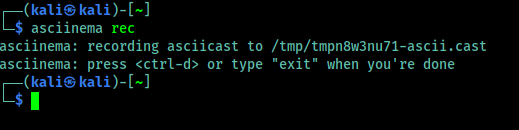
asciinema started

Now we can type any command and it will be recorded. Now we need to remember one thing that it records only the terminal, not other apps or the whole screen. When we feel that our recording is complete we can press CTRL+D or run exit command, shown in the following screenshot:
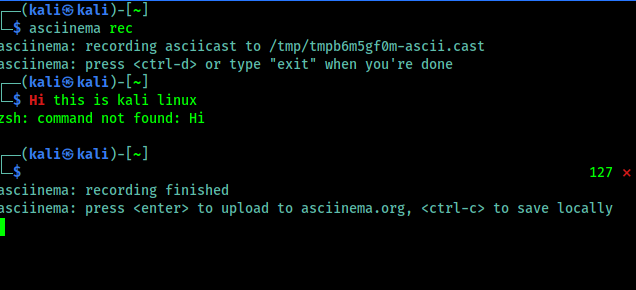
asciinema save options

Here it is clearly written that if we want to upload it on asciinema.org then we need to just press Enter⤶ and to save it on just our system we need to use CTRL+C.

We press Enter⤶ to upload it on asciinema.org and in the following screenshot we got the link of the recording.

asciinema uploaded

Now we can open this on our browser, here we might need an asciinema.org account. If it requires then we can easily create it by using mail id. Asciinema doesn't requires any password they verify the mail address (🤫We can use temp-mail for a temporary mail id🤫), and we are ready to rock. We can see various options there as shown in the following screenshot.
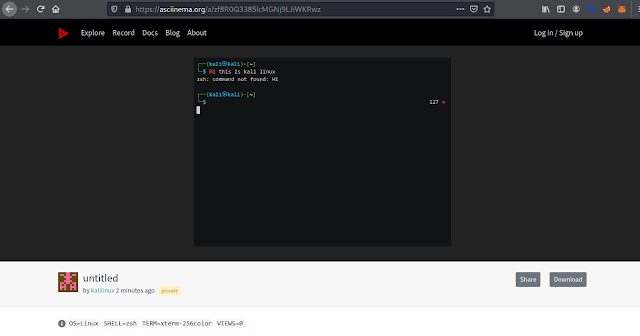
asciinema website options

We can share it in various way. We can directly send someone the link. Asciinema also supports oEmbed/Open Graph/Twitter Card protocols, displaying a nice thumbnail where possible. We can also easily embedded an asciicast on any HTML page. If we want to put a recording in a blog post, project’s documentation or in a conference talk slides. As we embedded a asciinema terminal record, please check below:


We also can play our locally saved asciinema records (with *.cast file extension), by using following command:

asciinema play filename.cast

This is about record and share our terminal in a very easy way. Forget screen recording apps and blurry video. Enjoy a lightweight, purely text-based approach to terminal recording on our Kali Linus system.

Love our articles? Make sure to follow us on Twitter and GitHub, we post article updates there. To join our KaliLinuxIn family, join our Telegram Group. We are trying to build a community for Linux and Cybersecurity. For anything we always happy to help everyone on the comment section. As we know our comment section is always open to everyone. We read each and every comment and we always reply.


Ähnliche Beiträge
🔍 Verwandte News

Auch interessante Nachrichten Right way to record and share our Terminal sessions

Thematisch verwandte Begriffe: Right, record, share, Terminal · 6 Treffer

Laden...

Videos werden geladen ...

Laden...

Beiträge werden geladen ...

Laden...

Videos werden geladen ...

Laden...

Beiträge werden geladen ...

Laden...

Videos werden geladen ...

Laden...

Beiträge werden geladen ...

Laden...

Videos werden geladen ...

Laden...

Beiträge werden geladen ...

Laden...

Videos werden geladen ...

Zum Aktualisieren ziehen
ZERO-DAY CVE-2026-94097 | A vulnerability was determined in Netcore NBR200V2 1.3.241127.071246. Th…
Advisory →
TTS Reader • tsecurity.de Voice
tsecurity.de Icon
tsecurity.de App
Offline-Lesen, Eilmeldungen & 0ms Ladezeit

Installiere tsecurity.de direkt auf deinen Home-Bildschirm für das ultimative Vollbild-Magazinerlebnis ohne Browser-Leisten.

Nächster Beitrag
Themen-Radar & Intelligence Matrix
Echtzeit-Taxonomie nach Angriffsvektoren & Plattformen

tsecurity.de Live Threat Radar

🔴 LIVE RADAR
MONITORING
AKTIV
CVE-DATENBANK
LIVE
🔍
Community Radar & Live Chat
Sentinel Bot online • Live-Stream
Dein Cluster: Security Explorer
Match:
lädt…
Verbindung zum Community-Stream wird aufgebaut...
Bearbeitungsmodus — Senden überschreibt deine Nachricht
Community-Puls — was gerade passiert
lädt…
Aktivitäten deiner Analysten
lädt…
Neues Thema oder Eilmeldung einreichen

Reiche interessante Links, Zero-Days oder Debatten ein. Die Community entscheidet per Upvote über die Veröffentlichung.

Heiß diskutierte Einreichungen
🔖 Gespeicherte Artikel
📂 Keine gespeicherten Artikel vorhanden.
Zurück Ziehen Vor
Links: vorheriger Artikel Rechts: nächster Artikel unten: schließen
News NIS-2 Frühwarnung Tier-1 Intel ⏱️ 3 Min vor 10 Min
Artikeldaten werden geladen...

Zurück: vorheriger Vor: nächster
↗ Original-Quelle
Social Reaktionen Deine Reaktion zählt
Einstufung & Relevanz-Poll 0 Stimmen
In sozialen Netzwerken teilen 1-Klick