



If you're working with PHP and need to get or send data from a website, cURL is the tool you'll need. This post is going to show you the basics of cURL: what it is, and how you can use it in your PHP projects.
We'll go through easy examples to help you understand how to make cURL work for you. So, let's get started and learn how to use this handy tool in PHP!
What is cURL in PHP?
cURL in PHP is a tool that lets you make requests to other websites or servers from your PHP code. It's like using a web browser or phone app to access a website or online service, but your PHP script does it instead.
You can use cURL to get data from a website, send files, or interact with APIs (which are like special access points for different online services). It's handy for making your PHP code talk to other websites or online services.
If you're interested in how to utilize cURL for web scraping and its basic commands, feel free to read this post.
How to use cURL in PHP?
Unlike other programming languages, cURL is supported out of the box in PHP. This is a step-by-step on how to use cURL in PHP:
Step 1: Install libcurl
We need to install the libcurl itself first (library for cURL). Please note that this is not a PHP package. It's the curl library itself.
In order to use PHP's cURL functions you need to install the » libcurl package. PHP requires libcurl version 7.10.5 or later. As of PHP 7.3.0, version 7.15.5 or later is required. As of PHP 8.0.0, version 7.29.0 or later is required. - requirement documentation.
Step 2: Verify it's enabled
Create a simple PHP script that calls the phpinfo() function. This function outputs a lot of information about your PHP environment, including which extensions are enabled. Look for a section about cURL. If it's there, cURL is enabled.
<?php

phpinfo();

?>
Visit the page and locate the "cURL support" section to see if it's already enabled.
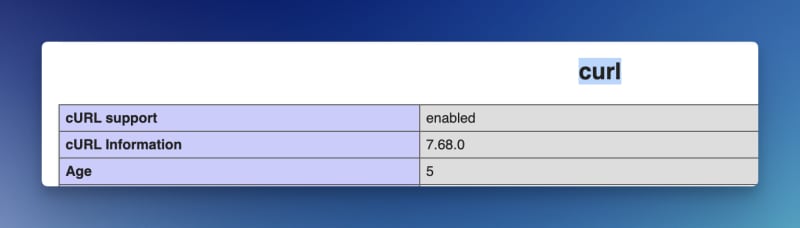
What if it isn't enabled yet?
Open your php.ini file, which is the configuration file for PHP. Look for a line that says extension=curl or extensions=php_curl. Uncomment this line, then save the file. Don't forget to restart the server as well.
Step 3: Start writing cURL!
Here is a simple cURL example in PHP
<?php


    $ch = curl_init();


    curl_setopt($ch, CURLOPT_URL, "https://www.google.com");


    curl_setopt($ch, CURLOPT_RETURNTRANSFER, true);


     $response = curl_exec($ch);


    curl_close($ch);


    echo $response;
Code explanation:
- curl_init: initialize the curl
- curl_setopt: any option or setting for this curl request
- curl_exec: To execute the curl
- curl_close: closing the connection
This will be the default template when running a cURL in PHP.
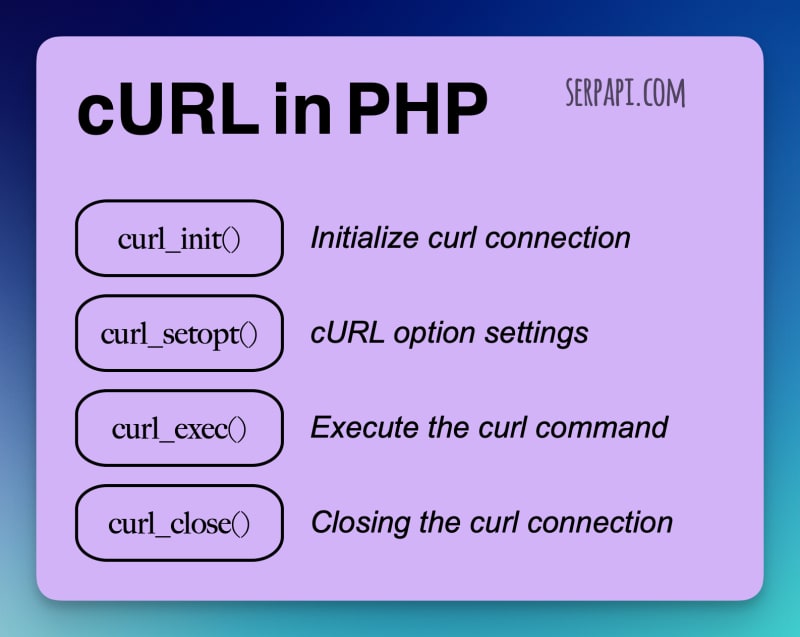
cURL Commands in PHP
Here are some cURL commands in PHP.
Sure, I'll list some common cURL settings in PHP for different types of requests. These are to be used with curl_setopt or curl_setopt_array functions between curl_init and curl_exec.
Simple GET Request
No additional settings are required for a simple GET request beyond initializing cURL and setting the URL.
Simple POST Request
To send a POST request with data:
curl_setopt($curl, CURLOPT_POST, true);
curl_setopt($curl, CURLOPT_POSTFIELDS, "param1=value1¶m2=value2");
Save Raw HTML in a File
To save the output directly to a file:
$file = fopen("index.html", "w");

curl_setopt($curl, CURLOPT_FILE, $file);
Remember to close the file with fclose($file) after curl_close.
Basic Authentication
For basic HTTP authentication:
curl_setopt($curl, CURLOPT_HTTPAUTH, CURLAUTH_BASIC);

curl_setopt($curl, CURLOPT_USERPWD, "username:password");
Sending JSON Data
To send JSON data in a POST request:
$jsonData = json_encode(['tool' => 'curl']);

curl_setopt($curl, CURLOPT_POST, true);

curl_setopt($curl, CURLOPT_POSTFIELDS, $jsonData);

curl_setopt($curl, CURLOPT_HTTPHEADER, array('Content-Type: application/json'));
To add a custom header to your request:
curl_setopt($curl, CURLOPT_HTTPHEADER, array("X-Custom-Header: value"));
Simulating a User Agent
To set a custom User-Agent header:
curl_setopt($curl, CURLOPT_USERAGENT, "User-Agent-String");
Using Proxies
To make a request via a proxy server:
curl_setopt($curl, CURLOPT_PROXY, "proxyserver:port");
Remember to replace "proxyserver:port" with the actual proxy server address and port.
Benefits of using cURL in PHP
Here are the top five benefits of using cURL in PHP instead of performing cURL commands directly on the command line:
- Integration with Web Applications: Using cURL in PHP allows for direct integration with web applications. This is crucial for dynamically fetching data from external sources, interacting with APIs, and integrating these processes seamlessly into the overall workflow of the web application.
- Automated Data Processing: PHP enables automatic processing and manipulation of the data retrieved through cURL. This is particularly useful for handling responses in various formats like JSON or XML, which are common in web services and APIs.
- Error Handling: PHP offers more sophisticated error-handling capabilities when using cURL. This allows for more robust programming by programmatically responding to different error conditions, logging them, or triggering specific actions based on the type of error.
- Dynamic Request Customization: PHP can dynamically create cURL requests based on various conditions such as user input, database contents, or other logic. This flexibility is essential for applications requiring customizable and dynamic web requests.
- Session Management: cURL in PHP can be used in conjunction with session management to maintain stateful interactions with external services. This is important for scenarios like web scraping or dealing with APIs that require authenticated sessions.
These benefits make using cURL in PHP advantageous for developing complex, data-driven web applications, especially compared to the more manual and less dynamic nature of command-line cURL usage.
What is the curl alternative in PHP?
Guzzle can be considered a modern alternative to cURL in PHP. Guzzle is a PHP HTTP client that makes it easy to send HTTP requests and trivial to integrate with web services.
Link: https://docs.guzzlephp.org/en/latest/