



OpenAI provides many awesome APIs that help developers around the world to build their AI apps. One of the struggles many developers face is inconsistent output, which is not suitable for programmatic use. OpenAI introduced a solution for this. It's called function calling.
What you get in this blog post:
- Understand function calling and how to use it
- Extract the user's natural language into a structured format
- Learn how to call an external API combined with an AI model
- Response with natural language based on external API data
- You can create a program that understands and can respond in human language
The code source is available at: https://github.com/hilmanski/openai-function-calling-example
What is the "function calling" by OpenAI?
Function calling in the OpenAI world allows developers to get structured responses from the model. A Model can respond with a detailed JSON object that we defined ourselves, which makes it easier for developers to connect the model's language with external tools and applications, turning conversational requests into programmable tasks.

Before function calling (The old way)
Since AI models are smart enough, we can ask the model to return a specific format. But there's no guarantee that the model will produce precisely what we want.
Here is how I would do it the old way. Let's say we build a shopping assistant that can figure out these things from the user's natural language prompt: item, amount, price, and brand
const openai = new OpenAI({

        apiKey: OPENAI_API_KEY,

    });


const userPrompt = `Holiday is coming.

                  I have 1 son and 2 daughters. I want them to stay active.

                  So I need running tshirt for them by Armour, and my

                  budget is $50`


const completion = await openai.chat.completions.create({

    messages: [{"role": "system", "content":

                `You are a helpful assistant. Return user input in this format:

                "item": name of the product,

                "amount": number of items, return 1 if not specified,

                "brand": brand of the product,

                "price": price of the product,

              `},

                {"role": "user", "content": userPrompt}],

    model: "gpt-3.5-turbo",

  });


  console.log(completion.choices[0].message.content);
As you can see, I define my expected output in the system\ section when sending the messages.
Here is the result:
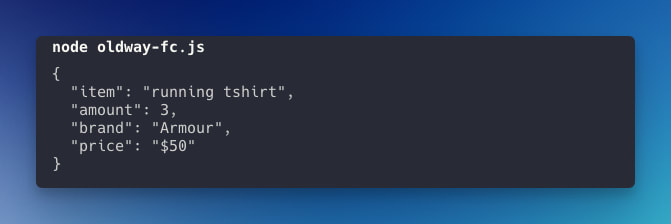
The result is good. The only problem is there are no guarantees that it will work consistently. It's a problem when we need to pass this data to a function that requires a certain value.
Example using function calling
Now, let's do the same task with function calling instead. You'll find the explanation after the code sample.
const tools = [

  {

    "type": "function",

    "function": {

      "name": "extractShoppingDetail",

      "description": "Extract shopping detail from the user prompt",

      "parameters": {

        "type": "object",

        "properties": {

          "item": {

            "type": "string",

            "description": "The item name"

          },

          "amount": {

            "type": "number",

            "description": "The amount of the item"

          },

          "brand": {

            "type": "string",

            "description": "The brand of the item"

          },

          "price": {

            "type": "number",

            "description": "The price of the item"

          }

        },

        "required": ["query"]

      }

    }

  }

]


const userPrompt = `Holiday is coming.

                    I have 1 son and 2 daughters. I want them to stay active.

                    So I need running tshirt for them by Nike, and my budget is $50`


const completion = await openai.chat.completions.create({

    model: "gpt-3.5-turbo",

    messages: [{"role": "user", "content": userPrompt}],

    tools: tools,

    tool_choice: "auto",

  });


console.log(completion.choices[0].message.tool_calls[0].function.arguments)
Code explanation
- Tools, we define the function in an array since
function callingcan accept multiple functions - In the function object, we define the output at the parameters. We can determine the type and the key name
- In the chat completion method, now we don't need to tell the system; instead, we will attach
toolsparameter based on thetoolsvariable we defined previously - Tool_choice is which function we want to call, but we can let it auto for now.
- The output of this function is available at
.message.tool_calls[0].function.arguments
What's the benefit of using function calling?
- You can have a consistent output schema
- You can define the type of the output
- You can have multiple functions
What if the prompt is not complete
Let's say the user only provides us with this information
`I need a running tshirt for my son for this holiday, and my budget is $50`
There is no brand and no amount of information on that prompt. So, the response would be:
{

  "item": "running t-shirt",

  "price": 50

}
In this case, we can create a conditional statement in our program: checking if the object doesn't contain a specific key, then we can add a default value.
Read our study case where we experimented to scrape raw HTML data using function calling by OpenAI.
Use function calling for request external API
The good thing about having a consistent output is we can utilize this response to continue to access an external API.
Let's say we want the shopping results from the Google shopping website. We can use Google Shopping API by SerpApi.
This is the endpoint (CURL sample) for this API
curl --get https://serpapi.com/search \

 -d engine="google_shopping" \

 -d q="Macbook+M2" \

 -d api_key="SERPAPI_KEY"
Make sure you've registered at serpapi.com to get your SERPAPI_KEY
Install SerpApi package
Don't forget to install the API package you want to use. In this sample, we need to install the serpapi package*:* https://github.com/serpapi/serpapi-javascript
npm install serpapi
Basic sample
Since the API only needs a query q as a parameter. We can pass on the item that we got from the previous response.
const { getJson } = require("serpapi");


const userPrompt = `Holiday is coming.

          I have 1 son and 2 daughters. I want them to stay active.

          So I need running tshirt for them by Nike, and my budget is $50`


const completion = await openai.chat.completions.create({

    model: "gpt-3.5-turbo",

    messages: [{"role": "user", "content": userPrompt}],

    tools: tools,

    tool_choice: "auto"

});


const args = completion.choices[0].message.tool_calls[0].function.arguments

const parsedArgs = JSON.parse(args)


try {

    const result = await getJson({

        engine: "google_shopping",

        api_key: SERPAPI_KEY,

        q: parsedArgs['item']

    });


    console.log(result["shopping_results"])

} catch (error) {

    console.log('Error running SerpApi search request')

    console.log(error)

}
Here is the output
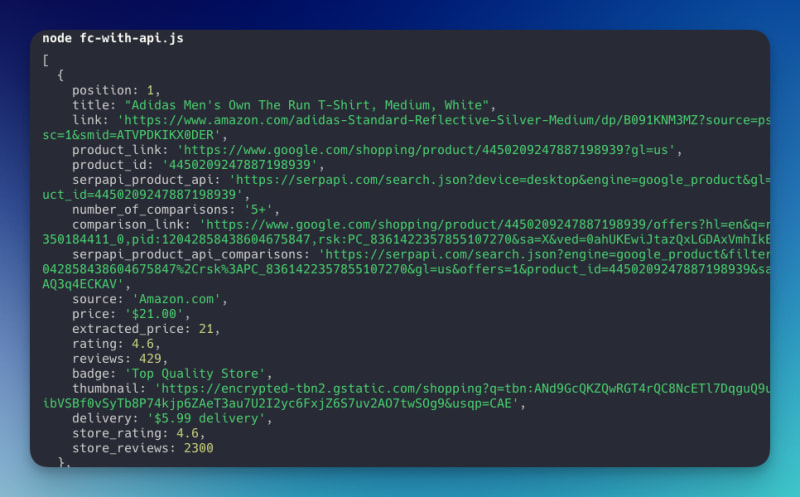
We've successfully called an external API based on the value extracted from the function calling.
Using filter
Since the filter API is available, let's use the first method. Based on the documentation, we can add a tbs parameter with this value: mr:1,price:1,ppr_max:$MAX_BUDGET .
The value itself comes from Google Shopping. You can take a look at the URL parameter after performing a fitler. We just need to adjust the $MAX_BUDGET
Here's my adjusted code
const result = await getJson({

    engine: "google_shopping",

    api_key: SERPAPI_KEY,

    q: parsedArgs['item'],

    tbs: `mr:1,price:1,ppr_max:${parsedArgs['price']}`,

});
I also adjust the budget from the promo to $10.

Now, all the results returned are less than $10.
So, we can mix and match the responses from function calling depending on what the API provided to filter the result.
Response with natural human language
So far, we returned (log) the data directly in JSON format. We can ask AI to analyze this data and return it to us in a more natural response. For this, we need to create a second call to the chat completion API.
Watch out for the maximum token (character limit) you can pass. It varies between OpenAI models.
Here is my code addition
 let apiResult = {}


    try {

        console.log('------- Request for External API ----------')

        apiResult = await getJson({

            engine: "google_shopping",

            api_key: SERPAPI_KEY,

            q: parsedArgs['item'],

            tbs: `mr:1,price:1,ppr_max:${parsedArgs['price']}`,

        });

    } catch (error) {

        console.log('Error running SerpApi search request')

        console.log(error)

    }


    console.log('------- Request for natural language ----------')

    const naturalResponse = await openai.chat.completions.create({

        model: "gpt-3.5-turbo",

        messages: [

            {"role": "system", "content": "You are a shopping assistant. Provide me the top 3 shopping results. Only get the title, price and link for each item in natural language."},

            {"role": "user", "content": JSON.stringify(apiResult['shopping_results'].slice(0, 3))}

        ],

    })


    console.log(naturalResponse.choices[0].message.content)
Here is the result
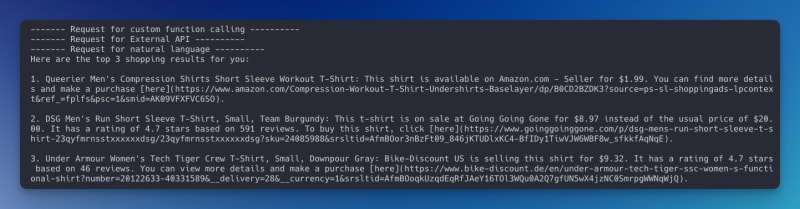
See now that our shopping assistant talks just like a human. It also informs us of additional information that they got from the JSON result.
That's it!
This is the basis for creating an intelligent assistant that can access external data from external API by utilizing the function calling feature from OpenAI. I hope this post can help you build your next fantastic idea!
If you need a chat-like program to understand/consider the user's previous conversation, you might need the assistant API by OpenAI, which we will cover in a different post.
Alternatively, you can also use the custom GPT by OpenAI to build the chat program in a no-code way. Read our guide on how to connect custom GPT to the internet.
Feel free to contact me at hilman(at)serpapi(dot)com should you have any questions on this.
SOCIAL SHARE CARD GENERATOR