



In the last post we have gone through the Installation and Setup of LangChain.
In the realm of LangChain, the pivotal element shaping any application lies in the language model. This module lays the foundation for effective interaction with language models, ensuring a seamless integration process. 🚀
Key Components of Model I/O 🧩
LLMs and Chat Models (used interchangeably): 🗣️
LLMs:
Definition: Pure text completion models.
Input/Output: Take a text string as input and return a text string as output.
Chat Models:
Definition: Models leveraging a language model as a base, differing in input and output formats.
Input/Output: Accept a list of chat messages as input and return a Chat Message.
Prompts: 📝
Templatize, dynamically select, and manage model inputs. This enables the creation of flexible and context-specific prompts guiding the language model's responses.
Output Parsers: 📤
These components extract and format information from model outputs. They prove invaluable for converting raw language model output into structured data or specific formats required by the application.
LLMs: 🧠
LangChain's integration with Large Language Models (LLMs), such as OpenAI, Cohere, and Hugging Face, constitutes a fundamental aspect of its functionality. LangChain itself doesn't host LLMs but provides a uniform interface for interacting with various LLMs.
This section outlines the usage of the OpenAI LLM wrapper in LangChain, applicable to other LLM types. Assuming it's installed, let's initialize the LLM:
from langchain.llms import OpenAI

llm = OpenAI()
LLMs adhere to the Runnable interface, the basic building block of the LangChain Expression Language (LCEL). This implies support for invoke, ainvoke, stream, astream, batch, abatch, astream_log calls.
LLMs accept strings as inputs or objects coerced to string prompts, including List[BaseMessage] and PromptValue. Now, let's delve into some examples:
response = llm.invoke("List the seven wonders of the world.")

print(response)

You can alternatively call the stream method to stream the text response.
for chunk in llm.stream("Where were the 2012 Olympics held?"):

    print(chunk, end="", flush=True)

Chat Models: Revolutionizing Conversations in LangChain 💬
In the dynamic realm of LangChain, the integration of chat models emerges as a pivotal force, breathing life into interactive chat applications. These models, a specialized variant of language models, wield the power of internal language models while showcasing a distinctive interface tailored around chat messages as both inputs and outputs. Let's embark on an in-depth exploration of leveraging OpenAI's chat model within the LangChain ecosystem.
from langchain.chat_models import ChatOpenAI

chat = ChatOpenAI()
Within the language of LangChain, chat models seamlessly interact with various message types, including AIMessage, HumanMessage, SystemMessage, FunctionMessage, and ChatMessage (sporting an arbitrary role parameter). The stalwarts among these are undeniably HumanMessage, AIMessage, and SystemMessage.
from langchain.schema.messages import HumanMessage, SystemMessage

messages = [

    SystemMessage(content="You are Michael Jordan."),

    HumanMessage(content="Which shoe manufacturer are you associated with?"),

]

response = chat.invoke(messages)

print(response.content)

Unveiling the Power of Prompts 🎭
Prompts, the architects of coherent and relevant language model outputs, assume a central role in the LangChain narrative. From straightforward instructions to intricate few-shot examples, handling prompts within LangChain is a streamlined journey, all thanks to a suite of dedicated classes and functions.
Crafting a Dynamic Prompt with PromptTemplate 🖋️
from langchain.prompts import PromptTemplate


# Simple prompt with placeholders

prompt_template = PromptTemplate.from_template(

    "Tell me a {adjective} joke about {content}."

)


# Filling placeholders to create a prompt

filled_prompt = prompt_template.format(adjective="funny", content="robots")

print(filled_prompt)
For chat models, where prompts evolve into more structured conversations with messages assigned specific roles, LangChain introduces the ChatPromptTemplate.
Shaping an Interactive Chat Prompt 🤔
from langchain.prompts import ChatPromptTemplate


# Defining a chat prompt with various roles

chat_template = ChatPromptTemplate.from_messages(

    [

        ("system", "You are a helpful AI bot. Your name is {name}."),

        ("human", "Hello, how are you doing?"),

        ("ai", "I'm doing well, thanks!"),

        ("human", "{user_input}"),

    ]

)


# Formatting the chat prompt

formatted_messages = chat_template.format_messages(name="Bob", user_input="What is your name?")

for message in formatted_messages:

    print(message)
This strategic approach empowers the creation of chatbots that are not only interactive but also dynamic in their responses, adapting to the nuances of the conversation.
Both PromptTemplate and ChatPromptTemplate seamlessly integrate with the LangChain Expression Language (LCEL), positioning themselves as integral components within more extensive and intricate workflows—a topic we'll delve deeper into shortly.
Custom prompt templates become the artisans' tools, essential for tasks demanding unique formatting or specific instructions. The artistry involves defining input variables and crafting a custom formatting method, providing LangChain the flexibility to cater to a diverse array of application-specific needs.
Discover the power of few-shot prompting in LangChain, a feature that empowers models to learn from examples. This proves indispensable for tasks requiring contextual understanding or recognition of specific patterns. Few-shot prompt templates can be meticulously constructed from a set of examples or with the aid of an Example Selector object—unveil more on this here. Embrace the journey of transforming prompts into dialogues, where language models breathe life into interactive narratives within the LangChain universe.
The Power of Output Parsers in LangChain 🛠️
Output parsers stand as the unsung heroes in the vibrant ecosystem of LangChain, playing a pivotal role in shaping the responses generated by language models. This section is an exploration of the nuanced world of output parsers, accompanied by code examples utilizing LangChain's diverse set, including PydanticOutputParser, SimpleJsonOutputParser, CommaSeparatedListOutputParser, DatetimeOutputParser, and XMLOutputParser.
PydanticOutputParser: Crafted Precision ✨
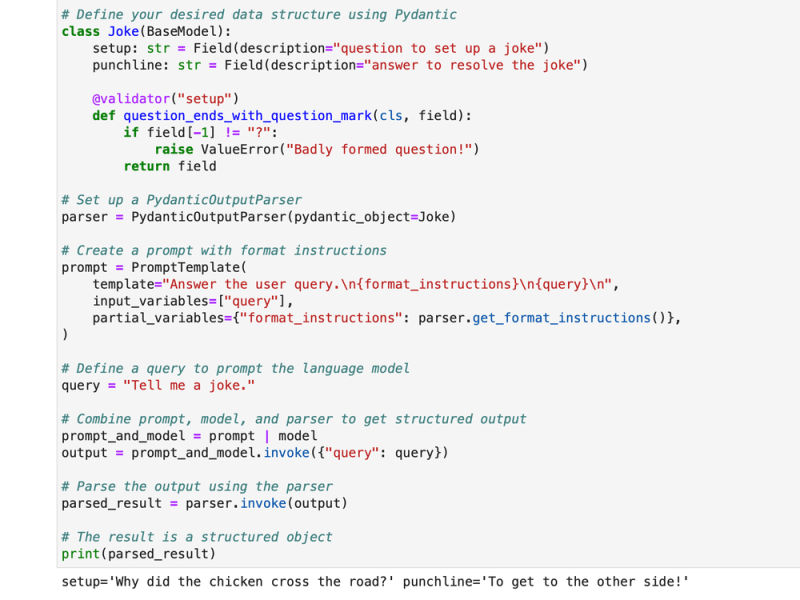
LangChain introduces the PydanticOutputParser, a gem for parsing responses into Pydantic data structures. Let's delve into a step-by-step example to witness its prowess:
# Initializing the language model

model = OpenAI(model_name="text-davinci-003", temperature=0.0)


# Defining the desired data structure using Pydantic

class Joke(BaseModel):

    setup: str = Field(description="question to set up a joke")

    punchline: str = Field(description="answer to resolve the joke")


    @validator("setup")

    def question_ends


_with_question_mark(cls, field):

        if field[-1] != "?":

            raise ValueError("Badly formed question!")

        return field


# Setting up a PydanticOutputParser

parser = PydanticOutputParser(pydantic_object=Joke)


# Creating a prompt with format instructions

prompt = PromptTemplate(

    template="Answer the user query.\n{format_instructions}\n{query}\n",

    input_variables=["query"],

    partial_variables={"format_instructions": parser.get_format_instructions()},

)


# Defining a query to prompt the language model

query = "Tell me a joke."


# Combining prompt, model, and parser for structured output

prompt_and_model = prompt | model

output = prompt_and_model.invoke({"query": query})


# Parsing the output using the parser

parsed_result = parser.invoke(output)


# The result is a structured object

print(parsed_result)
SimpleJsonOutputParser: Decoding JSON-Like Elegance 🌐
When dealing with JSON-like outputs, LangChain's SimpleJsonOutputParser takes the stage. Here's a glimpse into its functionality:
# Creating a JSON prompt

json_prompt = PromptTemplate.from_template(

    "Return a JSON object with `birthdate` and `birthplace` key that answers the following question: {question}"

)


# Initializing the JSON parser

json_parser = SimpleJsonOutputParser()


# Crafting a chain with the prompt, model, and parser

json_chain = json_prompt | model | json_parser


# Streaming through the results

result_list = list(json_chain.stream({"question": "When and where was Elon Musk born?"}))


# The result is a list of JSON-like dictionaries

print(result_list)

CommaSeparatedListOutputParser: Unraveling Lists with Ease 📜
The CommaSeparatedListOutputParser steps in when extracting comma-separated lists from model responses becomes imperative. Witness its simplicity in action:
# Initializing the parser

output_parser = CommaSeparatedListOutputParser()


# Creating format instructions

format_instructions = output_parser.get_format_instructions()


# Creating a prompt to request a list

prompt = PromptTemplate(

    template="List five {subject}.\n{format_instructions}",

    input_variables=["subject"],

    partial_variables={"format_instructions": format_instructions}

)


# Defining a query to prompt the model

query = "English Premier League Teams"


# Generating the output

output = model(prompt.format(subject=query))


# Parsing the output using the parser

parsed_result = output_parser.parse(output)


# The result is a list of items

print(parsed_result)

DatetimeOutputParser: Unveiling Temporal Insights 🕰️
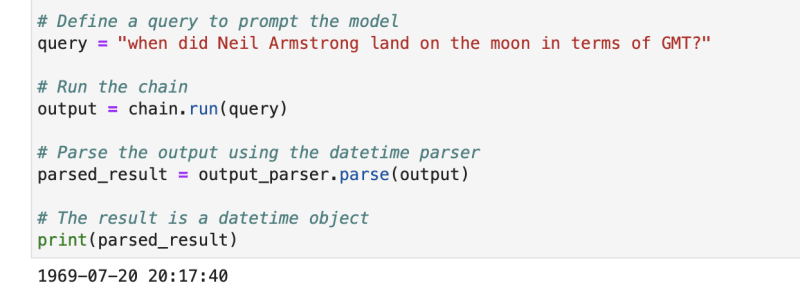
LangChain's DatetimeOutputParser is tailored for parsing datetime information. Experience its capabilities firsthand:
# Initializing the DatetimeOutputParser

output_parser = DatetimeOutputParser()


# Creating a prompt with format instructions

template = """

Answer the user's question:

{question}

{format_instructions}

"""


prompt = PromptTemplate.from_template(

    template,

    partial_variables={"format_instructions": output_parser.get_format_instructions()},

)


# Creating a chain with the prompt and language model

chain = LLMChain(prompt=prompt, llm=OpenAI())


# Defining a query to prompt the model

query = "when did Neil Armstrong land on the moon in terms of GMT?"


# Running the chain

output = chain.run(query)


# Parsing the output using the datetime parser

parsed_result = output_parser.parse(output)


# The result is a datetime object

print(parsed_result)
These examples unfold the versatility of LangChain's output parsers, adept at structuring diverse model responses to cater to various applications and formats. Output parsers emerge as indispensable tools, elevating the usability and interpretability of language model outputs within the LangChain ecosystem.
SOCIAL SHARE CARD GENERATOR