



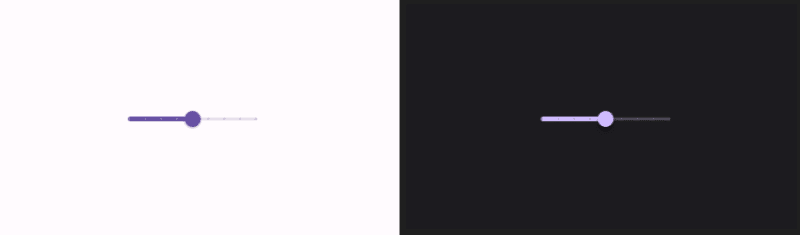
If you are reading this, you most likely came from this Instagram post or this GitHub repository. If not, it's fine; you can proceed to learn about the fundamentals of creating a circular draggable Slider. The default slider provided by Jetpack Compose is linear, as shown in the image below.
In this piece, we are going to implement a custom one that will appear as shown below.
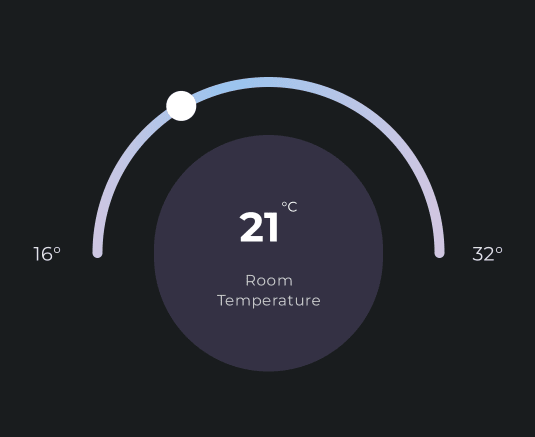
Be sure to access the full code for easier reference.
The canvas
The canvas is needed when we want to implement custom elements that are not provided by Jetpack Compose or the built-in Android implementations. We are not going to entirely talk about the canvas here, but only its aspects that will be used, which are:
- The
drawArcmethod - The
drawCirclemethod
The methods' names tend to give us a hint of what they do. To draw the slider, an arc will be needed, and the drawArc method will be utilized.

The thumb indicator, which is a circle, will be drawn using the drawCircle method.
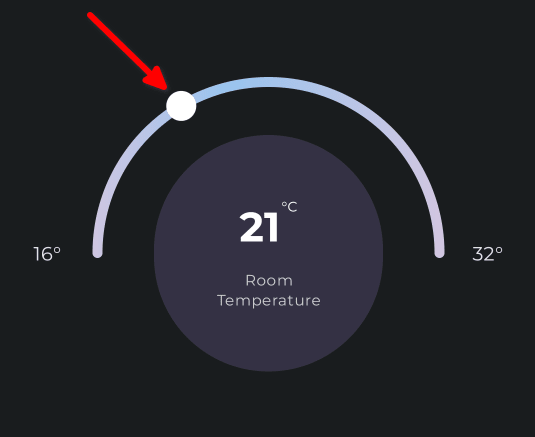
Let's begin dissecting the canvas, starting with its skeleton implementation.
@OptIn(ExperimentalComposeUiApi::class)

@Composable

fun CircularSlider(modifier: Modifier=Modifier,

    padding: Float=50f,

    stroke: Float=20f,

    cap: StrokeCap=StrokeCap.Round,

    touchStroke: Float=50f,

    onChange: ((Float) -> Unit)?=null) {


    //Other code here


    LaunchedEffect(key1=angle) {


        //TODO(Add code here...)

    }


    //TODO(Add code here...)


    Canvas(modifier=modifier .onGloballyPositioned {


            //TODO(Add code here...)

        }


        .pointerInteropFilter {


            //TODO(Add code here...)


        }) {


        drawArc(

            //TODO(Add code here...)

        )


        drawCircle(

            //TODO(Add code here...)

        ))

    }

}
The //TODO(Add code here...) shows where code snippets will be added to complete the Canvas.
LaunchedEffect
Let's begin with the LaunchedEffect block. It will be used to ensure that the thumb indicator doesn't exceed the bounds of the arc by using an if conditional block. It will also be used to set the percentage traversed by the thumb indicator in relation to the arc's length using the invoke() operator.
LaunchedEffect(key1=angle) {


    if (angle < 0.0f && angle > -90f) {

        angle=0.0f

    }


    else if (angle < 0.0f && angle < -90f) {

        angle=180.0f

    }


    else if (angle >=180f) {

        angle=180f

    }


    appliedAngle=angle onChange?.invoke(angle / 180f)

}
The figure 180 was settled on for this tutorial since we are creating a semicircle which usually covers 180°. So if the thumb's position is at 90°, then the percentage covered will be 50%. appliedAngle will be used in a moment when positioning the thumb's position indicator.
The second TODO will be for creating a gradient background for the arc. You can find the snippet in the full code.
The onGloballyPositioned and the pointerInteropFilter modifiers
onGloballyPositioned is used to position the canvas and its contents. It does so using the LayoutCoordinates' width and height. The center is calculated by halving the width and height. The radius is calculated using either the width or by subtracting half of the stroke's weight and the base padding from the height's half dimensions. The smaller value between the two will be the set radius.
.onGloballyPositioned {

    width = it.size.width

    height = it.size.height

    center = Offset(width / 2f, height / 2f)

    radius = min(width.toFloat(), height.toFloat()) / 2f - padding - stroke / 2f

}
pointerInteropFilter is where the dragging event logic is controlled.
.pointerInteropFilter {

    val x=it.x

    val y=it.y

    val offset=Offset(x, y)


    when (it.action) {


        MotionEvent.ACTION_DOWN -> {

            val d=distance(offset, center)

            val a=angle(center, offset)


            if (d >= radius - touchStroke / 2f && d <= radius + touchStroke / 2f) {

                nearTheThumbIndicator=true angle=a

            }


            else {

                nearTheThumbIndicator=false

            }

        }


        MotionEvent.ACTION_MOVE -> {

            if (nearTheThumbIndicator) {

                angle=angle(center, offset)

            }

        }


        MotionEvent.ACTION_UP -> {

            nearTheThumbIndicator=false

        }


        else ->return@pointerInteropFilter false

    }


    return@pointerInteropFilter true

}
The events of interest here are ACTION_DOWN, ACTION_MOVE, and ACTION_UP. ACTION_DOWN is fired when the user's finger first touches the device's screen. ACTION_MOVE when the finger moves on the screen from the point of first contact. ACTION_UP is fired when the finger is lifted off the screen. A when statement is used to help decide which action will be fired.
For all three events, the finger's touch position coordinates(x and y) are captured for use in determining the offset.
val x = it.x

val y = it.y

val offset = Offset(x, y)
The offset will be used to calculate the distance(d) from the thumb and the thumb's indicator. It will also be used in determining the angle(a) where the thumb is on the arc.
val d = distance(offset, center)

val a = angle(center, offset)
You may be wondering why we need the distance. The distance is crucial because we don't want the thumb indicator to move when the user's finger is too far from it, but only when it is near the thumb position indicator. To effect that, the if block under the ACTION_DOWN only allows the thumb indicator to be dragged when:
- Is equal or at a slightly greater distance than radius minus half the size of the touch stroke(
d >= radius - touchStroke / 2f) - Is lesser than or equal to the arc's radius length plus half the size of the touch stroke(
d <= radius + touchStroke / 2f)
When these conditions are met, the event is registered as near the thumb indicator(nearTheThumbIndicator = true).
If an ACTION_MOVE is registered and the finger is at the required proximity, then the thumb indicator's angle on the arc is updated using a helper method called angle(). The helper method's implementation is shown below:
fun angle(center: Offset, offset: Offset): Float {

    val rad = atan2(center.y - offset.y, center.x - offset.x)

    val deg = Math.toDegrees(rad.toDouble())

    return deg.toFloat()

}
It calculates the degree using the atan2 mathematical function. Since it returns the values in radians, it is converted to degrees.
The proximity distance is also calculated using a helper function whose implementation is shown below.
fun distance(first: Offset, second: Offset): Float {

    return sqrt((first.x - second.x).square() + (first.y - second.y).square())

}
It uses the Euclidean distance formula to compute the distance.
Drawing the arc and circle
The arc starts from -180° to 180° since we are moving in a clockwise direction, and that's how the canvas calibrates the angles.
drawArc(

    brush = gradient,

    startAngle = -180f,

    sweepAngle = 180f,

    topLeft = center - Offset(radius, radius),

    size = Size(radius * 2, radius * 2),

    useCenter = false,

    style = Stroke(

        width = stroke,

        cap = cap

    )

)
For the circle, its center is set using sin and cos. The mathematics behind that can be accessed exclusively from this resource.
drawCircle(

    color = Color.White,

    radius = 30f,

    center = center + Offset(

        radius * cos((-180 + appliedAngle) * PI / 180f).toFloat(),

        radius * sin((-180 + appliedAngle) * PI / 180f).toFloat()

    )

)
And that's it. I hope you got some insights on drawing a custom circular slider. Let me hear your thoughts in the comment section below.
SOCIAL SHARE CARD GENERATOR