



I decided to fixate on this historical moment. I finally started learning WordPress from the developer side.
At the first I did some looking into:
1️⃣ Explored versioning. When I learnt that each version release is themed around one of the jazz musicians, I understand what the popularity of WordPress is all about.
2️⃣ Download and install WordPress.
3️⃣ Analyse the file structure. The most interesting thing to notice is the existence of files with the prefix wp-.
4️⃣ Introduced to the database. There were not very many tables in WordPress, it took a few minutes to study their contents.
5️⃣ Then I looked at the documentation a little bit 🧐
Next, I decided I was ready for development.
To do:
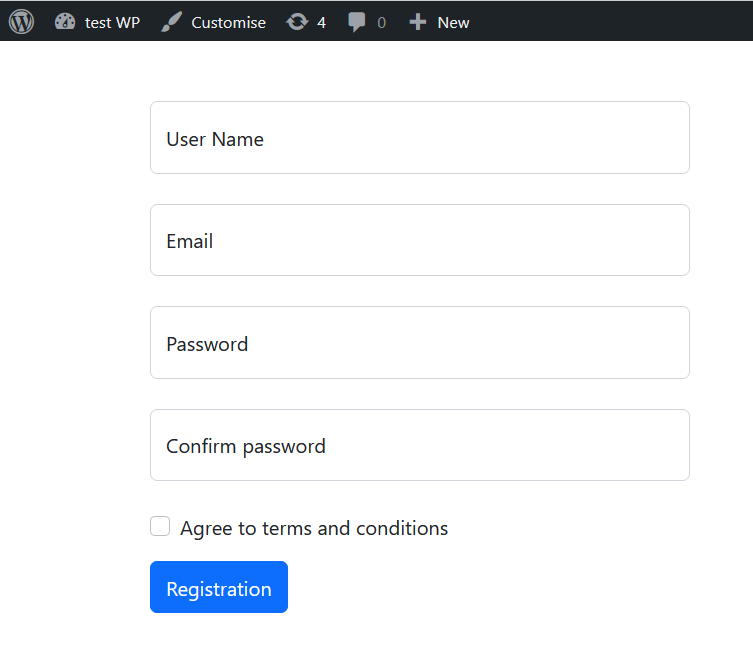
1️⃣ Create a template with a registration form (bootstrap).
2️⃣ Enable multi-language on the site and add a second language translation for the form.
3️⃣ Create a plugin to work with Accredible Credential API and with functionality:
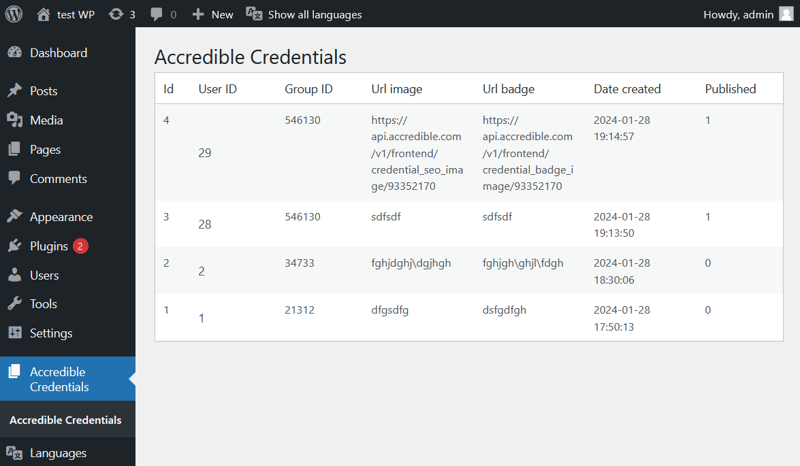
- display the list of badges in admin panel;
- after user registration create a certificate in Accredible
I uploaded the code for my experiments to the repository.
Theme with registration form:
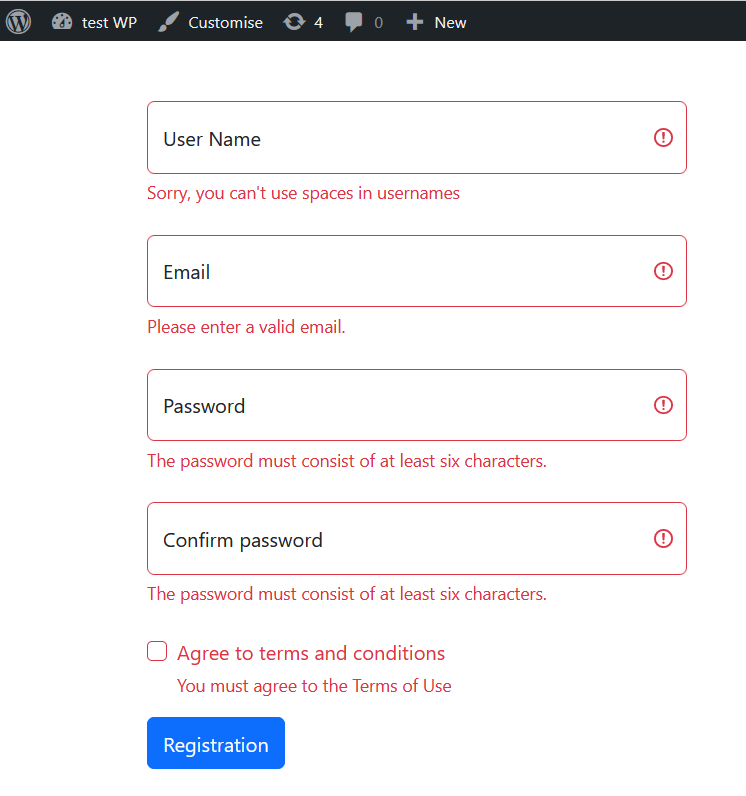
I also added a little bit of validation:
Theme code:
<?php

require_once(ABSPATH . WPINC . '/registration.php');

global $wpdb, $user_ID;


$success = false;

$errors = [];


if( $_POST ) {


    $username = $wpdb->escape($_POST['username']);

    if( username_exists( $username ) ) {

        $errors[] = esc_html__('Username already exists, try another one.');

    }


    $email = $wpdb->escape($_POST['email']);

    if( email_exists( $email ) ) {

        $errors['email'] = esc_html__('This email is already registered.');

    }


    if(0 !== strcmp($_POST['password'], $_POST['password_confirmation'])){

        $errors['password_confirmation'] = esc_html__('Password mismatch');

    }


    if( empty($errors) ) {

        $password = $_POST['password'];

        $new_user_id = wp_create_user( $username, $password, $email );

        $success = true;

    } else {

        $message = esc_html__('There are errors in completing the form:');

    }

}

?>


<?php get_header(); ?>


<?php if($success){ ?>

<div class="row mt-5">

    <div class="col">

        <div class="alert alert-success" role="alert">

            <?=esc_html__('User registered successfully')?>

        </div>

    </div>

</div>

<?php } else { ?>

<div class="row mt-5">

    <div class="col">

        <?php if(isset( $message )):?>

        <div class="alert alert-danger" role="alert" id="message">

            <?=$message?>

            <?php foreach( $errors as $error_message ){ ?>

                <br /><?=$error_message?>

            <?php } ?>

        </div>

        <?php endif;?>

        <form id="wp_signup_form" action="<?php echo $_SERVER['REQUEST_URI']; ?>" method="post" class="needs-validation" novalidate>

            <div class="col-md-4 control-group form-floating mb-4">

                <input id="username" type="text" name="username" class="form-control" placeholder="User Name" pattern="[0-9a-zA-Z!@#$%^&*\S]*" value="<?= isset( $_POST['username'] ) ? $_POST['username']  : '' ?>" required>

                <label for="username"><?php echo esc_html__( 'User Name', 'testpage' )?></label>

                <span class="error invalid-feedback"><?=esc_html__('Sorry, you can\'t use spaces in usernames')?></span>

            </div>

            <div class="col-md-4 control-group form-floating mb-4">

                <input id="email" type="text" name="email" class="form-control" pattern="[A-Za-z0-9._+\-']+@[A-Za-z0-9.\-]+\.[A-Za-z]{2,}$" value="<?= isset( $_POST['email'] ) ? $_POST['email']  : '' ?>" placeholder="Email" required>

                <label for="email"><?php echo esc_html__( 'Email', 'testpage' )?></label>

                <span class="error invalid-feedback"><?=esc_html__('Please enter a valid email.')?></span>

            </div>

            <div class="col-md-4 control-group form-floating mb-4">

                <input id="password" type="password" name="password" pattern="[0-9a-zA-Z!@#$%^&*]{6,}" class="form-control" value="<?= isset( $_POST['password'] ) ? $_POST['password']  : '' ?>" placeholder="Password" required>

                <label for="password"><?php echo esc_html__( 'Password', 'testpage' )?></label>

                <span class="error invalid-feedback"><?=esc_html__('The password must consist of at least six characters.')?></span>

            </div>

            <div class="col-md-4 control-group form-floating mb-4">

                <input id="password_confirmation" type="password" name="password_confirmation" pattern="[0-9a-zA-Z!@#$%^&*]{6,}" class="form-control" value="<?= isset( $_POST['password_confirmation'] ) ? $_POST['password_confirmation']  : '' ?>" placeholder="Confirm Password" required>

                <label for="password_confirmation"><?php echo esc_html__( 'Confirm password', 'testpage' )?></label>

                <span class="error invalid-feedback"><?=esc_html__('The password must consist of at least six characters.')?></span>

            </div>

            <div class="col-md-4 form-check mt-3 mb-3">

                <input id="terms" name="terms" class="form-check-input" type="checkbox" required>

                <label class="form-check-label" for="terms"><?php echo esc_html__( 'Agree to terms and conditions', 'testpage' )?></label>

                <span class="error invalid-feedback"><?=esc_html__('You must agree to the Terms of Use')?></span>

            </div>

            <div class="col-12">

                <button class="btn btn-primary py-2" id="submitbtn" type="button"><?php echo esc_html__( 'Registration', 'testpage' )?></button>

            </div>

        </form>

    </div>

</div>

<?php }

get_footer();

?>
I used the same library for connecting to the API that I used for Joomla
I have separated the list in the Admin Panel into a New Menu Item:
Code for displaying the list:
<?php

/**

 * Accredible Certificate administration panel

 *

 * @package WordPress

 * @subpackage Administration

 * @since 1.0.0

 */


$title = __( 'Accredible Credentials' );

global $wpdb;

$items = $wpdb->get_results("SELECT * FROM `wp_accrediblecertificate` order by id desc");


?>

<div class="wrap">

    <h1 class="wp-heading-inline">

        <?php echo esc_html( $title ); ?>

    </h1>


    <div class="row">

        <div class="col-md-12">

            <div id="j-main-container" class="j-main-container">

                <?php if (empty($items)) : ?>

                    <div class="alert alert-info">

                        <span class="icon-info-circle" aria-hidden="true"></span><span class="visually-hidden"><?php echo __('INFO'); ?></span>

                        <?php echo __('No data'); ?>

                    </div>

                <?php else : ?>

                    <table class="table wp-list-table widefat fixed striped table-view-list" id="bannerList">

                        <thead>

                            <tr>

                                <th scope="col" class="column-language_">

                                    <?= __( 'Id', 'testpage' ); ?>

                                </th>

                                <th scope="col" class="w-10">

                                    <?= __( 'User ID', 'testpage' ); ?>

                                </th>

                                <th scope="col" class="w-10">

                                    <?= __( 'Group ID', 'testpage' ); ?>

                                </th>

                                <th scope="col" class="column-response">

                                    <?= __( 'Url image', 'testpage' ); ?>

                                </th>

                                <th scope="col" class="column-response">

                                    <?= __( 'Url badge', 'testpage' ); ?>

                                </th>

                                <th scope="col" class="column-response">

                                    <?= __( 'Date created', 'testpage' ); ?>

                                </th>

                                <th scope="col" class="w-5 d-none d-md-table-cell">

                                    <?= __( 'Published', 'testpage' ); ?>

                                </th>

                            </tr>

                        </thead>

                        <tbody>

                            <?php foreach ($items as $i => $item) : ?>

                                <tr class="row<?php echo $i % 2; ?>" data-draggable-group="<?php echo $item->id; ?>">

                                    <td class="text-center">

                                        <?php echo $item->id; ?>


                                    </td>

                                    <th scope="row" class="has-context">

                                        <?php echo $item->user_id; ?>

                                    </th>

                                    <td class="">

                                        <?php echo $item->group_id; ?>

                                    </td>

                                    <td class="">

                                        <?php echo $item->url_image; ?>

                                    </td>

                                    <td class="">

                                        <?php echo $item->url_badge; ?>

                                    </td>

                                    <td class="">

                                        <?php echo $item->created; ?>

                                    </td>

                                    <td class="d-none d-md-table-cell">

                                        <?= $item->published; ?>

                                    </td>

                                </tr>

                            <?php endforeach; ?>

                        </tbody>

                    </table>

                <?php endif; ?>

            </div>

        </div>

    </div>


    <div class="clear"></div>

</div><!-- .wrap -->

<?php


require_once ABSPATH . 'wp-admin/admin-footer.php';
I hope this Post will be useful to those wishing to know about WordPress development.
Thanks in advance for the 💖 🦄 🤯 🙌 🔥 if you enjoyed it!