



Learning the building blocks of LCEL to develop increasingly complex RAG chains
In this post, I will be going over the implementation of a Self-evaluation RAG pipeline for question-answering using LangChain Expression Language (LCEL). The focus of this post will be on the use of LCEL for building pipelines and not so much on the actual RAG and self evaluation principles used, which are kept simple for ease of understanding.

I will be covering the following topics :
- Basic initialization steps
- Development of different variations of the RAG pipeline of increasing complexity using LCEL
- Methods for extracting intermediate variables from a LCEL-scripted pipeline
- Reasons for using LCEL
The Setup
Before we jump into the development of the RAG chain, there are some basic setup steps that we need to perform to initialize this setup. These include :
Data Ingestion
The data ingestion consists of two key steps :
- Reading the text from the pdf
- Splitting up the pdf text into chunks for inputting to the vector database
Prompt Templates
We will be using different prompts for the question-answering and self-evaluation tasks. We will be having 3 different prompt templates :
- qa_prompt : Basic prompt for the question-answering task
- qa_eval_prompt : Prompt for evaluator model that takes as input question-answer pair
- qa_eval_prompt_with_context : Similar to above prompt but additionally includes the context as well for the evaluation
Database Initialization
We initialize a simple vector database using FAISS and Open AI embeddings. For retrieval, we set k as 3 (return top 3 chunks for a given query)
RAG Development
Simple QA RAG
We start off with an example of a basic RAG chain that carries out the following steps :
- Retrieves the relevant chunks (splits of pdf text) from the vector database based on the user’s question and merges them into a single string
- Passes the retrieved context text along with question to the prompt template to generate the prompt
- Input generated prompt to LLM to generate final answer
Using LangChain Expression Language(LCEL), this RAG would be implemented as such:
rag_chain = (
            RunnableParallel(context = retriever | format_docs, question = RunnablePassthrough() ) |
            qa_prompt |
            llm
)
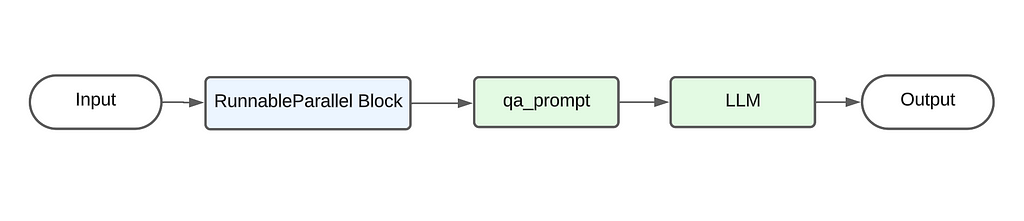
The above code primarily follows the pipe architecture where the output from the preceding element is used as the input for the next element. The below diagram showcases the flow of data. Starting from the user’s input, it passes first through the RunnableParallel block, then through the qa_prompt to generate the prompt. This prompt is then sent to the LLM to generate the final output.
There are two key additions to this pipeline that are unique to LangChain :
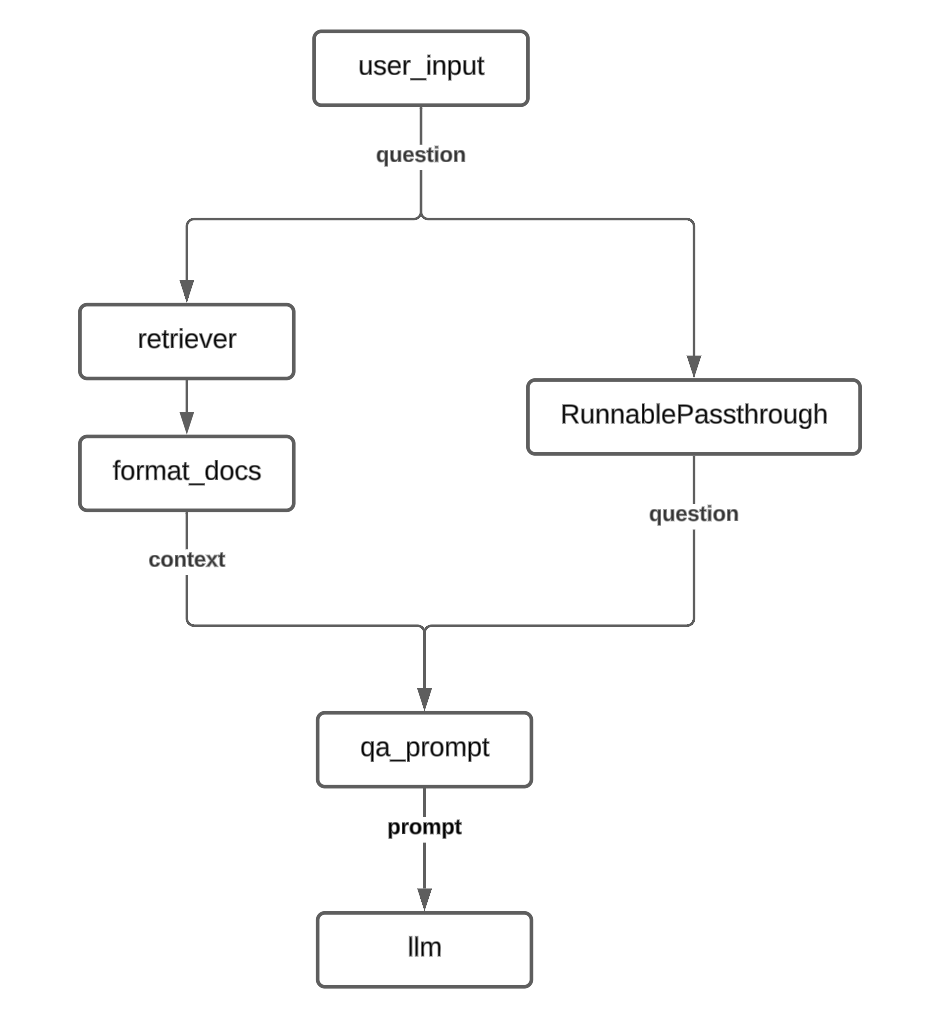
- RunnableParallel : As the name suggests, this class provides the functionality to run multiple processes in parallel. As a result, the output of a RunnableParallel is a dict with the keys being the arguments provided during its initialization. In this case, the output would have two keys : context and question.
So why do we need this in our current situation? Its required because the qa_prompt template requires two input values: the context and the question. Therefore we need to compute these values individually and then pass them together to the qa_prompt template. - RunnablePassthrough : This is a useful class when you want to pass through the input to the next stage without any modification. Essentially, this acts as an identity function that returns whatever is passed as its input.
The flowchart for the above RAG would look like this :
QA RAG with Self Evaluation I
Building over the previous RAG chain, we now introduce new elements into the chain to implement the self evaluation component.
The self evaluation component is again a pretty straightforward implementation. We take the answer provided by the first LLM and pass it to the evaluator LLM along with the question and ask it to provide a binary response (Correct/Incorrect).
rag_chain = (
            RunnableParallel(context = retriever | format_docs, question = RunnablePassthrough() ) |
            RunnableParallel(answer= qa_prompt | llm | retrieve_answer, question = itemgetter("question") ) |
            qa_eval_prompt |
            llm_selfeval |
            json_parser
            )
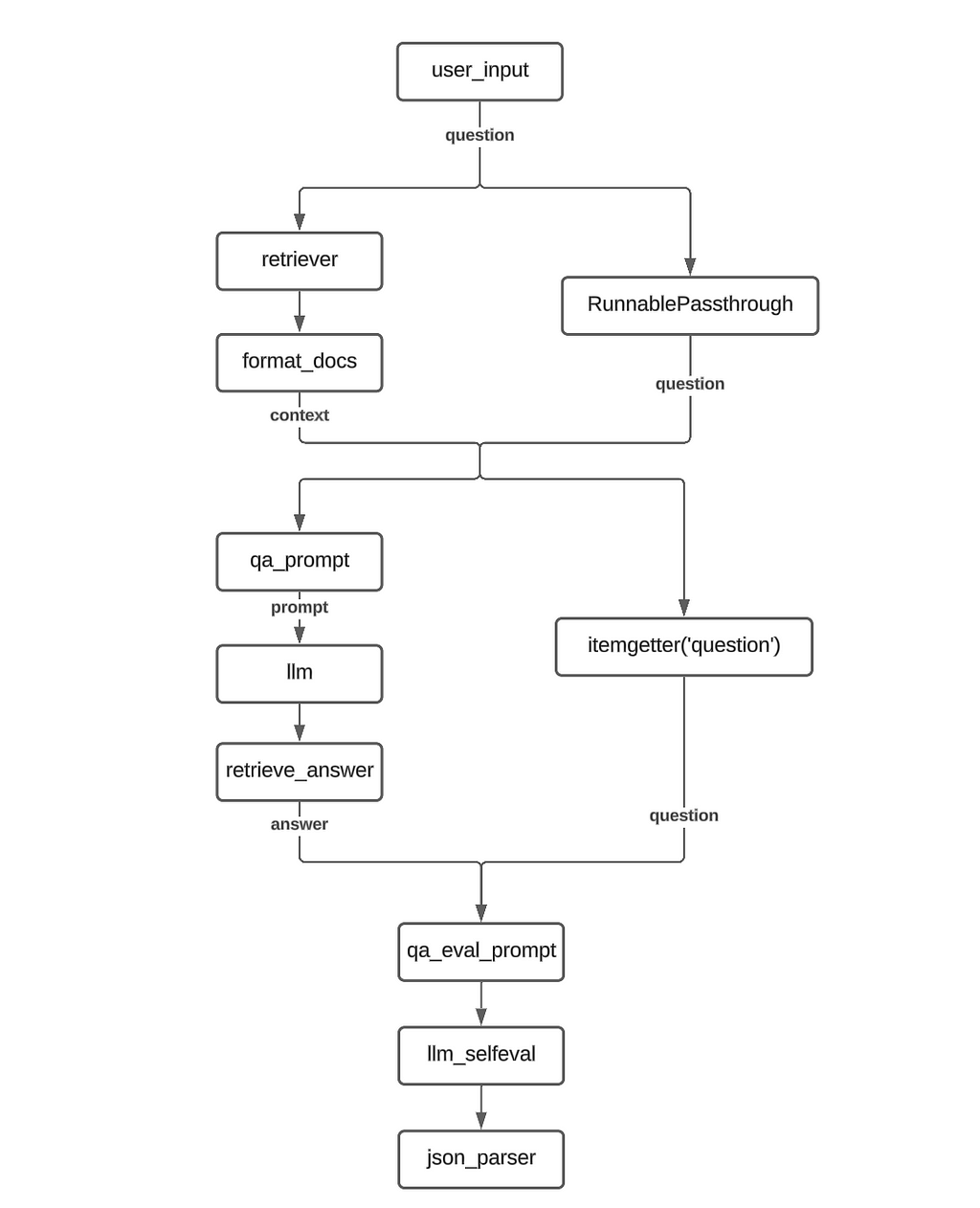
The first key difference is the addition of an additional RunnableParallel component. This is required because, similar to the initial prompt for the QA, the self eval prompt also requires two inputs : the base LLM’s answer as well as the user’s question.
So the output of the first RunnableParallel is the context text and the question while the output of the second RunnableParallel is the LLM answer along with the question.
NOTE: For the second RunnableParallel, we use the itemgetter method to retain only the question value from the previous input and propagate it forward. This is done instead of using RunnablePassthrough as it would passed on the full input (dict with two keys) whereas we are only interested in passing on the question right now and not the context. Additionally, there is the issue of formatting as qa_eval_prompt expects a dict with str -> str mapping but using RunnablePassthrough would results in a str-> dict mapping
The flowchart for this RAG implementation would look like this:
QA RAG with Self Evaluation II
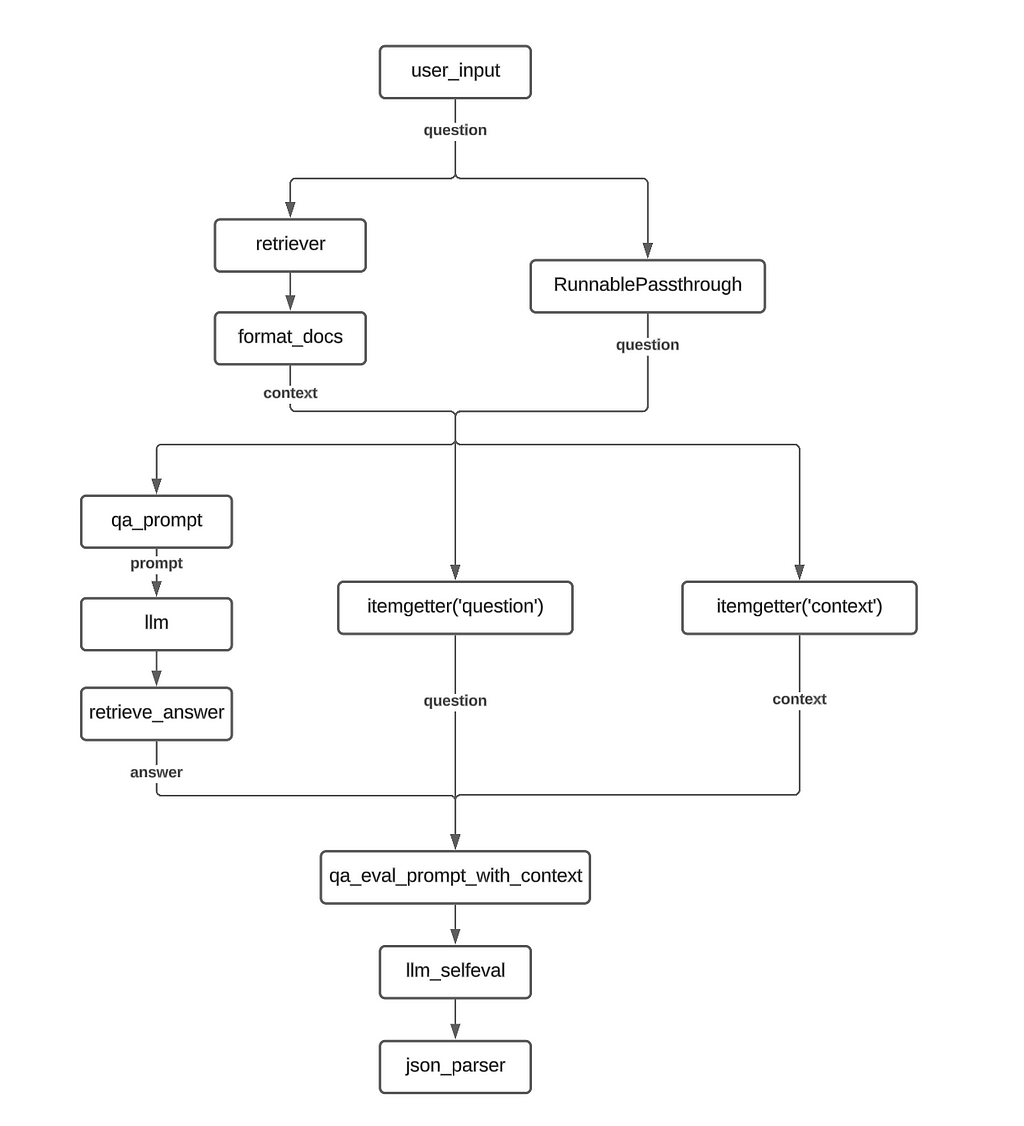
For this variation, we make a change to the evaluation procedure. In addition to the question-answer pair, we also pass the retrieved context to the evaluator LLM.
To accomplish this, we add an additional itemgetter function in the second RunnableParallel to collect the context string and pass it to the new qa_eval_prompt_with_context prompt template.
rag_chain = (
            RunnableParallel(context = retriever | format_docs, question = RunnablePassthrough() ) |
            RunnableParallel(answer= qa_prompt | llm | retrieve_answer, question = itemgetter("question"), context = itemgetter("context") ) |
            qa_eval_prompt_with_context |
            llm_selfeval |
            json_parser
            )
Implementation Flowchart :
Retrieving intermediate variables
One of the common pain points with using a chain implementation like LCEL is the difficulty in accessing the intermediate variables, which is important for debugging pipelines. We look at few options where we can still access any intermediate variables we are interested using manipulations of the LCEL
Using RunnableParallel to carry forward intermediate outputs
As we saw earlier, RunnableParallel allows us to carry multiple arguments forward to the next step in the chain. So we use this ability of RunnableParallel to carry forward the required intermediate values all the way till the end.
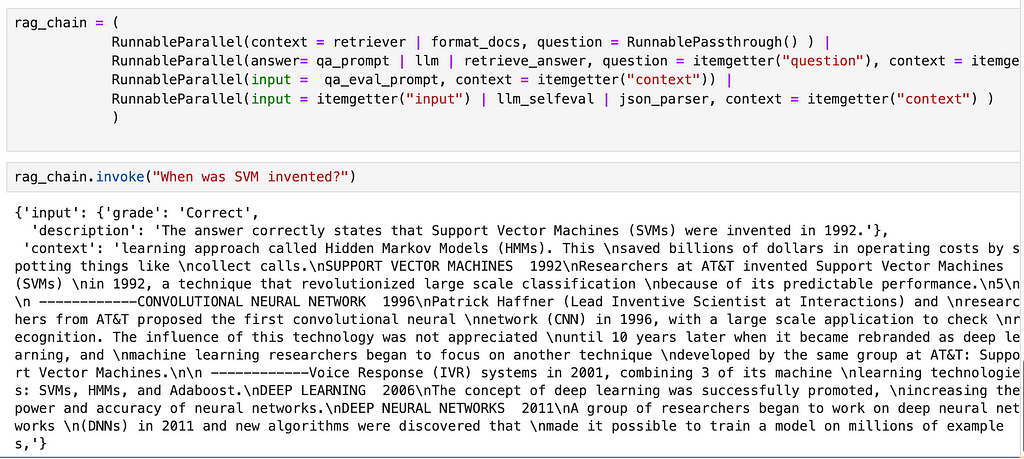
In the below example, we modify the original self eval RAG chain to output the retrieved context text along with the final self evaluation output. The primary change is that we add a RunnableParallel object to every step of the process to carry forward the context variable.
Additionally, we also use the itemgetter function to clearly specify the inputs for the subsequent steps. For example, for the last two RunnableParallel objects, we use itemgetter(‘input’) to ensure that only the input argument from the previous step is passed on to the LLM/ Json parser objects.
rag_chain = (
            RunnableParallel(context = retriever | format_docs, question = RunnablePassthrough() ) |
            RunnableParallel(answer= qa_prompt | llm | retrieve_answer, question = itemgetter("question"), context = itemgetter("context") ) |
            RunnableParallel(input =  qa_eval_prompt, context = itemgetter("context")) |
            RunnableParallel(input = itemgetter("input") | llm_selfeval , context = itemgetter("context") ) |
            RunnableParallel(input = itemgetter("input") | json_parser,  context = itemgetter("context") )
            )
The output from this chain looks like the following :
A more concise variation:
rag_chain = (
            RunnableParallel(context = retriever | format_docs, question = RunnablePassthrough() ) |
            RunnableParallel(answer= qa_prompt | llm | retrieve_answer, question = itemgetter("question"), context = itemgetter("context") ) |
            RunnableParallel(input =  qa_eval_prompt | llm_selfeval | json_parser, context = itemgetter("context"))
            )
Using Global variables to save intermediate steps
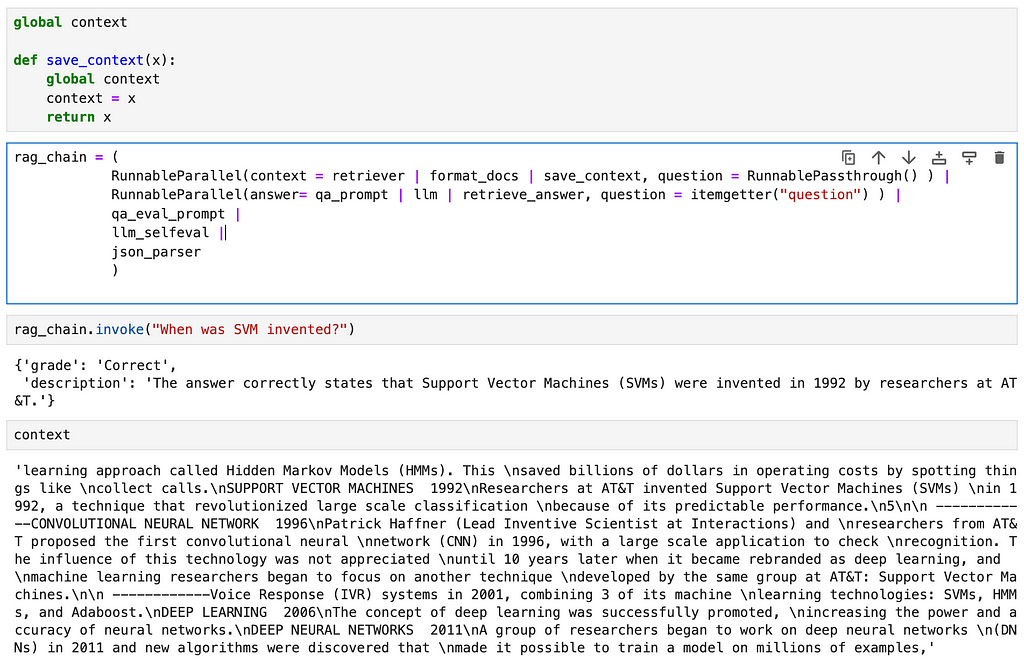
This method essentially uses the principle of a logger. We introduce a new function that saves its input to a global variable, thus allowing us access to the intermediate variable through the global variable
global context

def save_context(x):
    global context
    context = x
    return x

rag_chain = (
            RunnableParallel(context = retriever | format_docs | save_context, question = RunnablePassthrough() ) |
            RunnableParallel(answer= qa_prompt | llm | retrieve_answer, question = itemgetter("question") ) |
            qa_eval_prompt |
            llm_selfeval |
            json_parser
            )
Here we define a global variable called context and a function called save_context that saves its input value to the global context variable before returning the same input. In the chain, we add the save_context function as the last step of the context retrieval step.
This option allows you to access any intermediate steps without making major changes to the chain.
Using callbacks
Attaching callbacks to your chain is another common method used for logging intermediate variable values. Theres a lot to cover on the topic of callbacks in LangChain, so I will be covering this in detail in a different post.
Why use LCEL?
The reasons for using LCEL are best explained by the authors of Langchain themselves in their official documentation.
Of the points mentioned in the documentation, the following are some that I find especially useful :
- Input and output schemas : Will be covering this in detail in a different post
- Async support : As we move towards production applications, it becomes more important to have async functionality. LCEL pipeline allow for the seamless transition to async operations.
- Optimized parallel execution
Above these reasons, as a matter of personal preference, I feel that using LCEL helps improve the readability of your code and allows for cleaner implementations.
Resources
Images : All images are created by the author
In addition to Medium, I share my thoughts, ideas and other updates on Linkedin.
Building a RAG chain using LangChain Expression Language (LCEL) was originally published in Towards Data Science on Medium, where people are continuing the conversation by highlighting and responding to this story.
SOCIAL SHARE CARD GENERATOR