
INTRODUCTION
The Quiz app project, developed using React, offers users an engaging platform to test their knowledge across a wide range of subjects. Using JavaScript, it generates 10 multiple-choice questions of varying difficulty. The app taps into the Open Trivia DataBase(OTDB), ensuring a diverse range of questions for users to tackle. With each question dynamically generated, users can expect a new and challenging experience with every session. The quiz app provides an educational and enjoyable way to learn. Behind the functionality of this quiz app sits various states that React maintains. This article highlights the states essential for the functionality of this app.
State in React refers to values managed internally within a component, similar to variables declared inside a function. These values can change over time and when they do, React automatically re-renders the component to reflect those changes in the user interface. This allows React components to dynamically update and respond to user interactions or changes in data.
In React, states are employed to enable interactivity in websites. Without state management, the website would be static, boring and, would lack dynamic activity. Therefore, state management is very essential in developing websites that allow user interaction and dynamism. One of the common ways of managing state locally within a component is the useState hook, which allows components to declare and update state variables directly within the function body.
useState is a hook in React that allows functional components to maintain state. The useState hook returns a stateful value and a function to update it. To assess the useState hook, it needs to be imported from the react library like this:
import React, {useState} from "react";
Then, within the component, you use array destructuring to extract the state variable and the function to update it:
const [stateVariable, setStateFunction] = useState(initialValue);
stateVariable holds the current value of the state, and setStateFunction is used to update the state. The initialValue is the initial value of the state variable.
STATE REQUIREMENTS FOR OUR QUIZ APP
To ensure the proper functioning of our quiz app, several states were employed to look out for user interaction and ensure accurate interactivity, and seamless user experience in our quiz app.
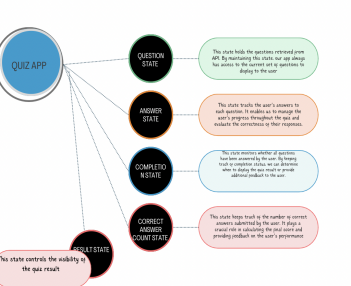
Image showing the different states being maintained in the quiz app.
STATE MANAGEMENT IN QUIZ APP
- Question state
This state holds the questions generated from API and serves as the basis upon which every other state functions to ensure an accurate and functional quiz app.
const [questions, setQuestions] = useState([]);

useEffect(() => {

        if (questions.length === 0) {

      fetch("https://opentdb.com/api.php?amount=10&category=21&difficulty=easy&type=multiple")

        .then((response) => response.json())

        .then((data) => {

          setQuestions(data.results);

},[questions])
The questions state is initialized with an empty array when the quiz app is launched and set to contain questions pulled from the API inside useEffect. The useEffect hook in React performs side effects i.e. actions that occur outside of the typical React component and are not directly controlled by React. Examples of such actions include data fetching, in the case of our quiz app, subscription to external data sources, etc.
The setQuestions function updates the question state with the result of data pulled from the API as shown in the code above.
- Answer State
The Answer state maps over the questions state and returns an object containing the questions, answer, incorrect answers, and selected answers. This enables the app to determine if the user gets a question right when the selected answer is the same as the correct answer in the state.
  const [questionsAndAnswers, setQuestionsAndAnswers] = useState([]);

 // each item in questionsAndAnswers will be an object of:

          /*

            -question

            -shuffled answers

            -correct answer

            -selected answer

          */

          setQuestionsAndAnswers(

            data.results.map((questionObject) => {

              return {

                question: questionObject.question,

                Answers: [

                  ...questionObject.incorrect_answers,

                  questionObject.correct_answer

                ],

                correctAnswer: questionObject.correct_answer,

                selectedAnswer: ""

              };

            })

          );
- Completion state
This state checks if all questions have been answered.
 const [showWarning, setShowWarning] = React.useState(false);


 const notAllAnswered = questionsAndAnswers.some(

      (questionObject) => questionObject.selectedAnswer === ""

    );


    setShowWarning(notAllAnswered);
The some() method checks the questionsandAnswers state to see if at least one of the selected answer properties is empty. This implies that not all questions have been answered and this updates the showWarning state to warn the user of having not answered at least one question.
- Correct answer count state
This state computes the number of questions the quiz app user got. It does this by looping through each QuestionandAnswers object to compare the selected answer and the correct answer, if they are the same, the setNumCorrectAnswers updates the numCorrectAnswers state by incrementing its initial value by 1.
 const [numCorrectAnswers, setNumCorrectAnswers] = useState(0);


const [showResult, setShowResult] = useState(false);


 if (!notAllAnswered) {

      questionsAndAnswers.forEach((questionObject) => {

        // compare selected answer & correct answer

        if (questionObject.selectedAnswer === questionObject.correctAnswer) {

          setNumCorrectAnswers(

            (prevNumCorrectAnswers) => prevNumCorrectAnswers + 1

          );

        }

      });


      // show result

      setShowResult(true);

    }
5 Result State
The Result state controls the visibility of the quiz result.
CONCLUSION
In conclusion, effective state management is crucial for ensuring the smooth functionality and interactivity of our quiz app. By utilizing various states such as the Questions state, Answers state, Completion state, Correct Answers count state, and Result state, we can efficiently handle data retrieval, user interaction, quiz completion tracking, and Result presentation. By understanding and implementing these states effectively, we can create a user-friendly quiz app that meets the needs and expectations of our audience. Thank you for joining us on this journey of exploring state management in our quiz app and feel free to ask any question in the comment section.

Quiz app image