
Zum Hauptinhalt springen
Echtzeit-Radar & Feeds
Alle RSS Feeds ➔
👥 Community & Social
Windows Tipps & SecurityGrafikkarte vor Überhitzung schützen: So geht’s(25.09.2026 um 08:00 Uhr)
••••••••••
Windows Tipps & SecurityGrafikkarte vor Überhitzung schützen: So geht’s(25.09.2026 um 08:00 Uhr)
••••••••••
Intelligence View
⚡ tsecurity.de Intelligence

Enable Touch ID Authentication for sudo on macOS Sonoma 14.x

Operating Environment: OS: MacOS Sonoma 14.5 Device: M1 MacBook Pro Explanation In macOS Sonoma, a new method has been introduced to enable Touch ID when running sudo commands, making it more persistent across system…

0
↗ Quelle (dev.to)
Reagiere als Erste:r — dein Feedback zählt!


Operating Environment:


  • OS: MacOS Sonoma 14.5


  • Device: M1 MacBook Pro


Explanation


In macOS Sonoma, a new method has been introduced to enable Touch ID when running sudo commands, making it more persistent across system updates. Previously, editing the /etc/pam.d/sudo file was necessary, but these changes would often revert after an update, requiring reconfiguration. With Sonoma, the settings can be added to a separate file /etc/pam.d/sudo_local, which isn't overwritten during updates, allowing Touch ID to remain enabled for sudo commands consistently.


Steps to Enable Touch ID for sudo


1. Create and Edit the Configuration File


Create a new configuration file based on the template provided in macOS Sonoma.


sudo cp /etc/pam.d/sudo_local.template /etc/pam.d/sudo_local


Edit the newly created file with your preferred text editor:


sudo vim /etc/pam.d/sudo_local


In the file, locate the following line, Uncomment it by removing the #:


- #auth       sufficient     pam_tid.so
+ auth sufficient pam_tid.so


Alternative Method Using sed and tee


You can achieve the same result with a single command using sed and tee:


sed -e 's/^#auth/auth/' /etc/pam.d/sudo_local.template | sudo tee /etc/pam.d/sudo_local


2. Confirm the Operation


Open a new terminal session and run a sudo command to test the setup:


sudo ls


You should be prompted to authenticate using Touch ID. If the command executes after Touch ID authentication, the setup is complete.
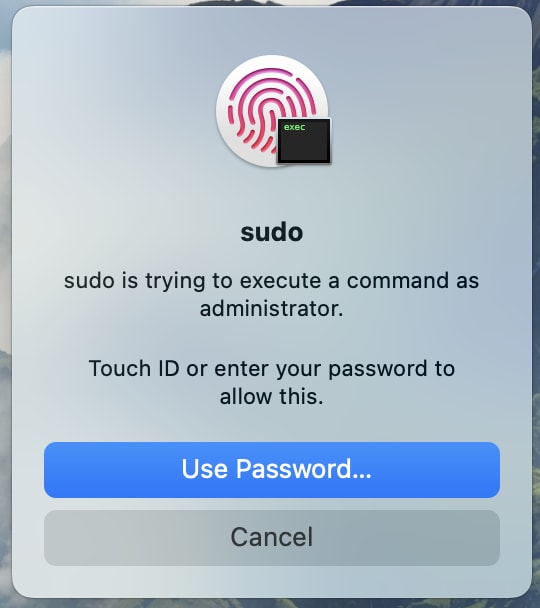


Screenshot 2024-06-22 at 4 48 00 PM


Background


Previously, enabling Touch ID for sudo required modifying /etc/pam.d/sudo, but these changes did not persist through macOS updates. By leveraging the new /etc/pam.d/sudo_local configuration in macOS Sonoma, we can ensure that Touch ID settings for sudo remain intact even after system updates.


The /etc/pam.d/sudo file now includes the following:


# sudo: auth account password session
auth include sudo_local
auth sufficient pam_smartcard.so
auth required pam_opendirectory.so
account required pam_permit.so
password required pam_deny.so
session required pam_permit.so


This configuration ensures that the settings in /etc/pam.d/sudo_local are loaded and used, maintaining Touch ID functionality for sudo commands.


Please note that for macOS versions earlier than Sonoma, manual editing of /etc/pam.d/sudo is still required to enable Touch ID for sudo commands.

1. Sofort-Triage & Abwehrmaßnahmen

SOC Incident Playbook: Vulnerability Remediation & Verification
Syntax validiert (0 Fehler)
title: Detect Exploitation - Enable Touch ID Authentication for sudo on macOS Sonoma 14.x
id: c3312bae-5474-40cc-8e32-1c539ea8c52c
status: experimental
description: Automatisch generierte SIEM-Erkennungsregel basierend auf CTI Intelligence
references:
  - https://tsecurity.de/
author: iShareStuff CTI Automated Detection Engine
date: 2026-09-27
logsource:
  category: network_connection
  product: any
detection:
  selection:
      CommandLine|contains:
        - 'exploit'
  condition: selection
falsepositives:
  - Legitime administrative Zugriffe oder Penetrationstests
level: high
tags:
  - attack.initial_access
Syntax validiert (0 Fehler)
rule CTI_Threat_Indicator {
    meta:
        author = "iShareStuff CTI Automated Detection Engine"
        date = "2026-09-27"
        description = "YARA Signature for "
    strings:
        $str = "Enable Touch ID Authentication" ascii wide
    condition:
        any of them
}
Syntax validiert (0 Fehler)
index=security sourcetype IN ("cisco:asa", "pan:traffic", "zeek_conn", "suricata", "WinEventLog:Security")
("Enable Touch ID Authentication for sudo ")
| stats count earliest(_time) as first_seen latest(_time) as last_seen by src_ip, dest_ip, dest_host, signature
| eval first_seen=strftime(first_seen, "%Y-%m-%d %H:%M:%S"), last_seen=strftime(last_seen, "%Y-%m-%d %H:%M:%S")
| sort - count
Syntax validiert (0 Fehler)
message: "*Enable Touch ID Authentication for sudo *"
Syntax validiert (0 Fehler)
CommonSecurityLog
| where Message has "Enable Touch ID Authentication for sudo "
| summarize EventCount = count(), FirstSeen = min(TimeGenerated), LastSeen = max(TimeGenerated) by SourceIP, DestinationIP, DestinationPort, Activity
| extend DetectionRule = "iShareStuff-CTI-Compiled"
| sort by EventCount desc

2. Cyber Threat Intelligence & Forensik

🎯
MITRE ATT&CK Matrix Navigator 14 Taktiken
Reconnaissance
-
Resource Development
-
Initial Access
Execution
Persistence
-
Privilege Escalation
Defense Evasion
Credential Access
-
Discovery
-
Lateral Movement
-
Collection
-
Command and Control
Exfiltration
-
Impact
tsecurity.de Cognitive Threat RAG
Fokus-Vektor:

Analyse für identifizierte Bedrohung auf Basis von Live-CTI (ENISA EUVD): CVSS 0.0 · EPSS 0.0% · CISA KEV: nein. Handlungsableitung aus den verlinkten Hersteller-Quellen.

🛡️ Angriffsfläche & Exposure

Netzwerk/Remote-Zugriff ohne Vorauthentifizierung möglich.

⚡ Empfohlene Sofortmaßnahmen
  • 1. Perimeter-Inspektion: Relevante Portfreigaben und exponierte Endpunkte unverzüglich scannen.
  • 2. Patch-Applikation: Hersteller-Hotfix einspielen oder betroffene Daemons in isolierte DMZ-Segmente überführen.
  • 3. Telemetrie & EDR-Alerts: Prozessaufrufe und Child-Processes auf anomale Shell-Spawns überwachen.
Ähnliche Beiträge
🔍 Verwandte News

Auch interessante Nachrichten Enable Touch ID Authentication for sudo on macOS Sonoma 14.x

Thematisch verwandte Begriffe: Enable, Touch, Authentication, sudo · 6 Treffer

Laden...

Videos werden geladen ...

Laden...

Beiträge werden geladen ...

Laden...

Videos werden geladen ...

Laden...

Beiträge werden geladen ...

Laden...

Videos werden geladen ...

Laden...

Beiträge werden geladen ...

Laden...

Videos werden geladen ...

Laden...

Beiträge werden geladen ...

Laden...

Videos werden geladen ...

💬 Kommentare werden geladen…
Zum Aktualisieren ziehen
ZERO-DAY CVE-2026-100739 | A vulnerability was detected in mathurvishal CloudClassroom-PHP-Project…
Advisory →
tsecurity.de Icon
Offline-Lesen, Eilmeldungen & 0ms Ladezeit

Installiere tsecurity.de direkt auf deinen Home-Bildschirm für das ultimative Vollbild-Magazinerlebnis ohne Browser-Leisten.

Nächster Beitrag