
Zum Hauptinhalt springen
tsecurity.de LIVE
Echtzeit-Radar & Feeds
Alle RSS Feeds
👥 Community & Social
YouTube Security VideosGoogle Cloud Tech: Gemini is coming to your city(24.09.2026 um 15:00 Uhr)
AI & KI NachrichtenGoogle’s latest moonshot to put machine learning in space(24.09.2026 um 15:12 Uhr)
Windows Tipps & SecurityPoll: What's your favorite Surface of 2026?(24.09.2026 um 14:58 Uhr)
Sichere ProgrammierungStreaming Materialized Views for Live Read Models (2026)(24.09.2026 um 15:02 Uhr)
Sichere ProgrammierungA Day Is Not 86400 Seconds: The DST Bug in Your Date Math(24.09.2026 um 15:02 Uhr)
Sichere ProgrammierungSetting up Traefik: reverse proxy with automatic HTTPS(24.09.2026 um 15:02 Uhr)
Sichere ProgrammierungA 200 OK response does not prove a secret leak(24.09.2026 um 15:02 Uhr)
Sichere ProgrammierungHow hot do you like it?(24.09.2026 um 15:05 Uhr)
YouTube Security VideosGoogle Cloud Tech: Gemini is coming to your city(24.09.2026 um 15:00 Uhr)
AI & KI NachrichtenGoogle’s latest moonshot to put machine learning in space(24.09.2026 um 15:12 Uhr)
Windows Tipps & SecurityPoll: What's your favorite Surface of 2026?(24.09.2026 um 14:58 Uhr)
Sichere ProgrammierungStreaming Materialized Views for Live Read Models (2026)(24.09.2026 um 15:02 Uhr)
Sichere ProgrammierungA Day Is Not 86400 Seconds: The DST Bug in Your Date Math(24.09.2026 um 15:02 Uhr)
Sichere ProgrammierungSetting up Traefik: reverse proxy with automatic HTTPS(24.09.2026 um 15:02 Uhr)
Sichere ProgrammierungA 200 OK response does not prove a secret leak(24.09.2026 um 15:02 Uhr)
Sichere ProgrammierungHow hot do you like it?(24.09.2026 um 15:05 Uhr)
Intelligence View
⚡ tsecurity.de Intelligence

Edge Cases to Keep in Mind. Part 3 — Time of Check to Time of Use Race Conditions in Android UI

In this article, we’ll show how race conditions affect Android runtime permission system. If you are a developer you’ve probably heard about race conditions. They are often associated with concurrent background operations performed in the …

0
↗ Quelle (dev.to)
Reagiere als Erste:r — dein Feedback zählt!

In this article, we’ll show how race conditions affect Android runtime permission system.


If you are a developer you’ve probably heard about race conditions. They are often associated with concurrent background operations performed in the fractions of seconds. However, certain race conditions may also appear in UI and last for the infinite time. In this article, we’ll show how race conditions affect Android runtime permission system.


Race condition & Time of check to time of use — what does it mean?


Firstly, we need to explain some basic terms.


Race condition occurs if multiple operations occur at the same time and their order affects the result. A textbook example is two threads incrementing the same variable. It seems to be trivial, however, usually, we need to use special, thread-safe elements to implement it properly.


Time of check to time of use (TOCTTOU or TOCTOU, pronounced TOCK too) is a specific kind of race condition where a performed operation is preceded by state checking and that state is modified in the time between a check and actual execution. It is often illustrated by checking user privileges at the login time only. For example, if you are an administrator at the moment when you sign in and you can use your privileges until you sign out, even if your admin access is revoked in the meantime.


Android runtime permissions


Let’s also summarise Android runtime permissions basics.


Starting from Android 6.0 (API level 23) the most dangerous permissions has to be explicitly granted by a user at runtime rather than all at once on app installation time. The most noticeable element here is a system dialogue with DENY and ALLOW buttons like shown in figure 1.


Runtime permission dialog

Figure 1. Runtime permission dialog


After clicking on DENY button we receive PERMISSION_DENIED in onRequestPermissionsResult callback and we should disable the functionality that depends on this permission. According to the official snippet.


Additionally, user can also grant or deny permissions by using App permissions screen in application settings. You can see that screen in figure 2.


App permissions screen

Figure 2. App permissions screen


Edge cases are everywhere


Most of you may think that runtime permission denial is a super simple feature and there is no element which can be broken. Well, nothing could be further from the truth!


A dialogue appears only if permission is not granted. So we have the time of check just before displaying a dialogue. And time of use when DENY button is clicked. A period between them can last forever - user can open a dialogue then press home or recent button to move the task with the app to background and return anytime later.


Let’s check if runtime permission dialogue is vulnerable to TOCTTOU. To do so, we can create a super simple activity which checks actual granted permissions after returning from the dialog. Note that apart from standard onRequestPermissionsResult arguments check we'll call Context#checkSelfPermission() to obtain current permission grant status. Don't forget to set targetSdkVersion to 23 or higher. The code should look like this:


class MainActivity : Activity() {

override fun onCreate(savedInstanceState: Bundle?) {
super.onCreate(savedInstanceState)
setContentView(R.layout.main)
requestPermissions(arrayOf(WRITE_EXTERNAL_STORAGE), 1)
}

override fun onRequestPermissionsResult(requestCode: Int, permissions: Array<out String>, grantResults: IntArray) {
super.onRequestPermissionsResult(requestCode, permissions, grantResults)
val checkResultTextView = findViewById<TextView>(R.id.grantResultTextView)
val grantResultTextView = findViewById<TextView>(R.id.checkResultTextView)

val checkPermissionResult = checkSelfPermission(WRITE_EXTERNAL_STORAGE).toPermissionResult()
val grantPermissionResult = grantResults.firstOrNull()?.toPermissionResult()
checkResultTextView.text = "checkSelfPermission: $checkPermissionResult"
grantResultTextView.text = "onRequestPermissionsResult: $grantPermissionResult"
}

private fun Int.toPermissionResult() = when (this) {
PERMISSION_GRANTED -> "granted"
PERMISSION_DENIED -> "denied"
else -> "unknown"
}
}


Now we can perform a test. To do that we need a device or AVD with Android 6.0 (API 23) or newer. Test result is shown on figure 3.
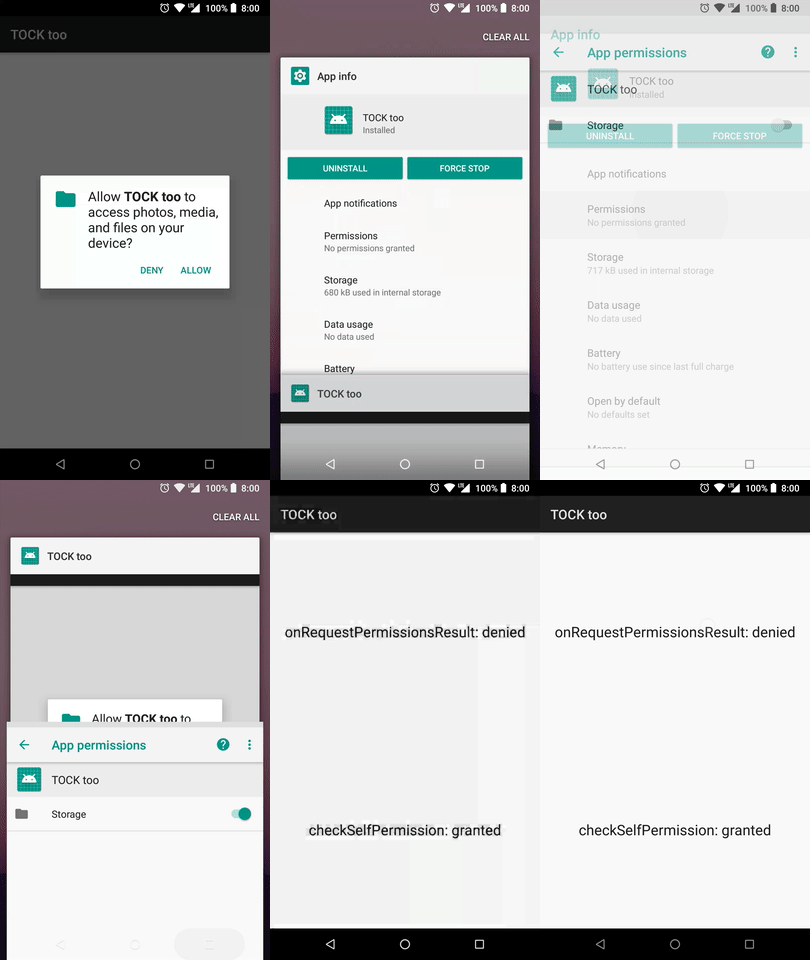


Captured TOCTTOU

Figure 3. Captured TOCTTOU


We can see that results differs. onRequestPermissionsResult argument is not valid. So DENY button is not denying anything! It simply does nothing with permission status but returns denied results to app.


Wrap up


It is important to keep timing into account when checking various things in the code. Caching check results may cause bugs and weird effects. TOCTTOU vulnerability does not depend on either platform or programming language so it has been classified as CWE-367.


You can check the full source code on GitHub.

The project also contains automated UI test demonstrating the issue.


Originally published at www.thedroidsonroids.com on December 14, 2017.

CTI Threat Relationship Graph2 Knoten / 1 Relationen
CVE / Incident Software MITRE ATT&CK CWE Weakness IoC
SOC Incident Playbook: Remote Code Execution (RCE) Defense
title: Detect Exploitation - Edge Cases to Keep in Mind. Part 3 — Time of Check to Time of Use Race Conditions in Android UI
id: 18aa2e67-c85f-491c-aba0-378ec44635c0
status: experimental
description: Automatisch generierte SIEM-Erkennungsregel basierend auf CTI Intelligence
references:
  - https://tsecurity.de/
author: iShareStuff CTI Automated Detection Engine
date: 2026-09-24
logsource:
  category: network_connection
  product: any
detection:
  selection:
      CommandLine|contains:
        - 'exploit'
  condition: selection
falsepositives:
  - Legitime administrative Zugriffe oder Penetrationstests
level: high
tags:
  - attack.initial_access
rule CTI_Threat_Indicator {
    meta:
        author = "iShareStuff CTI Automated Detection Engine"
        date = "2026-09-24"
        description = "YARA Signature for "
    strings:
        $str = "Edge Cases to Keep in Mind. Pa" ascii wide
    condition:
        any of them
}
tsecurity.de Cognitive Threat RAG
Fokus-Vektor:

Kognitive Analyse für identifizierte Bedrohung: Erhöhte Bedrohungslage im Bereich Edge Cases to Keep in Mind. Part 3 — Tim.... Basierend auf 368k Vektor-Korrelationen werden sofortige Isolationsmaßnahmen für betroffene Endpunkte empfohlen.

🛡️ Angriffsfläche & Exposure

Netzwerk/Remote-Zugriff ohne Vorauthentifizierung möglich.

Empfohlene Sofortmaßnahmen
  • 1. Perimeter-Inspektion: Relevante Portfreigaben und exponierte Endpunkte unverzüglich scannen.
  • 2. Patch-Applikation: Hersteller-Hotfix einspielen oder betroffene Daemons in isolierte DMZ-Segmente überführen.
  • 3. Telemetrie & EDR-Alerts: Prozessaufrufe und Child-Processes auf anomale Shell-Spawns überwachen.
🔗 Semantisch verwandte Zero-Days MariaDB 11.7 VEC
Ähnliche Beiträge
🔍 Verwandte News

Auch interessante Nachrichten Edge Cases to Keep in Mind. Part 3 — Time of Check to Time of Use Race Conditions in Android UI

Thematisch verwandte Begriffe: Edge, Cases, Keep, Mind · 6 Treffer

Laden...

Videos werden geladen ...

Laden...

Beiträge werden geladen ...

Laden...

Videos werden geladen ...

Laden...

Beiträge werden geladen ...

Laden...

Videos werden geladen ...

Laden...

Beiträge werden geladen ...

Laden...

Videos werden geladen ...

Laden...

Beiträge werden geladen ...

Laden...

Videos werden geladen ...

Zum Aktualisieren ziehen
ZERO-DAY CVE-2026-97179 | A security vulnerability has been detected in O2OA up to 9.5.3/10.0.2. T…
Advisory →
TTS Reader • tsecurity.de Voice
tsecurity.de Icon
tsecurity.de App
Offline-Lesen, Eilmeldungen & 0ms Ladezeit

Installiere tsecurity.de direkt auf deinen Home-Bildschirm für das ultimative Vollbild-Magazinerlebnis ohne Browser-Leisten.

Nächster Beitrag
Themen-Radar & Intelligence Matrix
Echtzeit-Taxonomie nach Angriffsvektoren & Plattformen

tsecurity.de Live Threat Radar

🔴 LIVE RADAR
MONITORING
AKTIV
CVE-DATENBANK
LIVE
🔍
Community Radar & Live Chat
Sentinel Bot online • Live-Stream
Dein Cluster: Security Explorer
Match:
lädt…
Verbindung zum Community-Stream wird aufgebaut...
Bearbeitungsmodus — Senden überschreibt deine Nachricht
Community-Puls — was gerade passiert
lädt…
Aktivitäten deiner Analysten
lädt…
Neues Thema oder Eilmeldung einreichen

Reiche interessante Links, Zero-Days oder Debatten ein. Die Community entscheidet per Upvote über die Veröffentlichung.

Heiß diskutierte Einreichungen
🔖 Gespeicherte Artikel
📂 Keine gespeicherten Artikel vorhanden.
Zurück Ziehen Vor
Links: vorheriger Artikel Rechts: nächster Artikel unten: schließen
News NIS-2 Frühwarnung Tier-1 Intel TTP ⏱️ 3 Min vor 10 Min
Artikeldaten werden geladen...

Zurück: vorheriger Vor: nächster
↗ Original-Quelle
Social Reaktionen Deine Reaktion zählt
Einstufung & Relevanz-Poll 0 Stimmen
In sozialen Netzwerken teilen 1-Klick