



Filtering Docker Images
Filtering Docker Images with --filter flag
This lab provides a detailed overview of using the --filter flag with the docker images command and docker search command.
Introduction
The docker images command is a powerful tool for listing and managing Docker images on the host system. By using the --filter flag, we can refine the output to show only the images that meet specific criteria. This can help us manage our images more efficiently and keep our system organized.
Filtering with the --filter Flag
The --filter flag allows us to specify conditions that Docker uses to filter the list of images. This flag can be combined with various options to target specific images based on their properties.
Dangling Images
A dangling image is an image that is no longer tagged and appears in listings as :. These images typically result from updating an existing image tag, leaving the old image without a tag.


`$ docker images --filter dangling=true`
REPOSITORY TAG IMAGE ID CREATED SIZE
4fd34165afe0 7 days ago 14.5MB
To remove all dangling images, we can use:
`$ docker image prune`
Repository-Specific Images
To list images from a specific repository, we can use the reference filter:
`$ docker images --filter reference="alpinelinux/docker-cli"`

REPOSITORY TAG IMAGE ID CREATED SIZE
alpinelinux/docker-cli latest d4e867dc1611 4 days ago 161MB
Images Before a Specific Image
To list images created before a specific image:
`$ docker images --filter before=alpine`

REPOSITORY TAG IMAGE ID CREATED SIZE
nginx stable-perl e790832271e7 5 weeks ago 236MB
busybox latest 65ad0d468eb1 12 months ago 4.26MB
Images Since a Specific Image
To list images created after a specific image:
`$ docker images --filter since=alpine`
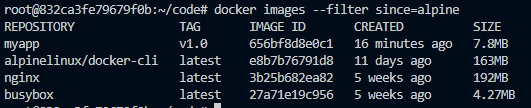
REPOSITORY TAG IMAGE ID CREATED SIZE
nginx latest 4f67c83422ec 18 hours ago 188MB
alpinelinux/docker-cli latest d4e867dc1611 4 days ago 161MB
Images with Specific Labels
This filtering is particularly useful in CI/CD pipelines where there is a need to deploy, test, or manage specific versions of Docker images based on labels.
Let's assume we have several Docker images on our system, and some of these images have been tagged with a specific label, com.example.version=1.0.
To filter and list only the images that have this label, we would use the following command:
`$ docker images --filter label=com.example.version=1.0`

Here’s an example output for the above command:
REPOSITORY   TAG       IMAGE ID       CREATED          SIZE

myapp        v1.0      656bf8d8e0c1   17 minutes ago   7.8MB
In this example:
The image myapp with the tag v1.0 has the label com.example.version=1.0.
The image anotherapp with the tag latest also has the label com.example.version=1.0.
Adding Labels to Images
If we want to create a Docker image with a specific label, we can do so during the build process. Here’s an example Dockerfile that includes a label:
# Example Dockerfile

FROM alpine:latest

LABEL com.example.version="1.0"

COPY . /app

CMD ["sh", "/app/start.sh"]
To build this image and tag it as myapp:v1.0, we would use:
$ docker build -t myapp:v1.0 .
After building, this image will have the label com.example.version=1.0, and we can verify this by using the filter command.
Images by Reference
To list images with the latest tag:
$ docker images --filter reference="*:latest"

REPOSITORY   TAG       IMAGE ID       CREATED       SIZE

busybox      latest    3596868f4ba8   7 days ago    3.72MB

alpine       latest    44dd6f223004   9 days ago    7.73MB

redis        latest    2334573cc576   2 weeks ago   111MB
Formatting Output
The --format flag allows us to customize the output using Go templates. For example, to display only the sizes of the images:
$ docker images --format "{{.Size}}"

3.72MB

7.73MB

111MB

265MB

58.1MB
We can also customize the output of docker images command output to display only the repository, tag, and size of each image:
$ docker images --format "{{.Repository}}: {{.Tag}}: {{.Size}}"


busybox: latest: 3.72MB

alpine: latest: 7.73MB

redis: latest: 111MB

portainer/portainer-ce: latest: 265MB

nigelpoulton/tu-demo: latest: 58.1MB
Advanced Filtering
For more complex filtering needs, we can leverage our operating system's shell tools like grep and awk. Additionally, Docker Desktop extensions may offer enhanced filtering capabilities.
Example Scenario: Combining Filters and Shell Tools
To find and delete images larger than 100MB:

$ docker images --format "{{.Repository}} {{.Size}}" | awk '$2 > 100 {print $1}{print $2}'


konami98/reverse-proxy:

898MB

reverse-proxy-np:

898MB

reverse-proxy:

898MB

origin2:

901MB

konami98/origin:

901MB

1.45GB

1.07GB

cnrancher/autok3s:

319MB

rancher/k3s:

188MB

1.2GB
Filtering Docker images using the --filter flag helps manage and maintain a clean and efficient Docker environment. By understanding and utilizing the available filters, we can streamline our Docker image management process and ensure our system remains organized.