Systems Affected
Networked Systems
Overview
The National Cybersecurity and Communications Integration Center (NCCIC) has become aware of an emerging sophisticated campaign, occurring since at least May 2016, that uses multiple malware implants. Initial victims have been identified in several sectors, including Information Technology, Energy, Healthcare and Public Health, Communications, and Critical Manufacturing.
According to preliminary analysis, threat actors appear to be leveraging stolen administrative credentials (local and domain) and certificates, along with placing sophisticated malware implants on critical systems. Some of the campaign victims have been IT service providers, where credential compromises could potentially be leveraged to access customer environments. Depending on the defensive mitigations in place, the threat actor could possibly gain full access to networks and data in a way that appears legitimate to existing monitoring tools.
Although this activity is still under investigation, NCCIC is sharing this information to provide organizations information for the detection of potential compromises within their organizations.
NCCIC will update this document as information becomes available.
For a downloadable copy of this report and listings of IOCs, see:
- or 1-888-282-0870.
Description
Risk Evaluation
NCCIC Cyber Incident Scoring System (NCISS) Rating Priority Level (Color)
Yellow (Medium)
A medium priority incident may affect public health or safety, national security, economic security, foreign relations, civil liberties, or public confidence.
Details
While NCCIC continues to work with a variety of victims across different sectors, the adversaries in this campaign continue to affect several IT service providers. To achieve operational efficiencies and effectiveness, many IT service providers often leverage common core infrastructure that should be logically isolated to support multiple clients.
Intrusions into these providers create opportunities for the adversary to leverage stolen credentials to access customer environments within the provider network.
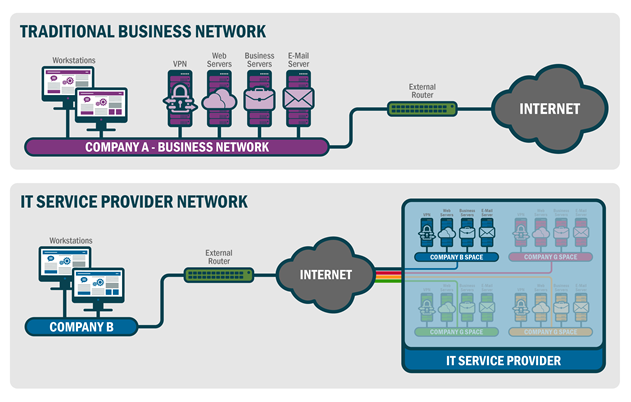
Figure 1: Structure of a traditional business network and an IT service provider network
Technical Analysis
The threat actors in this campaign have been observed employing a variety of tactics, techniques, and procedures (TTPs). The actors use malware implants to acquire legitimate credentials then leverage those credentials to pivot throughout the local environment. NCCIC is aware of several compromises involving the exploitation of system administrators’ credentials to access trusted domains as well as the malicious use of certificates. Additionally, the adversary makes heavy use of PowerShell and the open source PowerSploit tool to enable assessment, reconnaissance, and lateral movement.
Command and Control (C2) primarily occurs using RC4 cipher communications over port 443 to domains that change IP addresses. Many of these domains spoof legitimate sites and content, with a particular focus on spoofing Windows update sites. Most of the known domains leverage dynamic DNS services, and this pattern adds to the complexity of tracking this activity. Listings of observed domains are found in this document’s associated STIX package and .xlsx file. The indicators should be used to observe potential malicious activity on your network.
User impersonation via compromised credentials is the primary mechanism used by the adversary. However, a secondary technique to maintain persistence and provide additional access into the victim network is the use of malware implants left behind on key relay and staging machines. In some instances, the malware has only been found within memory with no on-disk evidence available for examination. To date, the actors have deployed multiple malware families and variants, some of which are currently not detected by anti-virus signatures. The observed malware includes PLUGX/SOGU and REDLEAVES. Although the observed malware is based on existing malware code, the actors have modified it to improve effectiveness and avoid detection by existing signatures.
Both REDLEAVES and PLUGX have been observed being executed on systems via dynamic-link library (DLL) side-loading. The DLL side-loading technique utilized by these malware families typically involves three files: a non-malicious executable, a malicious DLL loader, and an encoded payload file. The malicious DLL is named as one of the DLLs that the executable would normally load and is responsible for decoding and executing the payload into memory.
REDLEAVES Malware
The most unique implant observed in this campaign is the REDLEAVES malware. The REDLEAVES implant consists of three parts: an executable, a loader, and the implant shellcode. The REDLEAVES implant is a remote administration Trojan (RAT) that is built in Visual C++ and makes heavy use of thread generation during its execution. The implant contains a number of functions typical of RATs, including system enumeration and creating a remote shell back to the C2.
Capabilities
System Enumeration. The implant is capable of enumerating the following information about the victim system and passing it back to the C2:
- system name,
- system architecture (x86 or x64),
- operating system major and minor versions,
- amount of available memory,
- processor specifications,
- language of the user,
- privileges of the current process,
- group permissions of the current user,
- system uptime,
- IP address, and
- primary drive storage utilization.
Command Execution. The implant can execute a command directly inside a command shell using native Windows functionality by passing the command to run to cmd.exe with the “/c” option (“cmd.exe /c <command>”).
Command Window Generation. The implant can also execute commands via a remote shell that is generated and passed through a named pipe. A command window is piped back to the C2 over the network as a remote shell or alternatively to another process or thread that can communicate with that pipe. The implant uses the mutexRedLeavesCMDSimulatorMutex.
File System Enumeration. The implant has the ability to enumerate data within a specified directory, where it gathers filenames, last file write times, and file sizes.
Network Traffic Compression and Encryption. The implant uses a form of LZO compression to compress data that is sent to its C2. After compression, the data for this implant sample is then RC4-ciphered with the key 0x6A6F686E3132333400 (this corresponds to the string “john1234” with the null byte appended).
Network Communications REDLEAVES connects to the C2 over TCP port 443, but does not use the secure flag when calling the API function InternetOpenUrlW. The data is not encrypted and there is no SSL handshake as would normally occur with port 443 traffic, but rather the data is transmitted in the form that is generated by the RC4 cipher.
Current REDLEAVES samples that have been examined have a hard-coded C2. Inside the implant’s configuration block in memory were the strings in Table 1.
Table 1: REDLEAVES Sample Strings Found in C2QN4869MD – mutex used to determine if the implant is already running (Varies from sample to sample)2016-5-1-INCO –Unknown%windir.\system32\svchost.exe - process that the implant was injected intojohn1234 (with the null byte afterward) – RC4 KeyWhile the name of the initial mutex, QN4869MD in this sample, varies among REDLEAVES samples, the RedLeavesCMDSimulatorMutex mutex name appears to be consistent. Table 2 contains a sample of the implant communications to the domain windowsupdates.dnset[.]com over TCP port 443.
Table 2: REDLEAVES Sample Beacon
--- BEGIN SAMPLE BEACON ---00000000 c1 0c 00 00 7a 8d 9b dc 88 00 00 00 ....z... ....0000000C 14 6f 68 6e 16 6f 68 6e c4 a4 b1 d1 c4 e6 24 eb .ohn.ohn ......$.0000001C cf 49 81 a7 a1 c7 96 ff 6d 31 b4 48 8b 3e a3 c1 .I...... m1.H.>..0000002C 92 e2 c3 7c e4 4c cf e9 e1 fa fb 6a fa 66 2c bf ...|.L.. ...j.f,.0000004C 7b 13 a7 30 17 3d eb fb d3 16 0e 96 83 21 2e 73 {..0.=.. .....!.s0000005C dc 44 a2 72 fb f4 5e d0 4d b7 85 be 33 cd 13 21 .D.r..^. M...3..!0000006C 3f e2 63 da da 5b 5e 52 9a 9c 20 36 69 cb cd 79 ?.c..[^R .. 6i..y0000007C 13 79 7a d4 ed 63 b7 41 5d 38 b4 c2 84 74 98 cd .yz..c.A ]8...t..0000008C f8 32 49 ef 2d e7 f2 ed .2I.-...0000003C 5e 4b 72 6a f9 47 86 cd f1 cd 6d b5 24 79 3c 59 ^Krj.G.. ..m.$y--- END SAMPLE BEACON ---REDLEAVES network traffic has two 12-byte fixed-length headers in front of each RC4-encrypted compressed payload. The first header comes in its own packet, with the second header and the payload following in a separate packet within the same TCP stream. The last four bytes of the first header contain the number of the remaining bytes in little-endian format (0x88 in the sample beacon above).
The second header, starting at position 0x0C, is XOR’d with the first four bytes of the key that is used to encrypt the payload. In the case of this sample, those first four bytes would be “john” (or 0x6a6f686e using the ASCII hex codes). After the XOR operation, the bytes in positions 0x0C through 0x0F contain the length of the decrypted and decompressed payload. The bytes in positions 0x10 through 0x13 contain the length of the encrypted and compressed payload.
To demonstrate, in the sample beacon, the second header follows:
0000000C 14 6f 68 6e 16 6f 68 6e c4 a4 b1 d1
The length of the decrypted and decompressed payload is 0x7e000000 in little-endian format (0x146f686e XOR 0x6a6f686e). The length of the encrypted and compressed payload is 0x7c000000 in little-endian (0x166f686e XOR 0x6a6f686e). This is verified by referring back to the sample beacon which had the number of remaining bytes set to 0x88 and subtracting the length of the second header (0x88 – 0xC = 0x7c).
Strings
Note: Use caution when searching based on strings, as common strings may cause a large number of false positives.
Table 3: Strings Appearing in the Analyzed Sample of REDLEAVES
[ Unique Ascii strings ] --------------------red_autumnal_leaves_dllmain.dllwindowsupdates.dnset.com windowsupdates.dnset.comwindowsupdates.dnset.com2016-5-10-INCOjohn1234Feb 04 2015127.0.0.1 169.254tcphttpshttp[ Unique Unicode strings ] ------------------RedLeavesCMDSimulatorMutexQN4869MD\\\\.\\pipe\\NamePipe_MoreWindowsnetwork.proxy.typenetwork.proxy.http_portnetwork.proxy.http network.proxy.autoconfig_urlnetwork.proxy.a([a-zA-Z0-9])b([ \\t])c([a-zA-Z])d([0-9])h([0-9a-fA-F])n(\r|(\r?\n)) q(\"[^\"]*\")|('[^']*')w([a-zA-Z]+)z([0-9]+)Malware Execution Analysis
File Name: VeetlePlayer.exe
MD5: 9d0da088d2bb135611b5450554c99672
File Size: 25704 bytes (25.1 KB)
Description: This is the executable that calls the exports located within libvlc.dll
File Name: libvlc.dll
MD5: 9A8C76271210324D97A232974CA0A6A3
File Size: 33792 bytes (33.0 KB)
Description: This is the loader and decoder for mtcReport.ktc, the combined shellcode and implant file.
File Name: mtcReport.ktc
MD5: 3045E77E1E9CF9D9657AEA71AB5E8947
File Size: 231076 bytes (225.7 KB)
Description: This is the encoded shellcode and implant file. When this file is decoded, the shellcode precedes the actual implant, which resides at offset 0x1292 from the beginning of the shellcode in memory. The implant has the MZ and PE flags replaced with the value 0xFF.
All three of these files must be present for execution of the malware to succeed.
When all files are present and the VeetlePlayer.exe file is executed, it will make calls to the following DLL exports within the libvlc.dll file:
- VLC_Version checks to see if its calling file is named “VeetlePlayer.exe”. If the calling file is named something else, execution will terminate and no shellcode will be loaded.
- VLC_Create reads in the contents of the file mtcReport.ktc.
- VLC_Init takes in the offset in which the encoded shellcode/implant file is located and deobfuscates it. After deobfuscation, this export executes the shellcode.
- VLC_Destroy does nothing other than perform a return 0.
- VLC_AddIntf and VLC_CleanUp simply call the export VLC_Destroy, which returns 0.
When the libvlc.dll decodes the shellcode/implant, it calls the shellcode at the beginning of the data blob in memory. The shellcode then activates a new instance of svchost.exe and suspends it. It then makes a call to WriteProcessMemory() and inserts the implant with the damaged MZ and PE headers into its memory space. It then resumes execution of svchost.exe, which runs the implant.
The resulting decoded shellcode with the implant file below it can have a variable MD5 based on how it is dumped from memory. The MD5 checksums of two instances of decoded shellcode are:
- ba4b4087370780dc988d55cbb9de885d
- 3d032ba5f73cbc398f1a77af92077cd8
Table 4 contains the implant resulting from the original implant’s separation from the shellcode and the repair of its MZ and PE flags.
Table 4: Resulting Implant from Shellcode Separation
File Name: red_autumnal_leaves_dllmain.dllMD5: 3EBBFEEE3A832C92BB60B531F749230EFile Size: 226304 bytes (221.0 KB)PE Compile Date: 10 May 2016During execution, the file will create two mutexes called RedLeavesCMDSimulatorMutex and QN4869MD. It checks the QN4869MD mutex to see if it is already running. It will then perform initial enumeration of the system to include operating system versions, number of processors, RAM, and CPU information.PLUGX
PLUGX is a sophisticated Remote Access Tool (RAT) operating since approximately 2012. Although there are now many variants of this RAT in existence today, there are still characteristics common to most variants.
Typically, PLUGX uses three components to install itself.
- A non-malicious executable
- A malicious DLL/installer
- An encoded payload – the PLUGX RAT.
A non-malicious executable with one or more imports is used to start the installation process. The executable will likely exist in a directory not normally associated with its use. In some cases, the actor may use an executable signed with a valid certificate, and rename the DLL and encoded payload with file names that suggest they are related to the trusted file. Importantly, the actor seems to vary the encoding scheme used to protect the encoded payload to stifle techniques used by AV vendors to develop patterns to detect it. The payload is either encoded with a single byte or encrypted and decompressed. Recently, NCCIC has observed a case where the encoded payload contains a decoding stub within itself, beginning at byte zero. The malware simply reads this payload and executes it starting at byte zero. The stub then decodes and executes the rest of itself in memory. Notably, this stub varies in its structure and algorithm, again stifling detection by signature based security software. The PLUGX malware is never stored on disk in an unencrypted or decoded format.
When the initial executable is launched, the imported library, usually a separate DLL, is replaced with a malicious version that in turn decodes and installs the third and final component, which is the PLUGX rat itself. Typically, the PLUGX component is obfuscated and contains no visible executable code until it is unpacked in memory, protecting it from AV/YARA scans while static. During the evolution of these PLUGX compromises, NCCIC noted an increasing implementation of protections of the actual decoded PLUGX in memory. For example, the most recent version we looked at implements a secure strings method, which hides the majority of the common commands used by PLUGX. This is an additional feature designed to thwart signature based security tools.
Once the PLUGX RAT is installed on the victim, the actors has complete C2 capabilities of the victim system, including the ability to take screenshots and download files from the compromised system. The communications between the RAT (installed on the victim system) and the PLUGX C2 server are encoded to secure the communication and stifle detection by signature based network signature tools.
The advanced capabilities of PLUGX are implemented via a plugin framework. Each plugin operates independently in its own unique thread within the service. The modules may vary based on variants. Table 5 lists the modules and capabilities contained within one sample recently analyzed by NCCIC.
Table 5: Modules and Capabilities of PLUGX
Module Name
Capability
Disk
wide range of system-related capabilities including file / directory / drive enumeration, file / directory creation, create process, and obtain environment variables
Keylog
logs keystrokes and saves data to log file
Nethood
enumerates the host's network resources via the Windows multiple provider router DLL
Netstat
set the state of a TCP connection or obtain the extended TCP or UDP tables (lists of network endpoints available to a process) of each active process on the host
Option
provides the ability to initiate a system shutdown, adjust shutdown-related privileges for a given process, and lock the user's workstation
Portmap
port mapping
Process
process enumeration, termination, and capability to obtain more in-depth information pertaining to each process (e.g. CompanyName, FileDescription, FileVersion of each module loaded by the process)
Regedit
create, read, update & delete registry entries
Screen
capability to capture screenshots of the system
Service
start, stop, remove, configure & query services
Shell
remote shell access
SQL
enumerate SQL databases and available drivers; execute SQL queries
Telnet
provides a telnet interface
The PLUGX operator may dynamically add, remove, or update PLUGX plugins during runtime. This provides the ability to dynamically adjust C2 capabilities based on the requirements of the C2 operator.
Network activity is often seen as POST requests similar to that shown in table 6. Network defenders can look to detect non-SSL HTTP traffic on port 443, which can be indicative of malware traffic. The PLUGX malware is also seen using TCP ports 80, 8080, and 53.
Table 6: Sample PLUGX Beacon
POST /D15DB9E25ADA34EC9E559736 HTTP/1.1Accept: */*HX1: 0HX2: 0HX3: 61456HX4: 1User-Agent: Mozilla/4.0 (compatible; MSIE 9.0; Windows NT 6.1; SLCC2; .NET CLR 2.0.50727; .NET4.0C; .NET4.0E)Host: sc.weboot.info:443Content-Length: 0Cache-Control: no-cacheEven though the beacon went to port 443, which is commonly used for encrypted HTTP communications, this traffic was plaintext HTTP, as is common for this variant of PLUGX.
For IT Service Providers
All organizations that provide IT services as a commodity for other organizations should evaluate their infrastructure to determine if related activity has taken place. Active monitoring of network traffic for the indicators of compromise (IOCs) provided in this report, as well as behavior analysis for similar activity, should be conducted to identify C2 traffic. In addition, frequency analysis should be conducted at the lowest level possible to determine any unusual fluctuation in bandwidth indicative of a potential data exfiltration. Both management and client systems should be evaluated for host indicators provided. If an intrusion is suspected, please reach out to the NCCIC at the contact information provided at the end of this report.
For Private Organizations and Government Agencies
All organizations should include the IOCs provided in their normal intrusion detection systems for continual analysis. Organizations that determine their risk to be elevated due to alignment to the sectors being targeted, unusual detected activity, or other factors, should conduct a dedicated investigation to identify any related activity. Organizations which leverage external IT service providers should validate with their providers that due diligence is being conducted to validate if there are security concerns with their specific provider. If an intrusion is suspected, please reach out to the NCCIC at the contact information provided at the end of this report.
NCC Group
“RedLeaves Implant-Overview”
National Cyber Security Centre
“Infrastructure Update Version 1.0” Reference: March 17, 2017
FireEye
“BUGJUICE Malware Profile”. April 05, 2017 11:45:00 AM, 17-00003261, Version: 1
JPCERT/CC
“ChChes- Malware that Communicates with C&C Servers Using Cookie Headers”
.
- Ensure your networking equipment has the latest available operating system and patches.
Host Recommendations
- Implement policies to block workstations-to-workstation remote desktop protocol (RDP) connections through group policy object (GPO) on Windows, or a similar mechanism.
- Store system logs of mission critical systems for at least one year within a SIEM.
- Review the configuration of application logs to verify fields being recorded will contribute to an incident response investigation.
Users Management
- Immediately set the password policy to require complex passwords for all users (minimum of 15 characters); this new requirement should be enforced as user passwords expire.
- Reduce the number of domain and enterprise administrator accounts.
- Create non-privileged accounts for privileged users and ensure they use the non-privileged account for all non-privileged access (e.g., web browsing, email access);
- If possible, use technical methods to detect or prevent browsing by privileged accounts (authentication to web proxies would enable blocking of domain administrators).
- Use two-factor authentication (e.g., security tokens for remote access and to any sensitive data repositories);
- If soft tokens are used, they should not exist on the same device that is requesting remote access (laptop), and instead should be on a telephone or other out-of-band device.
- Create privileged role tracking;
- Create a change control process to all privilege escalations and role changes on user accounts;
- Enable alerts on privilege escalations and role changes; and
- Log privileged user changes in the environment and alert on unusual events.
- Establish least privilege controls; and
- Implement a security-awareness training program.
Best Practices
- Implement a vulnerability assessment and remediation program.
- Encrypt all sensitive data in transit and at rest.
- Create an insider threat program.
- Assign additional personnel to review logging and alerting data.
- Complete independent security (not compliance) audit.
- Create an information sharing program.
- Complete and maintain network and system documentation to aid in timely incident response, including:
- network diagrams,
- asset owners,
- type of asset, and
- an up-to-date incident response plan.
References
- and this Privacy & Use policy. ↗ Original-Artikel auf us-cert.gov lesenVollständiger Original-BerichtAusführliche Details, Code-Beispiele & Hersteller-Stellungnahme auf us-cert.gov.Wie bewertest du diesen Beitrag?1 Klick FeedbackTeilen mit Netzwerk & Team:Hat Ihnen dieser Tipp / Anleitung geholfen?
Community-Analysen & Experten-Meinungen 0
Verfasse deine eigene Analyse, teile Workarounds oder diskutiere diesen Vorfall im Blog.Noch keine Community-Analyse verfasst. Markiere einen Textabschnitt oder klicke oben auf „ Eigene Analyse verfassen“!Community Pulse: Relevanz-Einschätzung1 Klick Experten-Votum🔴 Akute Relevanz 0%🟡 In Evaluierung 0%🟢 Keine Auswirkung 0%Spannende Innovation 0%Port 8095 EngineVerwandte Story-Cluster & Quellen (Vektor-KI)
Tipp: Mit Pfeiltasten [ ← ] und [ → ] blättern
🔖 Gespeicherte Artikel
📂 Keine gespeicherten Artikel vorhanden.📂 News ⏱️ 3 Min vor 10 MinArtikeldaten werden geladen...Zum Aktualisieren ziehen
tsecurity.de App
Offline-Lesen, Eilmeldungen & 0ms LadezeitInstalliere tsecurity.de direkt auf deinen Home-Bildschirm für das ultimative Vollbild-Magazinerlebnis ohne Browser-Leisten.
Nächster BeitragCommunity Radar & Live Chat
Sentinel Bot online • Live-StreamDein Cluster: Security ExplorerMatch:lädt…Aktivitäten deiner Analysten
lädt…Neues Thema oder Eilmeldung einreichen
Reiche interessante Links, Zero-Days oder Debatten ein. Die Community entscheidet per Upvote über die Veröffentlichung.
Heiß diskutierte Einreichungen
SOCIAL SHARE CARD GENERATOR