
Zum Hauptinhalt springen
Echtzeit-Radar & Feeds
Alle RSS Feeds ➔
👥 Community & Social
Windows Tipps & SecurityGrafikkarte vor Überhitzung schützen: So geht’s(25.09.2026 um 08:00 Uhr)
••••••••••
Windows Tipps & SecurityGrafikkarte vor Überhitzung schützen: So geht’s(25.09.2026 um 08:00 Uhr)
••••••••••
Intelligence View
⚡ tsecurity.de Intelligence

How to query CSV as a database table in Java with esProc

The code for calculating CSV files in Java is too cumbersome, and relying on databases can lead to complex structures. esProc provides JDBC drivers and computation libraries, which can embed SPL statements in Java and directly query CSV…

0
↗ Quelle (dev.to)
Reagiere als Erste:r — dein Feedback zählt!

The code for calculating CSV files in Java is too cumbersome, and relying on databases can lead to complex structures. esProc provides JDBC drivers and computation libraries, which can embed SPL statements in Java and directly query CSV files as data tables, making it much more convenient.

Download esProc first, recommend standard edition: Free download

Download and install the corresponding version.

Before configuring the Java environment, try whether the installation of esProc is successful. Prepare a standard CSV file:
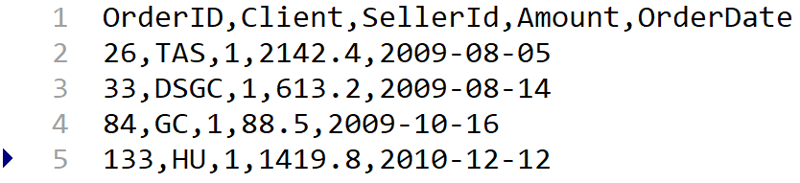


Image description

Open the esProc IDE, create a new script, and write the SPL statement in cell A1 to read the CSV file:



Image description

Press ctrl-F9 to execute, and you can see the execution result on the right side of the IDE. The file is read as a data table, which is very convenient for debugging SPL code.
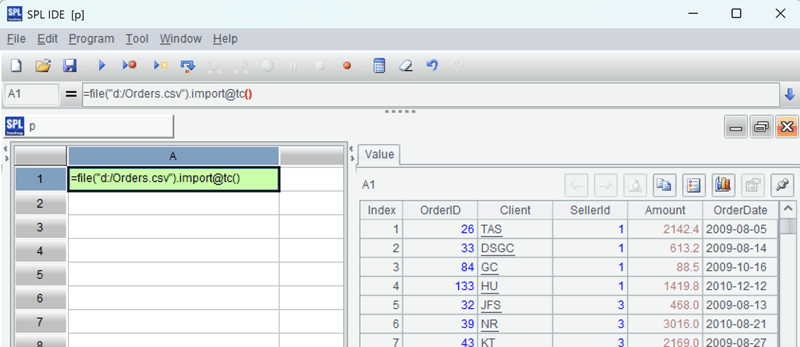


Image description

The IDE is running normally, indicating that esProc’s own environment is functioning properly. Then configure the Java environment.

Find the esProc JDBC related jars from the directory “[Installation directory]\esProc\lib”: esproc-bin-xxxx.jar, icu4j_60.3.jar.
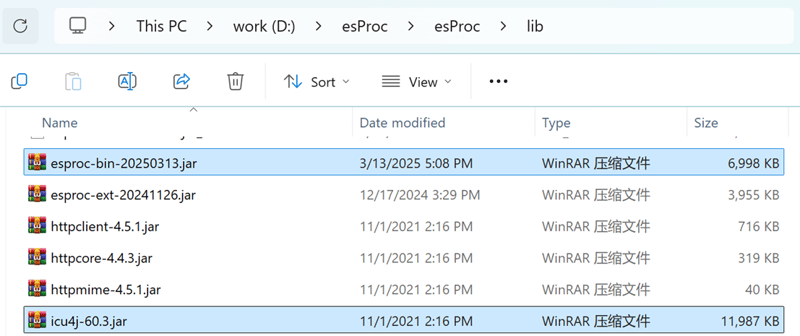


Image description

Deploy these two jar packages to the class path of the Java development environment.

Find the esProc configuration file raqsoftConfig. xml from the directory “[Installation directory] \ esProc \ config” and deploy it to the Java development environment’s class path. The configuration file can be used without modification, and the mainPath locates the default path for various files such as CSV files, which can be modified as needed.
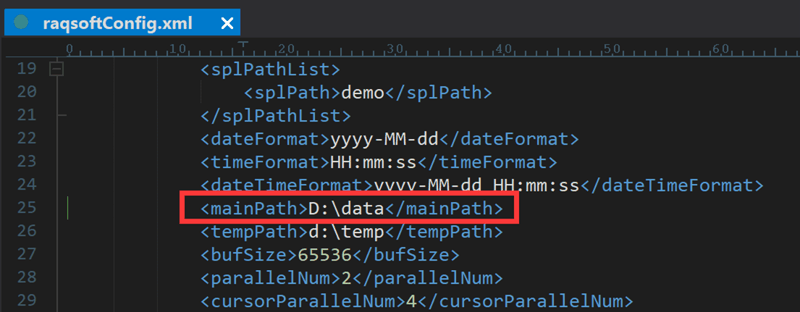


Image description

Next, you can write Java code to execute SPL through esProc JDBC:


Class.forName("com.esproc.jdbc.InternalDriver");
Connection con= DriverManager.getConnection("jdbc:esproc:local://");
PreparedStatement st = con.prepareStatement("=file(\"d:/Orders.csv\").import@tc()");
ResultSet rs = st.executeQuery();
ResultSetMetaData rsmd = rs.getMetaData();
for ( int c = 1; c <= colCount;c++) {
String title = rsmd.getColumnName(c);
if( c > 1 ) {
System.out.print("\t");
}
else {
System.out.print("\n");
}
System.out.print(title);
}
while (rs.next()) {
for(int c = 1; c<= colCount; c++) {
if ( c > 1 ) {
System.out.print("\t");
}
else {
System.out.print("\n");
}
Object o = rs.getObject(c);
System.out.print(o.toString());
}
}
if (con!=null) {
con.close();
}


The first four lines are the key, loading the esProc driver and executing SPL statements to read the CSV file. As can be seen, this part of the code is completely consistent with the code for executing SQL through database JDBC.

Here is the execution result:
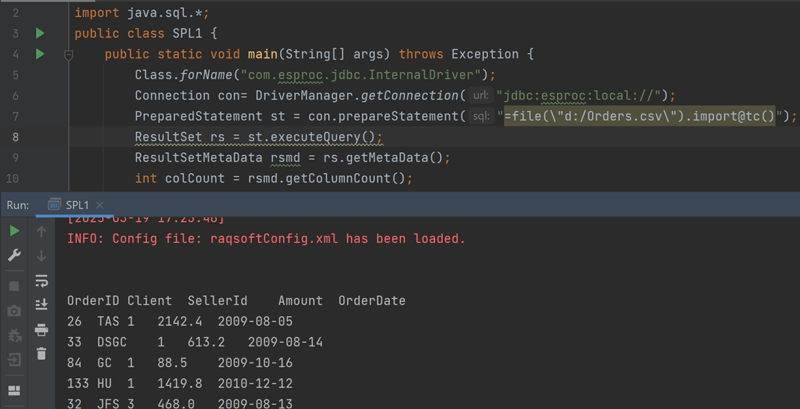


Image description

Of course, just reading data in won’t reduce much Java workload. Let’s try querying with conditions and design a parameter to replace the prepareStatment with the following code:


PreparedStatement st = con.prepareStatement("=file(\"d:/Orders.csv\").import@tc().select(Amount>? && Amount<=? && like@c(Client,?))");
st.setInt(1,2000);
st.setInt(2,4000);
st.setString(3,"*s*");


Find the records with Amount between 2000 and 4000 and client containing s (case insensitive). The result after execution looks like this:
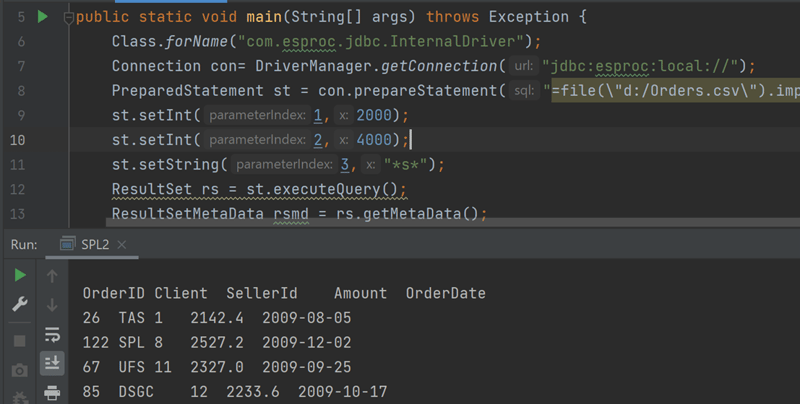


Image description

The above is the native code SPL of esProc, and esProc also supports simple SQL, making it convenient for database programmers to use. For example, group and aggregation query:


PreparedStatement st = con.prepareStatement("$select year(OrderDate) y, Client,sum(Amount) amt,count(1) cnt from d:/Orders.csv group by year(OrderDate),Client having sum(Amount)>?");
st.setInt(1,5000);


Group and aggregate by year and client and then filter, and after execution, you can see the result:
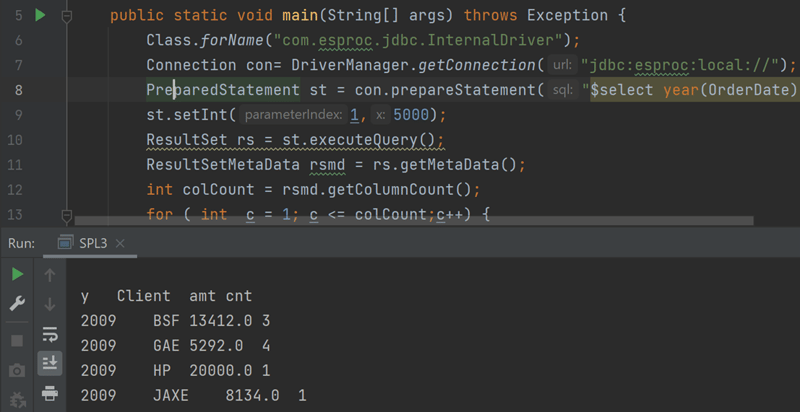


Image description

esProc also supports calculating large CSV files that exceed memory, and the code is also simple. The official website provides specific instructions.

1. Sofort-Triage & Abwehrmaßnahmen

SOC Incident Playbook: Vulnerability Remediation & Verification
Syntax validiert (0 Fehler)
title: Detect Exploitation - How to query CSV as a database table in Java with esProc
id: 7d0f48b6-362c-4a6e-b98d-76b6a89bb955
status: experimental
description: Automatisch generierte SIEM-Erkennungsregel basierend auf CTI Intelligence
references:
  - https://tsecurity.de/
author: iShareStuff CTI Automated Detection Engine
date: 2026-09-26
logsource:
  category: network_connection
  product: any
detection:
  selection:
      CommandLine|contains:
        - 'exploit'
  condition: selection
falsepositives:
  - Legitime administrative Zugriffe oder Penetrationstests
level: high
tags:
  - attack.initial_access
Syntax validiert (0 Fehler)
rule CTI_Threat_Indicator {
    meta:
        author = "iShareStuff CTI Automated Detection Engine"
        date = "2026-09-26"
        description = "YARA Signature for "
    strings:
        $str = "How to query CSV as a database" ascii wide
    condition:
        any of them
}
Syntax validiert (0 Fehler)
index=security sourcetype IN ("cisco:asa", "pan:traffic", "zeek_conn", "suricata", "WinEventLog:Security")
("How to query CSV as a database table in ")
| stats count earliest(_time) as first_seen latest(_time) as last_seen by src_ip, dest_ip, dest_host, signature
| eval first_seen=strftime(first_seen, "%Y-%m-%d %H:%M:%S"), last_seen=strftime(last_seen, "%Y-%m-%d %H:%M:%S")
| sort - count
Syntax validiert (0 Fehler)
message: "*How to query CSV as a database table in *"
Syntax validiert (0 Fehler)
CommonSecurityLog
| where Message has "How to query CSV as a database table in "
| summarize EventCount = count(), FirstSeen = min(TimeGenerated), LastSeen = max(TimeGenerated) by SourceIP, DestinationIP, DestinationPort, Activity
| extend DetectionRule = "iShareStuff-CTI-Compiled"
| sort by EventCount desc

2. Cyber Threat Intelligence & Forensik

🎯
MITRE ATT&CK Matrix Navigator 14 Taktiken
Reconnaissance
-
Resource Development
-
Initial Access
Execution
Persistence
-
Privilege Escalation
Defense Evasion
Credential Access
-
Discovery
-
Lateral Movement
-
Collection
-
Command and Control
Exfiltration
-
Impact
tsecurity.de Cognitive Threat RAG
Fokus-Vektor:

Kognitive Analyse für identifizierte Bedrohung: Erhöhte Bedrohungslage im Bereich How to query CSV as a database table in .... Basierend auf 368k Vektor-Korrelationen werden sofortige Isolationsmaßnahmen für betroffene Endpunkte empfohlen.

🛡️ Angriffsfläche & Exposure

Netzwerk/Remote-Zugriff ohne Vorauthentifizierung möglich.

⚡ Empfohlene Sofortmaßnahmen
  • 1. Perimeter-Inspektion: Relevante Portfreigaben und exponierte Endpunkte unverzüglich scannen.
  • 2. Patch-Applikation: Hersteller-Hotfix einspielen oder betroffene Daemons in isolierte DMZ-Segmente überführen.
  • 3. Telemetrie & EDR-Alerts: Prozessaufrufe und Child-Processes auf anomale Shell-Spawns überwachen.
🔗 Semantisch verwandte Zero-Days MariaDB 11.7 VEC
Ähnliche Beiträge
🔍 Verwandte News

Auch interessante Nachrichten How to query CSV as a database table in Java with esProc

Thematisch verwandte Begriffe: query, database, table, Java · 6 Treffer

Laden...

Videos werden geladen ...

Laden...

Beiträge werden geladen ...

Laden...

Videos werden geladen ...

Laden...

Beiträge werden geladen ...

Laden...

Videos werden geladen ...

Laden...

Beiträge werden geladen ...

Laden...

Videos werden geladen ...

Laden...

Beiträge werden geladen ...

Laden...

Videos werden geladen ...

Zum Aktualisieren ziehen
ZERO-DAY CVE-2026-100534 | OpenClaw versions before 2026.8.1 contain an authorization bypass vulne…
Advisory →
tsecurity.de Icon
Offline-Lesen, Eilmeldungen & 0ms Ladezeit

Installiere tsecurity.de direkt auf deinen Home-Bildschirm für das ultimative Vollbild-Magazinerlebnis ohne Browser-Leisten.

Nächster Beitrag