
This is a submission for the KendoReact Free Components Challenge.
What I Built
My partner and I embraced the KendoReact Free Components Challenge by creating a NextJS web application that captures the playful spirit and unique traits of your dog, then presents it in a personalized report. The report is generated solely from a URL, making it easy to share with friends, family, vets, or anyone looking after your fur baby.
We named our project Bark Board—and it truly lives up to the hype!
Demo
Before diving into the details, I’m sure you’re eager to try it out:
🌐 - Experience the app at this link.
🖥️ - The source code is available on Github under an MIT license.
Here’s how it works:
The application guides users through a form where they provide essential details about their beloved pet.
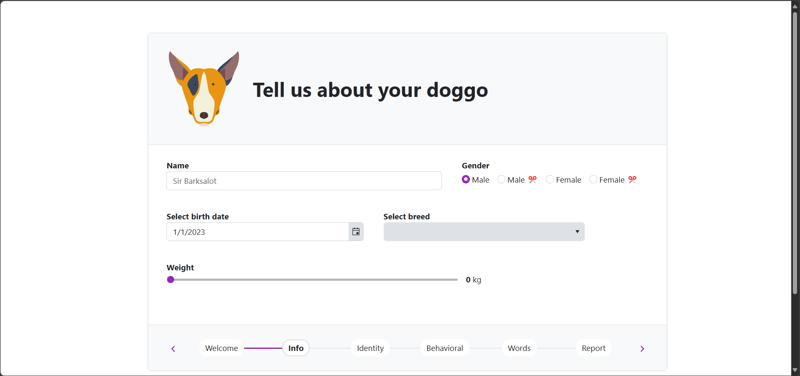
The form covers:
- Basic information such as name, breed, age, and weight.
- Key attributes that define their personality.
- Insights into their dog’s behavior.
- A selection of words your dog recognizes—feel free to choose a few.
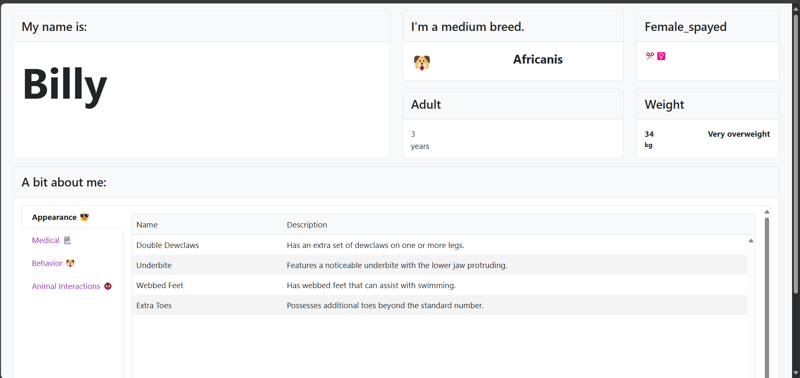
Once completed, the app generates a shareable report:
This unique URL can be shared with anyone, offering a quick and charming profile of your dog.
KendoReact Experience
Working with the KendoReact library was a mostly seamless and enjoyable experience, especially in conjunction with the NextJS framework.
We built a NextJS TypeScript project with Bootstrap theming using the Template Wizard Visual Studio Code tool and that workflow. The setup was straightforward and hassle-free.
Here are the top 10 KendoReact components we utilized:
In truth, we integrated even more than these 10 components throughout the project!
While the development process was largely smooth, we did encounter a couple of challenges, which I discuss below.
Challenge 1: Styling
One major hurdle was understanding how Telerik expects developers to integrate standard CSS classes from their chosen styling library (e.g., Bootstrap).
I initially aimed to apply familiar classes like mt-2 and p-3, but they didn’t work as expected. I spent considerable time combing through documentation, seeking guidance from ChatGPT, and debugging in the browser.
In hindsight, a simple Bootstrap cheat sheet would have been immensely helpful.
Links that assisted me:
- https://www.telerik.com/design-system/docs/themes/kendo-themes/bootstrap/
- https://www.telerik.com/design-system/docs/themes/kendo-themes/bootstrap/theme-variables/
Challenge 2: TileLayout
For our report, we envisioned an Apple-inspired tile view (check out this Figma file if you need a visual reference).
We discovered the TileLayout component, which was easy to implement. However, we soon realized that the default k-card CSS class applied a width: 65vw;, which disrupted our layout since every card inherited this style. A simple CSS override resolved the issue:
.k-card{

    width: 100%;

    height: 100%;

}
Challenge 3: Sneaky chip Property in ChipList
Another interesting nuance was observed in the Chip example. You can instantiate a Chip like this:
<Chip

  text={'Small Rounded'}

  value={'small rounded chip'}

  svgIcon={homeIcon}

  rounded={'small'}

  themeColor={'info'}

  fillMode={'outline'}

  />
However, when configuring a ChipList, additional properties (other than text and value) must be explicitly defined, as shown in the example below:
<ChipList

   data={commandChips}

   selection="multiple"

   chip={(props: ChipProps) => (

        <Chip

          {...props}

          themeColor={props.dataItem.themeColor}

          fillMode={props.dataItem.fillMode}

          size={props.dataItem.size}

        />

      )}

  />
This subtle distinction took a bit of unraveling, but it eventually became clear.
Conclusion
We really had so much fun with Bark Board!
There's a lot more on the horizon, and we're eager to roll out new features that further enhance your experience. Your feedback is invaluable—please feel free to share your thoughts, suggestions, and feature requests in the repository and on this blog post.
Let’s make Bark Board even better together!
My Team
The team was a duo: