



Amazon’s Simple Storage Service (S3) is an extremely robust cloud storage solution, and it has a ton of settings and functionality: including the ability to create a “pre-signed” URL that gives others permission to access objects in your bucket for a given time.
This story documents that functionality and an unexpected quirk I ran into while implementing it.
Background
I have a small application that allows a user to upload a file to an S3 bucket that the application owns. This action kicks off a series of processing events on the file.
When a user first initiates this process, a Lambda function hosting a Python API is hit and creates a “Pre-signed” POST URL, which gives the application a few seconds to upload the file.
I originally wrote the code for this in my development environment, which is located in us-east-1 — however, when I deployed the code to a new environment located in us-east-2 the application wouldn’t work, although I was deploying the same code in both places.
After a lot of trial and error (and googling), I finally figured out what was happening.
Reproducing the Issue
To reproduce this, I created the following resources:
testpresignedpostbucket— a private S3 bucket inus-east-1
testS3presignedpostUSEAST1 — a Lambda function deployed inus-east-1with a role that gives it permission to read and write to S3
testpresignedpostbucketeast2— a private S3 bucket inus-east-2
testS3presignedpostUSEAST2 — a Lambda function deployed inus-east-2with a role that gives it permission to read and write to S3
Both Lambdas are running Python 3.12, are set to be invoked using a Function URL, and have the same small snippet of code deployed; the only change being the corresponding bucket name:
import json

import boto3


bucket = 'testpresignedpostbucket' # append "east2" in that region


def lambda_handler(event, context):

    s3_client = boto3.client('s3')

    return s3_client.generate_presigned_post(bucket, 'test.txt', ExpiresIn=60)
This code uses boto3 to generate a pre-signed post, which will pass back a URL and the form fields needed to allow a user to upload an object to the bucket key “test.txt” for the next 60 seconds. I’m using the generate_presigned_post method because users are only writing to the bucket, they never read from it.
Finally, I also created a small text file to try to upload: test.txt , which only contained the words “Hello World!”
Testing the Resources
Note: The resources have all been deleted as of my writing this, so the following curl calls are for examples only.
I hit my Lambda in us-east-1 with the following curl command:
curl --request GET \

  --url https://isyo6u4s6j2mb2lfngzmbdas4u0pzkll.lambda-url.us-east-1.on.aws/
In response, I got the following:
{

 "fields": {

  "signature": "********",

  "AWSAccessKeyId": "********",

  "x-amz-security-token": "********",

  "key": "test.txt",

  "policy": "********=="

 },

 "url": "https:\/\/testpresignedpostbucket.s3.amazonaws.com\/"

}
Based on this response, I wrote the code in my application to use this information to upload my test.txt file:
import requests


def get_presigned_url(function_url):

    response = requests.get(function_url)

    response.raise_for_status()

    upload_file(response.json())


def upload_file(presigned_url_fields):

    payload = {

        "signature": presigned_url_fields["fields"].get("signature"),

        "AWSAccessKeyId": presigned_url_fields["fields"].get("AWSAccessKeyId"),

        "policy": presigned_url_fields["fields"].get("policy"),

        "x-amz-security-token": presigned_url_fields["fields"].get(

            "x-amz-security-token"

        ),

        "key": "test.txt",

    }

    with open("test.txt", "rb") as f:

        response = requests.post(

            presigned_url_fields["url"], data=payload, files={"file": f}

        )

        response.raise_for_status()

        print(response.status_code)
This worked as expected, I got an HTTP 204 in response, and my file ended up where I expected in my bucket:

Test.txt was successfully uploaded to S3
In us-east-2
However, as soon as I deployed this code to us-east-2 my Python script started throwing an HTTP 403 Client Error: Forbidden for url. My initial thought was that my bucket permissions were somehow misconfigured, but that didn’t make sense, as I had deployed the same CDK stack in both regions.
Curling the us-east-2 Lambda revealed a different set of keys, even though it was running the same code:
curl --request GET \

  --url https://yyji6kiile2t74orqi6bxppjxq0ybhei.lambda-url.us-east-2.on.aws/
{

 "fields": {

  "x-amz-date": "********",

  "x-amz-signature": "********",

  "x-amz-security-token": "********",

  "key": "test.txt",

  "x-amz-algorithm": "AWS4-HMAC-SHA256",

  "x-amz-credential": "********",

  "policy": "********=="

 },

 "url": "https:\/\/testpresignedpostbucketeast2.s3.amazonaws.com\/"

}
Since this was the same code deployed (via Amazon CDK) in two different regions, I was really confused!
Solution
It turns out that this issue is due to the AWS Signature Version.
AWS S3 uses Signature Version 4 in all regions. Regions created after January 30th, 2014 also default to using Version 4. However, regions created before January 30th, 2014 still support Version 2. See AWS’s documentation on Authenticating Requests for more information.
us-east-1was AWS’s first region and launched in 2006.
us-east-2didn’t launch until ten years later in 2016! (After the signature version change date)
Code Change
I found a GitHub issue that explained my problem: Botocore also defaults to using Version 2 while generating pre-signed posts in us-east-1 — so to make this work a simple code change to specify the signature version was needed:
import json

import boto3

from botocore.client import Config


bucket = 'testpresignedpostbucket'


def lambda_handler(event, context):

    s3_client = boto3.client('s3', config=Config(signature_version="s3v4"))

    return s3_client.generate_presigned_post(bucket, 'test.txt', ExpiresIn=60)
This results in the following response, with all the expected fields that we were seeing in us-east-2:
{

 "fields": {

  "x-amz-date": "********",

  "x-amz-signature": "********",

  "x-amz-security-token": "********",

  "key": "test.txt",

  "x-amz-algorithm": "AWS4-HMAC-SHA256",

  "x-amz-credential": "********",

  "policy": "********=="

 },

 "url": "https:\/\/testpresignedpostbucket.s3.amazonaws.com\/"

}
I would also like to note that if I had not been explicit in my Python script, I wouldn’t have run into this issue. However, the boto3 documentation for generate_presigned_post is a little bit vague on the fields dictionary — I could have used a bit more documentation.
def get_presigned_url(url):

    response = requests.get(url)

    response.raise_for_status()

    upload_file(response.json())


def upload_file(presigned_url_fields):

    with open("test.txt", "rb") as f:

        response = requests.post(

            presigned_url_fields["url"],

            data=presigned_url_fields["fields"],

            files={"file": f},

        )

        response.raise_for_status()

        print(response.status_code)
Ultimately, I feel like it’s better to use the newer signature version in both cases.
Another Gotcha - Order of Fields Keys Matter!
While writing this story, I stumbled upon another thing I didn’t expect: the order of the fields seems to matter.
Using Insomnia, I was testing uploading the file to the pre-signed URL and encountered the following 400 Bad Request error:
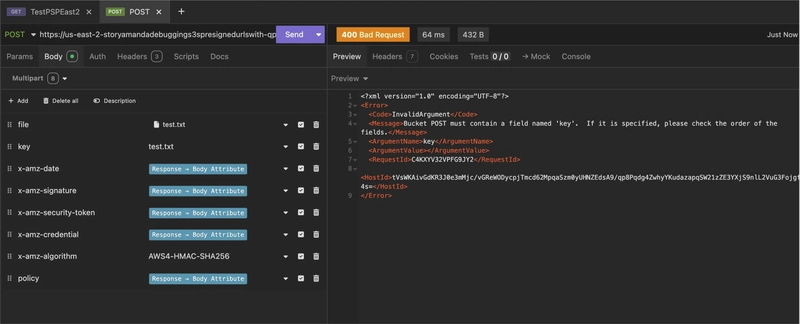
I received a 400 Bad Request when the fields were out of order
This was fixed by making sure that the key field came before the file:
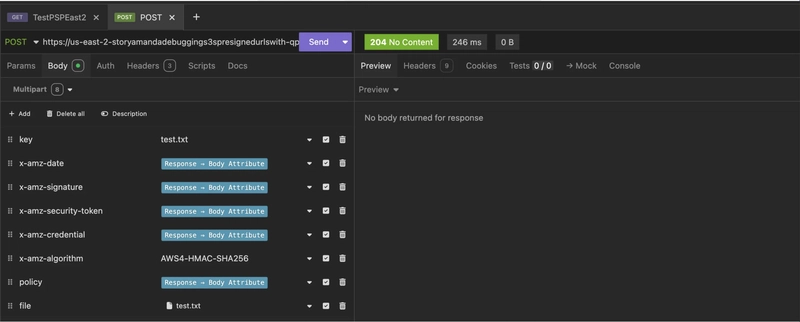
The same information sent in a different order results in a successful 204 response
This is a minor issue, but it gave me a moment of confusion!
Conclusion
When I deploy code in different regions, I typically expect the code to act the same way. I know that brand-new features may only be available in certain regions, but for heavily used services like Lambda and S3, I wasn’t expecting to find any quirks. It took me a couple of hours to track down what was happening in this case, so I hope this article can perhaps save someone else some time in the future!
This story is also available on Medium.
I enjoy writing about software development, project management, and my journey in the AWS Cloud. If you’d like to read more, please consider following me here on Dev.to or on Medium or LinkedIn.