
Zum Hauptinhalt springen
Echtzeit-Radar & Feeds
Alle RSS Feeds ➔
👥 Community & Social
Windows Tipps & SecurityGrafikkarte vor Überhitzung schützen: So geht’s(25.09.2026 um 08:00 Uhr)
••••••••••
Windows Tipps & SecurityGrafikkarte vor Überhitzung schützen: So geht’s(25.09.2026 um 08:00 Uhr)
••••••••••
Intelligence View
⚡ tsecurity.de Intelligence

Solução para Problema de Glitch Gráfico Nvidia GPU

Recentemente, me deparei com um problema gráfico no Visual Studio Code(e variantes) que afetava a interface do programa. A distorção acontecia de forma aleatória, e a cada vez que eu alternava entre janelas, digitava, ou até mesmo passava o…

0
↗ Quelle (dev.to)
Reagiere als Erste:r — dein Feedback zählt!

glitch


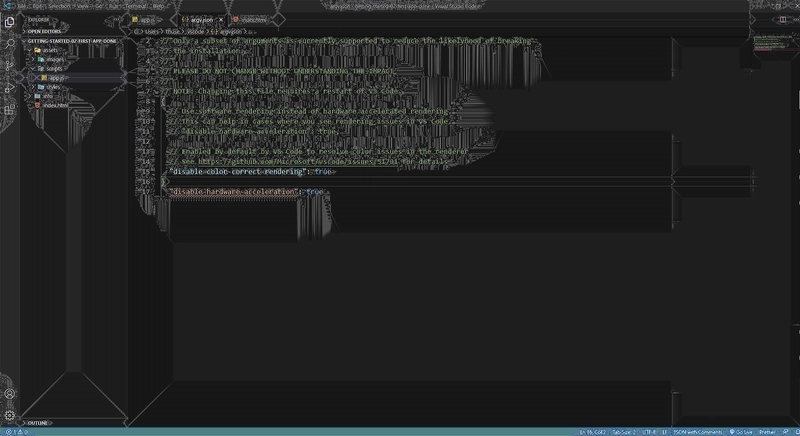
Recentemente, me deparei com um problema gráfico no Visual Studio Code(e variantes) que afetava a interface do programa. A distorção acontecia de forma aleatória, e a cada vez que eu alternava entre janelas, digitava, ou até mesmo passava o mouse sobre alguns campos. Após algumas tentativas de resolver, finalmente encontrei uma solução que pode ser útil para quem passar por um problema semelhante.


Descrição do Problema


O erro gráfico apareceu da seguinte maneira:


  • A distorção ocorria sem ação explícita minha, aparecendo quando eu mudava de tela, digitava, ou até mesmo apenas passava o mouse sobre a interface.

  • Em alguns casos, a distorção não afetava os campos de texto, mas aparecia ao redor desses campos.

  • O problema persistia, mesmo depois de tentar reinstalar o Visual Studio Code e remover as extensões.


Tentativas de Solução


Antes de encontrar a solução, tentei algumas abordagens:


  1. Reinstalar o Visual Studio Code: A reinstalação do programa não teve efeito sobre o problema.


  2. Desabilitar Extensões: Tentei remover todas as extensões, mas isso não fez diferença.


  3. Configuração de Argumentos de Execução: Segui algumas sugestões e tentei adicionar o argumento "disable-hardware-acceleration": true nas configurações do VS Code, mas isso também não resolveu o problema.


A Solução Encontrada


Foi ao investigar mais a fundo as configurações gráficas do sistema que encontrei a verdadeira causa do problema. Percebi que o erro estava relacionado ao "Image Sharpening" no painel de controle da Nvidia. Aqui estão os passos que segui para corrigir:


  1. Abrir o Painel de Controle da Nvidia: Deve estar instalado no seu SO.


  2. Ajustar Configurações 3D: Naveguei até as configurações 3D.


  3. Desabilitar o Aprimoramento de Imagem: Procure "Image Sharpening" ou o relativo em português, desativei a opção.


IDE - plus


Após desabilitar a opção no painel de controle da Nvidia, o problema foi resolvido. Essa solução pode ser útil para quem estiver enfrentando erros gráficos semelhantes no Visual Studio Code. Caso você também enfrente esse erro, recomendo tentar essa abordagem ou, se necessário, adicionar o argumento "disable-hardware-acceleration": true para forçar a utilização de renderização via software, direto na configuraçao de argumentos.


(Ctrl+Shift+P).

Pesquise por Configure Runtime Arguments command.


Com isso, reinicie a IDE e ficou tudo normal novamente

1. Sofort-Triage & Abwehrmaßnahmen

SOC Incident Playbook: Remote Code Execution (RCE) Defense
Syntax validiert (0 Fehler)
title: Detect Exploitation - Solução para Problema de Glitch Gráfico Nvidia GPU
id: 5f4944b4-beff-4990-92aa-7fb063219639
status: experimental
description: Automatisch generierte SIEM-Erkennungsregel basierend auf CTI Intelligence
references:
  - https://tsecurity.de/
author: iShareStuff CTI Automated Detection Engine
date: 2026-09-26
logsource:
  category: network_connection
  product: any
detection:
  selection:
      CommandLine|contains:
        - 'exploit'
  condition: selection
falsepositives:
  - Legitime administrative Zugriffe oder Penetrationstests
level: high
tags:
  - attack.initial_access
Syntax validiert (0 Fehler)
rule CTI_Threat_Indicator {
    meta:
        author = "iShareStuff CTI Automated Detection Engine"
        date = "2026-09-26"
        description = "YARA Signature for "
    strings:
        $str = "Solução para Problema de Glitc" ascii wide
    condition:
        any of them
}
Syntax validiert (0 Fehler)
index=security sourcetype IN ("cisco:asa", "pan:traffic", "zeek_conn", "suricata", "WinEventLog:Security")
("Soluo para Problema de Glitch Grfico Nvi")
| stats count earliest(_time) as first_seen latest(_time) as last_seen by src_ip, dest_ip, dest_host, signature
| eval first_seen=strftime(first_seen, "%Y-%m-%d %H:%M:%S"), last_seen=strftime(last_seen, "%Y-%m-%d %H:%M:%S")
| sort - count
Syntax validiert (0 Fehler)
message: "*Soluo para Problema de Glitch Grfico Nvi*"
Syntax validiert (0 Fehler)
CommonSecurityLog
| where Message has "Soluo para Problema de Glitch Grfico Nvi"
| summarize EventCount = count(), FirstSeen = min(TimeGenerated), LastSeen = max(TimeGenerated) by SourceIP, DestinationIP, DestinationPort, Activity
| extend DetectionRule = "iShareStuff-CTI-Compiled"
| sort by EventCount desc

2. Cyber Threat Intelligence & Forensik

🎯
MITRE ATT&CK Matrix Navigator 14 Taktiken
Reconnaissance
-
Resource Development
-
Initial Access
Execution
Persistence
-
Privilege Escalation
Defense Evasion
Credential Access
-
Discovery
-
Lateral Movement
-
Collection
-
Command and Control
Exfiltration
-
Impact
tsecurity.de Cognitive Threat RAG
Fokus-Vektor:

Kognitive Analyse für identifizierte Bedrohung: Erhöhte Bedrohungslage im Bereich Solução para Problema de Glitch Gráfico .... Basierend auf 368k Vektor-Korrelationen werden sofortige Isolationsmaßnahmen für betroffene Endpunkte empfohlen.

🛡️ Angriffsfläche & Exposure

Netzwerk/Remote-Zugriff ohne Vorauthentifizierung möglich.

⚡ Empfohlene Sofortmaßnahmen
  • 1. Perimeter-Inspektion: Relevante Portfreigaben und exponierte Endpunkte unverzüglich scannen.
  • 2. Patch-Applikation: Hersteller-Hotfix einspielen oder betroffene Daemons in isolierte DMZ-Segmente überführen.
  • 3. Telemetrie & EDR-Alerts: Prozessaufrufe und Child-Processes auf anomale Shell-Spawns überwachen.
🔗 Semantisch verwandte Zero-Days MariaDB 11.7 VEC
Ähnliche Beiträge
🔍 Verwandte News

Auch interessante Nachrichten Solução para Problema de Glitch Gráfico Nvidia GPU

Thematisch verwandte Begriffe: Solução, para, Problema, Glitch · 6 Treffer

Laden...

Videos werden geladen ...

Laden...

Beiträge werden geladen ...

Laden...

Videos werden geladen ...

Laden...

Beiträge werden geladen ...

Laden...

Videos werden geladen ...

Laden...

Beiträge werden geladen ...

Laden...

Videos werden geladen ...

Laden...

Beiträge werden geladen ...

Laden...

Videos werden geladen ...

Zum Aktualisieren ziehen
ZERO-DAY CVE-2026-100503 | Ghidra versions through 12.1.4 contain a heap use-after-free vulnerabil…
Advisory →
tsecurity.de Icon
Offline-Lesen, Eilmeldungen & 0ms Ladezeit

Installiere tsecurity.de direkt auf deinen Home-Bildschirm für das ultimative Vollbild-Magazinerlebnis ohne Browser-Leisten.

Nächster Beitrag