Zum Hauptinhalt springen
Echtzeit-Radar & Feeds
Alle RSS Feeds ➔
👥 Community & Social
Windows Tipps & SecurityGrafikkarte vor Überhitzung schützen: So geht’s(25.09.2026 um 08:00 Uhr)
••••••••••
Windows Tipps & SecurityGrafikkarte vor Überhitzung schützen: So geht’s(25.09.2026 um 08:00 Uhr)
••••••••••
Intelligence View
⚡ tsecurity.de Intelligence

Understanding Users in Linux: Who’s Using the System?

Table of Contents What is a User? Types of Users in Linux How Linux Identifies Users (UIDs) Where Is User Information Stored? Essential User Management Commands Summary 1. What is a User? A user is simply…

0
↗ Quelle (dev.to)
Reagiere als Erste:r — dein Feedback zählt!


Table of Contents


  1. What is a User?


  2. Types of Users in Linux


  3. How Linux Identifies Users (UIDs)


  4. Where Is User Information Stored?


  5. Essential User Management Commands

  6. Summary


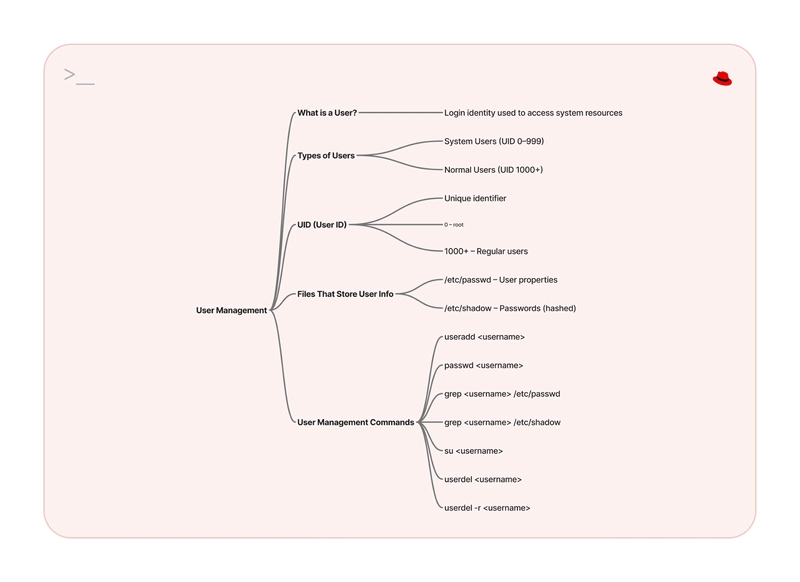
Linux Users Management Mind Map


1. What is a User?


A user is simply someone who logs into a Linux system. Each user has an account; a unique identity, that determines:


  • What they can do

  • What files they own

  • What resources they can access


You could think of it like this: if Linux was a house, users are the people with keys, each with different access levels.


2. Types of Users in Linux


a. System Users


These accounts are created automatically when Linux is installed. They're mostly used by the system and background services, not real people.


Examples:


  • root – the superuser (has unlimited control)


  • apache – used by web servers


  • mysql – used by the database engine


b. Normal Users


These are the actual human users who log in to do work. They can be added, edited, or deleted by an administrator (or the root user).


Example:

If you create a user called Hassaan, Linux sets up an account for Hassaan, gives them a home directory, and assigns them basic privileges.


3. How Linux Identifies Users (UIDs)


Behind the scenes, Linux assigns a UID (User ID) to every account. This UID is what the system actually uses to track users, not the usernames.


UID Ranges:


  • 0 – 999 → System Users


  • 1000 – 60000 → Normal Users


4. Where Is User Information Stored?


Linux keeps user data in special configuration files:


- /etc/passwd


Stores general info like usernames, UIDs, home directories, and default shells.


- /etc/shadow


Stores password-related info (in a secure, encrypted format). Only root can read this file.


5. Essential User Management Commands


➕ Create a New User


useradd <username>


🔑 Set or Change Password


passwd <username>


🧾 Check User Account Info


grep <username> /etc/passwd


🔐 Check Password Info


grep <username> /etc/shadow


🔁 Switch to Another User


su <username>


❌ Delete a User Account


  • Keep user data:


userdel <username>


  • Delete user and their home directory:


userdel -r <username>


6. Summary


Today’s Linux journey focused on user management, from creating users to checking their information and managing their accounts. Here’s a quick recap:


  • System users vs normal users

  • Linux uses UIDs to identify users (not just usernames)

  • You can easily create, modify, and delete users via the terminal

  • User data is stored in /etc/passwd and /etc/shadow


Tomorrow, we’ll take it a step further and dive into groups and permissions, how users interact with files and what access they have.


Until then, try running a few of these commands on your own system to explore how users are managed. You might discover some interesting things!

1. Sofort-Triage & Abwehrmaßnahmen

SOC Incident Playbook: Remote Code Execution (RCE) Defense
Syntax validiert (0 Fehler)
title: Detect Exploitation - Understanding Users in Linux: Who’s Using the System?
id: a25706ba-d25a-4295-bfa3-5b87f3d6f22b
status: experimental
description: Automatisch generierte SIEM-Erkennungsregel basierend auf CTI Intelligence
references:
  - https://tsecurity.de/
author: iShareStuff CTI Automated Detection Engine
date: 2026-09-27
logsource:
  category: network_connection
  product: any
detection:
  selection:
      CommandLine|contains:
        - 'exploit'
  condition: selection
falsepositives:
  - Legitime administrative Zugriffe oder Penetrationstests
level: high
tags:
  - attack.initial_access
Syntax validiert (0 Fehler)
rule CTI_Threat_Indicator {
    meta:
        author = "iShareStuff CTI Automated Detection Engine"
        date = "2026-09-27"
        description = "YARA Signature for "
    strings:
        $str = "Understanding Users in Linux: " ascii wide
    condition:
        any of them
}
Syntax validiert (0 Fehler)
index=security sourcetype IN ("cisco:asa", "pan:traffic", "zeek_conn", "suricata", "WinEventLog:Security")
("Understanding Users in Linux Whos Using ")
| stats count earliest(_time) as first_seen latest(_time) as last_seen by src_ip, dest_ip, dest_host, signature
| eval first_seen=strftime(first_seen, "%Y-%m-%d %H:%M:%S"), last_seen=strftime(last_seen, "%Y-%m-%d %H:%M:%S")
| sort - count
Syntax validiert (0 Fehler)
message: "*Understanding Users in Linux Whos Using *"
Syntax validiert (0 Fehler)
CommonSecurityLog
| where Message has "Understanding Users in Linux Whos Using "
| summarize EventCount = count(), FirstSeen = min(TimeGenerated), LastSeen = max(TimeGenerated) by SourceIP, DestinationIP, DestinationPort, Activity
| extend DetectionRule = "iShareStuff-CTI-Compiled"
| sort by EventCount desc

2. Cyber Threat Intelligence & Forensik

CTI Threat Relationship Graph3 Knoten / 2 Relationen
CVE / Incident Software MITRE ATT&CK CWE Weakness IoC
🎯
MITRE ATT&CK Matrix Navigator 14 Taktiken
Reconnaissance
-
Resource Development
-
Initial Access
Execution
Persistence
-
Privilege Escalation
Defense Evasion
Credential Access
-
Discovery
-
Lateral Movement
-
Collection
-
Command and Control
Exfiltration
-
Impact
tsecurity.de Cognitive Threat RAG
Fokus-Vektor:

Analyse für identifizierte Bedrohung auf Basis von Live-CTI (ENISA EUVD): CVSS 0.0 · EPSS 0.0% · CISA KEV: nein. Handlungsableitung aus den verlinkten Hersteller-Quellen.

🛡️ Angriffsfläche & Exposure

Netzwerk/Remote-Zugriff ohne Vorauthentifizierung möglich.

⚡ Empfohlene Sofortmaßnahmen
  • 1. Perimeter-Inspektion: Relevante Portfreigaben und exponierte Endpunkte unverzüglich scannen.
  • 2. Patch-Applikation: Hersteller-Hotfix einspielen oder betroffene Daemons in isolierte DMZ-Segmente überführen.
  • 3. Telemetrie & EDR-Alerts: Prozessaufrufe und Child-Processes auf anomale Shell-Spawns überwachen.
Ähnliche Beiträge
🔍 Verwandte News

Auch interessante Nachrichten Understanding Users in Linux: Who’s Using the System?

Thematisch verwandte Begriffe: Understanding, Users, Linux, Whos · 6 Treffer

Laden...

Videos werden geladen ...

Laden...

Beiträge werden geladen ...

Laden...

Videos werden geladen ...

Laden...

Beiträge werden geladen ...

Laden...

Videos werden geladen ...

Laden...

Beiträge werden geladen ...

Laden...

Videos werden geladen ...

Laden...

Beiträge werden geladen ...

Laden...

Videos werden geladen ...

💬 Kommentare werden geladen…
Zum Aktualisieren ziehen
ZERO-DAY CVE-2026-100739 | A vulnerability was detected in mathurvishal CloudClassroom-PHP-Project…
Advisory →
tsecurity.de Icon
Offline-Lesen, Eilmeldungen & 0ms Ladezeit

Installiere tsecurity.de direkt auf deinen Home-Bildschirm für das ultimative Vollbild-Magazinerlebnis ohne Browser-Leisten.

Nächster Beitrag