
Zum Hauptinhalt springen
Echtzeit-Radar & Feeds
Alle RSS Feeds ➔
👥 Community & Social
Windows Tipps & SecurityGrafikkarte vor Überhitzung schützen: So geht’s(25.09.2026 um 08:00 Uhr)
••••••••••
Windows Tipps & SecurityGrafikkarte vor Überhitzung schützen: So geht’s(25.09.2026 um 08:00 Uhr)
••••••••••
Intelligence View
⚡ tsecurity.de Intelligence

CI/CD Pipeline for a Node.js App with Automated Testing and Deployment to Render

Introduction Recently, a friend of mine shared her experience of getting stuck in a difficult loop while trying to set up a CI/CD pipeline for her Node.js application. This sparked the idea for this guide. In this article, we’ll create a …

0
↗ Quelle (dev.to)
Reagiere als Erste:r — dein Feedback zählt!

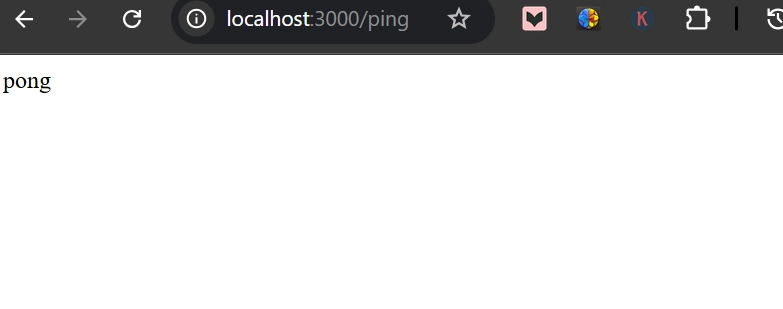
Image description


Introduction


Recently, a friend of mine shared her experience of getting stuck in a difficult loop while trying to set up a CI/CD pipeline for her Node.js application. This sparked the idea for this guide. In this article, we’ll create a professional yet beginner-friendly CI/CD pipeline using GitLab to automate testing and deployment for a simple Node.js application. By the end, you’ll have a robust DevOps workflow to ship code faster and safer.


📁 Folder Structure


node-ci-cd-app/
├── .gitlab-ci.yml # GitLab pipeline config
├── package.json
├── .gitignore
├── app.js # Main server file
├── routes/
│ └── ping.js # Example route
├── tests/
│ └── ping.test.js # Test for the ping route
└── README.md


✅ Step 1: Create a Simple Node.js App


1. Initialize Project


Start by setting up your project:


mkdir node-ci-cd-app && cd node-ci-cd-app
npm init -y


2. Install Dependencies


Install the necessary packages:


npm install express
npm install --save-dev jest supertest


3. Create Files


app.js


Create the main server file:


const express = require('express');
const pingRoute = require('./routes/ping');

const app = express();

app.use('/ping', pingRoute);

const PORT = process.env.PORT || 3000;
if (require.main === module) {
app.listen(PORT, () => console.log(`Server running on port ${PORT}`));
}

module.exports = app;


routes/ping.js


Set up an example route:


const express = require('express');
const router = express.Router();

router.get('/', (req, res) => {
res.send('pong');
});

module.exports = router;


tests/ping.test.js


Write a test for the ping route:


const request = require('supertest');
const app = require('../app');

describe('GET /ping', () => {
it('should return pong', async () => {
const res = await request(app).get('/ping');
expect(res.statusCode).toBe(200);
expect(res.text).toBe('pong');
});
});


.gitignore


Create a .gitignore file to exclude unnecessary files:


node_modules
.env


package.json (scripts section)


Update the scripts section in your package.json:


"scripts": {
"start": "node app.js",
"test": "jest"
}


You can now run:


node app.js         # Start server
npm test # Run tests


🚀 Step 2: Push to GitLab & Add CI/CD Pipeline


1. Create a New GitLab Repo


  • Go to GitLab

  • Click "New Project" > "Create blank project"

  • Name it node-ci-cd-app

  • Click "Create Project"


2. Connect Local Repo


Run these commands in your terminal:


git init
git remote add origin https://gitlab.com/your-username/node-ci-cd-app.git
git config --global user.name "Your Name"
git config --global user.email "[email protected]"
git add .
git commit -m "Initial commit"
git branch -M main
git push -u origin main


⚠️ If you encounter the error: error: src refspec main does not match any, it means the main branch does not exist yet. Simply run:


git branch -M main


Then try pushing again:


git push -u origin main


3. Add .gitlab-ci.yml


Create a .gitlab-ci.yml file in your root directory with the following content:


stages:
- test

run_tests:
stage: test
image: node:18
script:
- npm install
- npm test


4. Push to Trigger Pipeline


Add the CI/CD configuration file to your repository:


git add .gitlab-ci.yml
git commit -m "Add CI pipeline for testing"
git push


5. Monitor on GitLab


  • Go to CI/CD > Pipelines in your GitLab project.

  • Check the pipeline status and job logs to ensure everything is running smoothly.
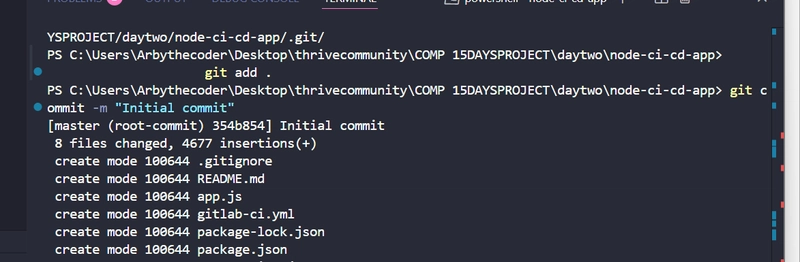


Image description


📊 Step 3: Deploy to Render (Coming Up)


In the next section, we will:


  • Deploy the Node.js app to Render using Deploy Hooks.

  • Secure secrets with GitLab CI/CD Variables.

  • Add a deploy stage to our pipeline.


Stay tuned for the next part!

1. Sofort-Triage & Abwehrmaßnahmen

SOC Incident Playbook: Vulnerability Remediation & Verification
Syntax validiert (0 Fehler)
title: Detect Exploitation - CI/CD Pipeline for a Node.js App with Automated Testing and Deployment to Render
id: 13c6db8e-a959-4f0f-82a6-bf14581f541f
status: experimental
description: Automatisch generierte SIEM-Erkennungsregel basierend auf CTI Intelligence
references:
  - https://tsecurity.de/
author: iShareStuff CTI Automated Detection Engine
date: 2026-09-27
logsource:
  category: network_connection
  product: any
detection:
  selection:
      CommandLine|contains:
        - 'exploit'
  condition: selection
falsepositives:
  - Legitime administrative Zugriffe oder Penetrationstests
level: high
tags:
  - attack.initial_access
Syntax validiert (0 Fehler)
rule CTI_Threat_Indicator {
    meta:
        author = "iShareStuff CTI Automated Detection Engine"
        date = "2026-09-27"
        description = "YARA Signature for "
    strings:
        $str = "CI/CD Pipeline for a Node.js A" ascii wide
    condition:
        any of them
}
Syntax validiert (0 Fehler)
index=security sourcetype IN ("cisco:asa", "pan:traffic", "zeek_conn", "suricata", "WinEventLog:Security")
("CICD Pipeline for a Nodejs App with Auto")
| stats count earliest(_time) as first_seen latest(_time) as last_seen by src_ip, dest_ip, dest_host, signature
| eval first_seen=strftime(first_seen, "%Y-%m-%d %H:%M:%S"), last_seen=strftime(last_seen, "%Y-%m-%d %H:%M:%S")
| sort - count
Syntax validiert (0 Fehler)
message: "*CICD Pipeline for a Nodejs App with Auto*"
Syntax validiert (0 Fehler)
CommonSecurityLog
| where Message has "CICD Pipeline for a Nodejs App with Auto"
| summarize EventCount = count(), FirstSeen = min(TimeGenerated), LastSeen = max(TimeGenerated) by SourceIP, DestinationIP, DestinationPort, Activity
| extend DetectionRule = "iShareStuff-CTI-Compiled"
| sort by EventCount desc

2. Cyber Threat Intelligence & Forensik

🎯
MITRE ATT&CK Matrix Navigator 14 Taktiken
Reconnaissance
-
Resource Development
-
Initial Access
Execution
Persistence
-
Privilege Escalation
Defense Evasion
Credential Access
-
Discovery
-
Lateral Movement
-
Collection
-
Command and Control
Exfiltration
-
Impact
tsecurity.de Cognitive Threat RAG
Fokus-Vektor:

Analyse für identifizierte Bedrohung auf Basis von Live-CTI (ENISA EUVD): CVSS 0.0 · EPSS 0.0% · CISA KEV: nein. Handlungsableitung aus den verlinkten Hersteller-Quellen.

🛡️ Angriffsfläche & Exposure

Netzwerk/Remote-Zugriff ohne Vorauthentifizierung möglich.

⚡ Empfohlene Sofortmaßnahmen
  • 1. Perimeter-Inspektion: Relevante Portfreigaben und exponierte Endpunkte unverzüglich scannen.
  • 2. Patch-Applikation: Hersteller-Hotfix einspielen oder betroffene Daemons in isolierte DMZ-Segmente überführen.
  • 3. Telemetrie & EDR-Alerts: Prozessaufrufe und Child-Processes auf anomale Shell-Spawns überwachen.
Ähnliche Beiträge
🔍 Verwandte News

Auch interessante Nachrichten CI/CD Pipeline for a Node.js App with Automated Testing and Deployment to Render

Thematisch verwandte Begriffe: CICD, Pipeline, Nodejs, with · 6 Treffer

Laden...

Beiträge werden geladen ...

Laden...

Videos werden geladen ...

Laden...

Beiträge werden geladen ...

Laden...

Videos werden geladen ...

Laden...

Beiträge werden geladen ...

Laden...

Videos werden geladen ...

Laden...

Beiträge werden geladen ...

Laden...

Videos werden geladen ...

💬 Kommentare werden geladen…
Zum Aktualisieren ziehen
ZERO-DAY CVE-2026-100739 | A vulnerability was detected in mathurvishal CloudClassroom-PHP-Project…
Advisory →
tsecurity.de Icon
Offline-Lesen, Eilmeldungen & 0ms Ladezeit

Installiere tsecurity.de direkt auf deinen Home-Bildschirm für das ultimative Vollbild-Magazinerlebnis ohne Browser-Leisten.

Nächster Beitrag